
1. المقدمة
This manual provides detailed instructions for the installation, operation, and maintenance of your IIWEY C4 PRO 4-Channel Dash Cam and its accompanying hardwire kit. The C4 PRO system is designed to provide comprehensive video surveillance for your vehicle, offering multi-channel recording and advanced parking monitoring features.
2. محتويات العبوة
يرجى التأكد من أن جميع العناصر المدرجة أدناه متضمنة في الحزمة الخاصة بك:
- C4 PRO Dash Cam Set (Main unit with front, interior, and rear cameras)
- Type C Port Hardwire Kit
- عتلة التثبيت
- 8 x Fuse Tap Cables (various types: LP, Mini, ATO, Micro2)
- 4 مشابك لإخفاء الكابلات

Image: Contents of the hardwire kit, including the main cable, various fuse taps, and a pry tool.
3. الإعداد والتثبيت
3.1 تركيب كاميرا داش
- تركيب الوحدة الرئيسية: اختر مكانًا مناسبًا على الزجاج الأمامي لسيارتك، عادةً خلف الجزء الخلفيview المرآة التي لا تعيقك view. Clean the area thoroughly before attaching the dash cam mount.
- ربط الكاميرات: Connect the interior and rear cameras to the main unit. Ensure cables are routed neatly and securely, using the provided cable hiding clips.
- توصيل الطاقة: For continuous power and parking mode functionality, connect the dash cam to the hardwire kit.

الصورة: أكثر منview of the IIWEY C4 PRO dash cam system, illustrating its multi-camera setup and connectivity.
3.2 تركيب مجموعة الأسلاك الصلبة
The hardwire kit enables 24-hour parking surveillance and protects your vehicle's battery from draining.
- تحديد صندوق الفيوزات: Locate your vehicle's fuse box, typically found under the dashboard or in the engine bay.
- توصيل الأسلاك: تحتوي مجموعة التوصيل المباشر على ثلاثة أسلاك:
- Red (BAT): Connect to a constant power fuse (always on, even when the ignition is off).
- Yellow (ACC): Connect to an accessory power fuse (on only when the ignition is on).
- أسود (GND): Connect to a metal bolt or screw on the vehicle's chassis for ground.
- Use Fuse Taps: Select the appropriate fuse tap cable (LP/Mini/ATO/Micro2) that matches your vehicle's fuse type. Insert the original fuse into the lower slot of the tap, and a new fuse (same amperage) for the dash cam into the upper slot.
- كابلات الطريق: Use the installation crowbar to neatly tuck the cables along the vehicle's trim and headliner to conceal them.

الصورة: مفصلة view of the hardwire kit's ACC, GND, and BAT wires for proper connection.

Image: Illustration of different fuse tap types and a typical hardwire kit installation in a vehicle's fuse box.
4. تعليمات التشغيل
4.1 التشغيل الأساسي
Once properly installed and powered, the dash cam will typically power on and begin recording automatically when your vehicle starts. It will power off shortly after the vehicle is turned off, unless parking mode is active via the hardwire kit.
4.2 Parking Modes (with Hardwire Kit)
The hardwire kit enables 24-hour surveillance with two distinct parking modes:
- وضع وقوف السيارات الفاصل الزمني: The dash cam records footage at a low frame rate (e.g., 1 frame per second) to conserve memory while continuously monitoring your parked vehicle. This allows for extended recording periods.
- وضع وقوف السيارات للكشف عن الاصطدام: The dash cam remains in standby mode and automatically activates to record and lock video footage upon detecting a significant impact or collision.

Image: Explanation of 24-hour parking modes, including time-lapse and collision detection.
4.3 Multi-Channel Recording
The C4 PRO supports various recording configurations:
| وضع | الكاميرا الأمامية | الكاميرا الصحيحة | الكاميرا اليسرى | الكاميرا الخلفية |
|---|---|---|---|---|
| 4 قناة | 2.7 كيلو بايت (1440 بكسل) | 1080 بكسل | 1080 بكسل | 1440 بكسل |
| 3 قناة | 1944 بكسل | 1080 بكسل | / | 1440 بكسل |
| 2 قناة | 1944 بكسل | / | / | 1440 بكسل |
| Single Front | 1944 بكسل | / | / | / |
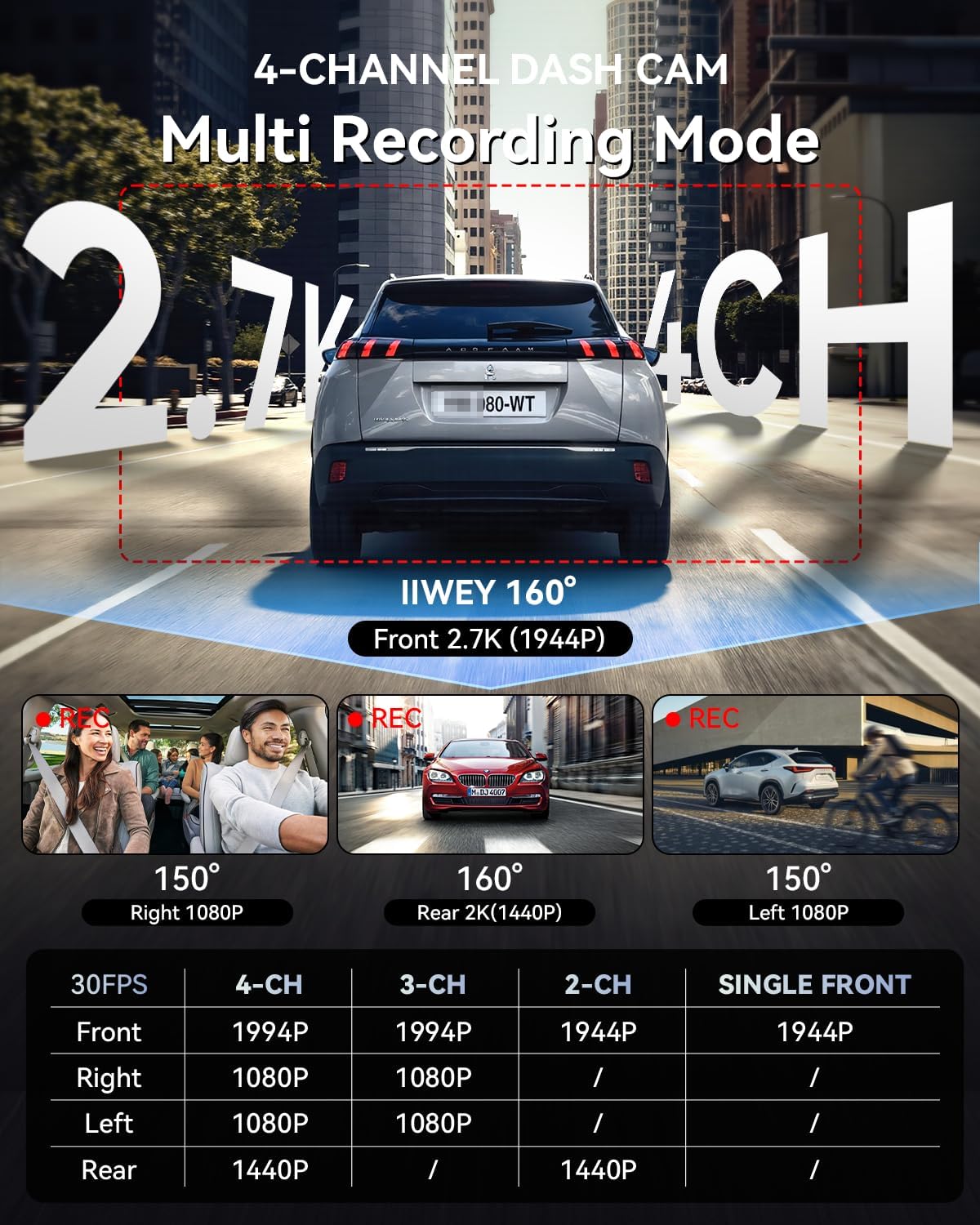
Image: Multi-recording mode options and corresponding resolutions for the C4 PRO dash cam.
4.4 حجم منخفضtagالحماية
The hardwire kit includes a smart power management chip that monitors your vehicle's battery voltagهـ. إذا كان المجلدtage drops below 11.6V, the kit will automatically cut off power to the dash cam, ensuring sufficient power remains to start your engine.

Image: Illustration of the hardwire kit's low voltagآلية الحماية الإلكترونية.
5. الصيانة
- إدارة بطاقة SD: Regularly format the microSD card (at least once a month) to ensure optimal performance and prevent data corruption. Use a high-quality, high-endurance microSD card.
- تنظيف العدسات: Keep camera lenses clean using a soft, lint-free cloth to ensure clear video recordings.
- تحديثات البرامج الثابتة: Check the official IIWEY webقم بزيارة الموقع بشكل دوري لتحديث البرامج الثابتة لتحسين الأداء وإضافة ميزات جديدة.
6. استكشاف الأخطاء وإصلاحها
- كاميرا لوحة القيادة لا تعمل:
- Check all power connections. Ensure the hardwire kit is correctly installed and receiving power from the fuse box. Verify the vehicle's battery voltage أعلى من المجلد المنخفضtage protection threshold (11.6V).
- Parking Mode is not working:
- Confirm the hardwire kit is correctly installed with the ACC and BAT wires connected to their respective constant and accessory power sources. Ensure parking mode is enabled in the dash cam's settings.
- فيديو فوtagهـ غير واضح أو غير واضح:
- Clean the camera lenses. Ensure the protective film has been removed from the lenses. Check if the dash cam is securely mounted and not vibrating.
- خطأ بطاقة SD:
- Format the microSD card. If the issue persists, try a different high-quality microSD card.
7. المواصفات
| ميزة | التفاصيل |
|---|---|
| ماركة | IIWEY |
| اسم الموديل | C4 PRO |
| دقة التقاط الفيديو | 2.7K 1440P (Front) |
| معدل الإطارات | 30 إطارًا في الثانية |
| المميزات الخاصة | Parking Assistant, Time Lapse, Low Voltagالحماية |
| مدخل مجموعة التوصيل المباشر | 12 فولت-24 فولت |
| مخرج مجموعة التوصيل المباشر | 5 فولت/3 أمبير |
| حجم منخفضtagه قطع | 11.6 فولت |
| نوع السيارة المتوافق | Car, Truck, Van |
| نوع العرض | شاشة الكريستال السائل |
| لون | أسود |
8. الضمان والدعم
For warranty information, technical support, or any inquiries regarding your IIWEY C4 PRO Dash Cam, please refer to the contact information provided with your purchase or visit the official IIWEY webالموقع. احتفظ بإيصال الشراء الخاص بك كإثبات للشراء في حالة مطالبات الضمان.
A video guide for installation may be available by scanning a QR code provided in the physical manual or on the product packaging.

Image: Reference to a video guide and manual for wiring the dash cam.