
OHAYO X10 Max
OHAYO X10 Max Bluetooth Speaker Instruction Manual
Welcome to your new OHAYO X10 Max Portable Bluetooth Speaker.
1. معلومات هامة حول السلامة
- لا تعرض مكبر الصوت لدرجات حرارة عالية أو لأشعة الشمس المباشرة لفترات طويلة.
- أبقِ السماعة بعيدة عن مصادر الحرارة والأشياء الحادة والمواد المسببة للتآكل.
- لا تقم بتفكيك السماعة أو إصلاحها أو تعديلها بنفسك. اتصل بفنيي الصيانة المؤهلين إذا لزم الأمر.
- تأكد من إغلاق غطاء منفذ الشحن بإحكام عند استخدام السماعة بالقرب من الماء للحفاظ على تصنيفها المقاوم للماء IPX7.
- استخدم فقط كابل الشحن المقدم أو كابل USB-C معتمدًا للشحن.
2. محتويات العبوة
- 1 x OHAYO X10 Max Bluetooth Speaker (White)
- 1 x USB-C Charging Cable (charging plug not contained)
- 1 x 3.5mm AUX Cable
- 1 × دليل المستخدم
- 1 × حبل
3. انتهى المنتجview
The OHAYO X10 Max is a versatile portable Bluetooth speaker designed for high-quality audio and durability. It features a powerful 25W sound output with active bass, IPX7 waterproofing, and a long-lasting 24-hour battery. Enjoy dynamic sound with colorful RGB lighting effects, dual pairing for stereo sound, and multiple input modes.
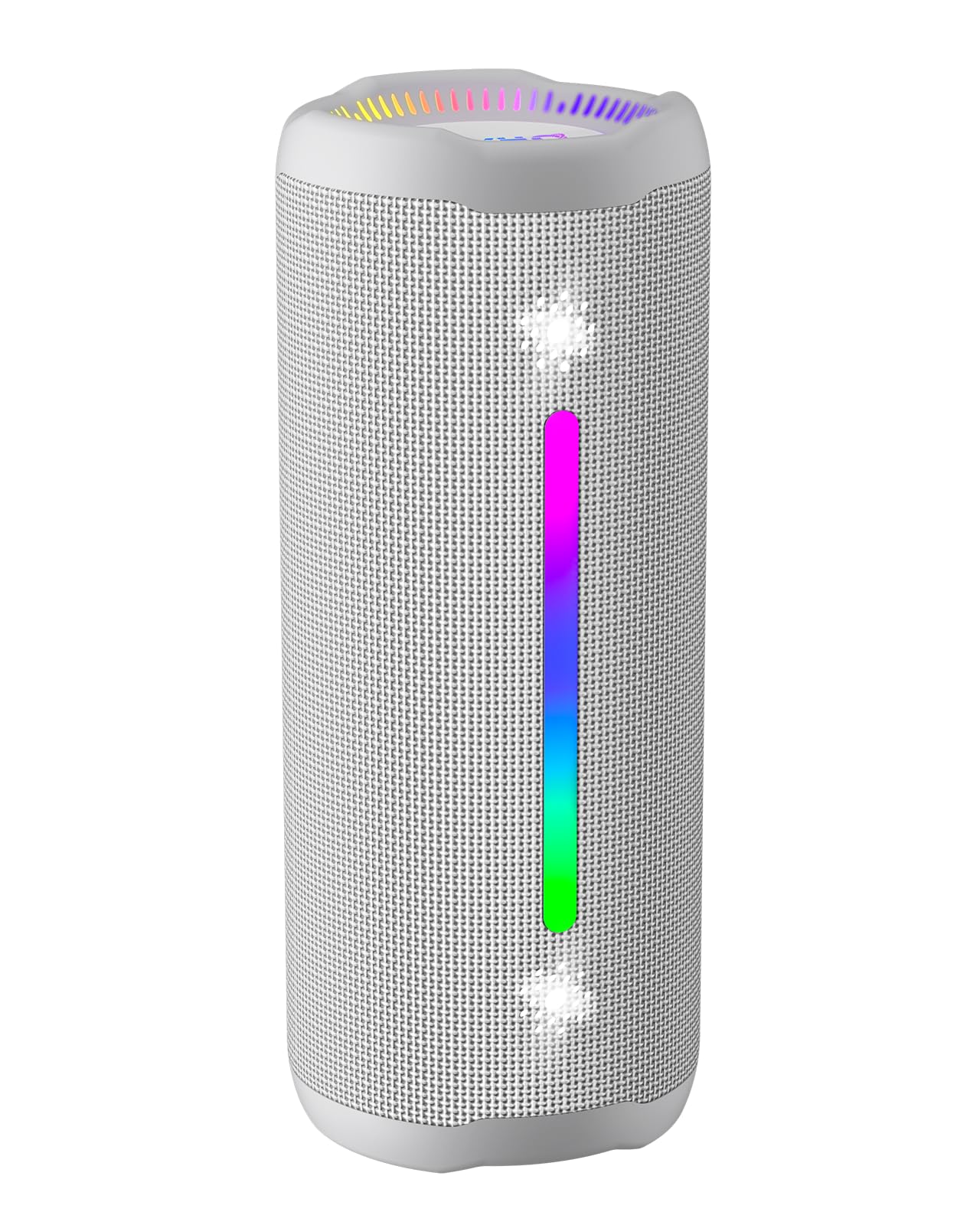
Figure 3.1: OHAYO X10 Max Bluetooth Speaker (White)

Figure 3.2: OHAYO X10 Max Bluetooth Speaker - Fully upgraded from appearance to performance.

Figure 3.3: 25W Deep Bass Sound - Independent channel design for accurate audio performance.

Figure 3.4: 6 Dazzling RGB Light Effects - Syncs with music for an immersive experience.

Figure 3.5: IPX7 Waterproof - Highly sealed design for use in various environments.

Figure 3.6: 24H Ultra-Long Battery Life - 6600mAh battery for extended playback.
4. الضوابط والمؤشرات
The OHAYO X10 Max features intuitive controls for easy operation.

الشكل 4.1: لوحة التحكم والمنافذ
- زر الطاقة: Press and hold to power on/off. Short press to switch between input modes (Bluetooth, AUX, TF Card, USB-Audio).
- رفع مستوى الصوت (>): اضغط ضغطة قصيرة لرفع مستوى الصوت. اضغط ضغطة مطولة للانتقال إلى المقطع التالي.
- خفض مستوى الصوت (<): اضغط لفترة قصيرة لخفض الصوت. اضغط لفترة طويلة للانتقال إلى المقطع السابق.
- زر الجهير: Press to activate/deactivate Bass Boost mode.
- زر التشغيل/الإيقاف المؤقت/الاتصال: اضغط ضغطة قصيرة لتشغيل/إيقاف الموسيقى مؤقتًا. اضغط ضغطة قصيرة للرد على المكالمات/إنهاؤها. اضغط ضغطة طويلة لرفض المكالمات. اضغط ضغطتين لتفعيل المساعد الصوتي.
- أضواء مؤشر البطارية: Four LED lights indicate battery level.
- شريط إضاءة RGB: Displays various colorful lighting effects.
- منفذ الشحن (USB-C): لشحن مكبر الصوت.
- منفذ AUX-in: للاتصال الصوتي السلكي.
- فتحة بطاقة TF: لتشغيل الموسيقى مباشرة من بطاقة MicroSD.
5. الإعداد
5.1 شحن السماعة
Before first use, fully charge the speaker. Connect the provided USB-C charging cable to the speaker's charging port and the other end to a 5V/2A USB power adapter (not included). The battery indicator lights will blink during charging and remain steady when fully charged.
5.2 تشغيل/إيقاف التشغيل
Press and hold the Power button for approximately 3 seconds to turn the speaker on or off. A voice prompt will confirm the action.
5.3 اقتران بلوتوث
- Turn on the speaker. It will automatically enter Bluetooth pairing mode, indicated by a blinking blue LED.
- قم بتمكين البلوتوث على جهازك (الهاتف الذكي، والكمبيوتر اللوحي، وما إلى ذلك).
- بحث عن "X10 Max" in your device's Bluetooth list and select it to connect.
- بمجرد الاتصال، سيؤكد صوت التنبيه نجاح الاقتران.
5.4 إقران ستيريو لاسلكي حقيقي (TWS)
To achieve a true wireless stereo experience, you can pair two OHAYO X10 Max speakers together.

الشكل 5.1: اقتران ستيريو لاسلكي حقيقي
- Ensure both X10 Max speakers are powered on and not connected to any other Bluetooth device.
- اضغط مرتين على زر التشغيل في إحدى السماعات (وهي السماعة الرئيسية). سيدخل الجهاز في وضع الاقتران اللاسلكي.
- The two speakers will automatically connect to each other. A voice prompt will confirm successful TWS pairing.
- الآن، قم بتوصيل جهازك بالسماعة الأساسية عبر البلوتوث كما هو موضح في القسم 5.3.
5.5 Connecting via AUX
Use the provided 3.5mm AUX cable to connect the speaker to devices without Bluetooth capability.
Figure 5.2: 4 Input Modes - Including AUX, TF, and USB-Audio.
- Connect one end of the AUX cable to the speaker's AUX-in port.
- قم بتوصيل الطرف الآخر بمخرج الصوت الخاص بجهازك.
- The speaker will automatically switch to AUX mode. If not, short press the Power button to cycle through modes until AUX mode is activated.
5.6 Using TF Card
Insert a MicroSD (TF) card with MP3/WAV/FLAC/WMA audio files into the TF card slot. The speaker will automatically switch to TF card mode and begin playback. Short press the Power button to cycle through modes if needed.
5.7 Using USB-Audio
Connect the speaker to a computer using the USB-C cable. The speaker can function as an external audio output device for your computer. Short press the Power button to cycle through modes if needed.
6. تعليمات التشغيل
6.1 تشغيل الموسيقى
- تشغيل/إيقاف مؤقت: اضغط ضغطة قصيرة على زر التشغيل/الإيقاف المؤقت/الاتصال.
- التحكم في مستوى الصوت: Short press the Volume Up (>) or Volume Down (<) buttons.
- المسار التالي: Long press the Volume Up (>) button.
- المسار السابق: Long press the Volume Down (<) button.
6.2 وظيفة تعزيز الجهير
Press the 'BASS' button to activate or deactivate the enhanced bass mode. This feature provides deeper and richer low frequencies for a more impactful audio experience.
6.3 أوضاع إضاءة RGB
The speaker features dynamic RGB lighting. The lights will automatically sync with the music beat. To turn the lights on/off, refer to the specific control instructions in your quick start guide or experiment with the mode button if available.
6.4 الاتصال بدون استخدام اليدين
عند توصيل مكبر الصوت بهاتفك الذكي عبر البلوتوث، يمكن استخدامه لإجراء مكالمات بدون استخدام اليدين.

الشكل 6.1: ميزة الاتصال بدون استخدام اليدين
- الرد/إنهاء المكالمة: اضغط ضغطة قصيرة على زر التشغيل/الإيقاف المؤقت/الاتصال.
- رفض المكالمة: اضغط مطولاً على زر التشغيل/الإيقاف المؤقت/الاتصال.
- تنشيط مساعد الصوت: Double press the Play/Pause/Call button.
7. الصيانة
- تنظيف: امسح السماعة بقطعة ناعمة ، دamp قماش. لا تستخدم مواد كيميائية قاسية أو منظفات كاشطة.
- تخزين: قم بتخزين مكبر الصوت في مكان بارد وجاف بعيدًا عن أشعة الشمس المباشرة ودرجات الحرارة العالية عند عدم استخدامه لفترات طويلة.
- العناية بالبطارية: لإطالة عمر البطارية، قم بشحن مكبر الصوت مرة واحدة على الأقل كل ثلاثة أشهر إذا لم يتم استخدامه بانتظام.
8. استكشاف الأخطاء وإصلاحها
| مشكلة | السبب المحتمل | حل |
|---|---|---|
| لا يتم تشغيل مكبر الصوت. | بطارية منخفضة. | اشحن السماعة بالكامل. |
| لا يمكن الاقتران عبر البلوتوث. | السماعة ليست في وضع الاقتران؛ البلوتوث في الجهاز معطل؛ المسافة بين السماعة والجهاز بعيدة جدًا. | Ensure speaker is in pairing mode (blinking blue LED). Turn on device Bluetooth. Move device closer to speaker (within 10 meters). |
| لا يوجد صوت أو مستوى الصوت منخفض. | مستوى الصوت منخفض جدًا على السماعة أو الجهاز؛ وضع الإدخال غير صحيح. | Increase volume on both speaker and device. Check if the correct input mode (Bluetooth, AUX, TF) is selected. |
| فشل اقتران TWS. | Speakers too far apart; one speaker already connected to another device. | Ensure speakers are close to each other. Disconnect any existing Bluetooth connections before TWS pairing. |
| تشويه الصوت. | مستوى الصوت مرتفع جدًا؛ البطارية منخفضة. | اخفض مستوى الصوت. اشحن السماعة. |
9. المواصفات
| ميزة | مواصفة |
|---|---|
| اسم الموديل | زسنومكس ماكس |
| نسخة البلوتوث | 5.3 |
| تكنولوجيا الاتصالات اللاسلكية | بلوتوث |
| الحد الأقصى لقوة خرج السماعة | 35 Watts (25W effective) |
| سعة البطارية | 6600 مللي أمبير |
| وقت اللعب | Up to 24 hours (varies with volume and light use) |
| مستوى مقاومة الماء | IPX7 (مقاوم للماء) |
| حجم الإدخالtage | 5 فولت (تيار مستمر) |
| استجابة التردد | 20 كيلو هرتز |
| إشارة إلى نسبة الضوضاء | 80 ديسيبل |
| نوع برنامج تشغيل الصوت | سائق ديناميكي |
| قطر مكبر الصوت | 75 مليمتر |
| قطر مكبر الصوت عالي التردد | 26 مليمتر |
| أبعاد المنتج | 2.95 بوصة عمق × 2.95 بوصة عرض × 7.28 بوصة ارتفاع |
| وزن العنصر | 450 جرام (15.9 أونصة) |
| مادة | أكريلونيتريل بوتادين ستايرين (ABS)، ألومنيوم |
| طريقة التحكم | زر |
| المميزات الخاصة | Bass Boost, AUX, Hi-Res Audio, 24-Hour Playtime, IPX7 Waterproof, TF Card Port, Dual Passive Radiators, Hands-free, True Wireless Stereo Pairing, Shockproof |
10. الضمان والدعم
The OHAYO X10 Max Bluetooth Speaker comes with an extended warranty. For specific warranty details and to register your product, please refer to the information provided in your quick start guide or contact OHAYO customer support.
For technical support or customer service inquiries, please contact OHAYO Direct. Contact information may be found in your product packaging or on the official OHAYO webموقع.
11. فيديو المنتج الرسمي
Video 11.1: Official OHAYO Portable Bluetooth Speaker overview by OHAYO Direct. This video highlights key features and design elements of the speaker.
Ask a question about this manual
Ask about setup, troubleshooting, compatibility, parts, safety, or missing instructions. Manuals+ will review the question and use this page’s manual context to help answer it.