
1. المقدمة
شكرا لك على الشراءasing the ZOLAMENTE 5K Digital Camera. This compact and versatile camera is designed to capture high-quality photos and videos, offering a range of features for both beginners and enthusiasts. Please read this manual carefully to ensure proper use and to maximize your camera's potential.

Image: ZOLAMENTE 5K Digital Camera highlighting its key features.
2. محتويات العبوة
تأكد من وجود جميع العناصر في الحزمة الخاصة بك:
- 1 × ZOLAMENTE 5K Digital Camera
- 1 × 64GB MicroSD Card
- 1 × كابل USB
- 1 × Rechargeable Battery (1200mAh)
- 1 × Camera Bag
- 1 × حزام
- 1 × Japanese Instruction Manual (English version provided here)

Image: All included accessories for the ZOLAMENTE 5K Digital Camera.
فيديو فتح العلبة
Video: A short unboxing demonstration of a similar digital camera, showing the contents.
3. انتهى المنتجview
The ZOLAMENTE 5K Digital Camera features a compact design with intuitive controls and dual screens for versatile shooting.
السمات الجسدية
- الشاشة الأمامية: 1.5-inch high-vision display for selfies.
- Rear Screen: 2.8-inch IPS LCD monitor for clear viewعمل.
- عدسة: F/3.2, focal length 7.36mm.
- المستشعر: 13 Megapixel CMOS sensor.
- أزرار: Shutter, Power, Menu, OK, Navigation (Up/Down/Left/Right), Zoom (W/T), DISP.
- الموانئ: USB charging port, MicroSD card slot, tripod mount.
- المؤشرات: LED light, flash.
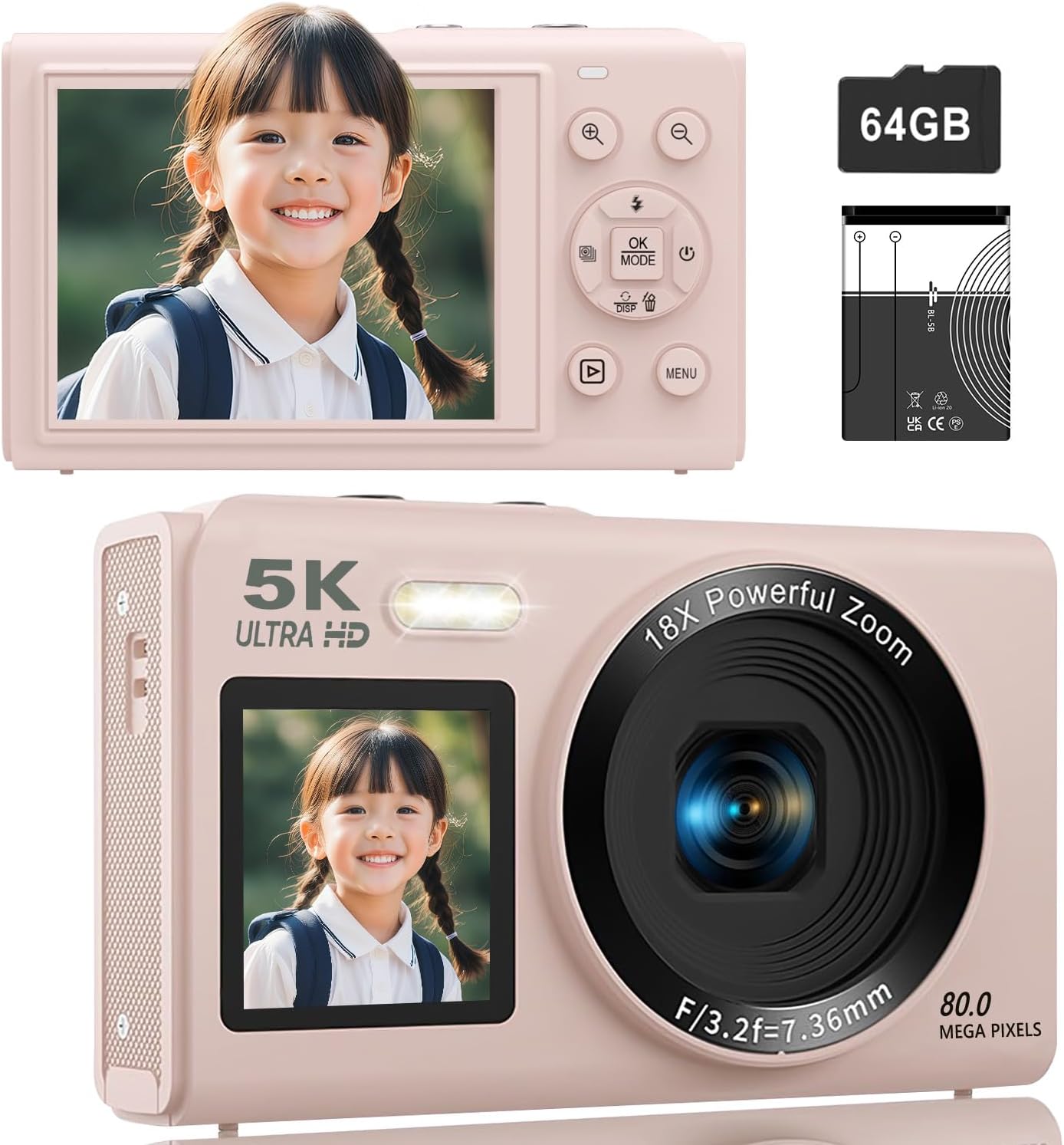
الصورة: الأمامية والخلفية views of the ZOLAMENTE 5K Digital Camera, showing its compact design and dual screens.
دوران المنتج View
فيديو: 360 درجة view of the S95PRO digital camera, showcasinتصميمها ومنافذها.
4. الإعداد
4.1. تركيب البطارية
- افتح غطاء حجرة البطارية الموجود في الجزء السفلي من الكاميرا.
- أدخل البطارية القابلة لإعادة الشحن المرفقة بسعة 1200 مللي أمبير، مع التأكد من صحة القطبية.
- أغلق غطاء حجرة البطارية جيدًا.
4.2. تركيب بطاقة MicroSD
The camera supports MicroSD cards up to 256GB. A 64GB MicroSD card is included.
- حدد مكان فتحة بطاقة MicroSD على جانب الكاميرا.
- أدخل بطاقة MicroSD بحيث تكون الموصلات الذهبية متجهة للأسفل حتى تسمع صوت طقطقة عند تثبيتها في مكانها.
- To remove, gently push the card inward until it pops out.
4.3. Initial Settings (Language, Date/Time)
Upon first use or after a factory reset, you may need to set the language and date/time.
- Power on the camera by pressing the Power button.
- اضغط على قائمة طعام button to access the settings.
- Navigate using the Up/Down buttons to find 'Language' or 'Date/Time' settings.
- يضعط OK to select, then use the navigation buttons to adjust the settings.
- يضعط قائمة طعام مرة أخرى للحفظ والخروج.
فيديو توضيحي للإعداد
Video: A demonstration of inserting the MicroSD card, powering on, and navigating basic settings like language and date/time.
5. تعليمات التشغيل
5.1. تشغيل/إيقاف التشغيل
اضغط على قوة زر لتشغيل الكاميرا أو إيقاف تشغيلها.
5.2. Switching Between Photo and Video Modes
اضغط على قائمة طعام button to access the mode selection screen. Use the navigation buttons to select between photo mode, video mode, or time-lapse mode, then press OK.
5.3. وضع الصور
The camera supports up to 80 Megapixel (MP) photo resolution. You can adjust the pixel settings in the menu.
- تأكد من أن الكاميرا في وضع الصورة.
- قم بتأطير اللقطة باستخدام الشاشة.
- اضغط على مصراع button halfway to focus, then fully press to take a photo.
Pixel Settings
You can select various pixel settings for your photos, up to 80MP, to suit your needs.
إعدادات الفلاش
اضغط على Up button to cycle through flash modes (Auto, On, Off).
Special Photo Features
- فلتر التجميل: Enhance facial features.
- الكشف عن الوجه: Automatically detects and focuses on faces.
- مؤقت ذاتي: Set a delay (e.g., 3s, 5s, 10s, 20s) before taking a photo.
- اطلاق النار مستمر: التقط صوراً متعددة بسرعة متتالية.

Image: Visual representation of various photo modes including beauty filter, face detection, self-timer, and continuous shooting.


الصور: تفصيلية views of face detection, continuous shooting, and self-timer features.
5.4. وضع الفيديو
Record stunning videos in 5K resolution. You can adjust video resolution settings in the menu.
- Ensure the camera is in video mode.
- اضغط على مصراع الزر لبدء التسجيل.
- اضغط على مصراع زر مرة أخرى لإيقاف التسجيل.
إعدادات دقة الفيديو
The camera supports various video resolutions, including 5K. Select your preferred resolution from the menu.

Image: Demonstrating 5K video recording and various photo resolutions (80MP, 56MP, 30MP, 20MP).
Special Video Features
- الحركة البطيئة: Capture dynamic scenes in slow motion.
- الفاصل الزمني: قم بتكثيف الأحداث الطويلة في مقاطع فيديو قصيرة وجذابة.
- Record While Charging: Allows for extended recording sessions.

Image: Illustrating autofocus, slow-motion, video loop, and time-lapse recording capabilities.
5.5. تقريب رقمي
The camera features an 18x digital zoom. Use the W (واسع) و T (Telephoto) buttons to zoom in and out, allowing you to capture distant subjects clearly without moving the lens.

Image: Demonstrating the 18x digital zoom capability and the front and rear screens.
5.6. Focus Modes
Choose from three focus modes to ensure sharp images:
- التركيز التلقائي (AF): يقوم بضبط التركيز تلقائيًا للحصول على صور واضحة.
- التركيز اليدوي (MF): Allows you to manually adjust focus by half-pressing the shutter button.
- التركيز الثابت: Maintains a fixed focus distance.

Image: Illustrating autofocus, image stabilization, pause function, and recording while charging.
5.7. Dual Screens
The camera features a 1.5-inch front screen and a 2.8-inch rear IPS screen. Long-press the تحت button to switch between the front and rear screens, which is convenient for selfies and vlogging.
5.8. مرشحات الألوان
The camera offers 19 types of color filters to add creative effects to your photos and videos.

Image: The ZOLAMENTE 5K Digital Camera displaying different filter options.
5.9. WiFi Transfer Function
Easily transfer captured images and videos to your smartphone via WiFi. This eliminates the need for card readers or computers for quick sharing on social media.
- Enable WiFi on your camera through the settings menu.
- Download the dedicated app (e.g., 'HelloCam') on your smartphone (available on App Store and Google Play).
- Connect your smartphone to the camera's WiFi network (SSID and password displayed on the camera screen).
- افتح التطبيق ل view ونقل files.

Image: Demonstrating WiFi transfer of images from the camera to a laptop and the camera being used as a webكام.
WiFi Connection Video
Video: Instructions on how to connect the camera to a smartphone via WiFi using the dedicated app.
5.10. Webوظيفة كام
يمكن استخدام الكاميرا كملف webcam for high-quality video calls and live streaming.
- قم بتوصيل الكاميرا بجهاز الكمبيوتر الخاص بك باستخدام كابل USB المرفق.
- يختار 'Webcam Mode' on the camera if prompted.
- Your computer should recognize the camera as a webكام.

Image: The camera connected to a laptop and functioning as a webكام.
6. الصيانة
- حافظ على نظافة الكاميرا عن طريق مسحها بقطعة قماش ناعمة وجافة.
- تجنب تعريض الكاميرا لدرجات حرارة شديدة أو غبار أو رطوبة.
- Store the camera in its protective bag when not in use.
- قم بعمل نسخ احتياطية منتظمة لصورك ومقاطع الفيديو الخاصة بك لمنع فقدان البيانات.
7. استكشاف الأخطاء وإصلاحها
المشاكل الشائعة والحلول
| مشكلة | السبب المحتمل | حل |
|---|---|---|
| الكاميرا لا تعمل | Low battery; Battery incorrectly inserted | Charge the battery; Reinsert battery correctly |
| Cannot take photos/videos | MicroSD card full; MicroSD card not inserted; Incorrect mode selected | يمسح files or replace card; Insert MicroSD card; Switch to photo/video mode |
| صور ضبابية | Incorrect focus mode; Camera shake | Adjust focus mode; Use image stabilization or a tripod |
| فشل اتصال WiFi | Incorrect password; App not installed | Verify WiFi password; Install the correct app |
8. المواصفات
| ميزة | التفاصيل |
|---|---|
| ماركة | زولامينتي |
| نموذج | كاميرا رقمية بدقة 5K |
| لون | Pink (with 64GB SD Card) |
| دقة الفيديو | حتى 5K |
| دقة الصورة | تصل إلى 80 ميجابكسل |
| تقريب رقمي | 18X |
| الشاشة الأمامية | 1.5 بوصة |
| الشاشة الخلفية | 2.8 بوصات IPS |
| المستشعر | 13 Million CMOS Sensor |
| عدسة الفتحة | ف/3.2 |
| البعد البؤري | 7.36 ملم |
| تخزين | Supports MicroSD up to 256GB (64GB included) |
| بطارية | بطارية قابلة لإعادة الشحن بسعة 1200 مللي أمبير في الساعة |
| وزن | تقريبا. 114 جرام (شاملاً البطارية) |
| أبعاد | 11.4 × 8.5 × 7.7 سم |
| ASIN | B0FQMLD2BV |
9. الضمان والدعم
This product, when purchased as a domestic genuine product (new), comes with a 5-year manufacturer's warranty. Please note that parallel imported or overseas retail products do not come with a manufacturer's warranty. For support, please contact your seller.