
1. المقدمة
This manual provides essential instructions for the installation, operation, and maintenance of your Aninerel 3000W Hybrid Solar Inverter, model ANJ-3KW-LV-WIFI. This device is designed to convert 24V DC power to 110V AC pure sine wave power, suitable for various off-grid and backup power applications. Please read this manual thoroughly before installation and use to ensure safe and efficient operation.
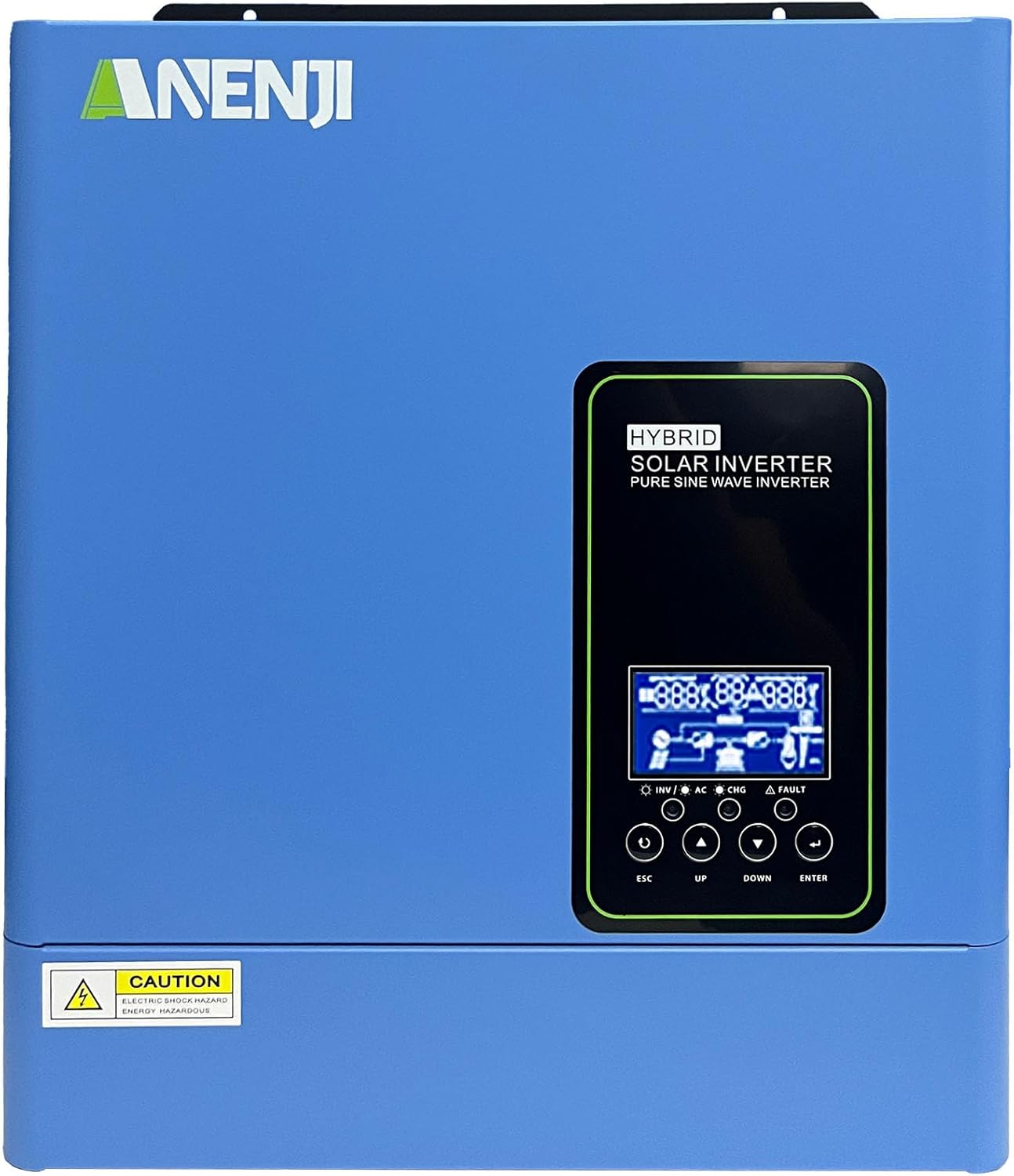
الشكل 1.1: الجبهة view of the Aninerel 3000W Hybrid Solar Inverter. The inverter features a blue casing with the Aninerel logo and a central LCD display panel with control buttons.
2. تعليمات السلامة
اتبع دائمًا احتياطات السلامة التالية لتقليل خطر الصدمة الكهربائية أو الحريق أو الإصابة:
- Read all instructions and cautionary markings on the unit and in this manual before installation or operation.
- Do not disassemble the inverter. Refer servicing to qualified personnel. Incorrect reassembly may result in electric shock or fire.
- لتقليل خطر التعرض لصدمة كهربائية، افصل جميع الأسلاك قبل محاولة إجراء أي صيانة أو تنظيف.
- This inverter is designed for indoor or semi-outdoor use with an IP65 rating. Avoid direct exposure to rain or snow.
- Ensure proper ventilation around the inverter to prevent overheating. Do not block ventilation openings.
- Use appropriate tools and personal protective equipment during installation.
- Ensure all wiring connections are tight and secure to prevent loose connections that can cause overheating.
- Do not connect the inverter to a public utility grid without proper authorization and safety measures.
3. انتهى المنتجview
The Aninerel 3000W Hybrid Solar Inverter integrates a pure sine wave inverter, an MPPT solar charge controller, and a battery charger into one compact unit. It is designed to provide uninterrupted power support.
3.1 الميزات الرئيسية
- خرج موجة جيبية نقية بقدرة 3000 واط: Converts 24V DC to 110V AC, providing stable power for sensitive electronics.
- Integrated 100A MPPT Solar Charge Controller: Maximizes solar energy harvesting with up to 500VDC PV input.
- Flexible Charging and Output Modes: Offers multiple modes (Solar Only, AC Priority, Hybrid Charging; Mains Priority, PV Priority, Hybrid Output) for diverse power management.
- توافق واسع للبطارية: Supports AGM, GEL, Lead-acid, Li-ion, and LiFePO4 24V batteries.
- شاشة LCD الذكية: Provides real-time monitoring and allows for easy configuration of system settings.
- لاسلكي مدمج: Enables remote monitoring of the inverter status (registration required).
- تصميم قوي: IP65-rated enclosure for durability in various environments, with intelligent cooling.
- الحماية الشاملة: يشمل overvoltagه ، undervoltage, reverse polarity, and short circuit protection.

الشكل 3.1: اللوحة الأمامية والخلفيةview. This diagram labels the LCD display, indicators, function buttons, RS485 communication port, grounding terminal, battery input, dry contact port, built-in Wi-Fi, AC input, AC output, PV input, and power on/off switch.
3.2 اللوحة الأمامية والمؤشرات
- شاشة LCD: Shows system status, operational data, and configuration settings.
- مؤشر الشحن: Illuminates to indicate battery charging status.
- مؤشر الحالة: Provides general operational status of the inverter.
- مؤشر خطأ: Lights up to signal system errors or warnings.
- Function Buttons (ESC, UP, DOWN, ENTER): Used for navigating menus and adjusting settings on the LCD.
3.3 اتصالات اللوحة الخلفية
- منفذ الاتصالات RS485: For external communication and monitoring.
- محطة التأريض: Essential for safety grounding.
- مدخل البطارية: Connects to the 24V battery bank.
- منفذ الاتصال الجاف: للتحكم الخارجي أو الإشارة.
- Built-in Wi-Fi Module: For wireless monitoring.
- مدخل التيار المتردد: Connects to grid utility or generator AC power.
- خرج التيار المتردد: يتصل بالأحمال المنزلية.
- المدخلات الكهروضوئية: يتصل بمصفوفات الألواح الشمسية.
- مفتاح تشغيل / إيقاف التشغيل: يتحكم في الطاقة الرئيسية للعكس.
4. التثبيت والإعداد
Proper installation is crucial for the safe and efficient operation of your hybrid solar inverter. Ensure all connections are made by a qualified electrician and adhere to local electrical codes.
4.1 تركيب العاكس
- اختر موقعًا مناسبًا جافًا وجيد التهوية ومحميًا من أشعة الشمس المباشرة والرطوبة.
- تأكد من وجود مساحة كافية حول العاكس لضمان تدفق الهواء والتبريد بشكل صحيح.
- قم بتركيب العاكس عموديًا على سطح متين باستخدام أدوات التثبيت المناسبة.
4.2 توصيلات الأسلاك
Follow the wiring diagram carefully. All wiring should be performed with the inverter and all power sources disconnected.
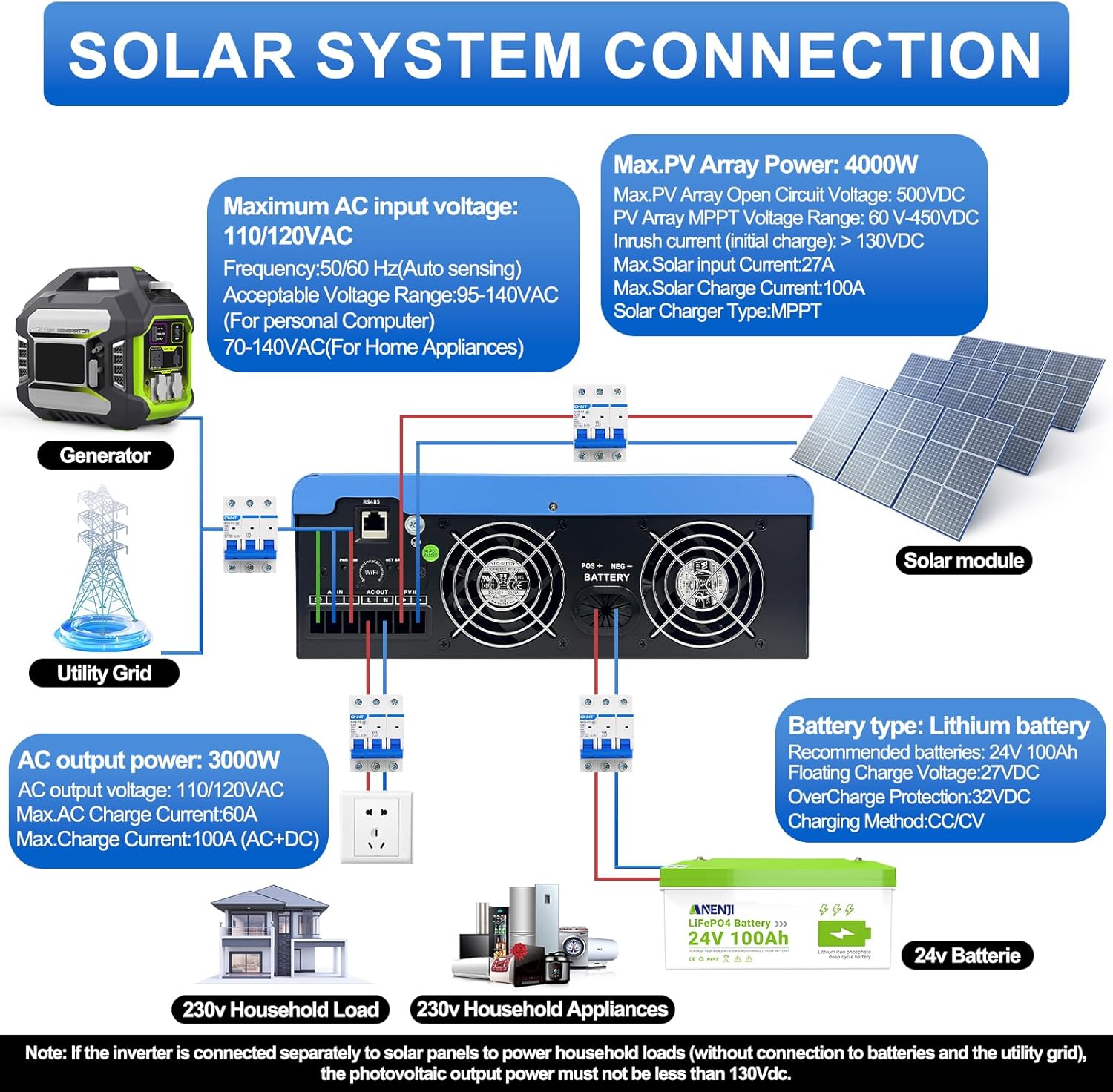
Figure 4.1: Solar System Connection Diagram. This diagram illustrates the connections for solar panels, generator, utility grid, 24V battery, and household loads to the inverter. It shows the PV input, battery input, AC input, and AC output terminals.
4.2.1 توصيل البطارية
- Connect the 24V battery bank to the battery input terminals on the inverter. Ensure correct polarity (+ to + and - to -).
- Use appropriate cable gauges for the battery connections to handle the expected current.
- The ANJ-3KW-LV-WIFI model supports a 24-volt DC system and is recommended for use with batteries of at least 100 ampere-hours capacity.

Figure 4.2: Inverter Battery Connection. This diagram shows wiring configurations for both 12-volt and 24-volt battery systems, emphasizing correct series/parallel connections for the desired voltage.
4.2.2 توصيل الطاقة الشمسية
- Connect the solar panel array to the PV input terminals. Observe correct polarity.
- Ensure the total open circuit voltage of the PV array does not exceed 500VDC.
- The MPPT voltage range is 60-450VDC. Ensure your PV array voltage falls within this range for optimal charging.
4.2.3 توصيل إدخال التيار المتردد
- Connect the utility grid or generator AC power to the AC input terminals.
- The inverter supports 110/120VAC input with auto-sensing frequency (50/60Hz).
4.2.4 توصيل خرج التيار المتردد
- Connect your household loads or appliances to the AC output terminals.
- The inverter provides 3000W continuous AC output at 110/120VAC.
4.3 التشغيل الأولي
- بعد التأكد من سلامة جميع التوصيلات، قم بتشغيل قاطع الدائرة الكهربائية للبطارية أولاً.
- ثم قم بتشغيل قاطع دائرة مصفوفة الخلايا الكهروضوئية (إن وجد).
- Finally, switch on the AC input breaker (if applicable) and the inverter's main power switch.
- Observe the LCD display for initial boot-up and status indicators.
5. التشغيل
The inverter offers various configurable settings to optimize power management based on your specific needs.
5.1 شاشة LCD والإعدادات
The LCD display provides real-time information and allows you to configure operational parameters using the function buttons.
- استخدم UP و تحت أزرار للتنقل بين خيارات القائمة.
- يضعط يدخل لتحديد خيار أو تأكيد إعداد.
- يضعط خروج to exit a menu or cancel an action.
5.2 Charging Priority Modes
These settings determine how the battery bank is charged from available power sources.

Figure 5.1: Charger Source Priority. This diagram illustrates three charging priority options: Solar First (solar panels charge first, AC input only if solar is unavailable), Solar and AC Input Simultaneously (both solar and utility charge at the same time), and Solar Only (solar energy is the exclusive charging source).
- الطاقة الشمسية أولاً: Prioritizes solar power for charging. AC input will only charge the battery when solar power is insufficient or unavailable.
- AC Priority (Utility Priority): Prioritizes AC input (utility or generator) for charging. Solar power will supplement or take over if AC input is unavailable.
- الطاقة الشمسية فقط: The inverter will only charge the battery bank from solar power. AC input will not be used for charging.
5.3 Output Priority Modes
These settings determine the power source for your connected loads.

Figure 5.2: Output Source Priority. This diagram shows three output priority options: Solar First (power from solar first, AC input supplements if solar is insufficient), AC First (redirects AC input to power loads, uses solar/batteries when AC is unavailable), and DC Priority (prioritizes solar first, then battery, then AC input only when voltage drops to a programmable value).
- الطاقة الشمسية أولاً (أولوية الخلايا الكهروضوئية): Prioritizes solar power to supply loads. If solar power is insufficient, the battery bank will supplement, and then AC input will be used.
- AC First (Mains Priority): Prioritizes AC input (utility or generator) to power loads. If AC input is unavailable, the inverter will switch to battery power.
- DC Priority (Battery Priority): Prioritizes solar power first, then battery power. AC input will only engage when the battery voltage drops below a programmable threshold.
5.4 مراقبة شبكة Wi-Fi
The built-in Wi-Fi module allows for remote monitoring of your inverter's performance and status via a dedicated application. Registration may be required to access this feature.

Figure 5.3: Wi-Fi Monitoring. This image depicts a user monitoring the hybrid inverter's status wirelessly via a smartphone application, highlighting the convenience of the built-in Wi-Fi feature.
6. الصيانة
Regular maintenance helps ensure the longevity and optimal performance of your Aninerel Hybrid Solar Inverter.
- تنظيف: نظّف الجزء الخارجي من العاكس دوريًا بقطعة قماش جافة. تأكد من خلو فتحات التهوية من الغبار والأوساخ.
- الاتصالات: Annually check all electrical connections (battery, PV, AC input/output) for tightness and corrosion. Tighten any loose connections.
- بيئة: تأكد من أن بيئة التثبيت تظل ضمن نطاقات درجة الحرارة والرطوبة المحددة.
- البرامج الثابتة: تحقق من الشركة المصنعة webالموقع الإلكتروني للاطلاع على أي تحديثات متاحة للبرامج الثابتة لتحسين الأداء أو إضافة ميزات جديدة.
7. استكشاف الأخطاء وإصلاحها
يُقدّم هذا القسم حلولاً للمشاكل الشائعة التي قد تواجهها. إذا استمرت المشكلة، يُرجى الاتصال بخدمة دعم العملاء.
| مشكلة | السبب المحتمل | حل |
|---|---|---|
| العاكس لا يعمل | لا يوجد اتصال بالبطارية أو مستوى شحن البطارية منخفضtage; Power switch off; Loose wiring. | تحقق من توصيلات البطارية ومستوى الصوتtage; Ensure power switch is ON; Verify all wiring is secure. |
| لا يوجد مخرج تيار متردد | Overload; Short circuit on output; Inverter in fault mode; Output priority setting. | Reduce load; Check for short circuits; Refer to LCD fault codes; Adjust output priority settings. |
| البطارية لا تشحن بالطاقة الشمسية | حجم منخفض للخلايا الكهروضوئيةtage; Incorrect PV connection; Solar charging disabled; Faulty solar panels. | التحقق من حجم مجموعة الخلايا الكهروضوئيةtage (must be >60VDC); Verify PV polarity; Check charging priority settings; Inspect solar panels. |
| تحذير من ارتفاع درجة الحرارة | Insufficient ventilation; Excessive ambient temperature; Overload. | Ensure clear airflow around inverter; Relocate to cooler area; Reduce connected load. |
| مراقبة شبكة Wi-Fi لا تعمل | No Wi-Fi signal; Incorrect app configuration; Registration issue. | Check Wi-Fi signal strength; Reconfigure app settings; Contact support for registration issues. |
8. المواصفات
Technical specifications for the Aninerel 3000W Hybrid Solar Inverter ANJ-3KW-LV-WIFI:
| ميزة | مواصفة |
|---|---|
| رقم الموديل | ANJ-3KW-LV-WIFI |
| انتاج الطاقة المستمر | 3000 واط |
| ذروة انتاج الطاقة | 6000 واط |
| حجم الإدخال DCtage | 24 فولت |
| حجم إخراج التيار المترددtage | 110 فولت تيار متردد |
| شكل الموجة الناتجة | موجة جيبية نقية |
| الحد الأقصى لطاقة الإدخال الكهروضوئية | 4000 واط |
| تيار وحدة التحكم MPPT | 100 أمبير |
| الأعلى. PV Open Circuit Voltage | 500 فولت تيار مستمر |
| PV صفيف MPPT Voltage المدى | 60-450 فولت تيار مستمر |
| الحد الأقصى لتيار الإدخال المتردد | 60 أمبير |
| تردد الإخراج | 50/60 هرتز (استشعار تلقائي) |
| توافق البطارية | AGM, GEL, Lead-acid, Li-ion, LiFePO4 (24V) |
| تصنيف الحماية | IP65 |
| أبعاد المنتج | 15 × 6.98 × 18 بوصة |
| وزن العنصر | 16.5 رطل |
9. الضمان والدعم
For warranty information, please refer to the warranty card included with your product or visit the official Aninerel website. For technical support, troubleshooting assistance, or service inquiries, please contact Aninerel customer service through their official channels.
Manufacturer: Shenzhen Anenji Energy Technology Co.,Ltd