
مقدمة
This user manual provides detailed instructions for the installation, operation, maintenance, and troubleshooting of your LongPlus 8MP 4K UHD PoE Wired Security Camera Outdoor, Model LP8MEF8. This camera is designed to deliver high-quality surveillance with advanced features for enhanced security. Please read this manual thoroughly before using the product to ensure proper setup and functionality.
ماذا يوجد في الصندوق
Carefully unpack the box and ensure all items are present and in good condition. If any items are missing or damaged, please contact LongPlus customer support.
- 1 x LongPlus Dome Camera
- 1 × صندوق ملون
- 1 ملصقات تحذيرية
- 1 x Positioning Sticker
- 1 x Foam Bag/1 x Protective Film
المنتج انتهىview
الميزات الرئيسية
- دقة 4K الترا اتش دي: Captures video at 3840x2160 pixels with a 132° wide viewing angle and HDR for clear, detailed footage.
- كشف الحركة بالذكاء الاصطناعي: Advanced object detection for humans and vehicles, with customizable activity zones and privacy masks to reduce false alerts.
- ثلاثة أوضاع للرؤية الليلية: Offers IR Night Vision, Color Night Vision, and Smart Night Vision for clear visibility up to 100ft (30m) in various lighting conditions.
- Two-Way Audio & Strobe Light Alarm: Communicate with visitors or deter intruders using the built-in speaker and microphone, complemented by an automatic strobe light and siren alarm.
- تصميم متين: IP67 weatherproof metal housing ensures reliable operation in extreme weather conditions (-30°C to 60°C / -22°F to 140°F).
- الوصول عن بعد: مراقبة فو الحيةtage and recordings via the Longvision app, compatible with iOS, Mac, Windows, and Android devices. Supports up to 32 users.
- تخزين فعال: Utilizes H.265 High Efficiency Video Coding to optimize storage space. Supports local storage (via NVR, up to 10TB expandable) and cloud storage options.
- اتصال PoE: Power over Ethernet (PoE) simplifies installation by delivering power, audio, and video through a single Ethernet cable.
مكونات الكاميرا
The LongPlus LP8MEF8 camera features a robust dome design with integrated LED spotlights for color night vision, an infrared sensor for IR night vision, a lens, and a microphone/speaker for two-way audio. The durable metal housing provides protection against environmental elements.

Image: The LongPlus LP8MEF8 camera highlighting its IP67 weatherproof rating for all-season security and durable metal housing for efficient heat dissipation.

Image: Illustration of the camera's 132-degree wide field of view, capturing a broad area in 4K UHD resolution.
يثبت
1. Planning Installation Location
Choose a suitable location for your camera, considering the desired viewing area, proximity to an NVR or PoE switch, and protection from direct impact. The camera is IP67 weatherproof, making it suitable for outdoor use in various conditions.
2. تركيب الكاميرا
- Use the provided positioning sticker to mark the drill holes on the mounting surface.
- Drill holes according to the marks. Insert wall anchors if mounting on masonry.
- قم بتثبيت قاعدة الكاميرا على سطح التركيب باستخدام البراغي.
- اضبط زاوية الكاميرا لتغطية المنطقة المطلوبة.
3. توصيل الكاميرا
The LP8MEF8 camera uses Power over Ethernet (PoE) for simplified connectivity.
- قم بتوصيل أحد طرفي كابل إيثرنت بمنفذ PoE الخاص بالكاميرا.
- Connect the other end of the Ethernet cable to a PoE-enabled NVR (Network Video Recorder) or a PoE switch.
- Ensure the NVR/PoE switch is powered on. The camera will receive power and transmit data through this single cable.

Image: Diagram showing the easy plug-and-play PoE connection between the LongPlus camera and an NVR, supporting distances up to 660ft.
4. Initial Configuration (via NVR or App)
Refer to your NVR's manual for specific camera addition procedures. Generally, the NVR will automatically detect PoE cameras. For app-based setup:
- تنزيل Longvision قم بتنزيل التطبيق من متجر التطبيقات (iOS) أو متجر Google Play (Android).
- تسجيل حساب وتسجيل الدخول.
- اتبع التعليمات الموجودة داخل التطبيق لإضافة الكاميرا. يتضمن ذلك عادةً مسح رمز الاستجابة السريعة (QR) الموجود على الكاميرا أو إدخال معرّف الجهاز يدويًا.
- بمجرد الإضافة، يمكنك view يعيش فوtage and configure settings.
تعليمات التشغيل
1. حي View والتشغيل
- Open the Longvision app or access your NVR interface.
- Select the desired camera to view يعيش فوtage.
- استخدم وظيفة التشغيل لإعادةview فيديو مسجل.
2. أوضاع الرؤية الليلية
تدعم الكاميرا ثلاثة أوضاع للرؤية الليلية:
- الأشعة تحت الحمراء للرؤية الليلية: Provides black and white video using infrared LEDs in low-light conditions.
- رؤية ليلية ملونة: Utilizes built-in spotlights to provide full-color video in low light.
- الرؤية الليلية الذكية: Automatically switches between IR and color modes based on detected motion or light conditions.
You can switch between these modes via the Longvision app or NVR settings.

Image: Visual representation of the three night vision modes (Full-Color, AI, IR) available on the LongPlus camera, adapting to various lighting scenarios.
3. AI Motion Detection and Alerts
- تفعيل خاصية الكشف: In the app/NVR settings, enable AI motion detection for humans and/or vehicles.
- مناطق النشاط: تحديد مناطق محددة داخل الكاميرا view where motion detection should be active. This helps filter out irrelevant alerts.
- قناع الخصوصية: Configure privacy zones to block out sensitive areas from being recorded.
- إشعارات: Set up push notifications to receive real-time alerts on your mobile device when motion is detected.

Image: The camera's smart AI motion detection feature, capable of distinguishing between persons and vehicles to provide more accurate alerts.
4. وظائف الصوت ثنائي الاتجاه والإنذار
- صوت ثنائي الاتجاه: Use the microphone and speaker in the Longvision app to communicate with individuals near the camera.
- Strobe Light & Siren Alarm: When motion is detected, the camera can automatically trigger a strobe light and siren to deter intruders. This can also be manually activated via the app.

Image: A scenario depicting the camera's two-way audio and strobe light alarm features, allowing interaction and deterrence.
5. أوضاع التسجيل
The camera supports various recording options when connected to a compatible NVR:
- التسجيل المحفز بالحركة: Records only when motion is detected (default).
- Scheduled recording: Records during specific times of the day.
- 24/7 continuous recording: Records continuously.
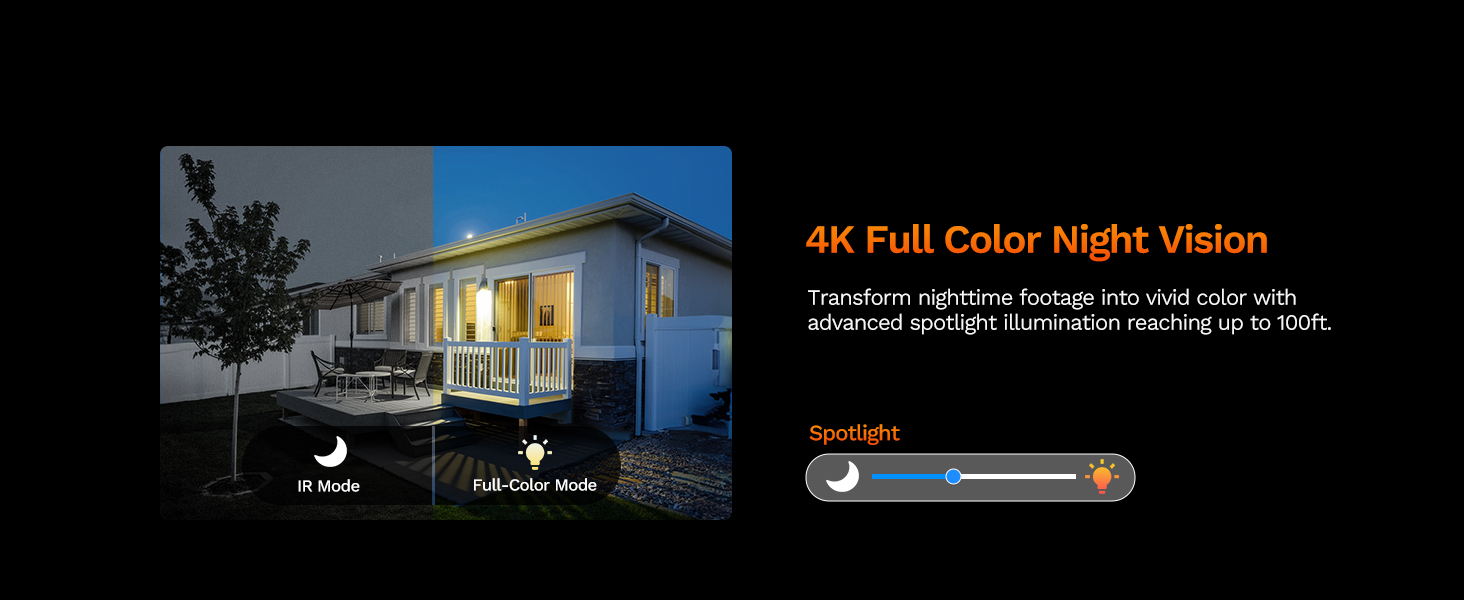
Image: The LongPlus NVR illustrating the benefits of H.265 (HEVC) video compression for saving storage space while maintaining video quality.
صيانة
- تنظيف: نظف عدسة الكاميرا وهيكلها بانتظام بقطعة قماش ناعمة.amp قطعة قماش. تجنب استخدام المنظفات الكاشطة التي قد تخدش العدسة.
- تحديثات البرامج الثابتة: Check the Longvision app or LongPlus website periodically for firmware updates. Keeping your camera's firmware updated ensures optimal performance and security.
- فحص الكابلات: Periodically inspect the Ethernet cable for any signs of wear or damage, especially in outdoor installations. Ensure connections are secure.
- الفحوصات البيئية: تأكد من عدم وجود أي عوائق تحجب رؤية الكاميرا view or interfering with its sensors.
استكشاف الأخطاء وإصلاحها
If you encounter issues with your LongPlus camera, refer to the following common problems and solutions:
| مشكلة | السبب المحتمل | حل |
|---|---|---|
| لا يوجد تغذية الفيديو | انقطاع التيار الكهربائي؛ وصلة كابل غير محكمة؛ مشكلة في الشبكة. | Check PoE connection to NVR/switch. Ensure NVR/switch is powered on. Verify Ethernet cable integrity. |
| جودة الصورة رديئة | عدسة متسخة؛ إضاءة غير كافية؛ مشاكل في عرض النطاق الترددي للشبكة. | Clean the camera lens. Ensure adequate lighting for color night vision or switch to IR mode. Check network speed. |
| كشف الحركة لا يعمل | Detection disabled; Incorrect sensitivity; Activity zone not set correctly. | Enable motion detection in app/NVR settings. Adjust sensitivity. Verify activity zone configuration. |
| لا يمكن الاتصال بالتطبيق | Incorrect network settings; App issues; Camera not online. | Ensure camera is connected to the network. Restart camera and router. Re-add camera to the app. Check app permissions. |
| الصوت ثنائي الاتجاه لا يعمل | Microphone/speaker disabled; Volume too low; Network latency. | Check audio settings in the app. Adjust volume levels. Ensure stable network connection. |
If the problem persists after trying these solutions, please contact LongPlus customer support for further assistance.
تحديد
| ميزة | وصف |
|---|---|
| ماركة | LongPlus |
| رقم الموديل | LP8MEF8 |
| تكنولوجيا الاتصال | سلكي (الطاقة عبر الإيثرنت - PoE) |
| دقة التقاط الفيديو | 4K UHD (3840x2160) |
| تقنية الاستشعار البصري | سيموس |
| نوع العدسة | مُثَبَّت |
| Viewزاوية جي | 132 درجة |
| الرؤية الليلية | Yes, up to 100 Feet (30m) range (IR, Color, Smart modes) |
| معدل الإطارات | 30 إطارًا في الثانية |
| وسائط التسجيل | Motion-triggered, Scheduled, 24/7 (via NVR) |
| المميزات الخاصة | H.265 Video Coding, Siren Alarm, Strobe Light Alarm, Two-Way Audio, Vehicle/Person Detection, Activity Zones, Privacy Mask, IP67 Waterproof |
| مصدر الطاقة | الكهرباء السلكية (PoE) |
| درجة حرارة التشغيل | -30 درجة مئوية إلى 60 درجة مئوية (-22 درجة فهرنهايت إلى 140 درجة فهرنهايت) |
| الأجهزة المتوافقة | Cameras, Laptops, Personal Computers, Smartphones |
| دعم نظام التشغيل | أندرويد، ماك أو إس، ويندوز، آي أو إس |
| أبعاد العنصر | 3.3 × 3.3 × 3.5 بوصة |
| لون | أبيض |
الضمان والدعم
معلومات الضمان
يوفر LongPlus ضمان لمدة 2 سنوات for this product from the date of purchase. This warranty covers manufacturing defects and ensures the product meets its specified performance standards under normal use.
الدعم الفني
LongPlus offers الدعم الفني مدى الحياة for its customers. If you have any questions, require assistance with setup, operation, or troubleshooting, or encounter any issues not covered in this manual, please do not hesitate to contact our professional technical team. We are committed to responding to your inquiries within 24 hours.
For support, please visit the official LongPlus webالموقع أو الرجوع إلى معلومات الاتصال المقدمة مع عبوة المنتج الخاص بك.