
1. المقدمة وما فوقview
The Jackery Explorer 240D is a compact and portable power station designed to provide reliable power for various devices. It features a 256Wh lithium battery, multiple output ports, and flexible charging options, making it suitable for outdoor activities, travel, and emergency backup power.
This manual provides essential information for the safe and efficient operation, maintenance, and troubleshooting of your Jackery Explorer 240D.
2. ماذا يوجد في الصندوق
- 1 x Jackery Explorer 240D Portable Power Station
- 1 × كابل USB-C إلى USB-C
- 1 x 10²W GaN Fast Charger
- 1 x E240D User Manual

Image: The Jackery Explorer 240D power station shown with its included USB-C to USB-C cable and 102W GaN Fast Charger.
3. مواصفات المنتج
- قدرة عالية: 256Wh energy storage, equivalent to 8 standard power banks.
- مخرجات متعددة الاستخدامات: 4 ports (3x USB-C, 1x USB-A) delivering up to 200W pure DC output (max 140W per port).
- 2-in-1 USB-C Cable: Functions as a carrying strap and a 140W fast-charging cable.
- تصميم محمول للغاية: Weighs only 4.85lbs, significantly lighter and smaller than comparable AC portable power stations.
- بطارية ليثيوم فوسفات الحديد المتينة: Upgraded lithium battery with a 10-year lifespan, maintaining ≥70% capacity after 6,000 charge cycles. Operates reliably from -4°F to 113°F.
- خيارات شحن متعددة: USB-C, solar, car charging, and AC-DC dual input. AC-DC dual input charges 0% to 80% in just one hour. Supports up to 100W solar charging.
- الاتصال: Powers laptops, smartphones, tablets, GoPros, drones, and can keep devices like Starlink Mini online for up to 10 hours.
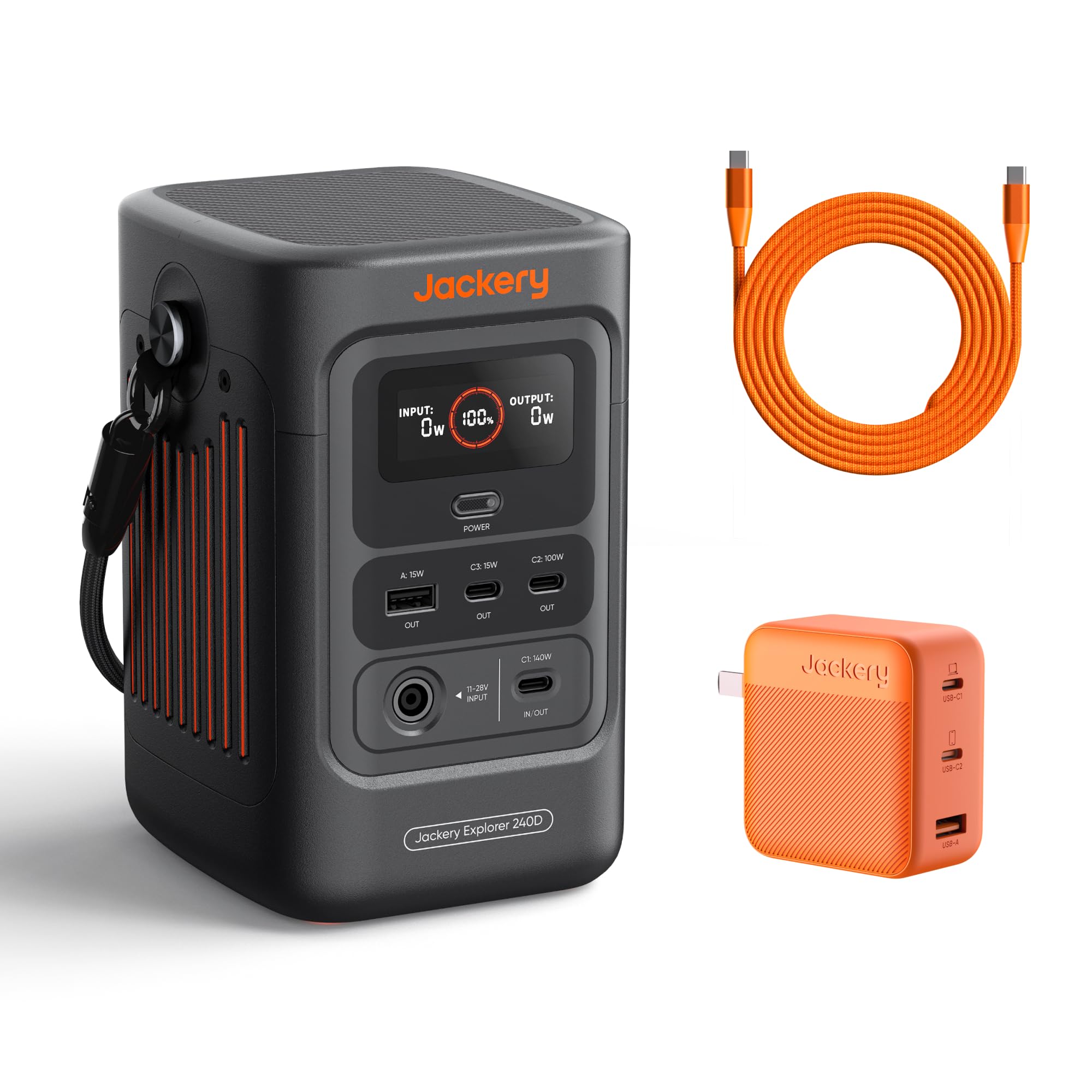
Image: The Jackery Explorer 240D, a compact and portable power station with multiple ports.
4. الإعداد
- أفرغ: قم بإزالة جميع المكونات بعناية من العبوة.
- التهمة الاولية: Before first use, fully charge the Explorer 240D using any of the available charging methods. It is recommended to fully charge the unit every 3 months to maintain battery health.
- تشغيل الطاقة: Press the "POWER" button to turn on the unit. The display will show battery percentage, input, and output wattage.
- Activate Outlets: Press the individual power buttons for DC/USB or AC outlets to activate them before connecting devices.
5. تعليمات التشغيل
5.1 أجهزة الشحن
- Connect your device's charging cable to the appropriate output port (USB-A, USB-C, or AC).
- Press the corresponding power button (DC/USB or AC) to activate the output.
- ستعرض الشاشة كمية الماء الخارجةtage.
- When finished, turn off the output ports to conserve battery.
5.2 وضع توفير الطاقة
The Explorer 240D features a Smart Energy-Saving Mode to efficiently extend power supply duration. This mode is activated by default upon first use.
- To activate the maximum 200W output, press the "POWER" button three times.
- The display will indicate when power saving mode is active or inactive.

Image: The Jackery Explorer 240D connected to and charging a laptop, smartphone, and other devices, demonstrating its multi-device charging capability.
6. طرق الشحن
The Jackery Explorer 240D offers flexible charging options:
- شحن USB-C: Use the included USB-C to USB-C cable and 102W GaN Fast Charger for rapid charging.
- AC-DC Dual Input: Achieve 0% to 80% charge in approximately one hour using both AC and DC inputs simultaneously.
- الشحن بالطاقة الشمسية: Connect compatible solar panels (up to 100W input) for eco-friendly charging. Charging time depends on weather conditions and solar panel wattage.
- شحن السيارة: Charge the unit using a 12V car charger (DC cable not included in all packages).

Image: The Jackery Explorer 240D demonstrating its multiple charging methods: AC wall outlet, solar panel, and car charger.
7. معرض الوسائط
7.1 صور المنتج

The Explorer 240D features 3 USB-C ports (1x 140W, 1x 100W, 1x 15W) and 1 USB-A port (15W) for fast charging.

The innovative 2-in-1 USB-C strap cable serves as both a convenient carrying handle and a powerful 140W fast-charging cable.

Equipped with a LiFePO4 battery, the Explorer 240D boasts a 10+ year lifespan and 6,000 charge cycles, ensuring long-term durability.

Weighing only 4.85lbs, the Explorer 240D is 46% lighter and 70% smaller than other AC portable power stations of similar capacity.
7.2 مقاطع فيديو رسمية للمنتج
فيديو: أكثر منview of the Jackery Explorer 240D, highlighting its features and portability. This video is provided by Jackery Inc.
فيديو: مقدمة قصيرةview عرضasing the Jackery Explorer 240D's compact size and ease of use. This video is provided by Jackery Inc.
8. المواصفات
| ماركة | جاكيري |
| اسم الموديل | Jackery Explorer 240D + 102W GaN 3-Port Fast Charger |
| رقم الموديل | جي-240ب |
| سعة البطارية | 256 وات في الساعة (80,000 مللي أمبير في الساعة) |
| انتاج واتtage | 200W (DC output, up to 140W per port) |
| نوع الموصل | يو اس بي نوع سي |
| عدد المنافذ | 5 (3x USB-C, 1x USB-A, 1x DC 12V 10A) |
| مصدر الطاقة | يعمل بالبطارية، يعمل بالطاقة الشمسية |
| وزن العنصر | 4.85 رطل |
| أبعاد العنصر | 4.73 × 6.69 × 4.19 بوصة |
| نوع البطارية | بطارية ليثيوم LiFePO4 |
| درجة حرارة التشغيل | -4 درجة فهرنهايت إلى 113 درجة فهرنهايت (-20 درجة مئوية إلى 45 درجة مئوية) |
9. الصيانة
- تخزين: Store the Explorer 240D in a cool, dry place away from direct sunlight and extreme temperatures.
- معدل إعادة الشحن: To prolong battery life, fully recharge the unit at least once every 3 months, even if not in use.
- تنظيف: استخدم قطعة قماش جافة وناعمة لتنظيف الجزء الخارجي من الجهاز. لا تستخدم المنظفات السائلة أو تغمر الجهاز في الماء.
- تجنب الإفراط في تصريف السوائل: لا تدع البطارية تنفد تماماً لفترات طويلة.
10. استكشاف الأخطاء وإصلاحها
- الوحدة لا تعمل: Ensure the battery is charged. If the battery is completely depleted, it may take a few minutes of charging before the unit powers on.
- لا يوجد إخراج من المنافذ: Confirm that the specific output port (DC/USB or AC) has been activated by pressing its respective power button. Check if the device connected is within the power station's wattagحدود ه.
- الشحن البطيء: Verify that the charging cable and adapter are functioning correctly and are properly connected. For solar charging, ensure panels are in direct sunlight and free from obstructions.
- حماية من التحميل الزائد: If the unit detects an overload, it may automatically shut down. Disconnect the overloaded device and restart the power station.
11. الضمان والدعم
The Jackery Explorer 240D comes with a ضمان الشركة المصنعة لمدة عامين. For technical support, warranty claims, or additional information, please contact Jackery Inc. directly or visit their official webموقع.
Manufacturer: Jackery
For further assistance, refer to the official Jackery support channels.