
1. المقدمة
This manual provides detailed instructions for the installation, usage, maintenance, and troubleshooting of your new Horavie KC101C Coffee Maker Replacement K Pod Holder. Please read this manual carefully before use to ensure proper function and longevity of the product. This K Pod Holder is specifically designed for compatibility with the Horavie KC101C coffee machine.
2. انتهى المنتجview
The Horavie KC101C Replacement K Pod Holder is an essential component for brewing single-serve beverages using K-cups in your compatible coffee machine. Constructed from 100% BPA-free plastic, it ensures safe and clean brewing. Its design facilitates easy installation and removal for cleaning and replacement.

الشكل 2.1: الجبهة view of the Horavie KC101C Replacement K Pod Holder.

Figure 2.2: The K Pod Holder shown alongside standard K-cups, demonstrating its intended use.
3. التثبيت
Follow these steps to correctly install the replacement K Pod Holder into your Horavie KC101C coffee machine:
- Open the Brewer Head: Lift the handle of your Horavie KC101C coffee maker to open the brewer head.
- Remove Existing Holder (if applicable): If there is an existing K Pod Holder, gently pull it upwards to remove it from the brewing chamber.
- Align the New Holder: Observe the brewing chamber and the new K Pod Holder. There is a small triangular notch on the holder and a corresponding alignment point in the machine's brewing chamber. Align these features.
- Insert the Holder: Carefully lower the new K Pod Holder into the brewing chamber, ensuring the notch aligns. Push down firmly until it clicks securely into place.
- التحقق من التثبيت: Gently try to lift the holder. If it is properly installed, it should not come out easily.
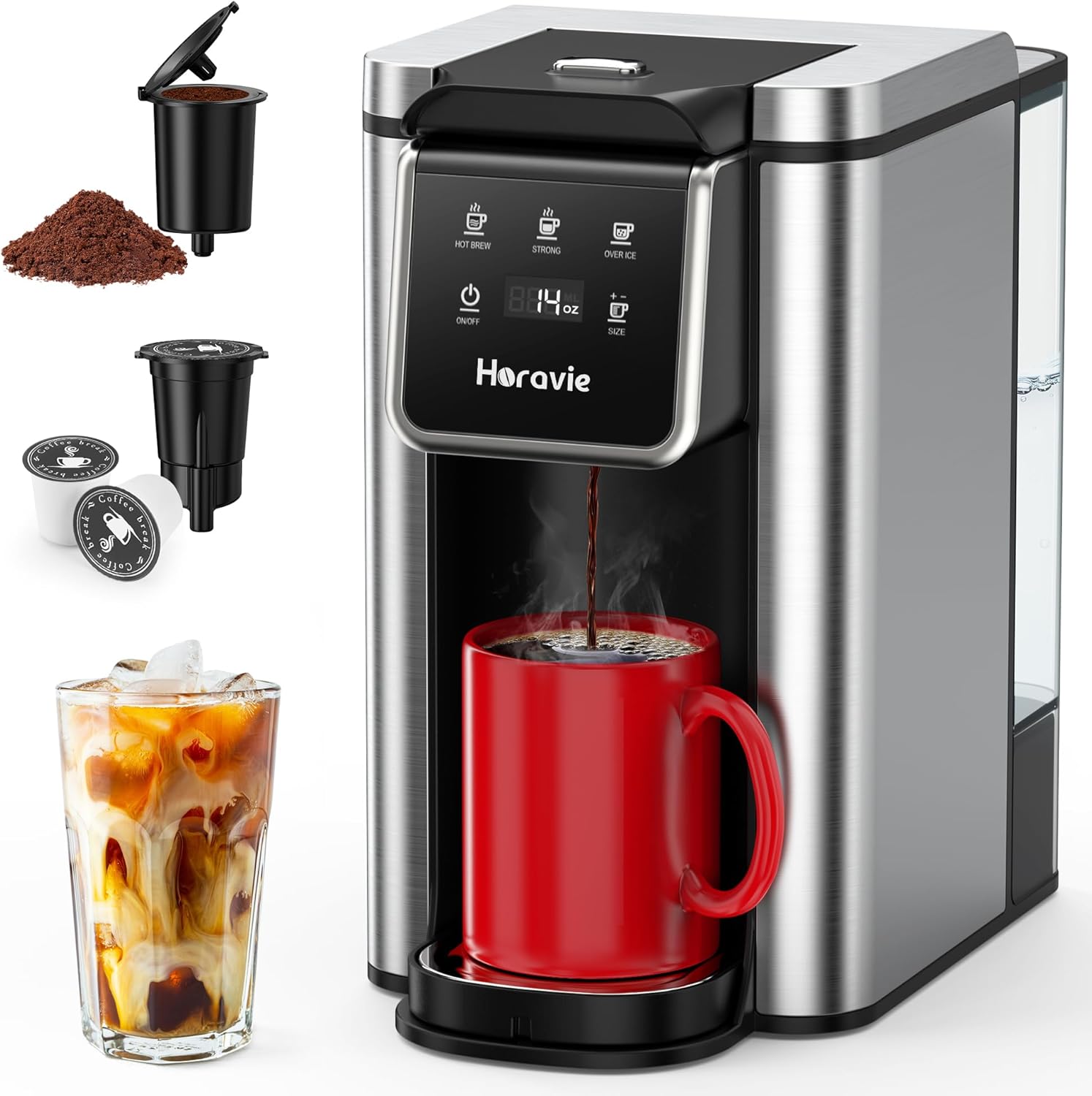
Figure 3.1: The Horavie KC101C coffee maker, illustrating the location for K Pod Holder installation.

Figure 3.2: Close-up of the brewing area, showing the K Pod Holder in place for K-cup brewing, and a reusable filter option.
4. Operating the K Pod Holder
Once the K Pod Holder is installed, using it is straightforward:
- أدخل كوب K: Place a single K-cup into the K Pod Holder. Ensure it sits flat and securely.
- Close Brewer Head: Lower the handle of the coffee maker until the brewer head is completely closed. This action will puncture the K-cup.
- المشروب: Select your desired brew size and press the brew button on your Horavie KC101C coffee machine.
- Remove Used K-Cup: After brewing is complete, lift the handle to open the brewer head and carefully remove the hot K-cup. Dispose of it properly.
5. الصيانة
Regular cleaning of your K Pod Holder is crucial for optimal performance and taste:
- التنظيف اليومي: After each use, remove the K Pod Holder from the coffee machine. Rinse it under warm running water to remove any coffee grounds or residue.
- التنظيف الأسبوعي: For a more thorough cleaning, disassemble the K Pod Holder by separating its components (if applicable to your specific holder design). Wash all parts with warm, soapy water. Use a small brush to clean any hard-to-reach areas, especially around the needle. Rinse thoroughly and allow to air dry completely before reassembling and reinstalling.
- تنظيف الإبر: The K Pod Holder contains a sharp needle that punctures the K-cup. If you notice reduced water flow or clogging, carefully clean the needle using a straightened paper clip. Caution: The needle is sharp. Exercise extreme care to avoid injury.
6. استكشاف الأخطاء وإصلاحها
If you encounter issues with your K Pod Holder, consider the following:
- Coffee Not Brewing / Slow Flow: This often indicates a clogged needle. Refer to the "Needle Cleaning" section under Maintenance. Ensure the K Pod Holder is correctly seated in the brewing chamber.
- K-Cup Not Punctured: Check if the K Pod Holder is installed correctly and if the brewer head is fully closed. Ensure the K-cup is properly seated within the holder.
- تسرب: Ensure the K Pod Holder is fully seated and aligned. Check for any visible damage to the holder or the coffee machine's brewing chamber seals.
- Holder Does Not Fit: Confirm that you have the correct replacement part for your Horavie KC101C coffee machine. This holder is specifically designed for the KC101C model.
7. المواصفات
| ميزة | التفاصيل |
|---|---|
| ماركة | هورافي |
| توافق النموذج | Horavie KC101C Coffee Machine |
| مادة | Plastic (100% BPA-free) |
| لون | أسود |
| المكونات المضمنة | 1 K-pod Holder |
| وزن العنصر | 1.13 أونصات |
| أبعاد الحزمة | 3.9 × 3.11 × 2.95 بوصة |
8. الضمان والدعم
For warranty information or technical support regarding your Horavie KC101C Replacement K Pod Holder, please refer to the documentation provided with your original Horavie KC101C coffee machine or contact Horavie customer service directly. Keep your purchase receipt as proof of purchase.