مقدمة
شكرا لك على الشراءasing the MD-1308BT Portable 3-Band Radio. This device offers a classic listening experience combined with modern connectivity options, including FM/AM/SW radio, Bluetooth, USB, AUX, and TF card playback. This manual provides detailed instructions for safe and efficient use of your radio.
معلومات السلامة
- لا تعرض الوحدة للمطر أو الرطوبة أو درجات الحرارة العالية.
- Avoid disassembling the radio. Refer all servicing to qualified personnel.
- أبعد الجهاز عن المجالات المغناطيسية القوية.
- Use only the specified charging cable and power adapter (DC 5V) to prevent damage.
- تخلص من البطاريات بطريقة مسؤولة وفقًا للوائح المحلية.
محتويات الحزمة
يرجى تحديد المربع للعناصر التالية:
- MD-1308BT Portable Radio
- كابل شحن USB
- هوائي خارجي
- دليل المالك (هذه الوثيقة)

Image: The MD-1308BT radio shown alongside its retail packaging and included USB charging cable.
المنتج انتهىview
Familiarize yourself with the main components and controls of your MD-1308BT radio:
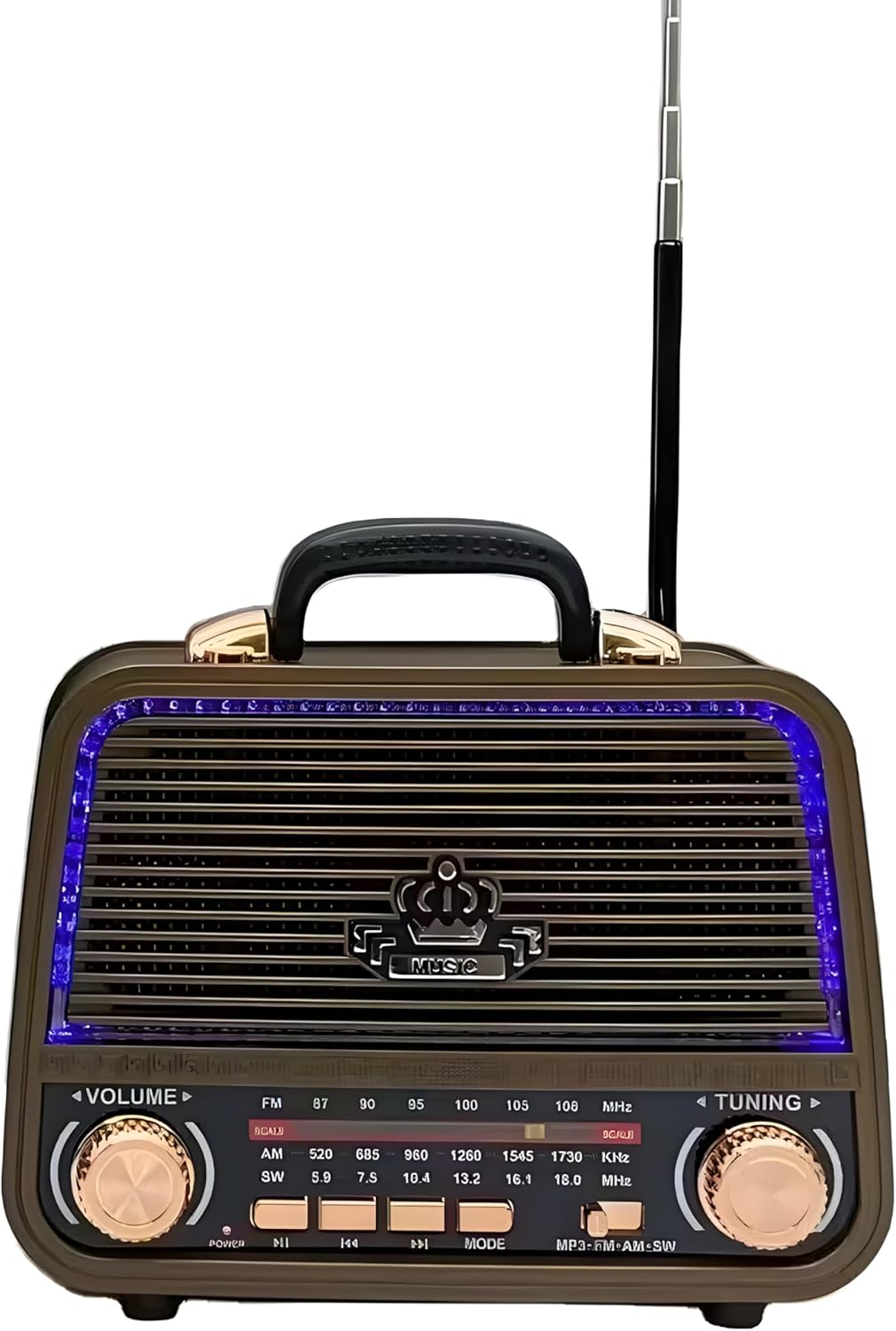
الصورة: الجبهة view of the MD-1308BT radio, showing the speaker grille, LED lighting, volume and tuning knobs, and playback control buttons.
ضوابط اللوحة الأمامية:
- مقبض الصوت: قم بتدويره لضبط مستوى الصوت.
- موجة الضبط: Rotate to tune into radio stations.
- محدد النطاق: Switch between FM, AM, and SW bands.
- زر التشغيل/التشغيل/الإيقاف المؤقت: Press to power on/off or play/pause media.
- أزرار المسار السابق/التالي: Navigate tracks in USB/TF/Bluetooth modes.
- زر الوضع: Switch between Radio, Bluetooth, USB, AUX, and TF card modes.
- عرض الصمام: Shows frequency or mode information.

الصورة: الخلفية view of the MD-1308BT radio, illustrating the battery compartment, USB port, TF card slot, and AUX input.
Rear Panel / Side Ports:
- منفذ USB: لتشغيل محرك أقراص فلاش USB.
- فتحة بطاقة TF: لتشغيل الملفات من بطاقة TF (MicroSD).
- مدخلات AUX: لتوصيل أجهزة الصوت الخارجية عبر كابل 3.5 ملم.
- مدخلات DC 5V: For charging the internal battery or direct power.
- حجرة البطارية: يحتوي على بطارية قابلة لإعادة الشحن.
- الهوائي الخارجي: هوائي قابل للتمديد لتحسين استقبال الراديو.
يثبت
1. شحن البطارية
- Connect the supplied USB charging cable to the DC 5V input port on the radio.
- قم بتوصيل الطرف الآخر من كابل USB بمحول طاقة USB متوافق (غير متضمن) أو بمنفذ USB بالكمبيوتر.
- The LED indicator will show charging status (specific indicator behavior may vary by unit).
- A full charge typically takes several hours. Disconnect the charger once fully charged.
2. Inserting Storage Media (USB/TF Card)
- For USB playback, insert a USB flash drive into the USB port.
- For TF card playback, insert a TF (MicroSD) card into the TF card slot with the contacts facing down.
3. تمديد الهوائي
For optimal radio reception, fully extend the external telescopic antenna.
تعليمات التشغيل
1. تشغيل/إيقاف التشغيل
اضغط مع الاستمرار على الطاقة / التشغيل / الإيقاف المؤقت زر لتشغيل الراديو أو إيقافه.
2. ضبط الحجم
تدوير مقدار knob to increase or decrease the sound level.
3. Radio Mode (FM/AM/SW)
- اضغط على وضع button until the radio mode (FM, AM, or SW) is selected.
- استخدم مختار الفرق switch to choose between FM, AM, or SW bands.
- تدوير ضبط knob to scan for and select radio stations. The frequency will be displayed on the LED screen.
- Extend the external antenna for better reception, especially for FM and SW bands.
4. وضع بلوتوث
- اضغط على وضع button until "BT" or "Bluetooth" appears on the display. The radio will enter pairing mode.
- على جهازك المحمول، قم بتمكين Bluetooth وابحث عن الأجهزة المتاحة.
- Select "MD-1308BT" from the list to pair. A confirmation sound may be heard.
- Once paired, you can play audio from your device through the radio. Use the radio's playback control buttons (Play/Pause, Previous/Next) or your device's controls.

Image: The MD-1308BT radio wirelessly connected to a smartphone, demonstrating Bluetooth audio playback.
5. تشغيل بطاقة USB/TF
- أدخل ذاكرة فلاش USB أو بطاقة TF تحتوي على ملفات صوتية MP3 fileإلى المنفذ المعني.
- اضغط على وضع button to switch to USB or TF card mode. Playback should start automatically.
- استخدم تشغيل/إيقاف مؤقت و السابق/التالي أزرار للتحكم في التشغيل.
6. وضع إدخال AUX
- Connect an external audio device (e.g., smartphone, MP3 player) to the AUX input port using a 3.5mm audio cable (not included).
- اضغط على وضع اضغط على الزر حتى تظهر كلمة "AUX" على الشاشة.
- يمكنك التحكم في التشغيل ومستوى الصوت من جهازك الخارجي المتصل.
صيانة
- Clean the radio's exterior with a soft, dry cloth. Do not use abrasive cleaners or solvents.
- عند عدم استخدام الراديو لفترات طويلة، قم بتخزينه في مكان بارد وجاف.
- To prolong battery life, avoid fully discharging the battery frequently and recharge it regularly.
استكشاف الأخطاء وإصلاحها
| مشكلة | السبب المحتمل | حل |
|---|---|---|
| الراديو لا يعمل. | البطارية منخفضة أو فارغة. | اشحن الراديو باستخدام كابل USB. |
| لا يوجد صوت أو مستوى الصوت منخفض. | Volume is too low; incorrect mode selected. | Increase volume using the VOLUME knob; ensure correct mode (Radio, BT, USB, AUX) is selected. |
| استقبال راديو ضعيف. | الهوائي غير ممتد؛ إشارة ضعيفة. | Fully extend the external antenna; try repositioning the radio. |
| البلوتوث غير قادر على الاتصال. | الراديو ليس في وضع الاقتران؛ الجهاز بعيد جدًا. | Ensure radio is in BT mode; keep devices within 10 meters; unpair and re-pair if necessary. |
| بطاقة USB/TF لا تعمل. | غير صحيح file تنسيق؛ لم يتم إدخال البطاقة/محرك الأقراص بشكل صحيح. | يضمن files are MP3 format; reinsert the USB drive/TF card; try a different drive/card. |
تحديد
- نموذج: MD-1308BT
- ماركة: نوعي
- تقنية الموالف: FM/AM/SW (3-Band)
- الاتصال: Bluetooth, USB, AUX, TF Card
- مصدر الطاقة: Rechargeable Battery / DC 5V
- المميزات الخاصة: Volume Control, LED Display, Rechargeable, Built-in Speaker, External Antenna
- لون: بني
- الأبعاد التقريبية للحزمة: 10 × 10 × 8.5 سم
الضمان والدعم
This product comes with a standard manufacturer's warranty. Please refer to the retailer's policy for specific warranty terms and conditions. For technical support or service inquiries, please contact your point of purchase.


