
1. علىview
The Element 32-inch 720p HD Xumo Smart TV offers reliable performance and smart functionality in a compact design. Ideal for smaller spaces such as kitchens, dorm rooms, guest rooms, or offices, this television combines a clear HD display with a versatile smart platform and modern connectivity options.
Key features include a 720p resolution display, a 120Hz effective refresh rate for smooth motion, and the integrated Xumo OS for access to numerous streaming applications and free live channels. Connectivity is robust with multiple HDMI ports, USB, LAN, Bluetooth, and Apple AirPlay support. The TV also comes with a voice remote for convenient navigation.
2. ماذا يوجد في الصندوق
Upon unboxing your Element 32-inch Xumo Smart TV, please ensure all the following components are present:
- 32-inch Element Xumo TV
- Voice Remote + 2 AAA batteries
- TV Stand & Screws
- دليل البدء السريع

Image: The contents of the TV box, showing the 32-inch television, its remote control, two stand feet, and a bag of screws for assembly. Dimensions of the TV are also displayed.
3. الإعداد
3.1 تركيب حامل التلفزيون
- قم بوضع شاشة التلفزيون بعناية على سطح ناعم ونظيف لمنع الخدوش.
- قم بمحاذاة كل قاعدة من قواعد الحامل مع فتحات البراغي المقابلة لها في الجزء السفلي من التلفزيون.
- Secure each stand foot using the provided screws. Ensure they are tightened firmly but do not overtighten.
- ارفع التلفاز بحرص وضعه على سطح مستوٍ وثابت.
Alternatively, the TV supports VESA mounting for wall installation (wall mount hardware sold separately).
3.2 توصيل الطاقة
Connect the power cord to the TV's power input and then plug it into a standard electrical outlet. A pilot light on the TV will indicate that it is receiving power.
3.3 Initial Setup (Xumo OS)
عند تشغيل التلفزيون لأول مرة، سيرشدك خلال عملية الإعداد الأولية. وهذا يشمل:
- اختيار اللغة: اختر لغتك المفضلة.
- إتصال شبكة: Connect the TV to your home Wi-Fi network or via an Ethernet cable.
- Xumo OS Account Setup: Follow on-screen prompts to set up or log in to your Xumo OS account. This is necessary to access smart features and apps.
- مسح القناة: في حالة توصيل هوائي، سيقوم التلفزيون بالبحث عن القنوات المتاحة.

Image: The Element 32-inch Xumo Smart TV is shown on a wooden TV stand, displaying its smart interface with various streaming app icons.
4. الاتصالات
The Element Xumo Smart TV provides a variety of ports for connecting external devices:
- منافذ HDMI (3): Connect high-definition devices such as Blu-ray players, gaming consoles, or cable/satellite boxes. One HDMI port supports eARC (enhanced Audio Return Channel) for simplified audio connections to compatible soundbars or AV receivers.
- منفذ USB (1): قم بتوصيل أجهزة التخزين USB بـ view الصور، وتشغيل الموسيقى، أو مشاهدة مقاطع الفيديو.
- منفذ LAN (Ethernet): للاتصال بالإنترنت السلكي.
- Audio Out (Optical) / Headphone Jack: لتوصيل أنظمة الصوت الخارجية أو سماعات الرأس.
- Composite Input / Analog Tuner: For connecting older devices or an antenna.
5. تشغيل جهاز التلفزيون
5.1 التحكم عن بعد
The included voice remote allows for intuitive control of your TV. It features dedicated buttons for popular streaming services and a microphone for voice commands.
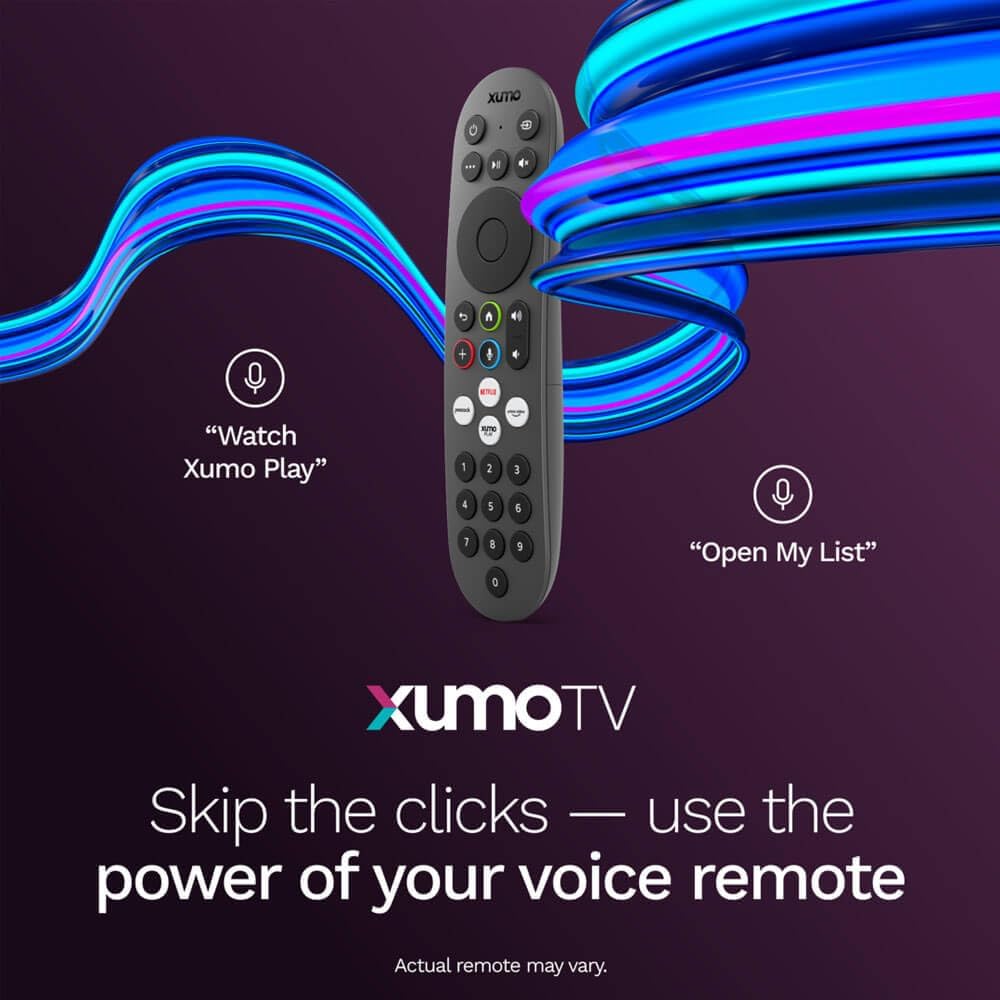
Image: A close-up of the Element Xumo Smart TV voice remote, highlighting its various buttons including a microphone for voice commands and quick access buttons for streaming services.
5.2 Smart Features & Streaming (Xumo OS)
The Xumo OS provides access to over 250 preloaded apps and more than 750 free live channels. You can:
- محتوى البحث: Use the unified search function to find content across all your installed apps.
- My List: Curate your personal watchlist for easy access to your favorite shows and movies.
- Free On-Demand Libraries: Explore a wide selection of free on-demand content.
- التحكم الصوتي: Use the voice remote to navigate, search, and control your TV hands-free.

Image: The Xumo TV interface showing a selection of popular streaming applications and content recommendations.
5.3 إعدادات الصورة والصوت
Your TV delivers a crisp 720p HD display with a 120Hz effective refresh rate, minimizing motion blur for clear visuals. Dolby Audio processing enhances the sound experience. You can adjust picture and sound settings via the TV's menu to suit your preferences.
- أوضاع الصورة: Select from various preset picture modes (e.g., Standard, Vivid, Movie, Sports) or customize settings like brightness, contrast, and color.
- أوضاع الصوت: Choose from different sound modes (e.g., Standard, Music, Movie, Speech) or adjust bass and treble levels.
5.4 Apple AirPlay & Home Support
Seamlessly stream content or mirror your screen from your iPhone, iPad, or Mac directly to your Element TV using Apple AirPlay. With Apple Home support, you can integrate your TV into your Apple smart home ecosystem for convenient control.
6. الصيانة
To ensure the longevity and optimal performance of your Element Xumo Smart TV, follow these maintenance guidelines:
- تنظيف الشاشة: امسح الشاشة برفق بقطعة قماش ناعمة وجافة وخالية من الوبر. لإزالة البقع الصعبة، امسح برفق.ampبلل قطعة القماش بالماء أو محلول التنظيف المخصص للشاشة (لا ترش مباشرة على الشاشة أبدًا).
- تنظيف الخزانة: استخدم قطعة قماش ناعمة وجافة لتنظيف خزانة التلفزيون. تجنب استخدام المنظفات أو المذيبات الكاشطة.
- تهوية: تأكد من عدم سد فتحات التهوية الموجودة في الجزء الخلفي من التلفزيون لمنع ارتفاع درجة الحرارة.
- إيقاف التشغيل عند عدم الاستخدام: قم بإيقاف تشغيل التلفزيون عندما لا يكون قيد الاستخدام للحفاظ على الطاقة وإطالة عمره.
7. استكشاف الأخطاء وإصلاحها
If you encounter any issues with your Element Xumo Smart TV, refer to the following common troubleshooting tips:
- لا يوجد طاقة: تأكد من توصيل سلك الطاقة بإحكام بكل من التلفزيون ومأخذ الكهرباء. تأكد من أن مأخذ الكهرباء يعمل بشكل صحيح.
- لا صورة/صوت: تأكد من تحديد مصدر الإدخال الصحيح. تحقق من جميع توصيلات الكابلات (HDMI، الهوائي، إلخ) للتأكد من تثبيتها بإحكام.
- جهاز التحكم عن بعد لا يعمل: استبدل بطاريات AAA في جهاز التحكم عن بعد. تأكد من عدم وجود أي عوائق بين جهاز التحكم عن بعد ومستشعر الأشعة تحت الحمراء في التلفزيون.
- مشاكل الاتصال بالشبكة: Restart your Wi-Fi router. Check the TV's network settings to ensure it's connected to the correct network and the password is entered correctly.
- Smart App Problems: Try restarting the app. If the issue persists, clear the app's cache or reinstall it. Ensure your TV's software is up to date.
For persistent issues, please contact Element customer support.
8. المواصفات
| ميزة | مواصفة |
|---|---|
| رقم الموديل | إي300إيه32سي |
| حجم الشاشة | 32 بوصة |
| دقة العرض | 720p (1366x768) |
| معدل التحديث | 60 Hz (120Hz Effective) |
| نسبة العرض إلى الارتفاع | 1.78:1 |
| نظام التشغيل | Xumo OS |
| الاتصال | 3x HDMI (1x eARC), 1x USB, LAN (Ethernet), Optical Audio Out, Headphone Jack, Composite Input, Wi-Fi, Bluetooth |
| المميزات الخاصة | Bezel-Less Design, Built-In Speaker, Voice Remote, Apple AirPlay & Home Support |
| TV with Stand Dimensions (W x H x D) | 28.8 بوصة × 19.2 بوصة × 7.0 بوصة |
| TV without Stand Dimensions (W x H x D) | 28.8 بوصة × 17.0 بوصة × 2.7 بوصة |
| وزن العنصر | 8.8 رطل |
9. الضمان والدعم
The Element 32-inch 720p HD Xumo Smart TV comes standard with a ضمان المصنع لمدة عاميغطي هذا الضمان عيوب المواد والتصنيع في ظل الاستخدام العادي. يُرجى الاحتفاظ بإيصال الشراء للمطالبة بالضمان.
For technical support, warranty inquiries, or further assistance, please refer to the contact information provided in your Quick Start Guide or visit the official Element Electronics webموقع.