
1. المقدمة
The Jackery Explorer 240D is a compact and portable power station designed to provide reliable power for various devices, especially during outdoor activities, travel, and emergencies. Featuring a durable LiFePO4 battery, multiple output ports, and flexible charging options, it offers a convenient and efficient energy solution.
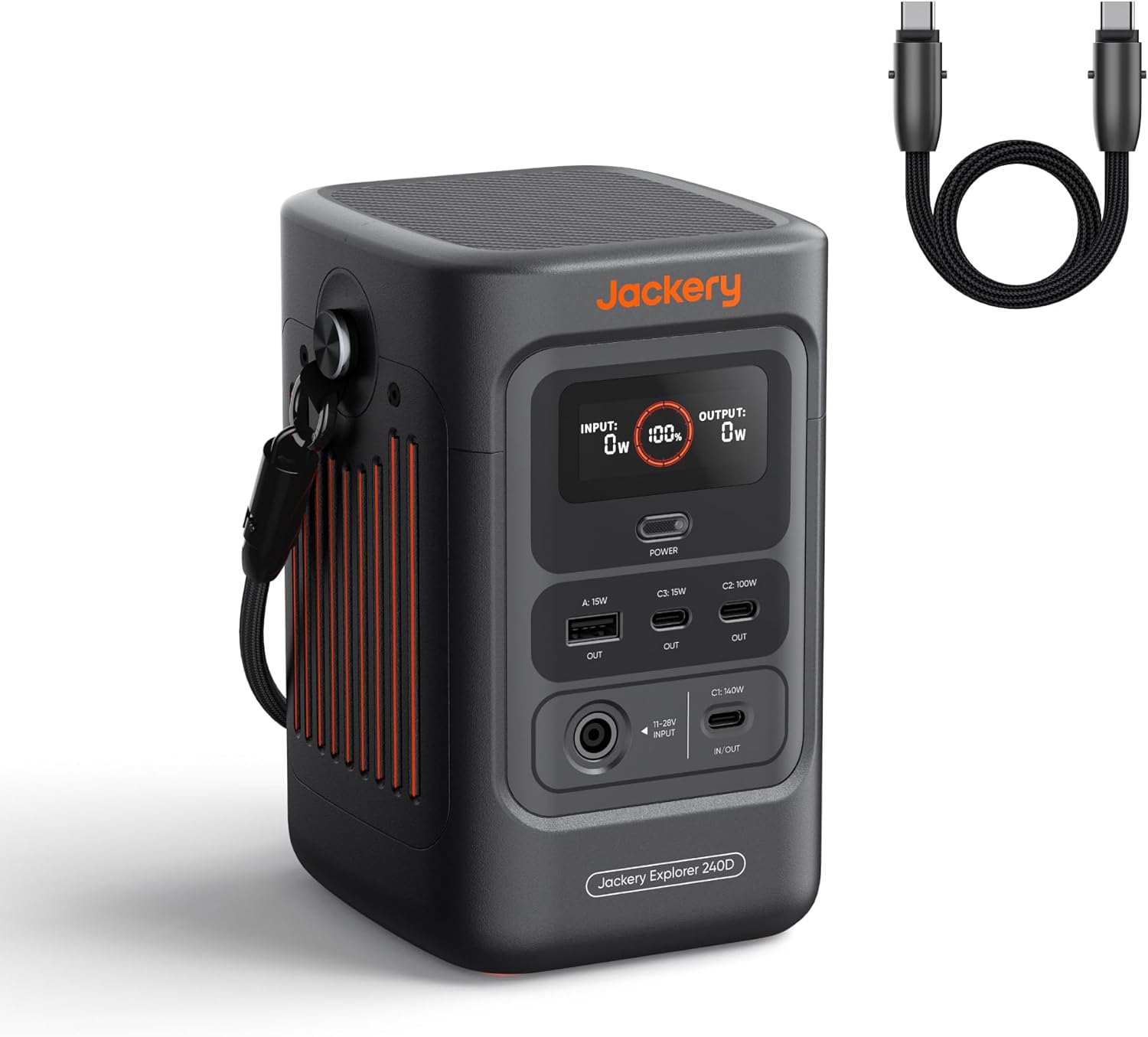
Figure 1: Jackery Explorer 240D Portable Power Station with included USB-C cable.
2. انتهى المنتجview
The Explorer 240D is equipped with a digital display and various ports for both input and output. Its compact design makes it highly portable.
2.1. المنافذ والشاشة
- منافذ الإخراج: The device features 4 versatile ports: 3 USB-C ports and 1 USB-A port. The USB-C1 port can deliver up to 140W, while the USB-C2 port provides up to 100W. The USB-A port offers 15W output.
- منافذ الإدخال: Charging inputs include a DC input (11-28V) and a USB-C input (up to 140W).
- عرض رقمي: The display shows input wattagهـ، خرج واطtage, and battery percentage.
- زر الطاقة: Used to power the unit on/off and activate/deactivate power-saving mode.
- ضوء متكامل: A built-in light with an SOS function is available for emergencies.

Figure 2: The Jackery Explorer 240D is designed for portability, weighing only 4.85 lbs.
3. الإعداد
3.1. الشحن الأولي
Before first use, it is recommended to fully charge your Explorer 240D. The device supports rapid charging, reaching 0% to 80% in approximately one hour using AC-DC dual input.
3.2. Attaching the 2-in-1 USB-C Strap Cable
The included USB-C cable doubles as a convenient carrying strap. To attach, align the connectors with the designated points on the power station and secure them. This allows for easy transport.

Figure 3: The versatile 2-in-1 USB-C cable functions as both a carrying strap and a fast-charging cable.
4. التشغيل
4.1. تشغيل / إيقاف التشغيل
Press and hold the main power button to turn the Explorer 240D on or off. The digital display will illuminate upon activation.
4.2. استخدام منافذ الإخراج
Connect your devices to the appropriate output ports. The Explorer 240D can power up to 4 devices simultaneously. For high-demand USB-C devices like laptops or Starlink Mini, utilize the USB-C1 (140W) or USB-C2 (100W) ports.

Figure 4: The Explorer 240D features multiple USB-C and USB-A ports for simultaneous device charging.
4.3. وضع توفير الطاقة
The power-saving mode is activated by default. To toggle this mode, press the power button three times. This feature helps extend battery duration by automatically turning off output when devices draw less than 2W for 6 hours.
4.4. Integrated Light
The built-in light can be activated by pressing the light button. Pressing it again will cycle through different modes, including an SOS emergency signal.
5. Charging the Explorer 240D
The Explorer 240D offers flexible charging options to ensure you're always prepared.
- شحن USB-C: Use the included 2-in-1 USB-C cable for fast charging from a compatible USB-C power source.
- الشحن بالطاقة الشمسية: Connect a compatible solar panel (up to 100W input) to the DC input port. Full solar charge can be achieved in approximately 2.8 hours.
- شحن السيارة: The device can be charged via a car charging cable (DC input). Full charge in approximately 4 hours.
- AC-DC Dual Input: For the fastest charging, utilize both AC and DC inputs simultaneously to reach 0% to 80% in just one hour.

Figure 5: Various methods to charge your Jackery Explorer 240D, including AC, solar, and car charging.
Video 1: Official Jackery video demonstrating the features and charging capabilities of the Explorer 240D.
6. الصيانة
To ensure the longevity and optimal performance of your Jackery Explorer 240D, follow these maintenance guidelines:
- عمر البطارية: The Explorer 240D is equipped with an upgraded LiFePO4 lithium battery designed for a 10-year lifespan. It maintains at least 70% of its original energy capacity even after 6,000 charge cycles.
- درجة حرارة التشغيل: The device is built to operate seamlessly in a wide temperature range, from -4℉ to 113℉ (-20℃ to 45℃).
- تخزين: قم بتخزين محطة الطاقة في مكان بارد وجاف بعيدًا عن أشعة الشمس المباشرة ودرجات الحرارة القصوى.

Figure 6: The Explorer 240D's LiFePO4 battery offers an extended lifespan of over 10 years with 6,000 charge cycles.
7. استكشاف الأخطاء وإصلاحها
If you encounter issues with your Explorer 240D, consider the following common troubleshooting steps:
- الجهاز لا يشحن: Ensure all charging cables are securely connected to both the power station and the power source. Verify the power source is active.
- Output Not Working: Check if the power station is turned on. Ensure the power-saving mode is not inadvertently activated if you require continuous low-power output. Confirm that the device you are trying to power is compatible with the port's output specifications.
- مشاكل العرض: If the display is not functioning correctly, try restarting the power station.
For persistent issues, please refer to the official Jackery support resources.
8. المواصفات
| ميزة | التفاصيل |
|---|---|
| أبعاد المنتج | 4.73 × 4.19 × 6.69 بوصة |
| وزن العنصر | 4.85 رطل |
| الشركة المصنعة | جاكيري |
| رقم الموديل | جي-240ب |
| ماركة | جاكيري |
| لون | أسود |
| ميزة خاصة | محمول |
| الاستخدامات الموصى بها | Camping, Outdoor Activities, Road Trips, Backup Generator for Outagحالات الطوارئ |
| مصدر الطاقة | يعمل بالبطارية، يعمل بالطاقة الشمسية |
| نوع البطارية | LiFePO4 الليثيوم |
| سعة البطارية | 256 واط/ساعة |
| العاصمة المخرجات | 200W (up to 140W per port) |
| دورات الشحن | 6,000 cycles (to ≥70% capacity) |
| درجة حرارة التشغيل | -4 درجة فهرنهايت إلى 113 درجة فهرنهايت (-20 درجة مئوية إلى 45 درجة مئوية) |
9. ماذا يوجد في الصندوق
Upon unboxing your Jackery Explorer 240D, you should find the following items:
- 1 x Jackery Explorer 240D Portable Power Station
- 1 x USB-C to USB-C Cable (2-in-1 strap cable)
- 1 x E240D User Manual (this document)
10. الضمان والدعم
The Jackery Explorer 240D is built with a durable LiFePO4 battery designed for a 10-year lifespan. For detailed warranty information, product registration, and customer support, please visit the official Jackery webالموقع أو الاتصال بخدمة العملاء الخاصة بهم.