
1. المقدمة
This manual provides detailed instructions for the installation, operation, and maintenance of your PGST A107F-US-F Home Security Alarm System. This system offers comprehensive security protection with WiFi and GSM/4G connectivity, a 4.3-inch color touchscreen, and compatibility with smart home platforms like Alexa and Google Assistant. It is designed for various applications including homes, apartments, and small businesses, providing real-time alerts without monthly fees.
2. Package Contents (24-Piece Kit)
تأكد من وجود جميع المكونات في الحزمة الخاصة بك:
- 1 x PGST Alarm Hub (Main Control Panel)
- 6 x PIR Motion Detectors
- 12 x Door/Window Alarm Sensors
- 3 × جهاز تحكم عن بعد
- 2 × RFID Tags
- 1 x Wired Siren (typically included with the hub)
- Power Adapter for Hub
- معدات التركيب
- دليل المستخدم
الصورة: أكثر منview of the 24-piece PGST A107F-US-F Home Security Alarm System kit, showing the main hub, motion detectors, door/window sensors, remote controls, and RFID tags.
3. الإعداد
3.1 Initial Setup of the Alarm Hub
- تشغيل الطاقة: Connect the alarm hub to a power outlet using the provided adapter. The hub will power on automatically.
- تحميل التطبيق: Download the 'Smart Life' or 'Tuya Smart' app from your smartphone's app store. Register or log in to your account.
- تكوين شبكة:
- اتصال واي فاي (2.4 جيجاهرتز): On the hub's touchscreen, navigate to the network settings. Select WiFi and follow the on-screen prompts to connect to your 2.4GHz home WiFi network. Ensure your phone is also connected to the same 2.4GHz network during setup.
- GSM/4G Connection: If using a SIM card, insert a valid 2G/3G/4G SIM card into the designated slot on the hub. The system will automatically detect the network.
- إضافة جهاز في التطبيق: Open the Smart Life/Tuya Smart app, tap 'Add Device', and select the alarm system category. Follow the in-app instructions to pair the hub with your account.

Image: Visual guide for configuring the network connection of the alarm hub using the touchscreen and mobile app.
3.2 Pairing Sensors and Accessories
The system supports up to 200 PGST sensor accessories and 5 remote controls. Follow these general steps to pair:
- الدخول في وضع الاقتران: On the alarm hub, navigate to the 'Accessories' or 'Add Device' section. Select the type of sensor you wish to add (e.g., Door Sensor, PIR Detector).
- تفعيل المستشعر: Trigger the sensor (e.g., separate the two parts of a door sensor, or wave your hand in front of a motion detector). The hub will detect the sensor and prompt you to confirm pairing.
- تأكيد الاقتران: Follow the on-screen instructions on the hub or in the app to complete the pairing process.

Image: Illustrates the process of customizing the name of a door/window sensor within the mobile application for easy identification.
3.3 وضع المستشعر
- أجهزة استشعار الأبواب والنوافذ: Install on the frame and moving part of doors and windows. Ensure the two parts are aligned and within 1 cm of each other when the door/window is closed.
- أجهزة كشف الحركة: Mount in corners or on walls at a height of 2-2.2 meters, ensuring a clear line of sight to the area you wish to monitor. Avoid placing near heat sources or direct sunlight.

Image: Depicts the optimal placement of a motion detector in a room, highlighting its 110-degree detection angle and 12-meter range.
4. تشغيل النظام
طرق التحكم 4.1
The PGST A107F-US-F system can be controlled via multiple methods:
- شاشة تعمل باللمس: Directly operate the system using the 4.3-inch color touchscreen on the alarm hub.
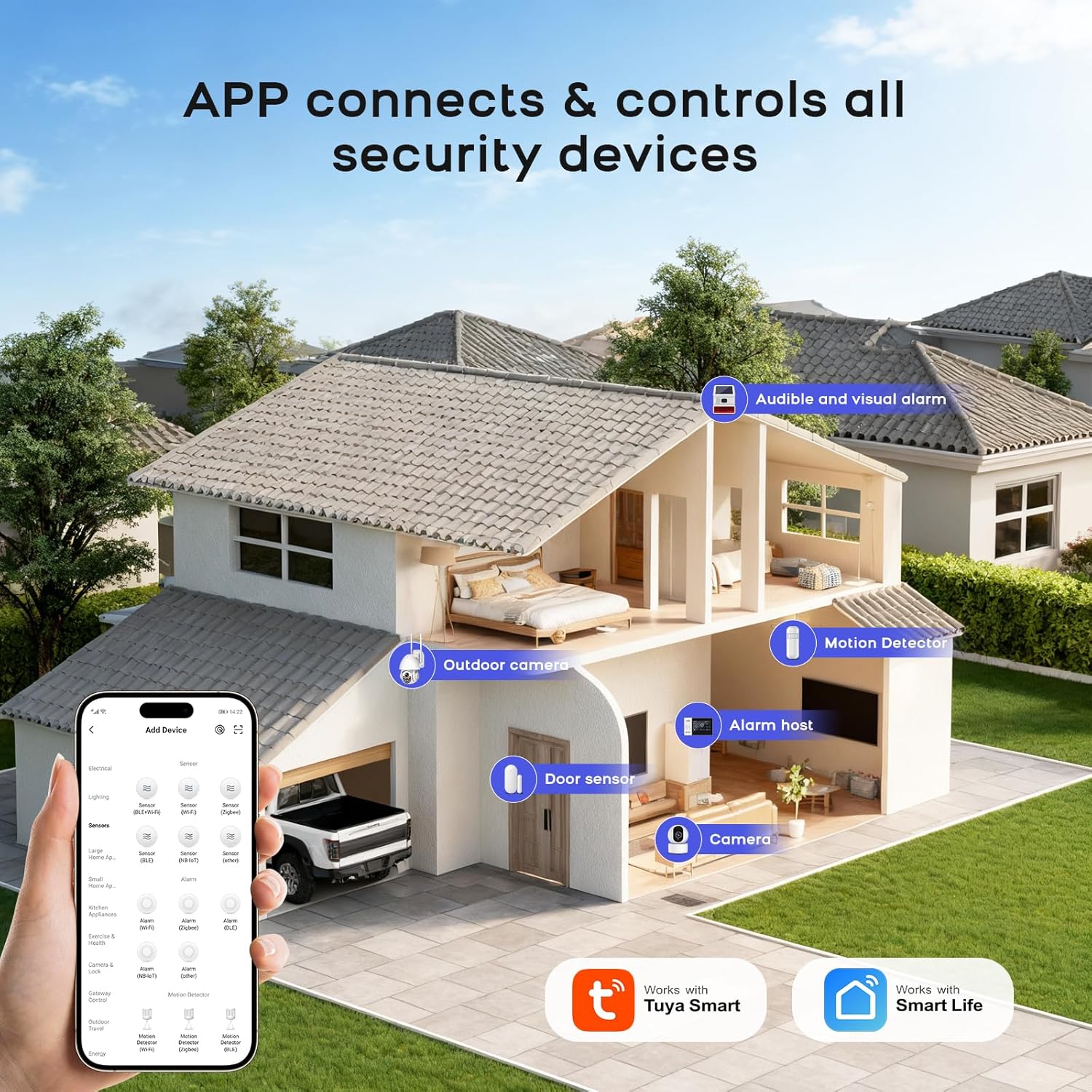
- تطبيق الهاتف المحمول: Use the Smart Life/Tuya Smart app for remote control and monitoring from anywhere.
- جهاز التحكم عن بعد: Use the provided remote controls for quick arming, disarming, and SOS functions.
- بطاقة RFID: Tap an RFID card on the hub for convenient arming or disarming.
- التحكم الصوتي: قم بالتكامل مع Amazon Alexa أو Google Assistant للأوامر الصوتية.

Image: Illustrates how the mobile app connects and controls all security devices, showing a smart home layout with various sensors.
4.2 التسليح ونزع السلاح
- وضع الذراع: Activates all sensors. Any triggered sensor will initiate an alarm. Use when leaving the premises.
- Stay Arm Mode: Activates perimeter sensors (e.g., door/window sensors) while allowing movement within the property (e.g., motion detectors are disarmed). Use when staying at home.
- وضع نزع السلاح: Deactivates all sensors, allowing free movement without triggering alarms.
- Silent Alarm Mode: The hub supports a silent alarm mode, which sends notifications without an audible siren, allowing you to take protective measures discreetly.

Image: A user interacting with an Alexa device to arm the home security system, demonstrating voice control functionality.
4.3 ميزات الطوارئ
The system includes an SOS function for emergencies:
- زر الاستغاثة: Press the SOS button on the alarm hub or the remote control to trigger an immediate emergency alert. This will activate the siren and send notifications to pre-set contacts.

Image: An elderly person holding an SOS remote control, illustrating the one-button emergency call feature for unexpected situations.
4.4 App Alerts and Notifications
The mobile app provides real-time monitoring and alerts:
- تنبيهات فورية: Receive push notifications on your smartphone for any triggered alarms, system status changes, or sensor events.
- تنبيهات البطارية المنخفضة: The system will notify you via SMS and app alerts when a device's battery is low, ensuring continuous protection.

Image: A child opening a door equipped with a door sensor, demonstrating the 24/7 monitoring and real-time alert feature on a smartphone.

Image: Illustrates the low battery alert system, showing how the hub and mobile app notify users when sensor batteries are below a critical threshold.
4.5 التسليح ونزع السلاح المقرر
Set flexible schedules for arming and disarming your system via the mobile app to integrate with your daily routine.

Image: A screenshot of the mobile app interface showing options for custom arming and disarming schedules, battery level, and sensor sensitivity.
4.6 Product Features Overview فيديو
فيديو: نبذة مختصرةview demonstrating key features of the PGST Home Security Alarm System, including ease of installation, smart functionalities, and various applications.
5. الصيانة
5.1 استبدال البطارية
- أجهزة الاستشعار: When a low battery alert is received for a specific sensor, replace its batteries promptly. Refer to the individual sensor's instructions for battery type and replacement procedure. Most sensors use standard alkaline batteries.
- Alarm Hub: The alarm hub typically has a built-in rechargeable battery for backup power during outages. Ensure the hub remains connected to power for optimal performance.
5.2 التنظيف
Clean the alarm hub and sensors periodically with a soft, dry cloth. Avoid using abrasive cleaners or solvents that could damage the devices.
6. استكشاف الأخطاء وإصلاحها
| مشكلة | السبب المحتمل | حل |
|---|---|---|
| System not connecting to WiFi. | Incorrect WiFi password; 5GHz network selected; weak signal. | Verify password; ensure 2.4GHz network is selected; move hub closer to router. |
| Sensor not triggering alarm. | Sensor not paired; low battery; incorrect placement; system disarmed. | Check pairing status; replace battery; adjust placement; arm the system. |
| لا توجد إشعارات من التطبيق. | App permissions disabled; phone not connected to internet; hub offline. | Enable app notifications; check phone's internet connection; verify hub's network status. |
| جهاز التحكم عن بعد لا يعمل. | انخفاض مستوى البطارية في جهاز التحكم عن بعد؛ جهاز التحكم عن بعد غير مقترن. | Replace remote battery; re-pair remote with the hub. |
7. المواصفات الفنية
| ميزة | مواصفة |
|---|---|
| ماركة | بي جي إس تي |
| رقم الموديل | A107F-US-F |
| لون | أبيض وأزرق |
| مصدر الطاقة | Battery Powered (for sensors), AC Adapter (for hub) |
| الأجهزة المتوافقة | Wifi, Alexa, Google Assistant |
| Hub Dimensions (L x W x H) | 8 × 4 × 3.5 بوصة |
| تكنولوجيا الاتصال | WiFi (2.4GHz), GSM/4G |
| نوع التثبيت | لاسلكي |
| نوع التنبيه | Audible And Visual, App Alerts, Phone Notifications |
| Hub Item Weight | 9.6 أونصات |
| المجلدtage | 5 فولت |
| طريقة التحكم | App, Touchscreen, Remote Control, RFID Card |
| تكوين خلية البطارية | قلوي (للمستشعرات) |
| أقصى مدى لاسلكي | 100 Meters (sensor to hub) |
| الاستخدامات الموصى بها | الأمن المنزلي |
| مستوى الضوضاء (صفارة الإنذار) | 110 ديسيبل |
| Kit Unit Count | 24 قطعة |
| تقنية الاستشعار | PIR Motion Detection, Magnetic Contact (Door/Window) |
8. الضمان والدعم
8.1 معلومات الضمان
The PGST A107F-US-F Home Security Alarm System typically comes with a 2-year limited warranty. Please refer to your purchase documentation or contact the seller for specific warranty terms and conditions.
8.2 دعم العملاء
For technical assistance, troubleshooting, or any questions regarding your alarm system, please contact PGST customer support through the vendor's official channels or the contact information provided with your product packaging.