
مقدمة
Thank you for choosing the WSTER WS-596 Retro Sedan Bluetooth Car Replica Speaker. This portable wireless speaker combines a classic car design with modern audio technology, offering high-definition sound, True Wireless Stereo (TWS) pairing, FM radio, and multiple playback options. This manual provides detailed instructions for setup, operation, and maintenance to ensure optimal performance and enjoyment of your device.
ماذا يوجد في الصندوق
- WSTER WS-596 Retro Sedan Bluetooth Speaker
- كابل الطاقة
المنتج انتهىview
The WS-596 speaker features a detailed retro sedan design with functional LED headlights and taillights. Key controls and ports are located on the rear panel for easy access.
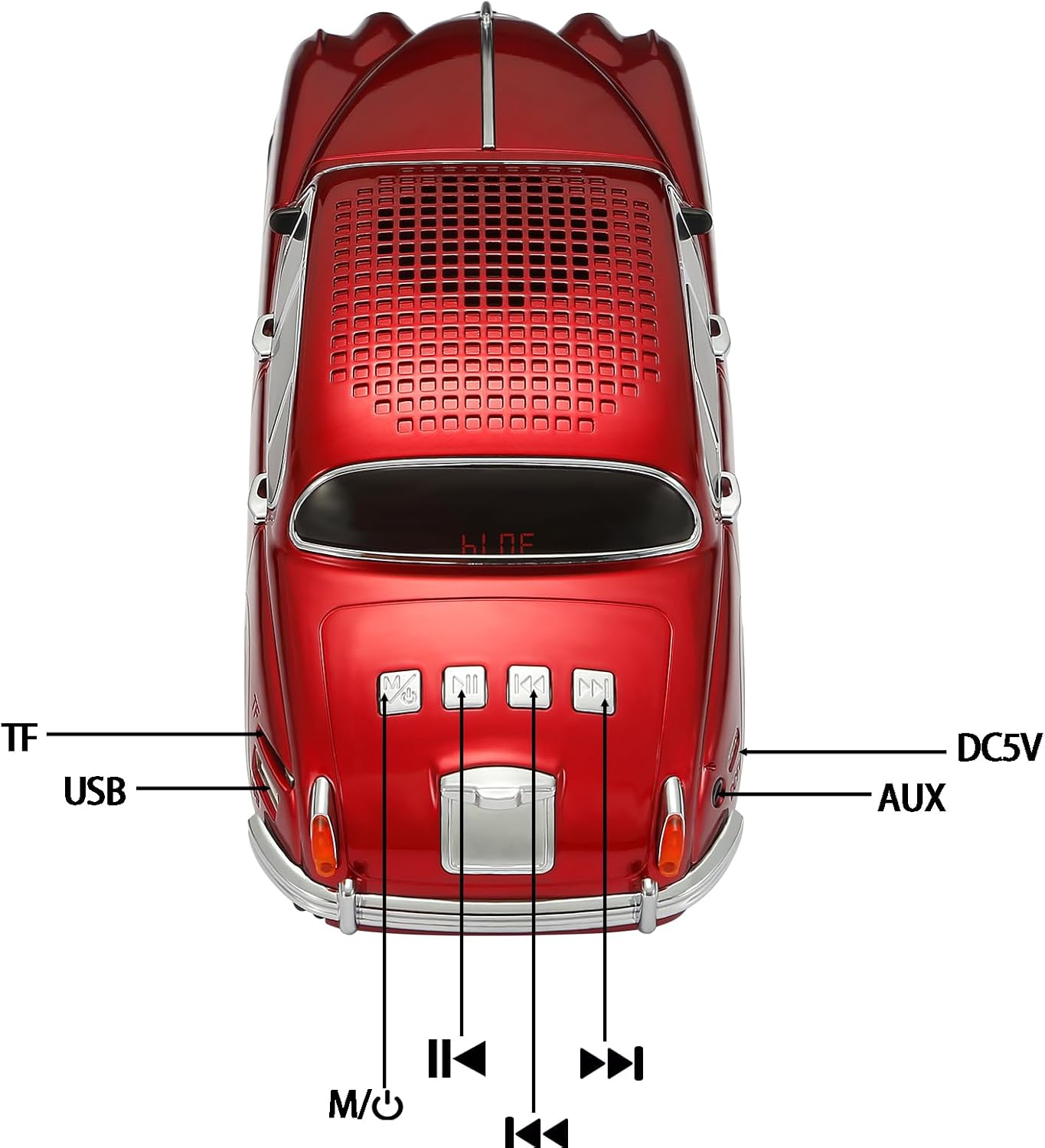
Image: Rear panel of the WS-596 speaker with labeled controls and ports.
الضوابط والمنافذ:
- M/○ (Power/Mode Button): Press and hold to power on/off. Briefly press to switch between modes (Bluetooth, FM Radio, USB, TF Card, Audio Recording, Selfie).
- ▶▶I (Next Track/Volume Up): Briefly press for next track. Press and hold to increase volume.
- I◀◀ (Previous Track/Volume Down): Briefly press for previous track. Press and hold to decrease volume.
- ▶II (Play/Pause/Call Button): Briefly press to play/pause music. Briefly press to answer/end calls. Press and hold to reject calls. Double-click to initiate TWS pairing.
- TF: TF (MicroSD) card slot for music playback.
- USB: منفذ USB لتشغيل الموسيقى من محرك أقراص USB.
- تيار مستمر 5 فولت: منفذ شحن من النوع C.
- مساعد: Auxiliary input port for wired audio connection.
يثبت
- شحن السماعة: Connect the provided power cable to the DC5V port on the speaker and a compatible USB power adapter (not included). The LED indicator will show charging status. Ensure the speaker is fully charged before first use.
- التشغيل/الإيقاف: اضغط مع الاستمرار على M/○ button for approximately 3 seconds to power the speaker on or off. You will hear an audible prompt and the display will light up.
تعليمات التشغيل
1. اتصال بلوتوث
- Power on the speaker. It will automatically enter Bluetooth mode, indicated by an audible prompt and 'BLUE' on the display.
- On your mobile phone or tablet, go to Bluetooth settings and enable Bluetooth.
- بحث عن available devices and select 'WS-596' from the list.
- بمجرد الاتصال، سوف تسمع صوت تأكيد.

Image: A smartphone displaying Bluetooth settings next to the WS-596 speaker, illustrating the connection process.
2. تشغيل الموسيقى
- تشغيل/إيقاف مؤقت: اضغط لفترة وجيزة على ◀ثانيا زر.
- ضبط مستوى الصوت: اضغط مع الاستمرار على ▶▶I button to increase volume. Press and hold the I◀◀ زر لخفض الصوت.
- المسار السابق / التالي: اضغط لفترة وجيزة على I◀◀ button for the previous track. Briefly press the ▶▶I زر للانتقال إلى المسار التالي.
3. تبديل الوضع
اضغط لفترة وجيزة على M/○ button to cycle through available modes: Bluetooth, FM Radio, USB, TF Card, Audio Recording, and Selfie mode.
4. تشغيل راديو FM
- قم بالتبديل إلى وضع راديو FM باستخدام M/○ زر.
- اضغط مع الاستمرار على ◀ثانيا button to automatically search for and save available FM stations. The speaker will scan through frequencies.
- بمجرد اكتمال المسح، استخدم I◀◀ و ▶▶I أزرار للتنقل بين المحطات المحفوظة.
5. وظائف الاستدعاء
- الرد على المكالمة: When an incoming call rings, briefly press the ◀ثانيا زر للرد.
- إنهاء المكالمة: During a call, briefly press the ◀ثانيا زر لإنهاء المكالمة.
- رفض المكالمة: عند رنين مكالمة واردة، اضغط مع الاستمرار على ◀ثانيا زر لرفض المكالمة.
- Switch Audio Source During Call: During a call, briefly press the ◀ثانيا button to switch the audio output between the speaker and your mobile phone.
6. إقران ستيريو لاسلكي حقيقي (TWS)
To achieve a wider stereo sound, you can pair two WS-596 speakers together:
- Ensure both WS-596 speakers are powered on and in Bluetooth mode, but not connected to any device.
- On one of the speakers (this will be the primary speaker), double-click the ◀ثانيا button. You will hear a 'beep' sound.
- The speakers will automatically search and pair with each other. Once successfully paired, you will hear a confirmation sound.
- Connect your mobile device to the primary speaker via Bluetooth as described in the 'Bluetooth Connection' section. Both speakers will now play audio simultaneously.

Image: Two WS-596 speakers, one red and one silver, playing music simultaneously, demonstrating TWS pairing.
7. تشغيل بطاقة USB/TF
أدخل محرك أقراص USB أو بطاقة TF (MicroSD) تحتوي على ملفات صوتية MP3 files into the respective port. The speaker will automatically switch to USB or TF card mode and begin playback. Use the track and volume controls as described above.
8. LED Headlights and Taillights
The LED headlights and taillights illuminate automatically when the speaker is in use, adding to the aesthetic appeal. These lights operate without distracting flashing effects.
صيانة
- احتفظ بمكبر الصوت بعيدًا عن الماء والرطوبة ودرجات الحرارة العالية.
- نظّف السماعة بقطعة قماش ناعمة وجافة. لا تستخدم منظفات أو مذيبات كاشطة.
- قم بتخزين مكبر الصوت في مكان بارد وجاف عند عدم استخدامه.
- تجنب إسقاط السماعة أو تعريضها لصدمات قوية.
استكشاف الأخطاء وإصلاحها
| مشكلة | السبب المحتمل | حل |
|---|---|---|
| لا يتم تشغيل مكبر الصوت. | بطارية منخفضة أو زر الطاقة غير مضغوط بشكل صحيح. | اشحن السماعة بالكامل. اضغط مع الاستمرار على زر التشغيل لمدة 3 ثانية. |
| لا يوجد صوت. | مستوى الصوت منخفض جدًا، أو الوضع غير صحيح، أو الجهاز غير متصل. | Increase volume on both speaker and connected device. Ensure correct mode is selected. Re-pair Bluetooth device. |
| البلوتوث غير قادر على الاتصال. | مكبر الصوت ليس في وضع الاقتران، أو الجهاز بعيد جدًا، أو به تداخل. | Ensure speaker is in Bluetooth mode. Keep devices within 10 meters. Turn off other Bluetooth devices. Forget and re-pair 'WS-596' on your device. |
| فشل اقتران TWS. | Speakers not in correct state or too far apart. | Ensure both speakers are in Bluetooth mode and not connected to any device. Place them close to each other. Double-click the play button on one speaker to initiate pairing. |
| استقبال الراديو FM ضعيف. | Weak signal or environmental interference. | Move the speaker to a location with better reception. Re-scan for channels. |
تحديد
| ميزة | التفاصيل |
|---|---|
| ماركة | غرب |
| رقم الموديل | WS-596 |
| تكنولوجيا الاتصال | بلوتوث |
| التكنولوجيا اللاسلكية | بلوتوث |
| وضع إخراج الصوت | ستيريو |
| الحد الأقصى لقوة خرج السماعة | 10 واط |
| استجابة التردد | 18 كيلو هرتز |
| مميزات اضافية | Built-in Microphone, FM Radio, LED Light, Portable, TWS |
| مواد التغليف | أكريلونيتريل بوتادين ستايرين (ABS) |
| أبعاد المنتج (العمق × العرض × الارتفاع) | 10.04 بوصة عمق × 3.23 بوصة عرض × 3.74 بوصة ارتفاع |
| وزن العنصر | 586 جرام |
| مصدر الطاقة | بطاريتان غير قياسيتين (مرفقتان) |
فيديو المنتج الرسمي
Video: A detailed instructional video demonstrating the features and operation of the WSTER WS-596 speaker, including power on/off, Bluetooth pairing, music playback controls, mode switching, FM radio, call functions, and TWS pairing.
الضمان والدعم
This product does not come with a specified warranty. For any technical support or inquiries, please refer to the seller's contact information on the purchase platform.