
1. المقدمة
Thank you for choosing the Temtop W100 Lite Professional Weather Station. This device provides real-time monitoring of indoor and outdoor temperature and humidity, atmospheric pressure, weather forecasts, moon phases, and includes an alarm clock function. This manual will guide you through the setup, operation, and maintenance of your weather station to ensure optimal performance.
2. محتويات العبوة
يرجى التحقق من محتويات العبوة عند فتح الصندوق:
- Weather Station Main Unit
- جهاز استشعار خارجي
- محول الطاقة
- دليل المستخدم

Image: Contents of the Temtop W100 Lite package, showing the main weather station unit, the outdoor sensor, and the power adapter.
3. انتهى المنتجview
Familiarize yourself with the main components and display features of your Temtop W100 Lite Weather Station.
3.1 Main Unit Display

الصورة: الجبهة view of the Temtop W100 Lite Weather Station, displaying various weather parameters and time information.
The main unit features a clear color display that shows the following information:
- درجة الحرارة والرطوبة في الهواء الطلق
- درجة الحرارة والرطوبة الداخلية
- Weather Forecast (Sunny, Partially Sunny, Cloudy, Rainy, Snowy)
- الوقت والتاريخ
- مرحلة القمر
- الضغط الجوي
- Comfort Level Indicator (Wet, Comfort, Dry)
- Sunrise and Sunset Times (for selected city)
3.2 Main Unit Buttons and Outdoor Sensor

الصورة: مفصلة view of the weather station display with labels indicating each data field.
الصورة: الخلفية view of the weather station, highlighting the battery compartment, power input, and control buttons.
The main unit features several control buttons on the back for settings adjustment:
- زر SET: Enters/confirms settings.
- UP/CH Button: Adjusts values upwards, changes channels.
- DOWN/MEM Button: Adjusts values downwards, accesses min/max memory.
- زر التنبيه: Sets temperature alerts.
- زر التنبيه: Sets alarm time.
- CITY Button: Selects city for sunrise/sunset times.
The outdoor sensor transmits temperature and humidity data wirelessly to the main unit.
4. الإعداد
4.1 تشغيل الجهاز
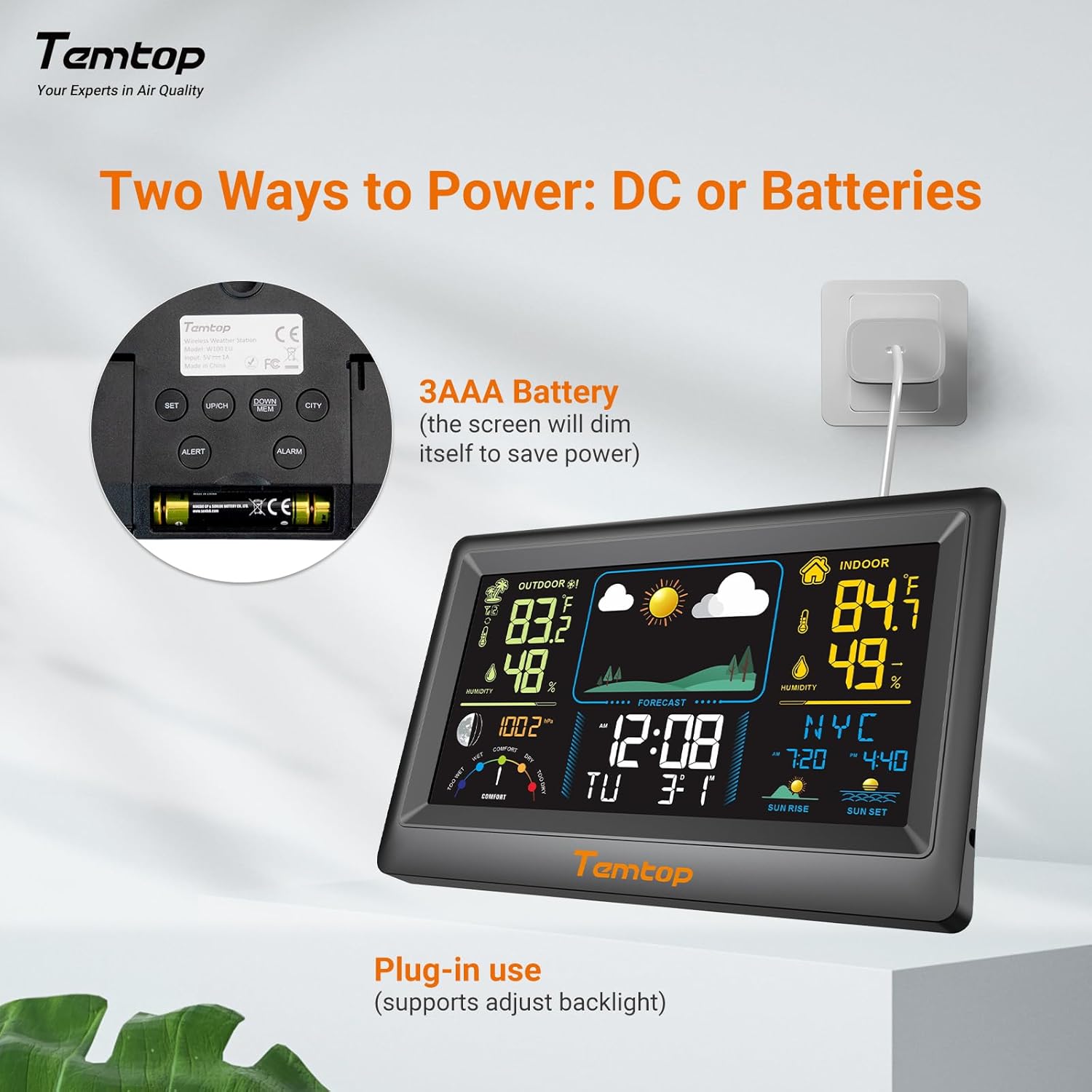
The weather station can be powered by either the included AC adapter or 3x AAA batteries (not included for the main unit, but included for the outdoor sensor). For continuous backlight and optimal performance, AC power is recommended.
- الوحدة الرئيسية: Insert the AC adapter into the power port on the back of the unit and plug it into a wall outlet. Alternatively, insert 3x AAA batteries into the battery compartment.
- جهاز استشعار خارجي: Insert 2x AAA batteries into the outdoor sensor's battery compartment.

الصورة: السابقample of digital displays, illustrating the clear readouts of temperature and humidity.

Image: Illustration of power modes, showing the weather station connected via AC adapter and the battery compartment. AC mode allows adjustable backlight, while battery mode conserves power by dimming the display.
4.2 وضع أجهزة الاستشعار الخارجية
Place the outdoor sensor in a shaded area, protected from direct sunlight and rain, to ensure accurate temperature and humidity readings. The sensor has a wireless range of up to 100 meters (328 feet) in an open, unobstructed area.

Image: Diagram showing the wireless range of the outdoor sensor from the main unit, suitable for gardens, terraces, or rooftops.
4.3 Initial Settings (Time, Date, City)
Follow these steps to set the correct time, date, and city for accurate sunrise/sunset times:
- اضغط مع الاستمرار على تعيين button to enter setting mode. The hour field will begin to flash.
- استخدم UP/CH و أسفل / MEM أزرار لضبط الساعة.
- يضعط تعيين to confirm the hour and move to the next item (minute, year, month, day). Repeat the adjustment and confirmation process for each.
- After setting the date, briefly press the مدينة button. The city code will flash.
- استخدم UP/CH button to scroll through the list of cities until you find your location.
- وأخيرا، اضغط تعيين to confirm your city selection. The sunrise, sunset times, and date will now be accurately displayed.
Video: This video demonstrates how to set the time, date, and city on your Temtop W100 Lite Weather Station to ensure accurate display of local sunrise and sunset times.
5. التشغيل
5.1 تفسير العرض
The main display is divided into several sections for easy reading:
- القسم الخارجي: Shows current outdoor temperature and humidity, and temperature trend.
- القسم الداخلي: Displays current indoor temperature and humidity, and temperature trend.
- النشرة الجوية: Icons indicate the predicted weather for the next 12 hours (Sunny, Partially Sunny, Cloudy, Rainy, Snowy).
- الوقت والتاريخ: الوقت الحالي، ويوم الأسبوع، والتاريخ.
- مرحلة القمر: يعرض مرحلة القمر الحالية.
- الضغط الجوي: Shows current barometric pressure and its trend.
- مستوى الراحة: A gauge indicating indoor comfort levels (Wet, Comfort, Dry).
- شروق الشمس غروب الشمس: Displays the local sunrise and sunset times for the selected city.

Image: Visual representation of the five weather forecast modes and moon phases displayed on the weather station.
5.2 اختيار وحدة درجة الحرارة
للتبديل بين درجة مئوية (°C) وفهرنهايت (°F)، اضغط لفترة وجيزة على UP/CH button during normal display mode.
5.3 Min/Max Temperature and Humidity Records
The weather station automatically records the minimum and maximum temperature and humidity values over a 24-hour period. Briefly press the أسفل / MEM زر ل view these records. Press again to cycle through min/max indoor and outdoor values.
5.4 ضبط المنبهات
The device supports both time alarms and temperature alerts.
- إنذار الوقت: اضغط على إنذار استخدم الزر للدخول إلى وضع ضبط المنبه. UP/CH و أسفل / MEM to adjust the alarm time, and إنذار to confirm. The snooze function can be activated by pressing any button (except ALARM) when the alarm sounds.
- تنبيهات درجة الحرارة: اضغط على يُحذًِر button to set high/low temperature alerts for indoor or outdoor readings. Use UP/CH و أسفل / MEM to set the desired temperature thresholds.
6. الصيانة
- تنظيف الشاشة وasing مع لينة، damp القماش. لا تستخدم المنظفات أو المذيبات الكاشطة.
- Replace batteries in the outdoor sensor when the low battery indicator appears on the main unit.
- تجنب تعريض الوحدة الرئيسية لأشعة الشمس المباشرة أو درجات الحرارة القصوى أو الرطوبة.
7. استكشاف الأخطاء وإصلاحها
| مشكلة | السبب المحتمل | حل |
|---|---|---|
| لا يوجد عرض على الوحدة الرئيسية. | لا يوجد كهرباء أو أن البطاريات منخفضة. | Ensure AC adapter is properly connected or replace batteries. |
| Outdoor readings are inaccurate or not displayed. | Sensor out of range, interference, or low sensor batteries. | Move sensor closer to main unit, reduce obstructions, or replace sensor batteries. |
| يبدو أن توقعات الطقس غير صحيحة. | The forecast is based on atmospheric pressure changes and is an estimation. | Allow time for the station to calibrate (up to 24 hours). It provides a general trend, not a precise forecast. |
8. المواصفات
| ميزة | التفاصيل |
|---|---|
| ماركة | تيم توب |
| نموذج | EU-W100-Lite |
| مصدر الطاقة | Battery (Main Unit: 3x AAA, Sensor: 2x AAA) / AC Adapter |
| المميزات الخاصة | Customizable Alarms, Wireless Connectivity |
| تكنولوجيا الاتصال | لاسلكي |
| لون | أسود |
| تقنية الاستشعار | لاسلكي |
| درجة حرارة التشغيل (العليا) | 40 درجة مئوية |
| نوع العرض | شاشة ملونة |
| وزن العنصر | 100 جرام |
9. الضمان والدعم
Temtop products are designed for reliability and performance. For warranty information, technical support, or service inquiries, please refer to the warranty card included in your package or visit the official Temtop webالموقع. احتفظ بإيصال الشراء كإثبات للشراء.