
1. المقدمة
This manual provides essential information for the safe and effective operation of your LASER TREE K1 Mini 5W Laser Engraver. Please read this manual thoroughly before assembly, operation, or maintenance to ensure proper usage and to prevent damage or injury. This device is designed for high-precision engraving and cutting on various materials, offering a 12x12 inch (300x300mm) work area.
2. معلومات السلامة
The LASER TREE K1 Mini 5W is a Class 4 laser product. Improper use can result in serious injury, including eye damage, skin burns, and fire. Always adhere to the following safety guidelines:
- حماية العين: Always wear the provided laser safety goggles when the laser is operating. Never look directly at the laser beam or its reflection.
- تهوية: Operate the engraver in a well-ventilated area to dissipate fumes and smoke produced during engraving or cutting.
- خطر الحريق: Keep a fire extinguisher nearby. Do not leave the machine unattended during operation. Certain materials are highly flammable.
- التوافق المادي: Only engrave or cut approved materials. Avoid reflective, transparent, or blue/purple/white materials, and non-anodized bare aluminum, as these can cause unpredictable laser behavior or damage.
- الأطفال والحيوانات الأليفة: احتفظ بالأطفال والحيوانات الأليفة بعيدًا عن منطقة التشغيل.
- التوقف في حالات الطوارئ: Familiarize yourself with the location of the power switch for immediate shutdown in an emergency.
3. انتهى المنتجview
The LASER TREE K1 Mini 5W Laser Engraver features a 5W output power blue laser diode, offering stable and efficient performance for various DIY projects. It boasts a large 300x300mm engraving area and a full metal aluminum design for durability and precision.
المميزات الرئيسية:
- Powerful 5W Laser: Equipped with a 5W output power blue laser diode for high-efficiency engraving and cutting, with a lifespan of up to 20,000 hours.
- دقة عالية: Utilizes beam compressed spot technology for enhanced accuracy, with a fixed 23mm focal length and a spot size of 0.16*0.04mm.
- التشغيل السريع: Supports engraving speeds up to 25,000 mm/min.
- التوافق الواسع للمواد: Engraves and cuts plywood, pine wood, stone, coated glass, brushed/mirror stainless steel, black acrylic, plastic, leather, anodized aluminum, and lacquered metal.
- تصميم حماية العين: Includes safety goggles and a magnetic cover to minimize eye irritation.
- Adjustable Support Feet: Four support feet increase the working height for engraving and cutting operations.
- Easy Focus Adjustment: A dedicated knob allows for simple adjustment of the laser module height to achieve optimal focus based on material thickness.
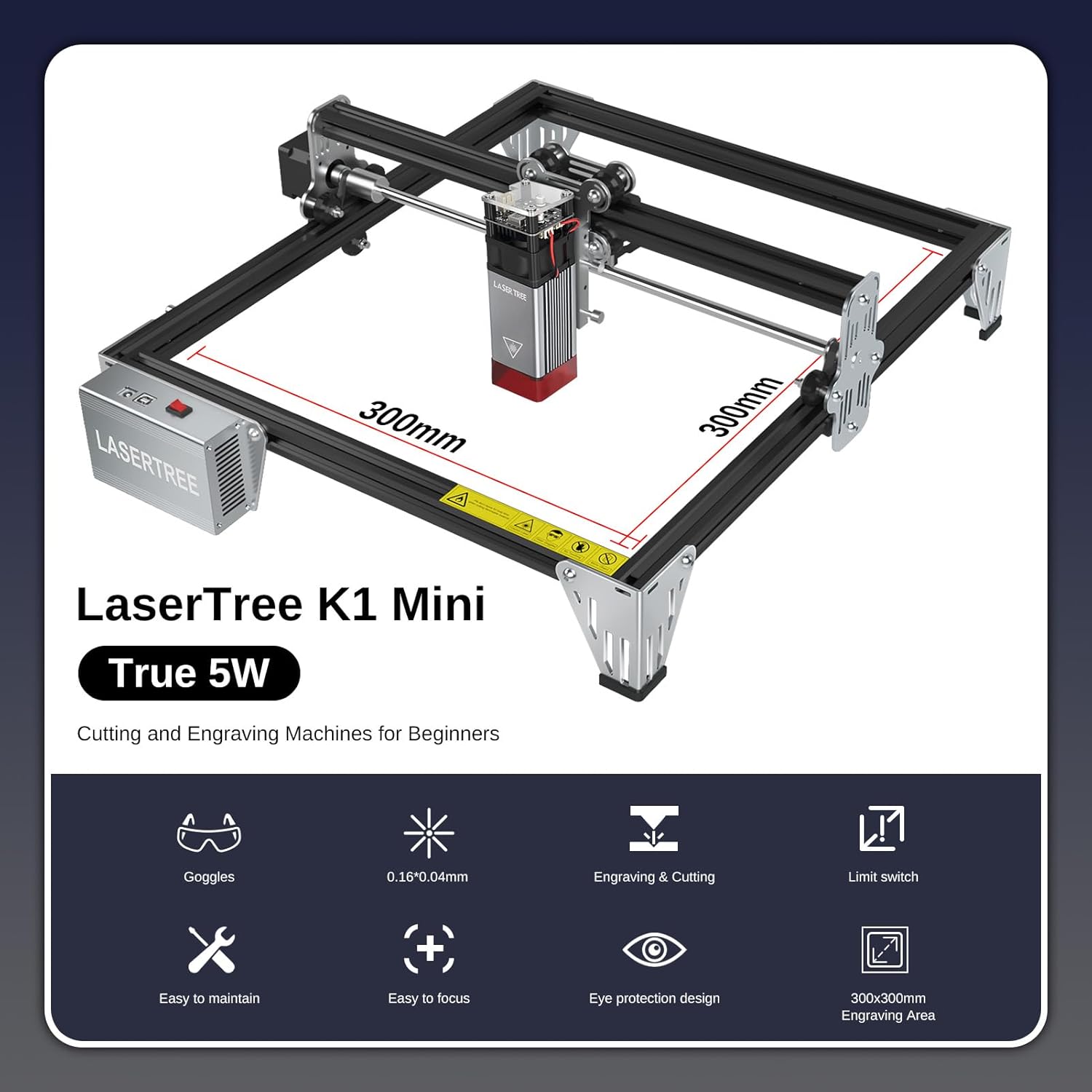
الشكل 3.1: انتهىview of the LASER TREE K1 Mini 5W Laser Engraver, highlighting its 300x300mm work area.

Figure 3.2: The 5W output power laser module demonstrating its cutting capabilities on various materials such as 3mm acrylic, 3mm MDF, and 4mm plywood.

Figure 3.3: Illustration of the laser's fine spot size (0.16x0.04mm), enabling high-precision engraving.

Figure 3.4: The laser engraver in operation, emphasizing the importance of eye protection with safety goggles and the laser module's protective cover.

Figure 3.5: Detail of the adjustable support feet, designed to increase the working height for various engraving and cutting tasks.
4. الإعداد
The LASER TREE K1 Mini 5W is designed for quick and easy installation. All parts are pre-packaged in clearly labeled bags. Refer to the detailed illustrated user manual included in your package for specific step-by-step assembly instructions.
خطوات الجمعية العامة:
- قم بفك جميع المكونات وتحقق منها وفقًا لقائمة التعبئة.
- قم بتجميع الإطار وفقًا للرسومات التوضيحية المرفقة.
- قم بتركيب وحدة الليزر على الرافعة.
- قم بتوصيل جميع الكابلات اللازمة (الطاقة، USB).
- تأكد من وضع الجهاز على سطح مستوٍ وثابت في منطقة جيدة التهوية.
5. تعليمات التشغيل
The K1 Mini 5W laser engraver is compatible with popular engraving software such as LaserGRBL (Windows XP/7/8/10) and LightBurn (Mac OS, Linux). LightBurn is paid software.
Software and Connection:
- Install your preferred software (LaserGRBL or LightBurn) on your computer.
- Connect the engraver to your computer using the provided USB cable.
- Power on the engraver.

Figure 5.1: The LASER TREE 5W laser engraver connects to a computer via USB and is compatible with LightBurn and LaserGRBL software.
خطوات التشغيل الأساسية:
- تحضير المواد: Place your chosen material on the engraving bed.
- ضبط التركيز: Use the focus adjustment knob to set the correct focal length for your material. The fixed focal length is 23mm.
- تصميم الحمل: افتح تصميمك file in the engraving software.
- تعيين المعلمات: Adjust engraving/cutting parameters (speed, power, DPI) based on the material. Refer to the Material Compatibility & Settings section.
- بدء العملية: Initiate the engraving or cutting process from the software. Always supervise the machine during operation.
Video 5.1: This video demonstrates the LASER TREE 5W laser engraver in action, showcasing its engraving capabilities on various materials like stainless steel, leather, and wood (zelkova). It highlights the precision and speed of the machine for different applications.
6. Material Compatibility & Settings
The LASER TREE K1 Mini 5W is compatible with a wide range of materials. Optimal settings vary depending on the material type and desired outcome (engraving vs. cutting). Always perform test engravings on scrap material to find the best parameters.
المواد المتوافقة:
- Plywood, Pine wood, Bamboo, Walnut
- Stone, Coated glass
- Brushed/Mirror stainless steel, Anodized aluminum, Lacquered metal
- Black acrylic, Plastic
- جلد
المواد غير المتوافقة:
- Blue, Purple, White, or Transparent materials
- Non-anodized bare aluminum
Recommended Engraving Parameters:

Figure 6.1: A table outlining recommended settings for different materials, including focus fixed plate distance, speed (mm/min), power (%), and interval/quality (Lines/mm).
| مواد النقش | Focus Fixed Plate (mm) | Recommended Speed (mm/min) | قوة (٪) | Interval (mm) / Quality (Lines/mm) |
|---|---|---|---|---|
| أكريليك | 5 | 6,000 | 30 | 0.04 / 10 |
| الخشب الرقائقي | 5 | 6,000 | 50 | 0.1 / 10 |
| لوح متوسط الكثافة | 5 | 6,000 | 20 | 0.05 / 10 |
| Pine board | 5 | 6,000 | 50 | 0.06 / 10 |
| الخيزران | 5 | 6,000 | 40 | 0.05 / 10 |
| الفولاذ المقاوم للصدأ | 5 | 1,200 | 100 | 0.04 / 10 |
| انوديك ألومينا | 5 | 6,000 | 50 | 0.05 / 10 |
| جلد | 5 | 6,000 | 10 | 0.05 / 10 |
Note: These parameters are starting points. Fine-tuning may be required for specific material batches or desired effects.
7. الصيانة
تضمن الصيانة المنتظمة طول العمر والأداء الأمثل لجهاز النقش بالليزر الخاص بك.
- تنظيف: Regularly clean the engraving bed, gantry rails, and laser lens. Use a soft, lint-free cloth and appropriate cleaning solutions for the lens.
- تشحيم: Periodically lubricate the moving parts (e.g., linear rails) as recommended in the detailed manual to ensure smooth operation.
- تحديثات البرامج الثابتة: Check the LASER TREE official webالموقع للحصول على أي تحديثات البرامج الثابتة المتوفرة لجهازك.
8. استكشاف الأخطاء وإصلاحها
إذا واجهت مشاكل، فراجع نصائح استكشاف الأخطاء وإصلاحها الشائعة التالية:
- الليزر لا يعمل: Check power connection, USB connection, and ensure the laser module is properly seated. Verify software settings for laser power.
- جودة النقش/القطع رديئة: Re-check focus, adjust speed/power settings, ensure material is flat and secure, and clean the laser lens.
- مشاكل الاتصال بالبرامج: Ensure correct drivers are installed, try a different USB port or cable, and restart both the engraver and computer.
- الآلة لا تتحرك: Check cable connections to motors, ensure no physical obstructions, and verify software commands.
For further assistance, contact LASER TREE customer support.
9. المواصفات
| مواصفة | التفاصيل |
|---|---|
| رقم الموديل | K1 Mini 5w |
| طاقة خرج الليزر | 5 واط (5000 ميلي واط) |
| منطقة العمل | 12 × 12 بوصة (300 × 300 ملم) |
| أبعاد المنتج | 13 × 13 × 6 بوصة |
| وزن العنصر | 9.26 رطل |
| البعد البؤري | ثابت 23 ملم |
| حجم البقعة | 0.16*0.04 ملم |
| أقصى سرعة للنقش | 25,000 ملم/دقيقة |
| توافق البرامج | LaserGRBL (Windows), LightBurn (Mac OS, Linux) |
| الشركة المصنعة | شجرة الليزر |
10. الضمان والدعم
LASER TREE is committed to providing high-quality products and customer satisfaction. Your product is supported by a professional engineer team ready to provide timely troubleshooting and after-sales support for all pre-sale and usage questions.
For warranty information or technical support, please refer to the contact details provided with your product packaging or visit the official LASER TREE webموقع.