
1. المقدمة
Thank you for choosing the NBD 5K 64MP Digital Camera. This manual provides essential information for setting up, operating, and maintaining your camera to ensure optimal performance and longevity. Please read this manual thoroughly before using your device.
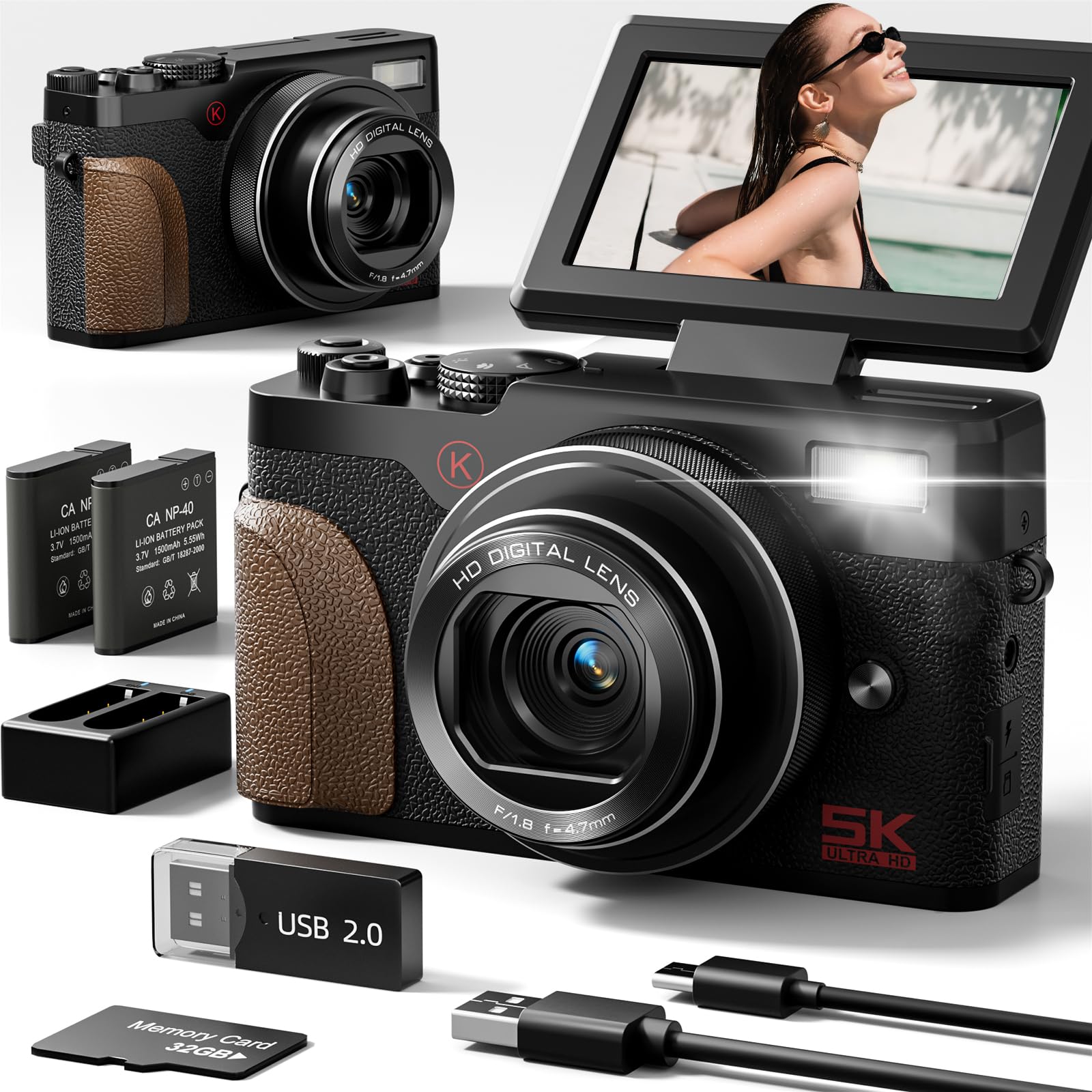
Image: The NBD 5K 64MP Digital Camera, a compact and versatile device for high-resolution photography and videography.

الصورة: أكثر منview of the NBD 5K 64MP UHD Digital Camera, highlighting its capabilities for capturing perfect moments.
2. محتويات العبوة
تأكد من وجود جميع العناصر في الحزمة الخاصة بك:
- NBD 5K 64MP Digital Camera
- 2 × بطاريات ليثيوم أيون
- شاحن البطارية
- بطاقة ذاكرة TF سعة 32 جيجابايت (مثبتة مسبقًا أو منفصلة)
- كابل يو اس بي
- حزام المعصم
- غطاء العدسة
- قطعة قماش للتنظيف
- دليل المستخدم (هذا المستند)

Image: A visual representation of the NBD 5K 64MP Digital Camera and its included accessories, such as batteries, charger, TF card, and USB cable.
3. الإعداد
3.1. شحن البطارية
- Insert a battery into the provided battery charger.
- قم بتوصيل الشاحن بمصدر الطاقة باستخدام كابل USB.
- The indicator light on the charger will show the charging status. Charge until fully charged.
3.2. Inserting the Battery and TF Card
- افتح غطاء حجرة البطارية الموجود في الجزء السفلي من الكاميرا.
- Insert the charged battery according to the polarity indicators.
- Insert the 32GB TF card into the designated slot until it clicks into place. Ensure the correct orientation.
- أغلق غطاء حجرة البطارية جيدًا.
3.3. ربط حزام المعصم
Thread the wrist strap through the strap lug on the side of the camera to prevent accidental drops.
Video: An unboxing and setup guide for the NBD K200 4K Camera, demonstrating battery and memory card installation.
4. تشغيل الكاميرا
4.1. تشغيل/إيقاف التشغيل
اضغط مع الاستمرار على زر الطاقة الموجود أعلى الكاميرا لتشغيلها أو إيقاف تشغيلها.
4.2. Using the Flip Screen
The 3-inch LCD screen can be flipped 180 degrees, making it ideal for selfies and vlogging. Adjust the screen to your desired angle for optimal viewعمل.

Image: The NBD 5K camera capturing Ultra HD video, showcasing its 180-degree flip screen for versatile shooting angles.
4.3. التقاط الصور ومقاطع الفيديو
Use the physical mode dial to select between various shooting modes:
- وضع الصورة: Capture 64MP high-resolution images. The camera features autofocus for sharp details.
- وضع الفيديو: Record stunning 5K videos.
- الحركة البطيئة: Capture dramatic slow-motion video sequences.
- الفاصل الزمني: Condense long events into short, captivating videos.
- اطلاق النار مستمر: التقط عدة صور متتالية بسرعة.
- مؤقت ذاتي: Set a delay before taking a photo, useful for group shots or self-portraits.
- التسجيل المتكرر: تسجيل الفيديو باستمرار، مع استبدال الملفات القديمة.tage عندما تكون بطاقة الذاكرة ممتلئة.

Image: The NBD 64MP Digital Camera demonstrating fast and precise autofocus for professional-level photos.

الصورة: حبيب سابقample of the NBD camera's 18X digital zoom capability, capturing distant subjects with clarity.

Image: A visual guide to the NBD camera's multi-functional modes, including video, time-lapse, continuous shooting, filter mode, macro mode, slow motion, and intelligent scene recognition.
4.4. استخدام الفلاش
The camera features a built-in flash for illuminating subjects in low-light conditions. Press the flash button to activate or deactivate it, or set it to auto mode.

Image: The NBD camera's anti-shake feature, illustrating how it helps capture clear images even with movement.
4.5. Applying Filters
Enhance your photos and videos with the camera's built-in filters. Navigate through the menu to select from various artistic effects.
Video: A demonstration of the NBD K100 camera's multiple built-in filters for creative photography.
4.6. Wi-Fi Connectivity and Sharing
The camera supports Wi-Fi connectivity for easy transfer of photos and videos to your smartphone or other devices. This allows for quick sharing to social media platforms.
فيديو: شرح مفصلview of the NBD 5K Digital Camera, highlighting its Wi-Fi and vlogging capabilities.
4.7. Webوضع الكاميرا
Connect the camera to your computer via USB to use it as a high-definition webكاميرا للبث المباشر أو مكالمات الفيديو.

Image: The NBD camera functioning in webcam mode, connected to a laptop for online interactions.
5. الصيانة
5.1. تنظيف الكاميرا
Use the provided cleaning cloth to gently wipe the lens and screen. Avoid using harsh chemicals or abrasive materials that could damage the camera's surfaces.
5.2. العناية بالبطارية
Store batteries in a cool, dry place when not in use. Avoid exposing them to extreme temperatures. Fully charge batteries before extended storage and periodically recharge them to maintain their lifespan.
5.3. التخزين
When not in use, store the camera in a dry, dust-free environment, preferably in its protective bag, to prevent scratches and damage.
6. استكشاف الأخطاء وإصلاحها
- الكاميرا لا تعمل: تأكد من شحن البطارية بالكامل وإدخالها بشكل صحيح.
- جودة الصورة رديئة: Check that the lens is clean and free from smudges. Ensure adequate lighting for your shot.
- خطأ بطاقة الذاكرة: Reinsert the TF card or try a different compatible card. Ensure the card is not full.
- مشاكل الاتصال بشبكة Wi-Fi: Ensure the camera's Wi-Fi is enabled and your device is within range. Refer to the camera's on-screen instructions for connecting to Wi-Fi.
- Camera makes noise: Some operational sounds are normal. If the noise is excessive or unusual, consult the manufacturer's support.
7. المواصفات
| ميزة | مواصفة |
|---|---|
| تقنية مستشعر الصور | سيموس |
| مدعوم File شكل | موف |
| ماركة | بنك دبي الوطني |
| اسم الموديل | بنك دبي الوطني |
| الحد الأقصى Webدقة صورة الكاميرا | 64 ميجا بكسل |
| حجم مستشعر الصور | 1/2.3 بوصة |
| عامل الشكل | مضغوط |
| دقة ثابتة فعالة | 64 ميجا بكسل |
| ميزة خاصة | مضغوط |
| لون | أسود |
| هل البطاريات متضمنة؟ | نعم |
| الشركة المصنعة | بنك دبي الوطني |
| File شكل | موف |
| تكنولوجيا الاتصال | USB |
| حجم الشاشة | 3 بوصة |
| نوع العرض | شاشة الكريستال السائل |
| نوع المستشعر | سيموس |
| دقة مستشعر الصورة | 64 ميجا بكسل |
| دقة الفيديو | 5K |
| وزن البطارية | 28 جرام |
| نوع خلية البطارية | أيون الليثيوم |
| عدد البطاريات | 2 بطارية ليثيوم أيون مطلوبة. (متضمنة) |
8. الضمان والدعم
For warranty information and technical support, please refer to the documentation included with your purchase or visit the official NBD webالموقع. احتفظ بإثبات الشراء الخاص بك لاستخدامه في أي مطالبات بالضمان.