
1. المقدمة
Welcome to the user manual for your RebotAi A9 8.7-inch Android 15 Tablet. This guide provides essential information on setting up, operating, maintaining, and troubleshooting your device to ensure a smooth and enjoyable user experience. Please read this manual carefully before using your tablet.
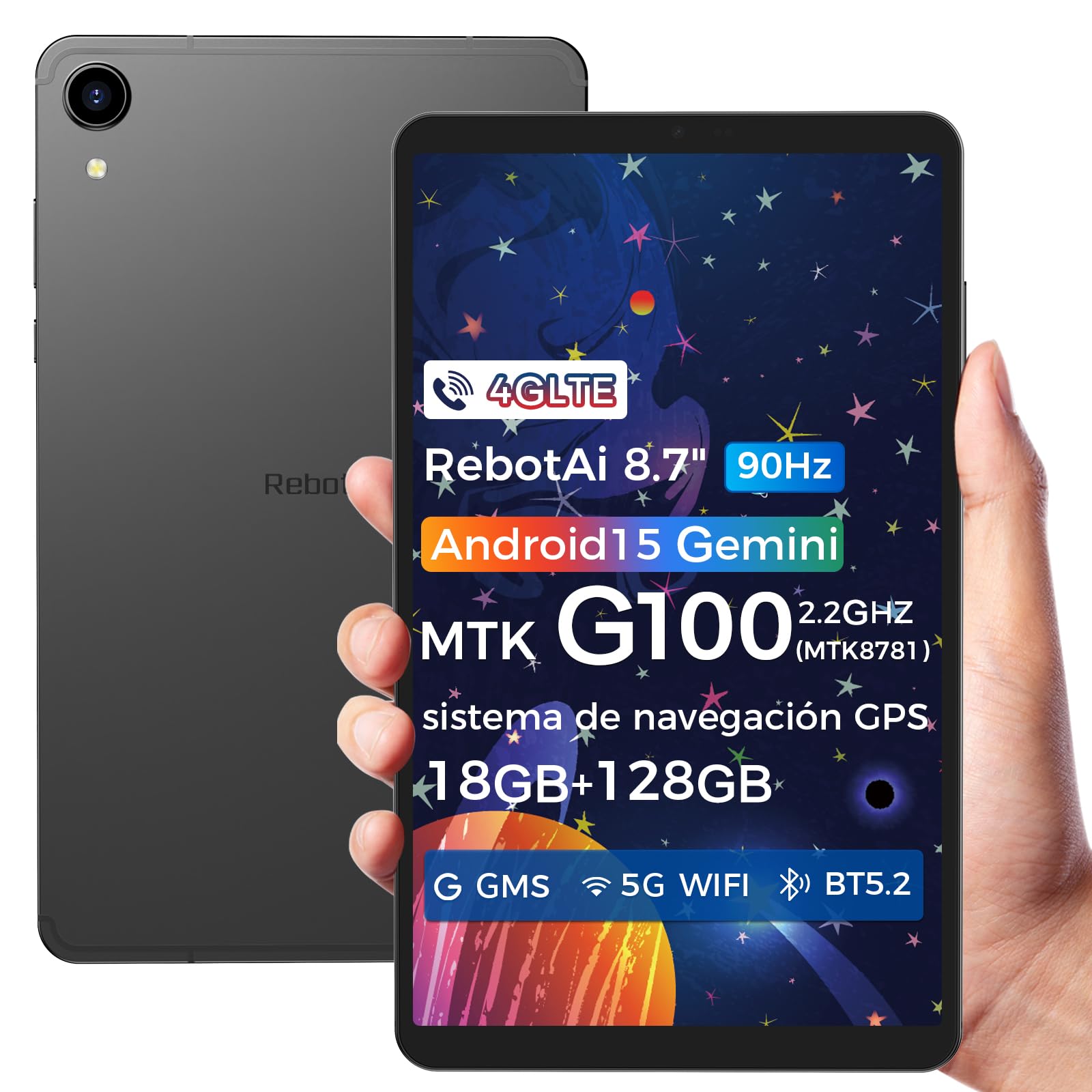
صورة: عام view of the RebotAi A9 tablet, showcasinتصميمها الأنيق.
2. محتويات العبوة
عند فتح العلبة، يرجى التأكد من وجود جميع العناصر:
- جهاز RebotAi A9 اللوحي
- كابل شحن USB-C
- أداة قاذف SIM
- دليل البدء السريع
- بطاقة الضمان
ملحوظة: In accordance with global environmental guidelines, the RebotAi A9 tablet does not include a power adapter. Please use a compatible USB-C power adapter (not included) for charging.
3. انتهى الجهازview
Familiarize yourself with the physical components of your RebotAi A9 tablet.

الصورة: أكثر منview of the RebotAi A9 tablet's key features, including its 8.68-inch display, Android 15 OS, 1340x800 IPS resolution with 90Hz refresh rate, MediaTek Helio G100 processor, slim design, 6GB RAM, 5000mAh battery, 128GB ROM, dual-band Wi-Fi, GPS, Bluetooth 5.2, and Widevine L1 support.
التصميم البدني
- عرض: 8.7-inch IPS screen with 1340 x 800 resolution and 90Hz refresh rate for vibrant colors and smooth visuals.
- Casing: Metallic casing with nano-coating process, offering a smooth feel and elegant appearance, designed for water and impact resistance.
- أبعاد: Approximately 7.8 mm thin.
- وزن: حوالي 360 جرام.

Image: This image highlights the tablet's durable construction, featuring nano-injection molding technology for advanced water and impact resistance. It shows details of the impermeability specifications and antenna slots designed with nanotechnology.
الصوت وأجهزة الاستشعار
- المتحدثون: Dual-BOX speakers for enhanced audio experience.
- مقبس سماعة الرأس: مقبس سماعة رأس قياسي 3.5 ملم.
- أجهزة الاستشعار: High-precision gyroscope, light sensor, and gravity sensor for accurate orientation, automatic screen rotation, and improved navigation.

Image: This image details the tablet's advanced features, including dual-band Wi-Fi (2.4GHz/5GHz), Bluetooth 5.2, dual-box speakers, and a 3.5mm headphone jack. It also highlights fast connectivity and precise positioning with A-GPS and 4-mode GPS, along with a 450 nits bright display.
4. الإعداد
4.1 التشغيل المبدئي
- Press and hold the Power button located on the side of the tablet until the RebotAi logo appears.
- اتبع التعليمات التي تظهر على الشاشة لتحديد اللغة والاتصال بشبكة Wi-Fi وإعداد حساب Google الخاص بك.
4.2 تركيب بطاقة SIM وبطاقة MicroSD
The tablet supports two nano-SIM cards for 4G LTE connectivity and a microSD card for storage expansion.
- حدد مكان درج بطاقة SIM/MicroSD على جانب الجهاز اللوحي.
- قم بإدخال أداة إخراج بطاقة SIM في الفتحة الصغيرة الموجودة بجوار الدرج لفتحها.
- Carefully place your nano-SIM card(s) and/or microSD card into the designated slots on the tray. Ensure the gold contacts are facing down.
- ادفع الدرج برفق إلى داخل الجهاز اللوحي حتى يستقر في مكانه.

Image: This image illustrates the tablet's connectivity options, highlighting 4G LTE support, Bluetooth 5.2, dual-band Wi-Fi (2.4GHz and 5GHz), and multi-system GPS (GPS/Galileo/Glonass). A close-up of the dual SIM card slot is also visible, indicating support for mobile data and calls.
5. التشغيل
5.1 العرض والمرئيات
The 8.7-inch IPS display with 1340 x 800 resolution and 90Hz refresh rate provides a clear and fluid visual experience. With 450 nits brightness, content remains visible even in bright environments. Widevine L1 support ensures high-definition video streaming from compatible services.

Image: An image showing the tablet being used for gaming, emphasizing its smooth performance for games and videos. It highlights the 8.68-inch screen, G100 chip, and 90Hz refresh rate for an uninterrupted and comfortable visual experience.
أداء 5.2
Powered by the MediaTek Helio G100 octa-core processor (MT8781), the RebotAi A9 delivers enhanced performance for multitasking, gaming, and media consumption. It features two high-performance Cortex-A76 cores and six low-power Cortex-A55 cores, along with a Mali-G57 MC2 GPU.

Image: An image detailing the MediaTek Helio G100 processor, showing its octa-core CPU architecture (Cortex-A76 and Cortex-A55 cores), Mali-G57 MC2 GPU, and 2.2 GHz frequency. A benchmark comparison chart is included, demonstrating its performance relative to other chipsets.
5.3 كاميرا
The tablet is equipped with a 13MP rear camera and a 5MP front camera, suitable for online meetings, video calls, and capturing daily moments with clear and natural images.

Image: This image focuses on the tablet's camera system, showing the 5MP front camera and 13MP rear camera. The accompanying text indicates these cameras provide clear and natural images suitable for online meetings and daily recordings.
5.4 ميزات نظام التشغيل أندرويد 15 والذكاء الاصطناعي
Running on Android 15 and GMS certified, the RebotAi A9 provides access to a wide range of Google services and applications. Its high-performance hardware and A9 chip are optimized for comfortable use of various AI tools, enhancing user interaction and productivity.

Image: An image depicting the tablet's interface with various app icons, emphasizing its Android 15 operating system and GMS certification. It highlights the high-performance hardware and A9 chip, enabling comfortable use of various AI tools.
6. الاتصال
The RebotAi A9 tablet offers comprehensive connectivity options:
- 4G LTE: Dual nano-SIM support for mobile data and calls, ensuring connectivity on the go.
- شبكة 5G WiFi: Dual-band Wi-Fi (2.4GHz and 5GHz) for fast and stable internet connections, ideal for streaming and downloads.
- بلوتوث شنومكس: For connecting wireless accessories such as headphones, speakers, and keyboards with lower power consumption.
- نظام تحديد المواقع العالمي (GPS): Multi-system GPS (GPS/Galileo/Glonass) for precise positioning and navigation.
7. التخزين والأداء
- كبش: 6GB of installed RAM, expandable virtually by an additional 12GB for a total of 18GB, ensuring smooth multitasking.
- التخزين الداخلي: 128GB of internal storage for your apps, photos, and files.
- مساحة تخزين قابلة للتوسعة: Supports microSD card expansion up to 1TB, providing ample space for large media fileق والوثائق.
8. البطارية والشحن
The RebotAi A9 is equipped with a 5000mAh high-capacity battery, offering extended usage times.
- عمر البطارية: Up to 12 hours of general use on a single charge.
- الشحن السريع: Supports 20W PD fast charging, allowing the tablet to be fully charged quickly.
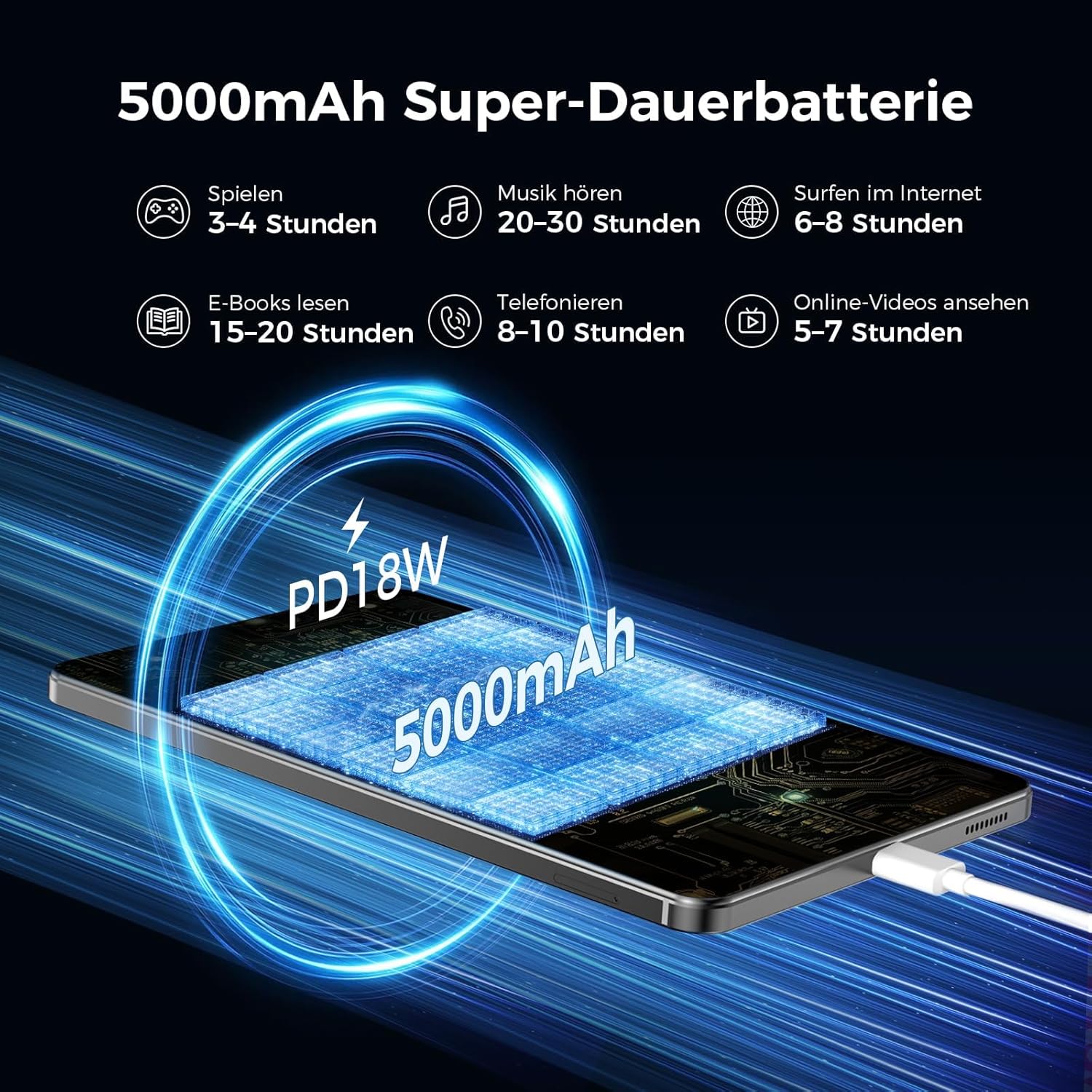
Image: An image illustrating the 5000mAh battery capacity and its estimated usage times for various activities: 3-4 hours gaming, 20-30 hours music, 6-8 hours internet browsing, 15-20 hours e-reading, 8-10 hours calls, and 5-7 hours online videos. It also shows the tablet being charged via PD18W fast charging.
9. الصيانة
To ensure the longevity and optimal performance of your RebotAi A9 tablet, follow these maintenance guidelines:
- تنظيف: استخدم قطعة قماش ناعمة وخالية من الوبر لتنظيف الشاشة وجسم الجهاز. تجنب المواد الكاشطة أو المواد الكيميائية القاسية.
- العناية بالبطارية: تجنب درجات الحرارة القصوى. لا تدع البطارية تُفرغ شحنتها بالكامل بشكل متكرر. للتخزين طويل الأمد، اشحن البطارية إلى حوالي 50%.
- تحديثات البرامج: التحقق من تحديثات النظام وتثبيتها بانتظام لضمان تحسينات الأمان والأداء.
- ادارة التخزين: قم بإزالة غير الضروري بشكل دوري fileالتطبيقات والأدوات لتحرير مساحة التخزين والحفاظ على الأداء.
10. استكشاف الأخطاء وإصلاحها
إذا واجهت مشكلات مع جهازك اللوحي، فحاول اتباع خطوات استكشاف الأخطاء وإصلاحها الشائعة التالية:
- الجهاز اللوحي لا يتم تشغيله: Ensure the battery is charged. Connect the tablet to a power source and try again.
- الشاشة لا تستجيب: Restart the tablet by holding the power button. If unresponsive, force restart by holding the power button for an extended period (usually 10-15 seconds).
- مشاكل الاتصال بشبكة Wi-Fi/4G: Toggle Wi-Fi/Mobile Data off and on. Restart your router or contact your service provider.
- تعطل التطبيقات: امسح ذاكرة التخزين المؤقت للتطبيق الذي يُسبب المشكلة أو أعد تثبيته. تأكد من تحديث برنامج جهازك اللوحي.
- الأداء البطيء: أغلق التطبيقات غير المستخدمة، وامسح ذاكرة التخزين المؤقت، وتأكد من وجود مساحة تخزين كافية. فكّر في إعادة ضبط المصنع كحل أخير (مع عمل نسخة احتياطية من بياناتك أولاً).
11. المواصفات
| ميزة | التفاصيل |
|---|---|
| ماركة | ريبوتاي |
| اسم الموديل | A9 |
| نظام التشغيل | أندرويد 15 |
| المعالج | MediaTek Helio G100 (MT8781) Octa-Core |
| كبش | 6 جيجا بايت (قابلة للتوسيع حتى 18 جيجا بايت) |
| سعة تخزين الذاكرة | 128 جيجا بايت |
| تخزين قابل للتوسيع | حتى 1 تيرابايت عبر بطاقة microSD |
| حجم الشاشة | 8.7 Inches (8.68 Inches) |
| دقة الشاشة | 1340 x 800 IPS, 90Hz Refresh Rate |
| الحد الأقصى للدقة المدعومة | 2560 Pixels (for content playback) |
| سطوع | 450 شمعة |
| الكاميرا الخلفية | 13 ميجا بكسل |
| الكاميرا الأمامية | 5 ميجا بكسل |
| سعة البطارية | 5000 مللي أمبير |
| عمر البطارية | حتى ساعتين |
| الشحن | 20W PD Fast Charging (cable included, adapter not included) |
| الاتصال | 4G LTE (Dual Nano-SIM), 5G WiFi (2.4GHz/5GHz), Bluetooth 5.2, GPS (GPS/Galileo/Glonass) |
| لون | رمادي |
12. الضمان والدعم
RebotAi offers a ضمان لمدة 2 سنوات for your A9 tablet. For any technical issues or support inquiries, please contact RebotAi customer service. We guarantee a quick response within 24 hours.
يرجى الرجوع إلى بطاقة الضمان المضمنة في الحزمة الخاصة بك لمعرفة الشروط والأحكام التفصيلية.