
1. المقدمة
Thank you for choosing the Jesebang S75 Wireless Earbuds. These earbuds are designed to provide a high-quality audio experience with advanced features such as Bluetooth 5.4 connectivity, Environmental Noise Cancellation (ENC) for clear calls, IPX7 waterproofing, and a secure over-ear hook design, making them ideal for sports and active lifestyles. This manual provides detailed instructions for setup, operation, and maintenance to ensure optimal performance and longevity of your device.
2. ماذا يوجد في الصندوق
يرجى التحقق من محتويات الحزمة للتأكد من وجود جميع العناصر:
- S75 Wireless Earbuds (2 units)
- Portable Charging Case (1 unit)
- كابل شحن USB-C (وحدة واحدة)
- Silicone Earplugs (S / M / L sizes, 3 pairs)
- دليل المستخدم (هذا المستند)

Image: Contents of the Jesebang S75 Wireless Earbuds package.
3. الإعداد
3.1 شحن سماعات الأذن والعلبة
Before first use, fully charge the earbuds and the charging case. The charging case features a dual LED digital display to show the battery levels of both the case and individual earbuds.
- قم بتوصيل كابل الشحن USB-C المقدم بمنفذ الشحن الموجود على العلبة وبمصدر طاقة USB.
- The LED display on the charging case will illuminate to indicate charging status. The numbers will increase as the case charges, and the earbud battery indicators will show their charging progress.
- Once fully charged, the display will show '100' for the case and full battery icons for the earbuds. A full charge typically takes approximately 2 hours.

Image: Charging the S75 Earbuds and Case with LED display.
3.2 الاقتران بجهازك
The S75 earbuds feature one-step auto-pairing for convenience.
- الاقتران الأولي: افتح علبة الشحن. سيتم تشغيل سماعات الأذن تلقائيًا ودخول وضع الاقتران.
- على جهازك (الهاتف الذكي، الجهاز اللوحي، وما إلى ذلك)، قم بتمكين البلوتوث وابحث عن الأجهزة المتاحة.
- Select "S75" from the list of found devices to connect. You will hear a voice prompt confirming the connection.
- إعادة الاتصال التلقائي: After the first successful pairing, the earbuds will automatically reconnect to the last paired device when you open the charging case.

Image: One-step auto-pairing process for Jesebang S75 Earbuds.
فيديو: أكثر منview of the Jesebang S75 Wireless Earbuds, demonstrating features like battery life, Bluetooth 5.4, sound quality, ENC, IPX7 waterproofing, ergonomic earhooks, and smart touch control. This video illustrates the product's key functionalities and design.
4. تشغيل سماعات الأذن
4.1 ارتداء سماعات الأذن
The S75 earbuds are designed with soft, elastic earhooks for a secure and comfortable fit, especially during physical activity.
- Choose the silicone earplugs (S, M, L) that best fit your ear canal for optimal sound and comfort.
- أدخل سماعة الأذن برفق في قناة أذنك.
- Adjust the earhook to rest securely over and behind your ear. Ensure a snug fit to prevent movement during exercise.

Image: Proper wearing of Jesebang S75 Earbuds with earhooks.
4.2 عناصر التحكم باللمس الذكية
The S75 earbuds feature highly sensitive touch sensors for easy control of music, calls, and voice assistant functions.
| فعل | وظيفة |
|---|---|
| One Click (L/R) | تشغيل/إيقاف الموسيقى مؤقتًا |
| Short Tap (L/R) | الرد على المكالمة/إنهائها |
| Long Tap (L/R) | رفض المكالمة |
| One Click Tap R | رفع الصوت |
| One Click Tap L | خفض الصوت |
| الصنبور الطويل 2 ثانية L | المسار السابق |
| النقر الطويل 2 ثانية R | المسار التالي |
| Triple Click (L/R) | تفعيل المساعد الصوتي |
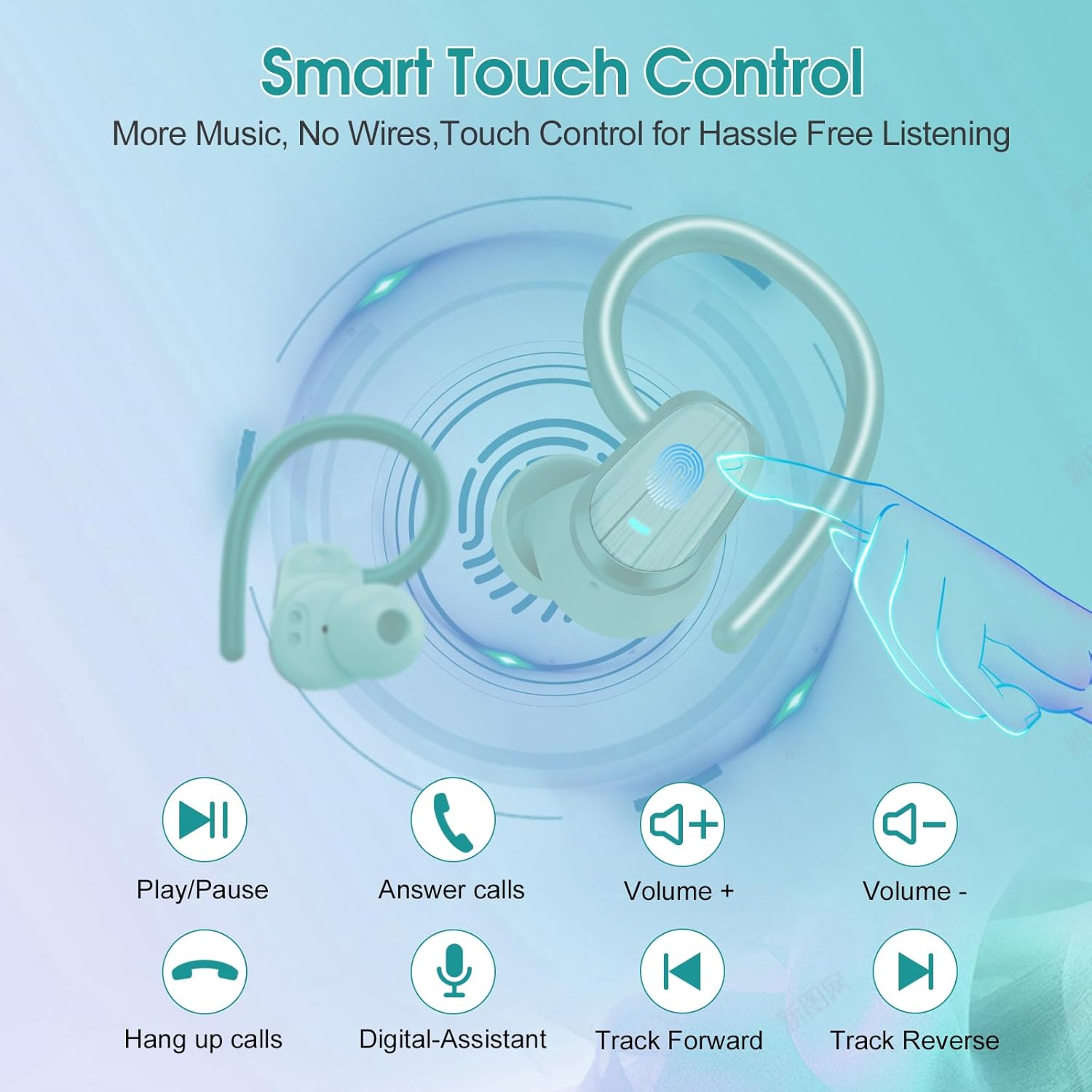
Image: Smart Touch Control functions on the S75 Earbuds.
5. الصيانة
5.1 مقاومة الماء (IPX7)
The S75 earbuds are rated IPX7 waterproof, meaning they can withstand immersion in water up to 1 meter for 30 minutes. This makes them suitable for workouts, running, and protection against sweat and rain.
- لا تقم بغمر سماعات الأذن عمداً لفترات طويلة أو في أعماق أكبر من المحددة.
- تأكد من أن منفذ الشحن جاف قبل الشحن لمنع التلف.
5.2 التنظيف
يساعد التنظيف المنتظم على الحفاظ على جودة الصوت والنظافة.
- استخدم قطعة قماش ناعمة وجافة وخالية من الوبر لمسح سماعات الأذن وعلبة الشحن.
- Remove the silicone earplugs and clean them with mild soap and water. Ensure they are completely dry before reattaching.
- تجنب استخدام المواد الكاشطة أو الكحول أو المنظفات الكيميائية.
6. استكشاف الأخطاء وإصلاحها
If you encounter any issues with your Jesebang S75 earbuds, please refer to the following common solutions:
| مشكلة | حل |
|---|---|
| سماعات الأذن لا تقترن | Ensure earbuds are charged. Turn off and on your device's Bluetooth. Forget "S75" in your device's Bluetooth settings and re-pair. |
| تعمل سماعة أذن واحدة فقط | Place both earbuds back in the charging case, close the lid, wait a few seconds, then open the lid again. This should reset the connection between them. |
| مستوى صوت منخفض أو جودة صوت رديئة | Adjust volume on both your device and earbuds. Ensure earplugs are correctly sized and seated in your ear canal. Clean any debris from the earbud speakers. |
| علبة الشحن لا تشحن | افحص كابل USB-C ومحول الطاقة. تأكد من نظافة منفذ الشحن وخلوه من أي أوساخ. |
| سماعات الأذن لا تشحن في العلبة | Ensure the charging contacts on both the earbuds and the case are clean and dry. Verify the charging case itself has sufficient battery. |
7. المواصفات
Key technical specifications for the Jesebang S75 Wireless Earbuds:
- اسم الموديل: س75
- تقنية الاتصال: لاسلكي (بلوتوث)
- إصدار البلوتوث: 5.4
- نطاق البلوتوث: 15 مترا
- نوع برنامج تشغيل الصوت: سائق ديناميكي
- حجم برنامج تشغيل الصوت: 14.2 مليمتر
- مستوى مقاومة الماء: مقاومة للماء بدرجة IPX7
- وضع الأذن: فوق الأذن
- عامل الشكل: في الأذن
- عمر البطارية (سماعات الأذن): حتى 10 ساعات (شحنة واحدة)
- إجمالي وقت اللعب (مع علبة الشحن): تصل إلى 50 ساعة
- وقت الشحن: Approximately 2 hours (for full charge)
- وزن السلعة: 3.17 أونصات
- الشركة المصنعة: Dongguan Huien Electronic Technology Co., Ltd
8. الضمان والدعم
Your Jesebang S75 Wireless Earbuds come with a standard return policy of 30 days from the date of purchase for refunds or replacements, as per Amazon's policy. For specific warranty details beyond this period, please refer to the information provided by the manufacturer or contact Jesebang customer support directly.
For further assistance, technical support, or inquiries, please visit the official Jesebang store on Amazon or contact their customer service channels.
متجر على الانترنت: Jesebang Store