
1. المقدمة
The WatchGuard Firebox T185 is a high-performance tabletop firewall designed to provide enterprise-grade security for branch offices and retail environments. This device handles demanding traffic loads and offers flexible connectivity options, including SFP+ fiber, 2.5Gb, and 1Gb Ethernet ports. It integrates advanced threat protection, VPN support, and SD-WAN capabilities to ensure secure and efficient network operations.
2. معلومات السلامة
- اقرأ جميع التعليمات قبل تشغيل الجهاز.
- تأكد من التأريض المناسب لمنع حدوث صدمة كهربائية.
- لا تعرض الجهاز للرطوبة أو درجات الحرارة القصوى.
- استخدم فقط مصدر الطاقة المرفق مع الجهاز.
- لا تفتح الجهازasinج؛ إحالة الخدمة إلى الموظفين المؤهلين.
- Secure the device physically using the Kensington Lock slot to prevent theft.
3. محتويات العبوة
تأكد من وجود جميع العناصر في العبوة:
- WatchGuard Firebox T185 Appliance
- محول الطاقة
- كابل إيثرنت
- دليل البدء السريع
4. جسديا أكثرview
Familiarize yourself with the ports, indicators, and features of your Firebox T185.

This image displays the WatchGuard Firebox T185, highlighting its front and rear panels. The front panel features LED indicators for status and mode. The rear panel includes a DC power input, two USB 3.2 ports, one O/WAN 1/LAN port, four 1 Gbps LAN ports (ports 2-5), two 2.5 Gbps PoE ports (ports 6-7), one 10 Gbps SFP+ port, a reset button, and a power switch. A Kensington lock slot is also visible.

The WatchGuard Firebox T185 is shown held in a hand, illustrating its compact tabletop form factor suitable for various environments.

تفصيلية view of the rear panel of the Firebox T185, showing the power input, USB ports, 1GbE LAN ports, 2.5GbE PoE ports, and the SFP+ port.
مؤشرات LED
توفر مصابيح LED الموجودة باللوحة الأمامية معلومات الحالة:
- مؤشر LED للحالة: يشير إلى الحالة التشغيلية للجهاز.
- Attn LED: تنبيهات بشأن تحذيرات النظام أو أخطائه.
- وضع LED: يعرض وضع التشغيل الحالي.
- مصابيح LED للمنفذ: Indicate link status and activity for each network port.
5. الإعداد الأولي
- فك الجهاز: Carefully remove the Firebox T185 and all accessories from the packaging.
- توصيل كابلات الشبكة:
- Connect your internet source (modem or upstream router) to the O/WAN 1/LAN ميناء.
- Connect your internal network devices (switches, computers) to the LAN ports (2-5). For higher speeds, use the 2.5 Gbps PoE ports (6-7) أو ال منفذ SFP + حسب الحاجة.
- توصيل الطاقة: Plug the power adapter into the device's power input and then into a power outlet. Turn on the power switch.
- تشغيل الطاقة: The device will power on automatically. Observe the LED indicators for boot-up status.
- الترتيب الأولي: الوصول إلى الجهاز web interface or use WatchGuard Cloud for initial configuration. Refer to the Quick Start Guide for default IP addresses and login credentials.
يقدم هذا الفيديو منتجًا أكثر منview of the WatchGuard Firebox T185, demonstrating its features and potential deployment scenarios. It highlights the device's physical aspects and connectivity options.
6. تعليمات التشغيل
Once configured, the Firebox T185 operates continuously to protect your network. Management is typically performed through the WatchGuard Cloud platform or a local web واجهة.
- يراقب: Regularly check the device status through the WatchGuard Cloud dashboard or local interface for alerts and performance metrics.
- تحديثات البرامج الثابتة: Keep the device firmware updated to ensure the latest security patches and features. Follow WatchGuard's official update procedures.
- VPN Connections: Utilize the VPN features for secure remote access or site-to-site connectivity as configured.
- شبكة SD-WAN: Leverage SD-WAN capabilities for optimized traffic routing and network resilience.
7. الصيانة
- التنظيف المنتظم: Keep the device free from dust. Use a soft, dry cloth to clean the exterior. Do not use liquid cleaners.
- تهوية: Ensure adequate airflow around the device to prevent overheating. Do not block ventilation openings.
- إدارة البرامج الثابتة: Periodically check for and apply firmware updates as recommended by WatchGuard.
- النسخ الاحتياطي للتكوين: Regularly back up your device configuration to prevent data loss in case of an issue.
8. استكشاف الأخطاء وإصلاحها
- لا يوجد طاقة:
- Check the power cable connection and ensure the power outlet is functional. Verify the power switch is in the 'On' position.
- لا يوجد اتصال بالشبكة:
- Verify all Ethernet cables are securely connected. Check the status of the port LEDs. Ensure your internet service is active. Review network configuration settings.
- الأداء البطيء:
- Check network traffic and resource utilization through the management interface. Ensure firmware is up-to-date. Consider reviewing security policies for potential bottlenecks.
- الجهاز المحموم:
- Ensure the device is placed in a well-ventilated area. Clear any dust from the ventilation openings.
9. المواصفات الفنية
| ميزة | قيمة |
|---|---|
| IPS Throughput (full scan) | 2.40 جيجابت في الثانية |
| Firewall Throughput (IMIX) | 7.90 جيجابت في الثانية |
| VPN Throughput (IMIX) | 1.14 جيجابت في الثانية |
| HTTPS (IPS enabled, full scan) | 1.00 جيجابت في الثانية |
| واجهات الشبكة | 4 x 1 GbE, 4 x 2.5 GbE, 1 x SFP/SFP+ |
| واجهات الإدخال/الإخراج | 1 Serial/2 USB-A 3.2 |
| اسم الموديل | صندوق إطفاء WatchGuard T185 |
| ميزة خاصة | UTM, VPN Support, Integrated SD-WAN |
| الاستخدامات الموصى بها | عمل |
| تكنولوجيا الاتصال | Ethernet, SFP+ |
| وزن العنصر | 6.8 رطل |
| نظام التشغيل | أدوات نارية |
| Data Transfer Rate (UTM) | 1830 ميجابت في الثانية |
| Maximum Upstream Data Transfer Rate | 1830 ميجابت في الثانية |
| عرض النطاق الترددي لمنفذ LAN | 2500 ميجابايت في الثانية |
| Modem Compatible | لا |
| التغطية | Software and emergency support |
| رمز المنتج الموحد | 654522437150 |
| الشركة المصنعة | حارس المراقبة |
| رقم قطعة الشركة المصنعة | WGT185000+WGT1850063 |

This image displays a table detailing key performance specifications for the WatchGuard Firebox T185, including IPS, Firewall, VPN, and HTTPS throughputs, as well as network and I/O interfaces.
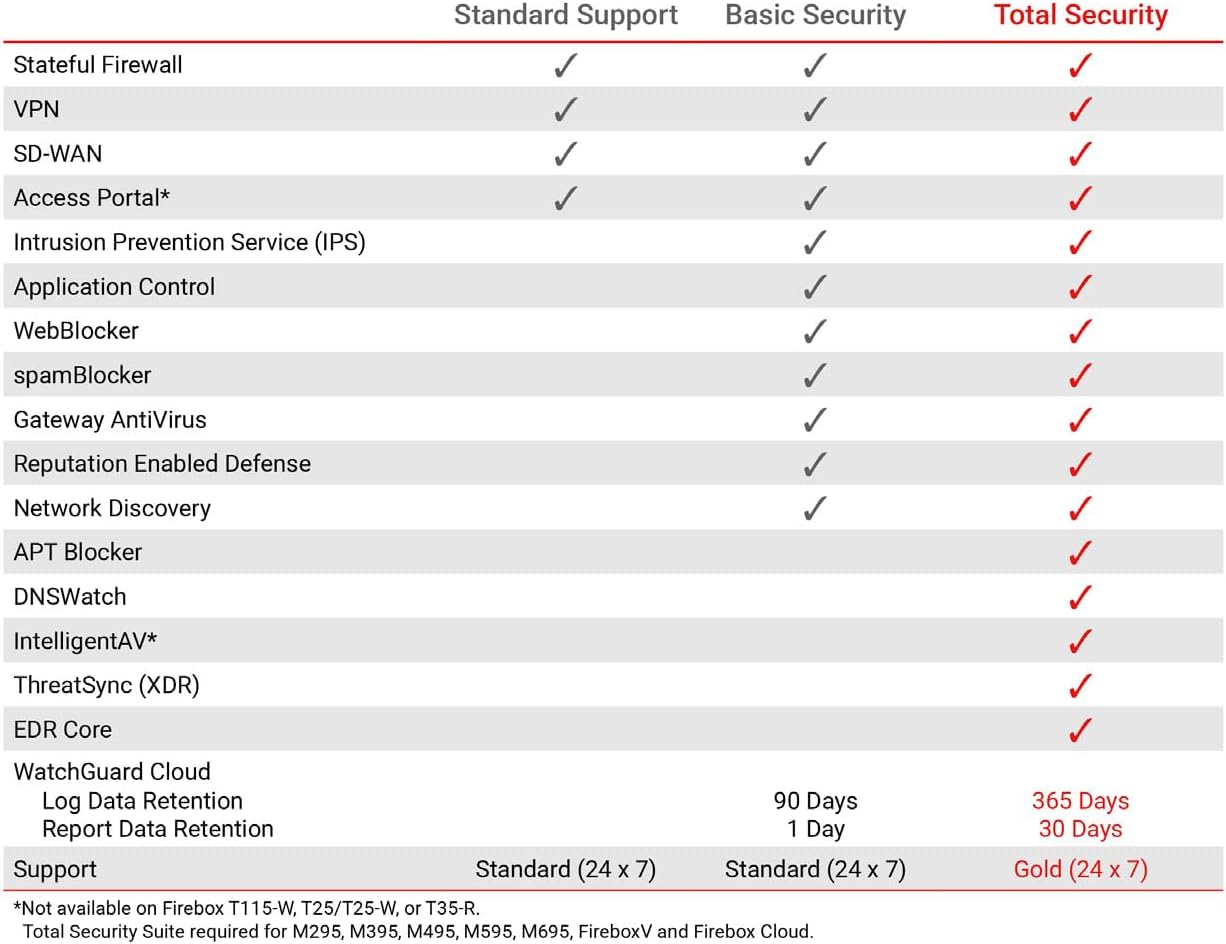
This table compares the security features included with Standard Support, Basic Security Suite, and Total Security Suite for the WatchGuard Firebox T185, showing which features are enabled for each option.
10. الضمان والدعم
The WatchGuard Firebox T185 comes with a 3-year Standard Support license (WGT185003).
- الدعم القياسي: Provides software updates and 24x7 emergency technical assistance, along with business-hours support for routine inquiries.
- خطط الحماية: Additional protection plans may be available, such as a 4-Year Protection Plan or a Complete Protect monthly plan. Refer to your purchase documentation for details.
- دعم الشركة المصنعة: لمزيد من المساعدة، قم بزيارة الموقع الرسمي WatchGuard support webموقع أو الاتصال بخدمة العملاء الخاصة بهم.