
1. المقدمة
This manual provides essential information for the safe and efficient operation of your Tornado 65UA5300E 65-inch 4K Frameless Android Smart TV. Please read it thoroughly before using the product and retain it for future reference.

الصورة 1.1: الجبهة view of the Tornado 65UA5300E Smart TV, showcasing its frameless design and included stand.
2. معلومات السلامة
اتبع دائمًا احتياطات السلامة الأساسية عند استخدام هذا التلفزيون لتقليل خطر الحريق والصدمة الكهربائية والإصابة.
- لا تعرض التلفزيون للمطر أو الرطوبة.
- تأكد من التهوية المناسبة؛ ولا تسد فتحات التهوية.
- لا تضع التلفاز على عربة أو حامل أو حامل ثلاثي أو قوس أو طاولة غير مستقرة.
- افصل التلفاز أثناء العواصف الرعدية أو عند عدم استخدامه لفترات طويلة.
- قم بإحالة جميع أعمال الصيانة إلى موظفي الخدمة المؤهلين.
3. محتويات العبوة
تأكد من وجود جميع العناصر في العبوة:
- Tornado 65UA5300E 65-inch 4K Frameless Android Smart TV
- جهاز التحكم عن بعد
- كابل الطاقة
- حامل تلفزيون (قطعتين)
- براغي لتجميع الحامل
- دليل المستخدم (هذا المستند)
4. الإعداد
4.1 فك التعبئة
Carefully remove the TV from its packaging. It is recommended to keep the original packaging for potential future transport or servicing.
4.2 تركيب الحامل
If you are not wall-mounting the TV, attach the included stand pieces. Place the TV face down on a soft, flat surface to prevent screen damage. Align each stand piece with the corresponding slots on the bottom of the TV and secure them with the provided screws.
الصورة 4.1: الأسفل view of the TV, illustrating the designated areas for stand attachment.
4.3 التركيب على الحائط
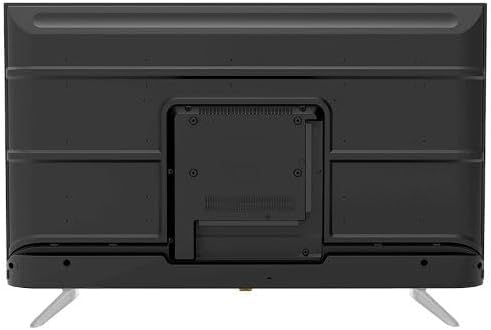
For wall mounting, remove the stand (if attached). Use a VESA-compatible wall mount (not included) that supports the TV's weight and dimensions. Consult a professional for wall mounting to ensure safety and proper installation.

الصورة 4.2: خلفي view of the TV, highlighting the VESA mounting pattern and various input/output ports.
4.4 توصيل الأجهزة الطرفية
قم بتوصيل أجهزتك الخارجية بالتلفزيون باستخدام المنافذ المناسبة:
- HDMI: For high-definition devices like Blu-ray players, gaming consoles, or set-top boxes. The TV has 3 HDMI ports, one with ARC support.
- USB: For connecting USB storage devices to play media (video, photos, music). The TV has 2 USB ports.
- LAN: للاتصال بالإنترنت السلكي.
- مدخلات RF: For connecting an antenna or satellite dish for the built-in digital receiver.
- مخرج الصوت الرقمي (بصري): للاتصال بنظام صوتي خارجي.
- مقبس سماعة الرأس (3.5،XNUMX ملم): لتوصيل سماعات الرأس.

الصورة 4.3: الجانب view of the TV, illustrating the accessible side input ports.
4.5 معالج التشغيل الأولي والإعداد
After connecting the power cable, press the power button on the remote control or TV. The TV will guide you through an initial setup wizard, including language selection, network connection (Wi-Fi or LAN), channel scanning, and Google account setup for Android TV features.
5. تشغيل التلفزيون
5.1 التحكم عن بعد أكثرview
The included remote control allows you to navigate the TV's functions. It features dedicated buttons for power, volume, channel, input selection, smart TV apps (Netflix, YouTube, Prime Video, Disney+), Google Assistant voice search, and menu navigation.
5.2 الوظائف الأساسية
- تشغيل/إيقاف التشغيل: اضغط على زر الطاقة.
- التحكم في مستوى الصوت: استخدم أزرار رفع/خفض الصوت.
- اختيار القناة: Use the Channel Up/Down buttons or numeric keypad.
- مصدر الإدخال: Press the 'Input' button to select between HDMI, AV, TV, etc.
5.3 ميزات التلفزيون الذكي (أندرويد 11)
Your TV runs on Android 11, providing access to a wide range of smart features:
- التطبيقات: Access pre-installed apps like Netflix, YouTube, Prime Video, Disney+, Shahid VIP, and download more from the Google Play Store.
- مساعد جوجل: Use voice commands via the remote control for search, control, and information.
- مدمج في Chromecast: قم بإرسال المحتوى من هاتفك الذكي أو جهازك اللوحي مباشرة إلى التلفزيون.
- Web المتصفح: تصفح الإنترنت مباشرة على التلفزيون الخاص بك.
- بلوتوث شنومكس: قم بتوصيل سماعات الرأس اللاسلكية أو مكبرات الصوت أو أجهزة البلوتوث الأخرى.
5.4 إعدادات الصورة والصوت
قم بتخصيص viewتجربة المشاهدة والاستماع من خلال قائمة إعدادات التلفزيون:
- أوضاع الصورة: Select from Dynamic, Game, Sports, Cinema, or User-defined modes.
- درجة حرارة اللون: Adjust to Normal, Cool, or Warm.
- أوضاع الصوت: Choose from Smart, User, Game, Movie, Music, or News.
- دولبي ديجيتال بلس: Enhanced audio processing for compatible content.
6. الصيانة
6.1 تنظيف التلفزيون
- شاشة: امسح الشاشة برفق بقطعة قماش ناعمة وخالية من الوبر. لإزالة البقع الصعبة، استخدم منظف شاشات مصمم خصيصًا لأجهزة التلفزيون، وضعه على قطعة القماش، وليس مباشرة على الشاشة.
- جسم: Wipe the TV's frame and back panel with a soft, dry cloth. Do not use abrasive cleaners or solvents.
6.2 تحديثات البرامج
Ensure your TV's software is up to date for optimal performance and security. Connect the TV to the internet and check for updates periodically through the settings menu.
7. استكشاف الأخطاء وإصلاحها
إذا واجهت أي مشكلات، راجع الحلول الشائعة التالية:
| مشكلة | الحل المحتمل |
|---|---|
| لا يوجد طاقة | Check if the power cable is securely plugged into the TV and the wall outlet. Ensure the outlet is functional. |
| لا توجد صورة، ولكن الصوت موجود | تحقق من مصدر الإدخال. تأكد من تشغيل الأجهزة الخارجية وتوصيلها بشكل صحيح. |
| لا يوجد صوت ولكن الصورة موجودة | Check the volume level and mute status. Verify audio settings and external audio connections. |
| جهاز التحكم عن بعد لا يعمل | استبدل البطاريات. تأكد من عدم وجود أي عوائق بين جهاز التحكم عن بعد ومستشعر الأشعة تحت الحمراء الخاص بالتلفزيون. |
| لا يمكن الاتصال بشبكة Wi-Fi | تحقق من جهاز التوجيه (الراوتر) والمودم. أعد إدخال كلمة مرور الواي فاي. حاول إعادة تشغيل التلفزيون وجهاز التوجيه. |
إذا استمرت المشكلة، اتصل بدعم العملاء.
8. المواصفات
| ميزة | التفاصيل |
|---|---|
| رقم الموديل | 65UA5300E |
| حجم الشاشة | 65 بوصة |
| تكنولوجيا العرض | قاد |
| دقة | 4K UHD (3840 × 2160) |
| نسبة العرض إلى الارتفاع | 16:9 |
| Viewزاوية جي | 178 درجة |
| سطوع | 250 شمعة/م² |
| معدل التحديث | 50/60 هرتز |
| دعم HDR | HDR10، HLG |
| تكنولوجيا الصوت | Dolby Digital Plus, Surround Sound |
| قوة إخراج الصوت | شنومكسو x شنومكس |
| نظام التشغيل | أندرويد 11 |
| الذاكرة الداخلية | 16 جيجا بايت |
| الاتصال | Wi-Fi, Bluetooth 5.0, LAN |
| المدخلات | RF Input (Digital) x1, Video Input x1, HDMI x3 (ARC), USB x2, LAN x1 |
| المخرجات | Digital Audio Output (Optical) x1, Headphone Jack (3.5mm) x1 |
| مزود الطاقة | تيار متردد 90-240 فولت / 50 هرتز |
| الطاقة الاحتياطية | 0.5 واط |
| الأبعاد (العرض × الارتفاع × العمق) بدون حامل | 1446 × 832 × 84 ملم |
| الأبعاد (العرض × الارتفاع × العمق) مع الحامل | 1446 × 892 × 305 ملم |
| الوزن الصافي | 15.32 كجم |
| الوزن الإجمالي | 21.32 كجم |
| بلد المنشأ | مصر |
9. الضمان
This Tornado TV comes with a 3-year full free warranty. Please retain your proof of purchase for warranty claims. For specific terms and conditions, refer to the warranty card included with your product or contact Tornado customer service.
10. الدعم
For further assistance, technical support, or service inquiries, please contact Tornado customer service. Contact details can typically be found on the manufacturer's official webالموقع أو على بطاقة الضمان.