
مقدمة
Welcome to the world of robotics with your new Xtrem Bots Bionic Robot! This interactive robot is designed to provide an engaging and educational experience, allowing users to explore basic programming concepts and remote control operation. With its versatile movement modes, LED lights, and robotic sounds, the Bionic Robot offers hours of interactive fun.

Image: The Xtrem Bots Bionic Robot in white and green, standing next to its white remote control.
محتويات الحزمة
- 1 x Xtrem Bots Bionic Robot (Model XT3803418)
- 1 × جهاز التحكم عن بعد
- دليل التعليمات (هذا المستند)
يثبت
1. تركيب البطارية
The Xtrem Bots Bionic Robot requires 2 AA batteries (included) for operation.
- حدد مكان حجرة البطارية في الجزء الخلفي من الروبوت.
- باستخدام مفك براغي صغير (غير متضمن)، افتح غطاء حجرة البطارية.
- قم بإدخال بطاريتين AA، مع التأكد من القطبية الصحيحة (+/-).
- استبدل غطاء حجرة البطارية وثبته بالمسمار.
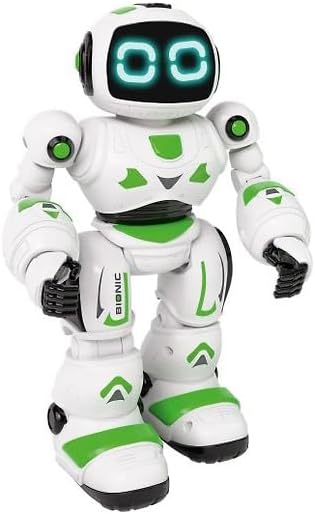
الصورة: الجبهة view of the Xtrem Bots Bionic Robot, showing its design.
2. تشغيل/إيقاف التشغيل
- To power on the robot, locate the power switch on its back and slide it to the "ON" position.
- To power off the robot, slide the power switch to the "OFF" position.
- Ensure the remote control also has batteries installed and is powered on to establish a connection.
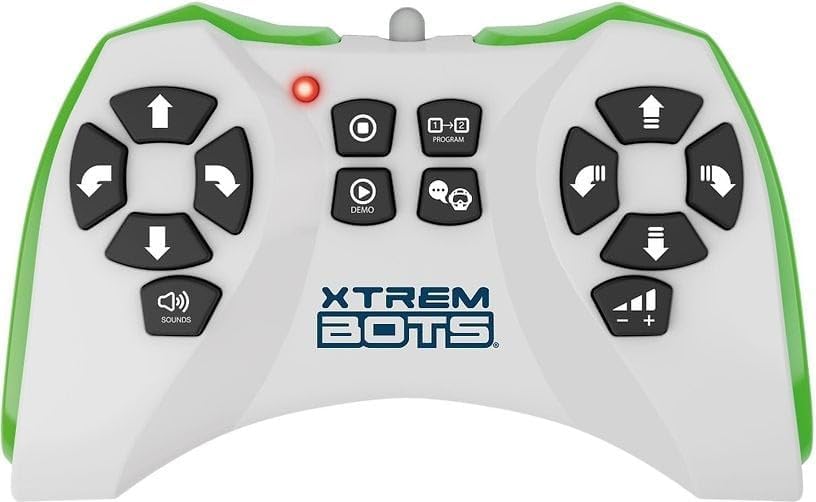
Image: The remote control for the Xtrem Bots Bionic Robot, showing various buttons for movement and functions.
تعليمات التشغيل
وظائف التحكم عن بعد
The remote control allows you to command your Bionic Robot with various actions. Familiarize yourself with the buttons and their corresponding functions:
- عناصر التحكم في الحركة: Use the directional buttons to make the robot move forward, backward, turn left, and turn right.
- وضع الشريحة: The robot can perform sliding movements.
- وضع المشي: The robot can perform walking movements.
- برمجة: Utilize the programming function to create sequences of up to 20 different actions.
- أضواء LED: The robot's eyes feature LED lights that illuminate during operation.
- Robotic Sound: The robot produces various robotic sounds.
وظائف البرمجة
To program a sequence of actions:
- Press the "Program" button on the remote control.
- Input your desired sequence of movements and actions (up to 20 steps).
- Press the "Program" button again to execute the programmed sequence.
Video: Demonstration of a remote control robot's programmable functions, including movement, sounds, and gesture sensing.
صيانة
- تنظيف: Wipe the robot and remote control with a dry, soft cloth. Do not use water or cleaning solutions.
- تخزين: Store the robot and remote control in a cool, dry place away from direct sunlight when not in use. Remove batteries if storing for extended periods.
- العناية بالبطارية: Always use fresh batteries of the recommended type. Do not mix old and new batteries or different types of batteries.
استكشاف الأخطاء وإصلاحها
| مشكلة | السبب المحتمل | حل |
|---|---|---|
| Robot does not respond. | Batteries are low or incorrectly installed. Remote control is off or out of range. | Check and replace batteries in both robot and remote. Ensure remote is within operating range. Power cycle both devices. |
| Robot moves erratically. | Interference from other electronic devices. Low battery power. | Move to an area with less electronic interference. Replace batteries. |
| Programming sequence is incorrect. | Incorrect button presses during programming. | Clear the current program and re-enter the sequence carefully. |
تحديد
| ميزة | التفاصيل |
|---|---|
| رقم الموديل | إكس تي 3803418 |
| ماركة | إكستريم بوتس |
| أبعاد | 30 × 20 × 15 سم |
| وزن | 500 جرام |
| مادة | بلاستيك |
| لون | أخضر |
| نوع البطارية | 2 × بطاريات AA (مضمنة) |
| مطلوب التجميع | لا |
| المميزات الخاصة | LED Lights, Robotic Sound, Programmable (up to 20 functions), Walk and Slide Movement Modes |
| الهدف التربوي | Introduce children to programming concepts and provide an educational, fun experience. |
معلومات السلامة
- غير مناسب للأطفال دون سن 3 سنوات بسبب الأجزاء الصغيرة.
- يوصى بإشراف الكبار أثناء اللعب.
- Do not operate near stairs, water, or other hazards.
- Do not attempt to modify or disassemble the robot or remote control.
- تخلص من البطاريات بطريقة مسؤولة وفقًا للوائح المحلية.
الضمان والدعم
For warranty information or technical support, please refer to the contact details provided on the product packaging or visit the official Xtrem Bots webموقع.