
1. المقدمة
Thank you for choosing the COTOE G7 Bluetooth Headset. This manual provides detailed instructions for setting up, operating, and maintaining your headset. Please read this manual carefully before use to ensure optimal performance and longevity of your device.
The COTOE G7 is a wireless Bluetooth headset designed for clear communication and audio playback. It features an LED digital display for battery status, extended standby time, and Active Noise Cancellation (ANC) for an enhanced audio experience.
2. محتويات العبوة
يرجى التحقق من الحزمة للعناصر التالية:
- COTOE G7 Bluetooth Headset (Gray)
- حافظة الشحن
- كابل شحن USB
- أطراف الأذن (أحجام مختلفة)
- دليل المستخدم
3. انتهى المنتجview
Familiarize yourself with the components of your COTOE G7 Bluetooth Headset.
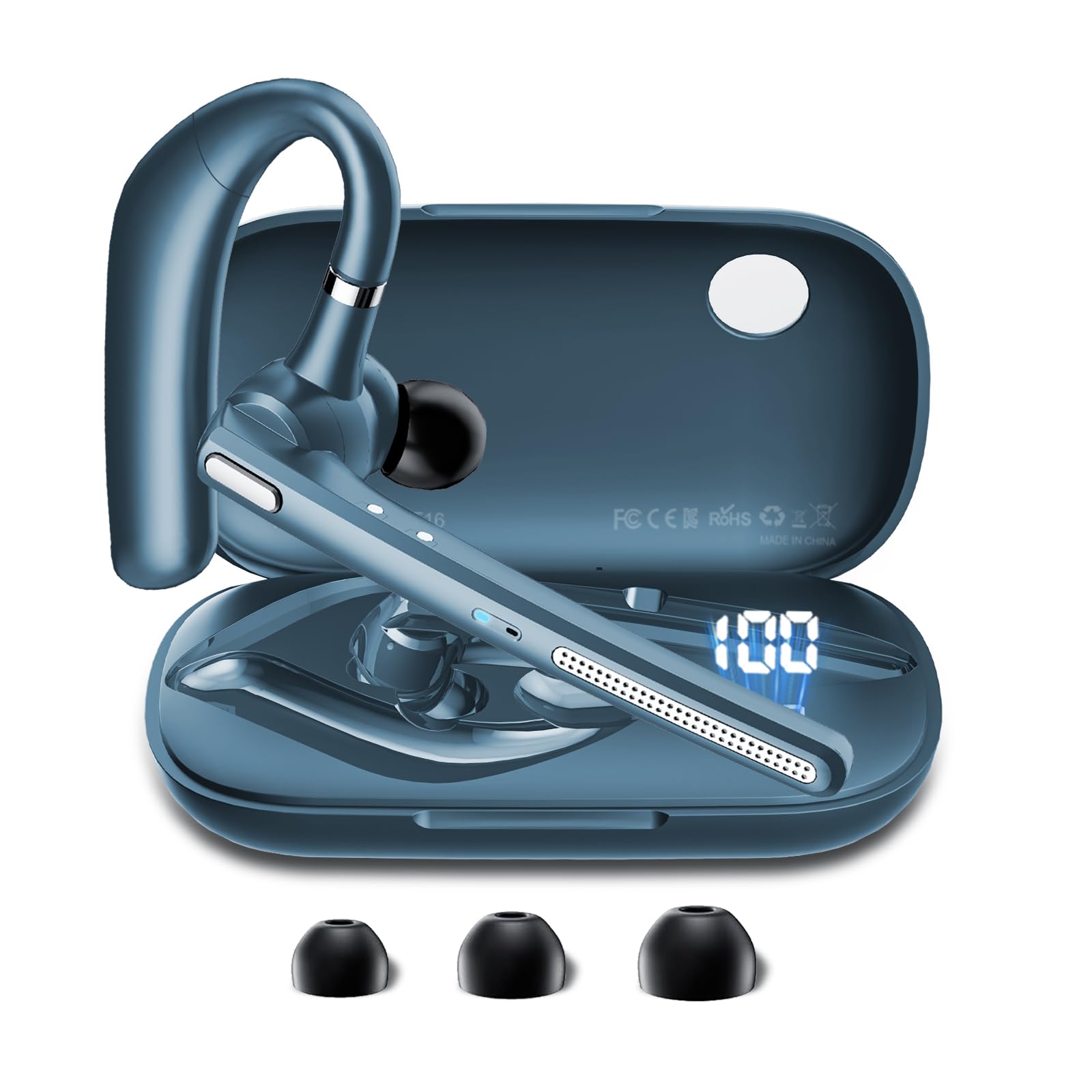
Image: The COTOE G7 Bluetooth Headset (gray) shown with its charging case. The headset features an ergonomic in-ear design, and the charging case is compact.
المكونات الرئيسية:
- سماعة الأذن: The main unit worn in the ear, containing the speaker, microphone, and control buttons.
- علبة الشحن: Used to store and charge the headset. Features an LED digital display.
- شاشة رقمية LED: Located on the charging case, indicates the charging status of the headset and the power level of the case.
4. الإعداد
4.1 شحن سماعة الرأس والعلبة
- قم بتوصيل كابل شحن USB بمنفذ الشحن الموجود على العلبة وبمصدر الطاقة (على سبيل المثال، محول حائط USB، أو منفذ USB في الكمبيوتر).
- The LED digital display on the charging case will show the current battery level and charging status.
- Place the headset into the charging case. Ensure proper alignment for charging. The headset's indicator light will show charging status.
- A full charge typically takes approximately 1-2 hours for the headset and 2-3 hours for the charging case.
ملحوظة: The headset offers up to 12 hours of music playback and the charging case provides 120 hours of standby time.
4.2 الاقتران بجهاز بلوتوث
- تأكد من شحن سماعة الرأس.
- Take the headset out of the charging case. It will automatically enter pairing mode, indicated by a flashing LED light (usually blue and red).
- على هاتفك المحمول أو أي جهاز آخر يدعم تقنية Bluetooth، انتقل إلى إعدادات Bluetooth.
- بحث عن available devices. You should see "COTOE G7" in the list.
- Select "COTOE G7" to connect. Once connected, the headset's LED light will stop flashing and may turn solid blue or turn off.
- إذا طُلب منك إدخال كلمة مرور، فأدخل "0000" (أربعة أصفار).
- The headset will automatically reconnect to the last paired device when powered on and within range.
5. تعليمات التشغيل
5.1 تشغيل/إيقاف التشغيل
- تشغيل الطاقة: Take the headset out of the charging case, or press and hold the Multi-function Button for approximately 3 seconds.
- إيقاف التشغيل: Place the headset back into the charging case, or press and hold the Multi-function Button for approximately 5 seconds.
5.2 إدارة المكالمات
- الرد على المكالمة: اضغط على زر الوظائف المتعددة مرة واحدة.
- إنهاء المكالمة: اضغط على الزر متعدد الوظائف مرة واحدة أثناء المكالمة.
- رفض المكالمة: اضغط مع الاستمرار على الزر متعدد الوظائف لمدة ثانيتين تقريبًا.
- إعادة الاتصال بالرقم الأخير: اضغط مرتين على الزر متعدد الوظائف.
5.3 تشغيل الموسيقى
- تشغيل/إيقاف مؤقت: اضغط على زر الوظائف المتعددة مرة واحدة.
- المسار التالي: اضغط مع الاستمرار على زر رفع الصوت.
- المسار السابق: اضغط مع الاستمرار على زر خفض الصوت.
5.4 التحكم في مستوى الصوت
- ارفع على الصوت: اضغط على زر رفع الصوت.
- تقليل الحجم: اضغط على زر خفض الصوت.
5.5 إلغاء الضوضاء النشط (ANC)
The COTOE G7 features Active Noise Cancellation to reduce ambient noise. To activate or deactivate ANC, locate the dedicated ANC button (if present) or refer to the specific button combination in your quick start guide. Typically, a long press on a designated button toggles ANC.
6. الصيانة
- تنظيف: Use a soft, dry, lint-free cloth to clean the headset and charging case. Do not use harsh chemicals or abrasive materials.
- تخزين: Store the headset in its charging case when not in use to protect it from dust and damage. Avoid extreme temperatures.
- العناية بالبطارية: To prolong battery life, avoid fully discharging the headset frequently. Charge it regularly, even if not used for extended periods.
- مقاومة الماء: The headset is not waterproof. Avoid exposure to liquids and moisture.
7. استكشاف الأخطاء وإصلاحها
| مشكلة | حل |
|---|---|
| سماعة الرأس لا تعمل. | Ensure the headset is charged. Place it in the charging case to confirm charging. |
| لا يمكن الاقتران بالجهاز. | Make sure Bluetooth is enabled on your device. Ensure the headset is in pairing mode. Try restarting both the headset and your device. Clear previous Bluetooth connections on your device. |
| لا يوجد صوت أو مستوى الصوت منخفض. | Check the volume levels on both the headset and your connected device. Ensure the headset is properly connected. Try playing different audio sources. |
| اتصال متقطع. | Ensure the headset is within the effective range of your Bluetooth device (typically 10 meters/33 feet). Avoid obstacles between the headset and device. |
8. المواصفات
- ماركة: COTOE
- نموذج: G7
- لون: رمادي
- وضع الأذن: في الأذن
- عامل الشكل: في الأذن
- التحكم في الضوضاء: إلغاء الضوضاء النشط
- وقت الاستعداد: ما يصل إلى 120 ساعة (مع علبة الشحن)
- وقت تشغيل الموسيقى: ما يصل إلى 12 ساعة (مع علبة الشحن)
9. الضمان والدعم
The COTOE G7 Bluetooth Headset comes with a standard manufacturer's warranty. Please refer to the warranty card included in your package for specific terms and conditions.
For technical support, troubleshooting assistance, or warranty claims, please contact COTOE customer service through the retailer where you purchased the product or visit the official COTOE webموقع لمعلومات الاتصال.