
1. المقدمة
The COLMI R02 Smart Ring is a compact, wearable device designed to monitor various health and activity metrics directly from your finger. It provides continuous tracking of heart rate, blood oxygen levels, sleep patterns, and daily activity without requiring a subscription fee. This manual will guide you through the setup, operation, and maintenance of your smart ring to ensure optimal performance.
2. معلومات هامة حول السلامة
- The COLMI R02 Smart Ring is not a medical device. Data obtained from this device is for reference only and should not be used for clinical diagnosis, medical research, diagnostic, or treatment purposes.
- Consult a healthcare professional before making any decisions based on the data provided by the ring.
- احتفظ بالجهاز وملحقاته بعيدًا عن متناول الأطفال.
- Avoid exposing the ring to extreme temperatures or direct sunlight for prolonged periods.
- لا تحاول تفكيك الجهاز أو تعديله، لأن هذا سيؤدي إلى إبطال الضمان وقد يتسبب في حدوث أضرار.
3. ماذا يوجد في الصندوق
Upon opening your COLMI R02 Smart Ring package, you should find the following items:
- 1 x COLMI R02 Smart Ring
- 1 × حقيبة شحن محمولة
- 1 × كابل شحن
- 1 × دليل التعليمات (هذه الوثيقة)
4. دليل المقاسات
Choosing the correct ring size is crucial for comfort and accurate data tracking. We recommend using a sizing kit or carefully measuring your finger circumference.
4.1. Measuring Your Finger
To measure your finger, you can use a non-elastic rope or paper strip. Wrap it snugly around your finger, mark the junction, and then measure the length with a ruler. Repeat this process multiple times for accuracy.

Figure 4.1: Visual guide for measuring finger circumference using a paper strip.
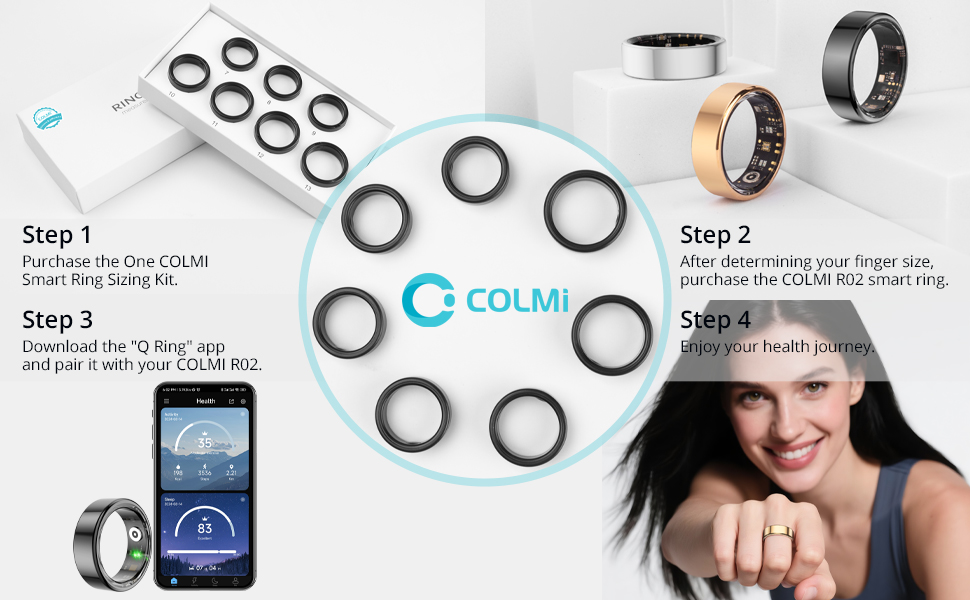
Figure 4.2: The COLMI Smart Ring Sizing Kit, recommended for precise size determination.
4.2. Ring Size Chart
| مقاس | Inner Diameter (inch) | محيط (بوصة) | المحيط (سم) |
|---|---|---|---|
| 7# | 0.69 | 2.17~2.26 | 5.5~5.74 |
| 8# | 0.72 | 2.26~2.36 | 5.75~6 |
| 9# | 0.75 | 2.36~2.47 | 6.01~6.27 |
| 10# | 0.79 | 2.47~2.57 | 6.28~6.53 |
| 11# | 0.82 | 2.57~2.67 | 6.54~6.77 |
| 12# | 0.85 | 2.67~2.77 | 6.78~7.03 |
| 13# | 2.77~2.83 | 7.04~7.2 |
Note: The above dimensions have a measurement tolerance of ± 0.2mm/0.0078inch. The ring size refers to the inner diameter, not the outer diameter.
4.3. Sizing Video Guide
Video 4.1: A detailed video guide on how to measure your finger for the correct ring size.
5. دليل الإعداد
5.1. Initial Charging and Activation
Before first use, ensure your COLMI R02 Smart Ring is fully charged and activated.
- Remove the insulation film from the ring.
- Place the smart ring into the portable charging case.
- Connect the charging cable to the charging case and a 5V DC USB power supply. The indicator light on the case will show charging status.
- Once fully charged, the ring is activated and ready for use.
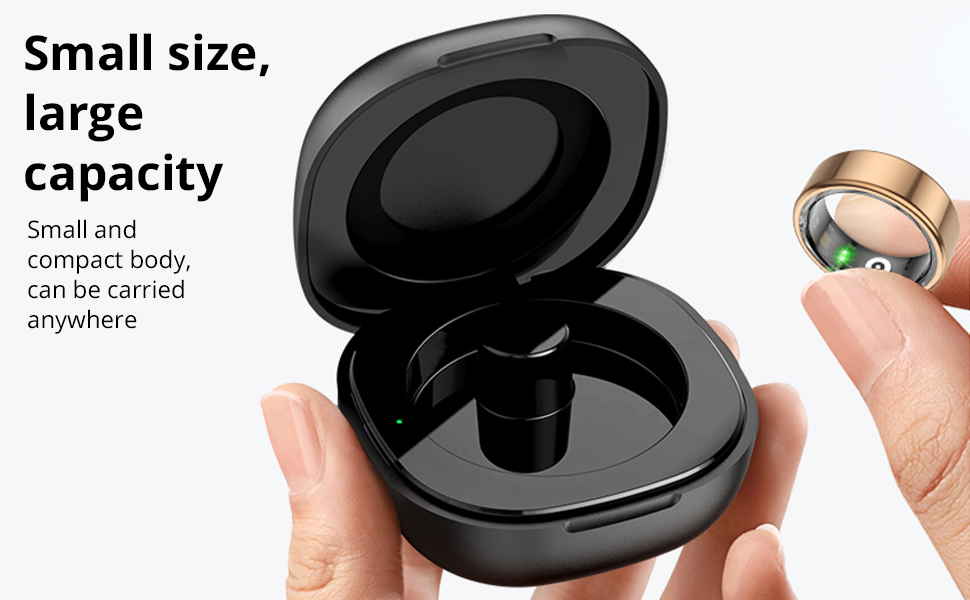
Figure 5.1: The COLMI R02 Smart Ring charging in its portable case. The case provides convenient charging on the go.
5.2. تنزيل التطبيق وإقرانه
To access and manage your health data, download the companion 'Q Ring' app and pair it with your smart ring.
- Download the 'Q Ring' app from the App Store (iOS) or Google Play Store (Android).
- تأكد من تمكين Bluetooth على هاتفك الذكي.
- Open the 'Q Ring' app and follow the on-screen instructions to search for and bind your COLMI R02 Smart Ring.
- The app will automatically synchronize data from the ring once connected.

Figure 5.2: The COLMI R02 Smart Ring and its companion app displaying various health metrics.
6. تشغيل الخاتم الذكي
The COLMI R02 Smart Ring continuously tracks your health data. Ensure the ring is worn correctly for accurate readings.
6.1. رصد معدل ضربات القلب
The ring features a high-performance heart rate sensor that automatically collects heart rate data every 30 minutes. You can view your heart rate status and monitor for abnormalities in the app.
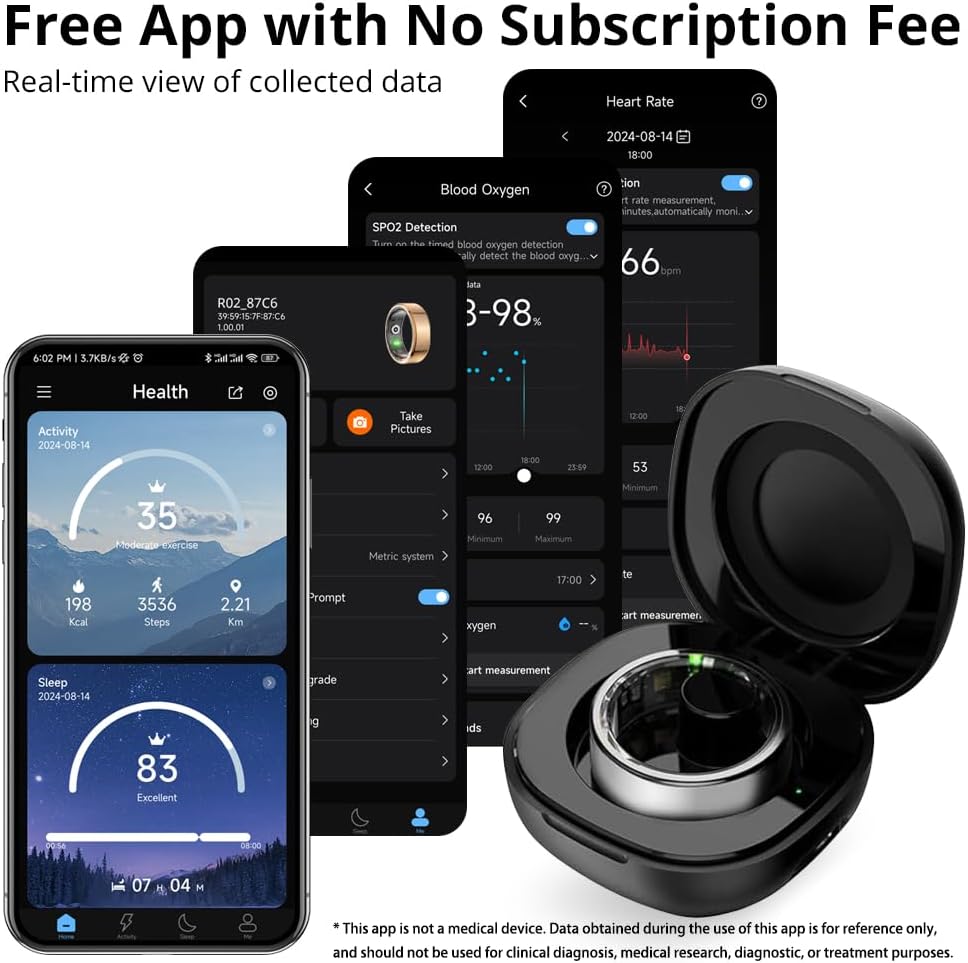
Figure 6.1: The app displays your heart rate data, including scheduled measurements and real-time readings.
6.2. Blood Oxygen Monitoring (SpO2)
The COLMI R02 records your blood oxygen data, an important indicator of human health. This data is accessible through the app.

Figure 6.2: The app provides a detailed view of your blood oxygen levels over time.
6.3. مراقبة النوم
The ring detects when you fall asleep and wake up, monitoring your sleep quality and duration. It generates concise reports to help you understand and improve your sleep patterns.
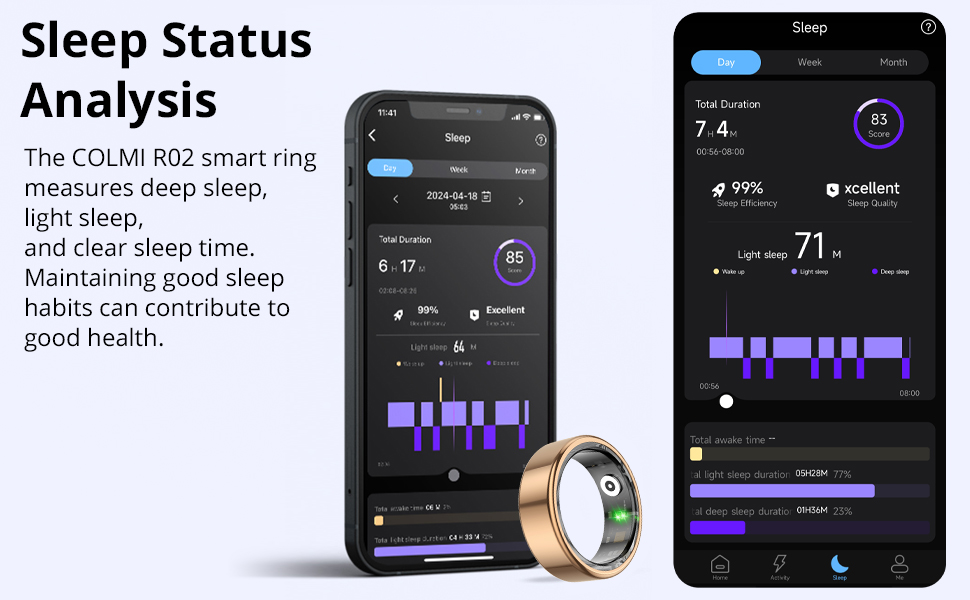
Figure 6.3: The app provides a comprehensive analysis of your sleep stagالجودة والنوعية.
6.4. تتبع النشاط
Track your daily steps, distance traveled, and calories burned to stay motivated and monitor your fitness progress.

Figure 6.4: The app displays your daily activity metrics, including steps, distance, and calories.
6.5. Photo Control
Utilize the remote camera control function in the app. Simply flick your finger while wearing the ring to remotely capture photos on your paired smartphone.
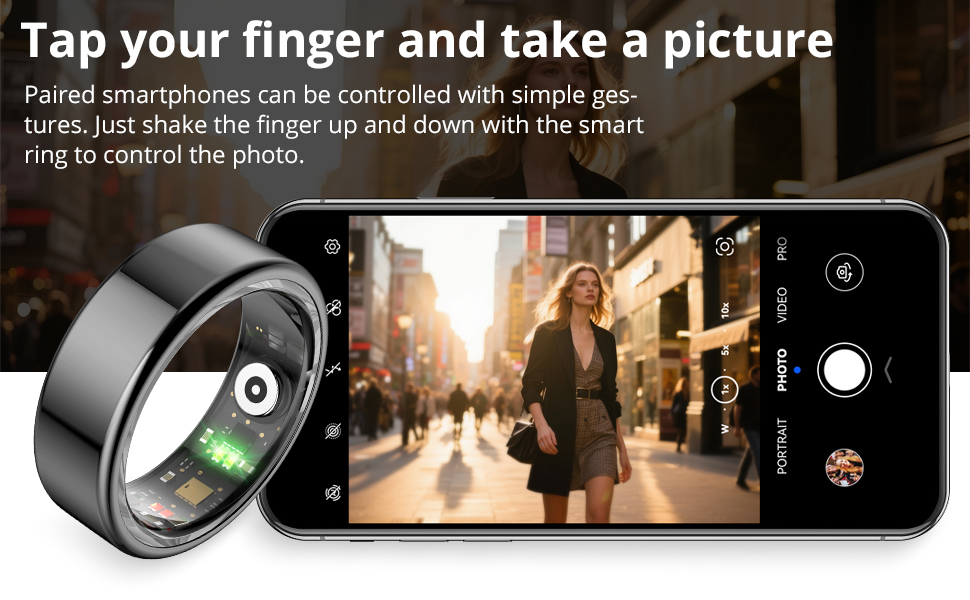
Figure 6.5: The smart ring allows for convenient remote control of your smartphone's camera.
7. الصيانة
7.1. Cleaning Your Ring
To maintain optimal performance and hygiene, regularly clean your COLMI R02 Smart Ring. Use a soft, damp cloth to wipe the surface of the ring. Avoid using harsh chemicals or abrasive materials, as these can damage the device.
7.2. العناية بحافظة الشحن
Keep the charging case clean and dry. Ensure the charging contacts inside the case are free from dust or debris to ensure proper charging of your ring.
8. استكشاف الأخطاء وإصلاحها
8.1. Ring Not Connecting to App
- Ensure the ring is charged and activated.
- تحقق من تمكين Bluetooth على هاتفك الذكي.
- Restart the 'Q Ring' app and try pairing again.
- If the issue persists, try restarting your smartphone.
8.2. Inaccurate Data Readings
- Ensure the ring is worn snugly on your finger, with the sensors making good contact with your skin.
- Avoid excessive movement during measurements, especially for real-time heart rate or blood oxygen readings.
- Clean the sensors on the inside of the ring regularly.
8.3. عمر البطارية القصير
- تأكد من شحن الخاتم بالكامل قبل الاستخدام.
- Frequent real-time monitoring (e.g., heart rate every 5 minutes) can shorten battery life. Adjust monitoring frequency in the app settings.
- Close unnecessary background apps on your phone that might be constantly trying to sync with the ring.
8.4. Heart Rate Measurement Settings Video
Video 8.1: This video demonstrates how to adjust heart rate measurement settings within the app to optimize data collection and battery life.
9. المواصفات
| ميزة | التفاصيل |
|---|---|
| اسم الموديل | COLMI R02 |
| توافق نظام التشغيل | Android, iPhone (iOS) |
| تكنولوجيا الاتصال | بلوتوث |
| معيار الاتصال اللاسلكي | بلوتوث |
| المميزات الخاصة | Heart rate monitoring, Photo Control, Sleep Measurement |
| المقاييس المقاسة | Heart Rate, Sleep Duration, Blood Oxygen |
| سعة البطارية | 15 مليamp ساعات |
| تكوين خلية البطارية | بوليمر الليثيوم |
| مادة | الفولاذ المقاوم للصدأ |
| مستوى مقاومة الماء | مقاوم للماء |
| وزن العنصر | 100 جرام |
| الشركة المصنعة | Shenzhen COLMI Technology Co., Ltd |
10. الضمان والدعم
10.1. ضمان المنتج
The COLMI R02 Smart Ring comes with a 1-year standard/full warranty from the date of purchase. This warranty covers manufacturing defects and malfunctions under normal use. Please retain your proof of purchase for warranty claims.
10.2. دعم العملاء
For any usage or quality issues, please contact COLMI customer service. Our professional after-sales service team is ready to assist you.
- الدعم عبر الإنترنت: قم بزيارة COLMI Store on Amazon للاطلاع على الأسئلة الشائعة وخيارات الاتصال.
- دعم البريد الإلكتروني: Refer to the contact information provided in your product packaging or on the official COLMI webموقع.