
1. المقدمة
This manual provides detailed instructions for the operation and maintenance of your NBD 5K Digital Camera. Please read this manual thoroughly before using the camera to ensure proper function and to maximize your photography and videography experience. This camera is designed for capturing high-resolution photos and videos, featuring a 48MP sensor, 5K video recording, 16X digital zoom, and a 180° flip screen.
2. محتويات العبوة
تأكد من تضمين جميع العناصر المدرجة أدناه في الحزمة الخاصة بك:
- NBD S100F 5K Digital Camera
- 52mm Wide Angle Lens
- عدسة ماكرو
- ميكروفون
- بطاقة ذاكرة 64 جيجا
- كابل يو اس بي
- Rechargeable Batteries (x2)
- شاحن البطارية
- قارئ البطاقات
- Camera Neck Rope (Strap)
- Black Leather Bag
- عدسة تنظيف القماش

Image 2.1: All components included with the NBD 5K Digital Camera.
3. الإعداد الأولي
3.1. إدخال البطارية
- حدد موقع غطاء حجرة البطارية في الجزء السفلي من الكاميرا.
- قم بتحريك مزلاج الغطاء لفتح الحجرة.
- أدخل البطارية وفقًا لمؤشرات القطبية (+/-) داخل الحجرة.
- أغلق غطاء حجرة البطارية حتى تسمع صوت طقطقة محكم.
3.2. إدخال بطاقة SD
- Open the SD card slot cover, usually located on the side of the camera.
- Insert the 64GB SD card with the metal contacts facing the front of the camera until it clicks into place.
- أغلق غطاء فتحة بطاقة SD.
3.3. تركيب العدسة
- Align the lens mount with the camera's lens attachment point.
- Gently twist the lens clockwise until it locks into position.
- To attach the macro or wide-angle lens, screw it onto the primary lens.
3.4. التشغيل الأولي
Press and hold the power button until the screen illuminates. Follow any on-screen prompts for initial settings such as date and time.
4. تشغيل الكاميرا
4.1. تشغيل/إيقاف التشغيل
Press the power button to turn the camera on. Press and hold the power button again to turn it off.
4.2. وضع الطلب
قم بتدوير قرص الوضع لاختيار أوضاع تصوير مختلفة:
- نظام آلي: For general photography with automatic settings.
- وضع المشهد: Pre-set modes for specific scenarios (e.g., Portrait, Landscape).
- وضع التأثير: قم بتطبيق فلاتر إبداعية على صورك.
- Lapse Mode: For time-lapse photography.
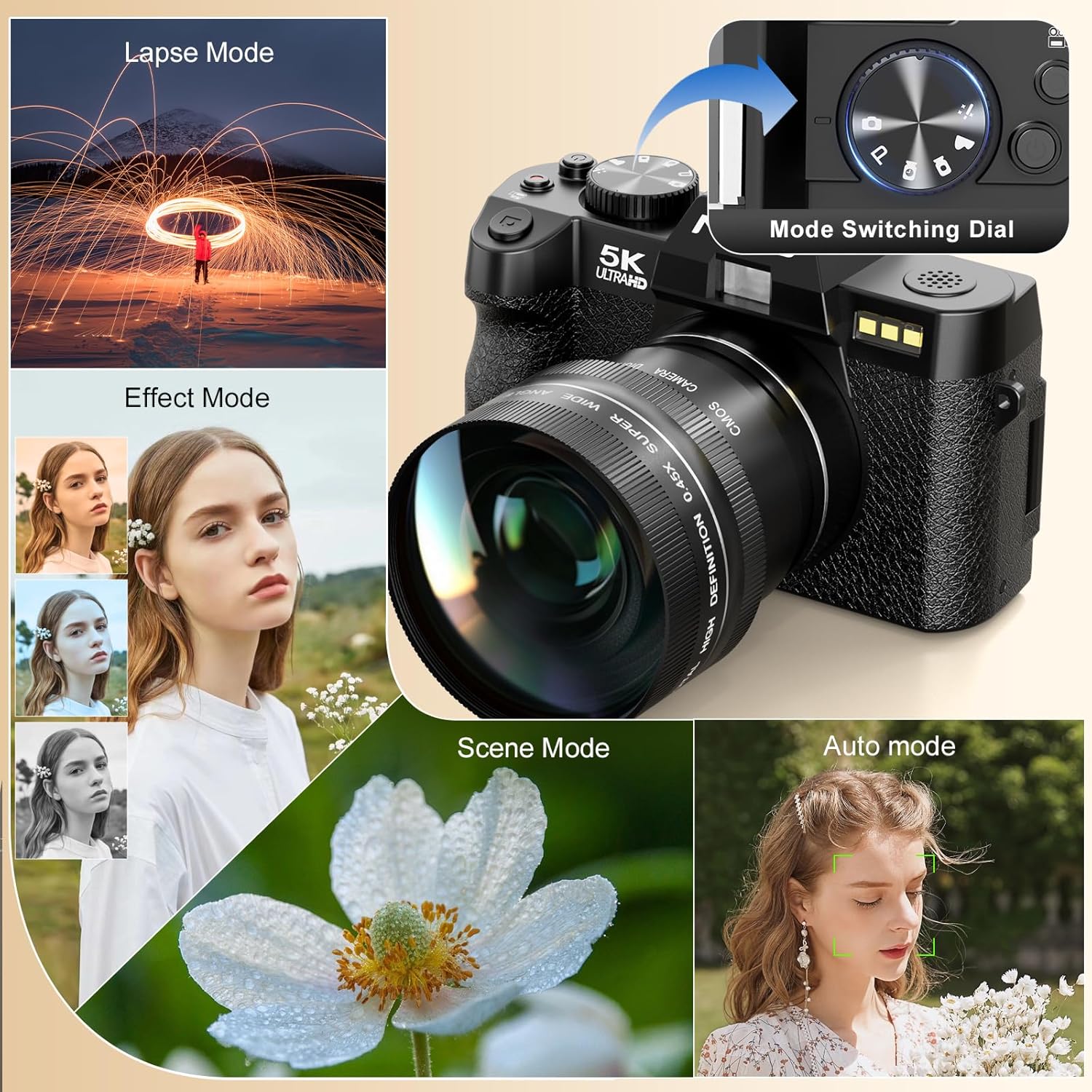
Image 4.1: Camera mode dial and examples of different shooting modes.
4.3. التقاط الصور
The camera features a 48MP sensor for high-resolution images. Utilize the AF (Autofocus) mode for sharp subjects and low-light focusing capabilities for challenging lighting conditions.

Image 4.2: Photo features including 48MP resolution, AF mode, and low-light performance.
4.4. تسجيل مقاطع الفيديو
Record videos in 5K (5210*2880) or 1080p resolution. Press the dedicated video recording button to start and stop recording.

Image 4.3: Visual representation of 5K video resolution.
4.5. وظيفة التكبير
The camera supports 16X digital zoom. Use the zoom controls to adjust the magnification for your shots.

Image 4.4: HDR feature and examples of 4x, 8x, and 16x digital zoom.
4.6. Using the 180° Flip Screen and Microphone
The 180° flip screen allows for easy self-recording and vlogging. The included microphone enhances audio quality for video recordings.
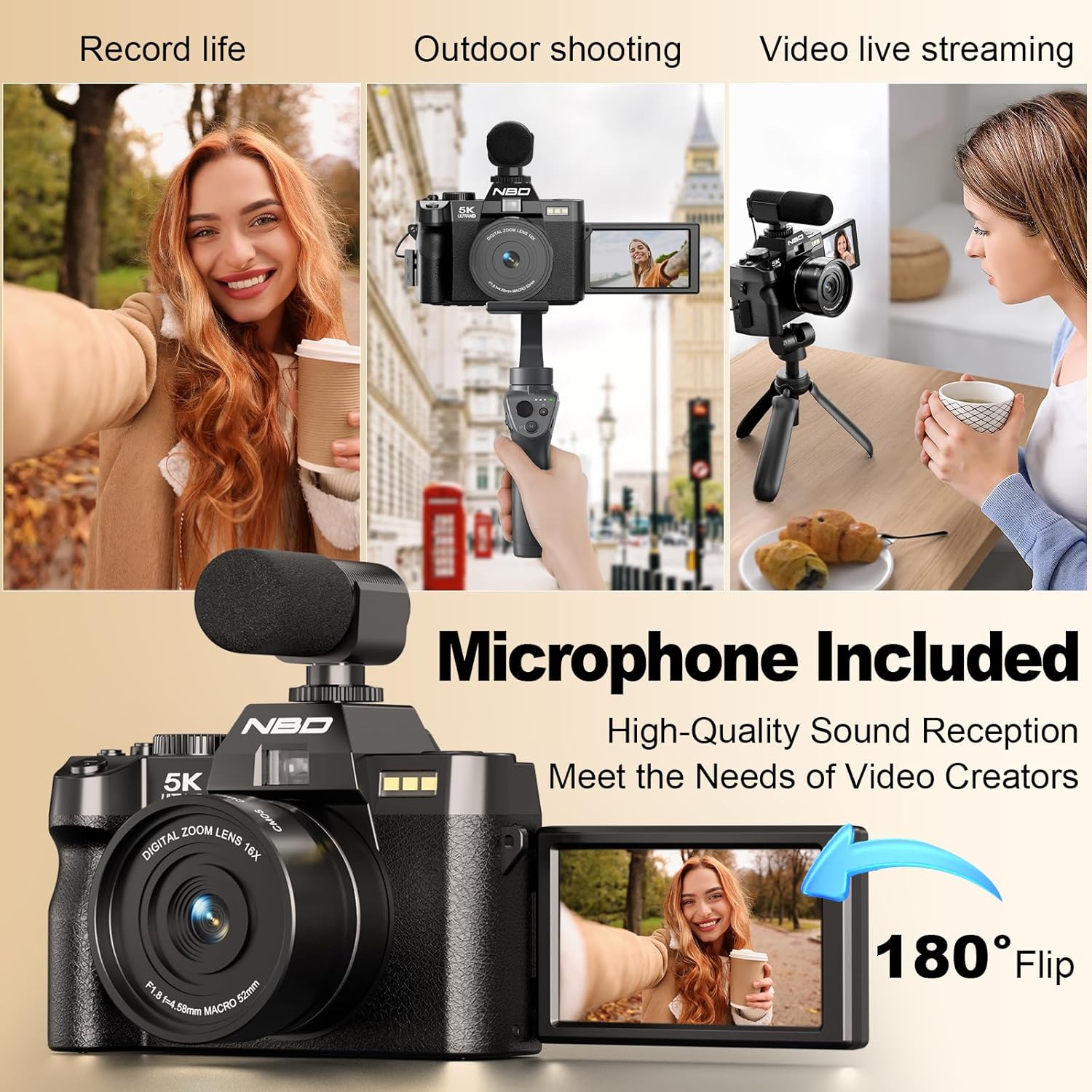
Image 4.5: Demonstrating the 180° flip screen and external microphone for vlogging and live streaming.
4.7. Wi-Fi Connectivity and File تحويل
Connect your camera to a smartphone or tablet via Wi-Fi for remote control and swift image transfer. Download the dedicated mobile application to access these features.
- اتصال واي فاي: Navigate to the camera's settings menu, select Wi-Fi, and follow the on-screen instructions to connect to your device.
- التحكم في التطبيق: استخدم تطبيق الهاتف المحمول لـ view بث مباشر مسبقview, control camera settings, and initiate photo/video capture remotely.
- File نقل: Transfer photos and videos directly to your connected device for sharing or backup. Alternatively, connect the camera to a computer via the USB cable for file نقل.

Image 4.6: Wi-Fi picture transfer and camera control via a mobile application.

Image 4.7: Options for swift image transfer via USB or Wi-Fi/App.
5. الصيانة
5.1. تنظيف الكاميرا والعدسة
- Use the provided lens cleaning cloth to gently wipe the lens surface. Avoid using abrasive materials.
- For the camera body, use a soft, dry cloth to remove dust and smudges. Do not use liquid cleaners directly on the camera.
5.2. العناية بالبطارية
- قم بشحن البطاريات بالكامل قبل الاستخدام الأول.
- قم بتخزين البطاريات في مكان بارد وجاف عندما لا تكون قيد الاستعمال.
- لا تعرض البطاريات لدرجات حرارة شديدة أو لأشعة الشمس المباشرة.
5.3. التخزين
When not in use for extended periods, store the camera in the provided black leather bag in a dry, dust-free environment. Remove batteries if storing for several months.
6. استكشاف الأخطاء وإصلاحها
| مشكلة | السبب المحتمل | حل |
|---|---|---|
| الكاميرا لا تعمل. | تم استنزاف البطارية أو إدخالها بشكل غير صحيح. | اشحن البطارية بالكامل. تأكد من تركيب البطارية بالقطبية الصحيحة. |
| الصور ضبابية. | التركيز غير الصحيح، أو اهتزاز الكاميرا، أو العدسة المتسخة. | Ensure autofocus is engaged. Hold the camera steady or use a tripod. Clean the lens with the provided cloth. |
| خطأ في بطاقة SD. | SD card is full, corrupted, or incorrectly inserted. | Check if the SD card is properly inserted. Format the SD card (this will erase all data). Replace with a new SD card if issues persist. |
| فشل الاتصال بشبكة Wi-Fi. | كلمة مرور غير صحيحة، أو خارج النطاق، أو مشكلة في التطبيق. | Verify Wi-Fi password. Ensure camera and device are within range. Restart both camera and mobile device. Reinstall the mobile application. |
7. المواصفات
| ميزة | التفاصيل |
|---|---|
| ماركة | بنك دبي الوطني |
| رقم الموديل | f84c2dbf-b0ce-418b-ab21-37b5d1f304dd |
| تقنية مستشعر الصور | سيموس |
| دقة ثابتة فعالة | 48 ميجا بكسل |
| دقة الفيديو | 5K (5210*2880), 1080p |
| التكبير البصري | 16x (Digital) |
| تثبيت الصورة | متحرك |
| حجم الشاشة | 3 بوصة |
| نوع العرض | LCD (180° Flip Screen) |
| نوع العدسة | Zoom, Macro (F1.8 aperture) |
| نوع التركيز | Auto Focus (Hybrid) |
| تكنولوجيا الاتصال | واي فاي |
| مدعوم File شكل | MP4, H.264, AAC (Video); JPEG, RAW (Image) |
| سعة تخزين الذاكرة | 32 GB (Included 64GB SD Card) |
| نوع البطارية | Lithium Ion (x2 included) |
| نوع التركيب | حامل ثلاثي القوائم |
| مستوى مقاومة الماء | غير مقاوم للماء |
8. معلومات الضمان
Please refer to the warranty card included in your product packaging for specific warranty terms and conditions. Typically, NBD products come with a limited manufacturer's warranty covering defects in materials and workmanship for a specified period from the date of purchase. Keep your proof of purchase for warranty claims.
9. دعم العملاء
For technical assistance, troubleshooting, or any questions regarding your NBD 5K Digital Camera, please contact NBD customer support. Contact information can typically be found on the NBD official webالموقع الإلكتروني أو على بطاقة الضمان المرفقة مع منتجك.
الموارد المتاحة على الإنترنت: Visit the official NBD webموقع للأسئلة الشائعة، وتحديثات البرامج، ومواد الدعم الإضافية.
10. مقاطع فيديو رسمية للمنتج
لم يتم العثور على أي فيديوهات رسمية للمنتج من البائع في بيانات المنتج المقدمة.