
1. المقدمة
Thank you for choosing the THOMSON WS902DUO Cosy Bookshelf Speakers. These active stereo speakers deliver a powerful 150W audio experience with deep bass from two 10 cm woofers. They offer versatile connectivity options including Bluetooth 5.3, Optical, HDMI (ARC), RCA, and USB playback. The included remote control and side panel adjustments provide precise control over your audio. Please read this manual carefully before use to ensure proper operation and to maximize your listening experience.

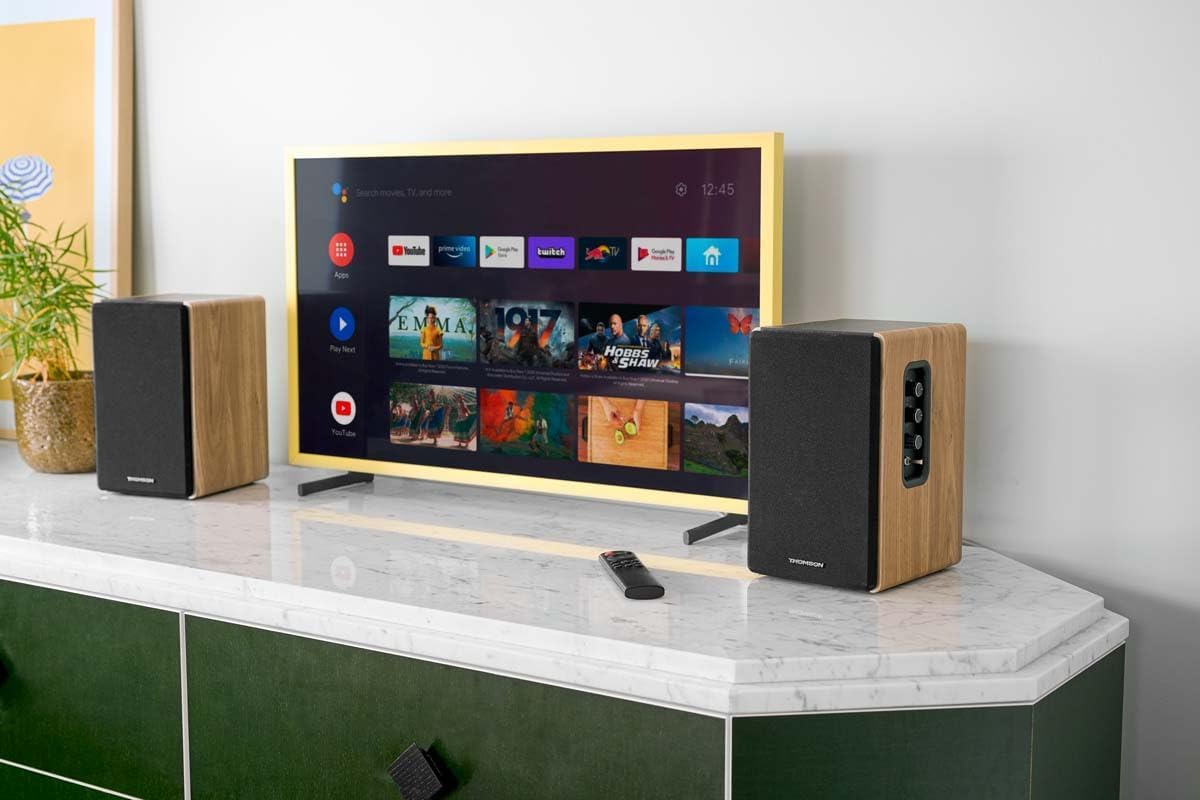
Image 1.1: THOMSON WS902DUO Bookshelf Speakers in a living space, showcasing their elegant wood finish.
2. تعليمات السلامة الهامة
- Read these instructions thoroughly before operating the product.
- احتفظ بهذه التعليمات للرجوع إليها في المستقبل.
- انتبه إلى جميع التحذيرات الموجودة على المنتج وفي تعليمات التشغيل.
- اتبع جميع التعليمات.
- لا تستخدم هذا الجهاز بالقرب من الماء.
- نظف فقط بقطعة قماش جافة.
- لا تسد أي فتحات تهوية. ثبّت المنتج وفقًا لتعليمات الشركة المصنعة.
- لا تقم بالتثبيت بالقرب من أي مصادر للحرارة مثل المشعات أو فتحات التدفئة أو المواقد أو أي أجهزة أخرى (بما في ذلك ampالمُضخِّمات) التي تنتج الحرارة.
- لا تفسد الغرض الأمني للقابس المستقطب أو القابس الأرضي. يحتوي القابس المستقطب على شفرتين إحداهما أوسع من الأخرى. يحتوي القابس الأرضي على شفرتين وشوكة أرضية ثالثة. يتم توفير الشفرة العريضة أو الشوكة الثالثة لسلامتك. إذا لم يكن القابس المرفق مناسبًا للمأخذ الكهربائي لديك، فاستشر كهربائيًا لاستبدال المقبس القديم.
- احمِ سلك الطاقة من أن يدوس عليه أحد أو يضغط عليه، وخاصةً عند المقابس ومنافذ التوصيل الكهربائية ونقطة خروجها من الجهاز.
- استخدم فقط المرفقات/الملحقات المحددة من قبل الشركة المصنعة.
- استخدم فقط مع العربة أو الحامل أو الحامل ثلاثي القوائم أو الحامل أو الطاولة المحددة من قبل الشركة المصنعة أو المباعة مع الجهاز. عند استخدام العربة، توخ الحذر عند تحريك مجموعة العربة/الجهاز لتجنب الإصابة نتيجة الانقلاب.
- افصل هذا الجهاز أثناء العواصف الرعدية أو عند عدم استخدامه لفترات طويلة من الزمن.
- أحل جميع أعمال الصيانة إلى موظفي الصيانة المؤهلين. يلزم إجراء الصيانة عند تعرض الجهاز للتلف بأي شكل من الأشكال، مثل تلف سلك مصدر الطاقة أو القابس، أو انسكاب السوائل أو سقوط الأشياء داخل الجهاز، أو تعرض الجهاز للمطر أو الرطوبة، أو عدم تشغيله بشكل طبيعي، أو سقوطه.
3. محتويات العبوة
يرجى التأكد من تضمين جميع العناصر المدرجة أدناه في الحزمة الخاصة بك:
- THOMSON WS902DUO Bookshelf Speakers (2 units)
- جهاز التحكم عن بعد
- كابل الطاقة
- كابل توصيل مكبر الصوت
- 3.5mm Jack to RCA Adapter Cable
- دليل المستخدم (هذا المستند)

Image 3.1: Packaging of the THOMSON WS902DUO Bookshelf Speakers.
4. انتهى المنتجview
4.1. Side Control Panel (Active Speaker)
The active speaker features a side control panel for easy access to essential functions.

Image 4.1: Side control panel.
- التحكم في الجهير: يقوم بضبط خرج التردد المنخفض.
- التحكم في الترددات العالية: يضبط خرج التردد العالي.
- التحكم في مستوى الصوت: Adjusts the overall sound volume.
- مفتاح التشغيل: يقوم بتشغيل أو إيقاف مكبرات الصوت.
- مؤشر LED: Shows the current status or selected input.
4.2. Rear Panel (Active Speaker)
The rear panel of the active speaker provides all necessary input and output connections.
الصورة 4.2: توصيلات اللوحة الخلفية.
- المدخلات البصرية: For connecting digital audio sources like TVs, game consoles, or Blu-ray players.
- Aux In (RCA): For connecting analog audio sources such as turntables, CD players, or PCs. A 3.5mm jack adapter is provided.
- TV Audio (HDMI ARC): For connecting to a TV's HDMI ARC port, allowing TV remote control of the speaker volume.
- تشغيل يو اس بي: لتشغيل ملفات MP3 files مباشرة من محرك أقراص فلاش USB.
- مخرج فرعي: For connecting an external active subwoofer for enhanced bass.
- مخرج السماعات: يتصل بالمتحدث السلبي.
- مدخلات الطاقة: يتصل بمصدر الطاقة الرئيسي.
4.3. جهاز التحكم عن بعد
The remote control provides convenient access to all speaker functions from a distance.

Image 4.3: Remote control.
- زر الطاقة: Turns the speakers on/off.
- زر كتم الصوت: كتم الصوت/إلغاء كتم الصوت.
- الحجم +/-: ضبط مستوى الصوت.
- عناصر التحكم في التشغيل (تشغيل/إيقاف مؤقت، تخطي): لتشغيل USB.
- Source Selection Buttons (OPT, BT, ARC, USB, LINE): يحدد مصدر إدخال الصوت.
- EQ Mode Buttons (MOVIE, MUSIC, DIALOG): Selects preset equalization modes.
5. الإعداد
5.1. وضع مكبر الصوت
Place the speakers on a stable, flat surface such as a bookshelf, desk, or speaker stands. For optimal stereo imaging, position the speakers equidistant from your listening position and at ear level. Ensure there is adequate space around the speakers for ventilation.
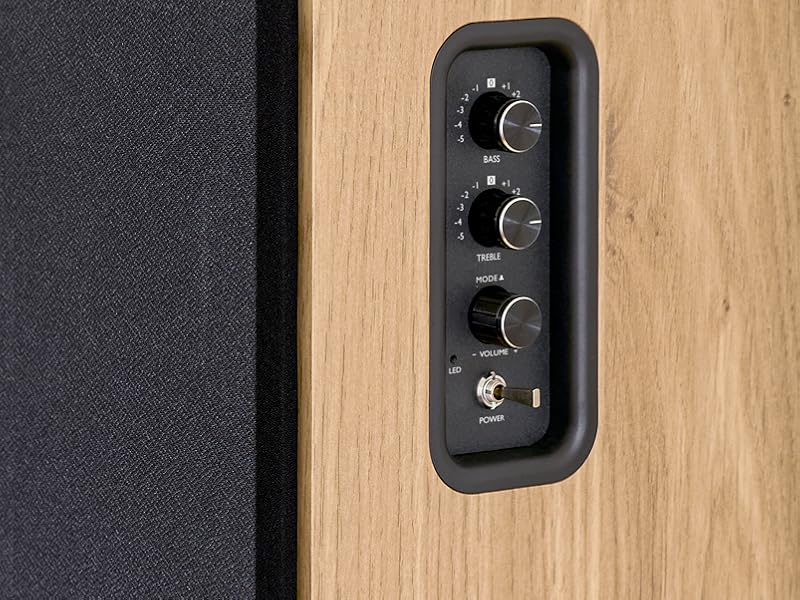
Image 5.1: Recommended speaker placement on a desk.
5.2. توصيل مكبرات الصوت
- حدد مكبر الصوت النشط (مع عناصر التحكم والمدخلات) ومكبر الصوت السلبي.
- Connect the included speaker cable from the speaker output terminals on the active speaker to the input terminals on the passive speaker. Ensure correct polarity (+ to + and - to -).
5.3. توصيل مصادر الصوت
Connect your desired audio sources to the active speaker using the appropriate cables.
- المدخلات البصرية: Use an optical cable to connect your TV, game console, or Blu-ray player to the OPTICAL IN port.
- مدخل HDMI (ARC): Use an HDMI cable to connect your TV's HDMI ARC port to the TV AUDIO (HDMI) port on the speaker. This allows your TV remote to control the speaker volume.
- مدخل RCA (AUX): Use an RCA cable (or the provided 3.5mm jack to RCA adapter) to connect devices like a turntable, CD player, or PC to the AUX IN (RCA) ports.
- مدخل USB: أدخل محرك أقراص فلاش USB يحتوي على MP3 files into the USB PLAY port.

Image 5.2: Speakers connected to a television via HDMI ARC.
5.4. اقتران بلوتوث
- تأكد من تشغيل مكبرات الصوت.
- Press the 'BT' button on the remote control or the side panel to select Bluetooth input. The LED indicator will flash, indicating pairing mode.
- على هاتفك الذكي أو جهازك اللوحي أو الكمبيوتر، قم بتمكين البلوتوث وابحث عن الأجهزة المتاحة.
- Select "THOMSON WS902DUO" from the list of devices.
- Once paired, the LED indicator will stop flashing and remain solid. You can now stream audio wirelessly.
5.5. توصيل مضخم الصوت (اختياري)
If you wish to enhance bass further, connect an active subwoofer to the 'Sub Out' port on the rear panel of the active speaker using an RCA cable.
6. تعليمات التشغيل
6.1. تشغيل/إيقاف التشغيل
Use the power switch on the side control panel or the power button on the remote control to turn the speakers on or off.
6.2. اختيار المصدر
Press the corresponding source button on the remote control (OPT, BT, ARC, USB, LINE) to switch between connected audio inputs. The LED indicator will change to reflect the selected source.
6.3. التحكم في مستوى الصوت
Adjust the volume using the 'Volume' knob on the side control panel or the 'VOL+/-' buttons on the remote control.
6.4. تعديلات الصوت
Fine-tune the sound to your preference:
- باس / ثلاثي: Use the 'Bass' and 'Treble' knobs on the side control panel to adjust the low and high frequencies.
- أوضاع EQ: Press the 'MOVIE', 'MUSIC', or 'DIALOG' buttons on the remote control to select preset equalization settings optimized for different content types.
6.5. تشغيل USB
When a USB flash drive with MP3 files is inserted and USB source is selected, the speakers will automatically begin playing. Use the playback control buttons on the remote control (Play/Pause, Skip) to manage your music.
6.6. تشغيل بلوتوث
After successful pairing (see Section 5.4), you can stream audio from your Bluetooth device. Use your device's controls or the speaker's remote control for playback and volume adjustments.
7. الصيانة
تضمن الصيانة المناسبة طول عمر مكبرات الصوت وأدائها الأمثل.
- تنظيف: Wipe the speaker surfaces with a soft, dry cloth. Do not use liquid cleaners or abrasive materials.
- تهوية: تأكد من عدم انسداد فتحات التهوية لمنع ارتفاع درجة الحرارة.
- تخزين: If storing the speakers for an extended period, unplug them from the power outlet and store them in a cool, dry place.
- تجنب الرطوبة: Keep the speakers away from water and high humidity.
8. استكشاف الأخطاء وإصلاحها
إذا واجهت أية مشكلات، فارجع إلى دليل استكشاف الأخطاء وإصلاحها التالي:
| مشكلة | السبب المحتمل | حل |
|---|---|---|
| لا يوجد طاقة | Power cable not connected; Power switch off; Wall outlet not working. | Ensure power cable is securely connected. Turn on the power switch. Test the wall outlet with another device. |
| لا يوجد صوت | Incorrect input source selected; Volume too low; Mute function active; Audio cable not connected properly. | Select the correct input source. Increase volume. Press Mute button on remote. Check all audio cable connections. |
| فشل اقتران البلوتوث | Speakers not in pairing mode; Device too far; Bluetooth disabled on source device. | Ensure speakers are in Bluetooth pairing mode (flashing LED). Move device closer to speakers. Enable Bluetooth on your source device. |
| تشغيل USB لا يعمل | محرك أقراص USB غير مهيأ بشكل صحيح؛ Files not MP3; USB drive not inserted properly. | Ensure USB drive is FAT32 formatted. Verify files are in MP3 format. Re-insert USB drive firmly. |
| تشويه الصوت | Volume too high; Source audio quality poor; Bass/Treble settings too extreme. | Lower the volume. Test with a different audio source. Adjust Bass and Treble controls. |
9. المواصفات
| ميزة | مواصفة |
|---|---|
| ماركة | تومسون |
| رقم الموديل | WS902DUO |
| أقصى طاقة خرج للسماعة | 150 واط |
| استجابة التردد | 60 هرتز |
| تكنولوجيا الاتصال | Bluetooth, HDMI (ARC), Optical, RCA, USB |
| نسخة البلوتوث | 5.3 |
| وضع إخراج الصوت | ستيريو (2.0 قناة) |
| حجم الإدخالtage | 230 فولت (تيار متردد) |
| نوع التركيب | تركيب الرف |
| نوع السماعة | Multimedia Bookshelf |
| المميزات الخاصة | Stereo Pairing, USB Port, Sub-Out, Remote Control, EQ Modes |
| الاستخدامات الموصى بها | Smartphone, Tablet, PC, TV, Game Console, DVD Player, Turntable |
| لون | لمسة نهائية من الخشب الطبيعي |
| طريقة التحكم | جهاز تحكم عن بعد، مقابض اللوحة الجانبية |
| حجم مكبر الصوت | 10 سنتيمتر |
| الأبعاد (الارتفاع × العرض × العمق) | 28 سم × 24 سم × 47 سم (تقريبًا، لكل سماعة) |
| وزن | 5048 Grams (total for pair) |
| عدد العناصر | 2 |
| بلد المنشأ | الصين |
10. معلومات الضمان
This THOMSON WS902DUO product comes with a ضمان محدود لمدة سنة واحدة يسري هذا الضمان من تاريخ الشراء. ويغطي عيوب التصنيع وجودة الصنع في ظل الاستخدام العادي. ولا يغطي الأضرار الناجمة عن سوء الاستخدام أو الحوادث أو التعديلات غير المصرح بها أو التلف الناتج عن الاستخدام العادي. يرجى الاحتفاظ بإثبات الشراء لتقديم مطالبات الضمان.
11. دعم العملاء
For technical assistance, warranty claims, or any questions regarding your THOMSON WS902DUO speakers, please contact your retailer or visit the official THOMSON support website. Please have your model number (WS902DUO) and proof of purchase ready when contacting support.
الدعم عبر الإنترنت: www.thomsonconsumer.com (يرجى التحقق من جهات الاتصال الخاصة بالدعم الإقليمي)