
مقدمة
Welcome to the user manual for your new HP OMEN 16-ae0002TX Gaming Laptop. This document provides essential information to help you set up, operate, maintain, and troubleshoot your device. Designed for high-performance gaming and demanding tasks, this laptop features a 14th Gen Intel Core i7 processor, NVIDIA GeForce RTX 4060 graphics, 16GB DDR5 RAM, and a 1TB SSD, all presented on a vibrant 16.1-inch FHD 165Hz display.
1. الإعداد الأولي
1.1 فتح علبة الكمبيوتر المحمول
أزل جميع المكونات من العبوة بعناية. تأكد من وجود العناصر التالية:
- HP OMEN 16-ae0002TX Gaming Laptop
- محول الطاقة
- سلك الطاقة
- دليل المستخدم (هذا المستند)
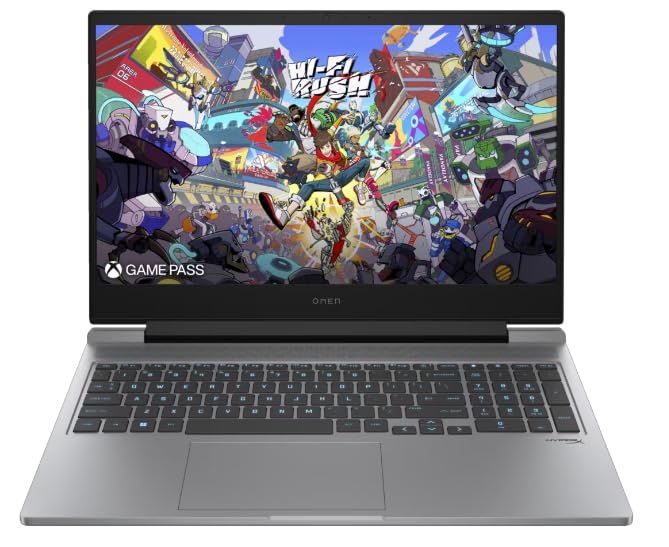
Figure 1: HP OMEN 16-ae0002TX Gaming Laptop overview.
1.2 توصيل محول الطاقة
- قم بتوصيل سلك الطاقة بمحول الطاقة.
- قم بتوصيل محول الطاقة بمأخذ الحائط.
- Connect the adapter's output plug to the power port on your laptop.
يوصى بشحن الكمبيوتر المحمول بالكامل قبل الاستخدام الأولي.
1.3 التمهيد الأول وإعداد Windows
Press the power button located on the laptop chassis. The laptop will boot up, and you will be guided through the Windows 11 Home setup process. Follow the on-screen instructions to configure your operating system, network settings, and user account.
1.4 توصيل الأجهزة الخارجية
Your HP OMEN laptop provides various ports for connecting external devices:
- منافذ USB: للفئران ولوحات المفاتيح وأجهزة التخزين الخارجية وأجهزة USB الأخرى.
- منفذ HDMI: للاتصال بالشاشات الخارجية أو أجهزة التلفاز.
- مقبس الصوت: لسماعات الرأس أو مكبرات الصوت الخارجية.
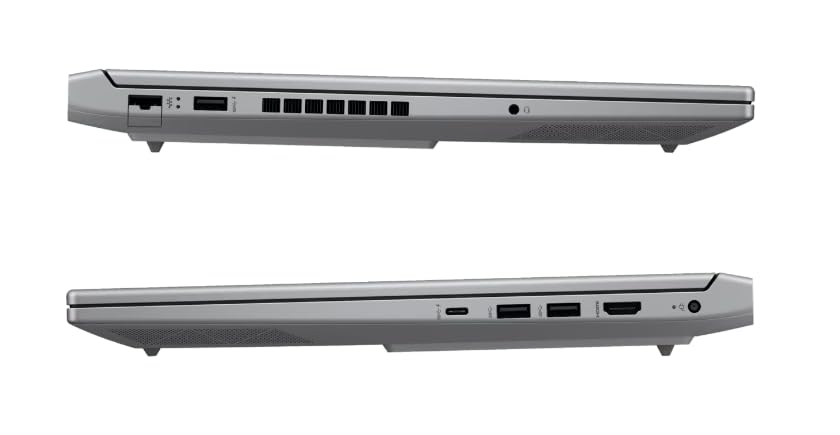
الشكل 2: الجانب view توضيح المنافذ المتاحة.
2. تشغيل الكمبيوتر المحمول
2.1 تشغيل/إيقاف التشغيل ووضع السكون
- تشغيل الطاقة: اضغط على زر الطاقة.
- اغلق: انقر فوق زر البدء في نظام التشغيل Windows، ثم حدد الطاقة > إيقاف التشغيل.
- وضع السكون: أغلق الغطاء أو حدد الطاقة > وضع السكون من قائمة ابدأ.
2.2 لوحة المفاتيح ولوحة اللمس
The laptop features a 1-zone RGB backlit full-size keyboard with HyperX tactile feedback for an enhanced gaming and typing experience. The integrated touchpad supports multi-touch gestures for navigation.
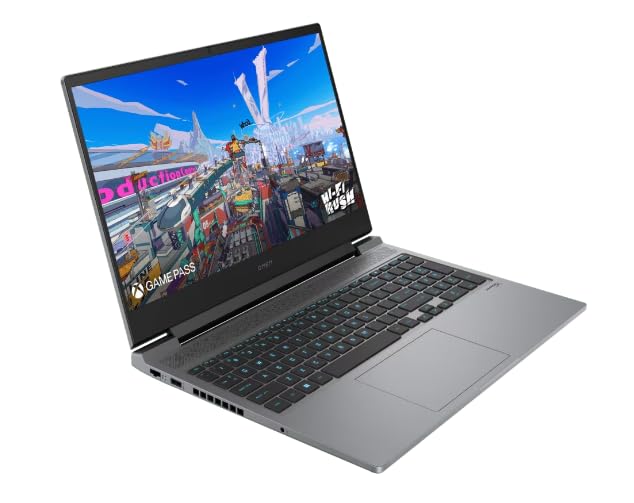
الشكل 3: تخطيط لوحة المفاتيح ولوحة اللمس.
2.3 ميزات العرض
The 16.1-inch FHD (1920 x 1080) IPS display offers a 165Hz refresh rate and 7ms response time, providing smooth and responsive visuals for gaming and multimedia. Adjust brightness and display settings through Windows display options.
2.4 الشبكة والاتصال اللاسلكي
- واي فاي: اتصل بالشبكات اللاسلكية عبر إعدادات الشبكة في نظام التشغيل ويندوز.
- بلوتوث: Pair Bluetooth-enabled devices such as headphones, mice, or game controllers.
2.5 HP True Vision 1080p FHD Camera
The integrated 1080p FHD webcam is suitable for video calls, online meetings, and streaming. Ensure proper lighting for optimal image quality.
3. الصيانة والعناية
3.1 التنظيف العام
- شاشة: استخدم قطعة قماش ناعمة وخالية من الوبر برفق دampاغسلها بالماء أو بمنظف الشاشة. تجنب المواد الكيميائية القاسية.
- لوحة المفاتيح والهيكل: Use a soft cloth. For dust, use compressed air.
- تأكد من إيقاف تشغيل الكمبيوتر المحمول وفصله عن التيار الكهربائي قبل التنظيف.
3.2 العناية بالبطارية
The laptop is equipped with a Lithium Ion battery. To maximize battery lifespan:
- تجنب درجات الحرارة القصوى.
- Do not let the battery completely discharge frequently.
- في حال تخزين الكمبيوتر المحمول لفترة طويلة، تأكد من شحن البطارية إلى حوالي 50%.
3.3 تحديثات البرامج
Regularly update your Windows operating system, drivers, and HP software to ensure optimal performance, security, and compatibility. These updates often include performance enhancements and bug fixes.
4. استكشاف المشكلات الشائعة وإصلاحها
يتناول هذا القسم المشكلات الشائعة التي قد تواجهها. للمشكلات الأكثر تعقيدًا، راجع قسم دعم HP. webموقع.
4.1 مشاكل الطاقة
- الكمبيوتر المحمول لا يعمل: تأكد من توصيل محول الطاقة بإحكام بكل من الكمبيوتر المحمول ومأخذ كهربائي يعمل. تحقق مما إذا كان ضوء مؤشر محول الطاقة مضاءً.
- البطارية لا تشحن: Verify the power adapter connection. Try a different outlet.
4.2 مشاكل العرض
- لا توجد صورة على الشاشة: Ensure the laptop is powered on. Try connecting an external monitor to check if the issue is with the laptop's display.
- صورة متقطعة أو مشوهة: قم بتحديث برامج تشغيل بطاقة الرسومات. اضبط معدل تحديث الشاشة في إعدادات ويندوز.
4.3 مشاكل الاتصال
- عدم الاتصال بشبكة Wi-Fi: تحقق من تفعيل Wi-Fi في إعدادات Windows. أعد تشغيل جهاز التوجيه والكمبيوتر المحمول.
- جهاز البلوتوث غير مقترن: تأكد من أن جهاز البلوتوث في وضع الاقتران وضمن النطاق. تحقق من إعدادات البلوتوث على جهاز الكمبيوتر المحمول الخاص بك.
5. مواصفات المنتج
| ميزة | مواصفة |
|---|---|
| ماركة | HP |
| اسم الموديل | HP laptopOMEN (ae0002tx) |
| المعالج | 14th Gen Intel® Core™ i7-14650HX (up to 5.2 GHz) |
| ذاكرة الوصول العشوائي (RAM) | 16 GB DDR5 (Max 32 GB) |
| تخزين | 1 تيرابايت SSD (محرك الحالة الصلبة) |
| بطاقة الرسوميات | NVIDIA GeForce RTX 4060 (8 GB GDDR6 مخصصة) |
| عرض | 16.1-inch FHD (1920 x 1080) IPS, 165Hz, 7ms, 300 nits |
| نظام التشغيل | ويندوز 11 هوم |
| لوحة المفاتيح | 1-zone RGB Backlit, HyperX tactile feedback |
| Webكاميرا | HP True Vision 1080p FHD |
| الاتصال | واي فاي، بلوتوث |
| الموانئ | USB (Total: 1), HDMI (Total: 1) |
| الأبعاد (الطول × العرض × السماكة) | 30L x 25W x 6Th Centimeters |
| وزن العنصر | 1.9 كيلوغرام |
| نوع البطارية | Lithium Ion (2.6 Watt Hours) |
6. معلومات الضمان
Your HP OMEN 16-ae0002TX Gaming Laptop comes with an onsite warranty. Please retain your proof of purchase for warranty claims. For detailed terms and conditions, refer to the warranty card included with your product or visit the official HP support webموقع.
7. دعم العملاء
For technical assistance, service, or further inquiries, please contact HP customer support:
- الصانع / المستورد: HP India Sales Pvt. Ltd., 24 Salarpuria Arena, Hosur Main Road, Adugodi, Bangalore-560030
- الدعم عبر الإنترنت: قم بزيارة الموقع الرسمي دعم HP Webموقع للسائقين، والأدلة، وأدلة استكشاف الأخطاء وإصلاحها.