
مقدمة
Thank you for choosing the Greadio CD03P Portable Bluetooth CD Player. This manual provides essential information for the safe and efficient operation of your device. Please read it thoroughly before use and retain it for future reference.
The Greadio CD03P is a versatile audio device featuring CD playback, Bluetooth 5.3 connectivity, dual wireless karaoke microphones, dynamic LED lights, and multiple input options including USB, TF card, and AUX. It is powered by a 4000mAh rechargeable battery, offering portability for various environments.
المنتج انتهىview
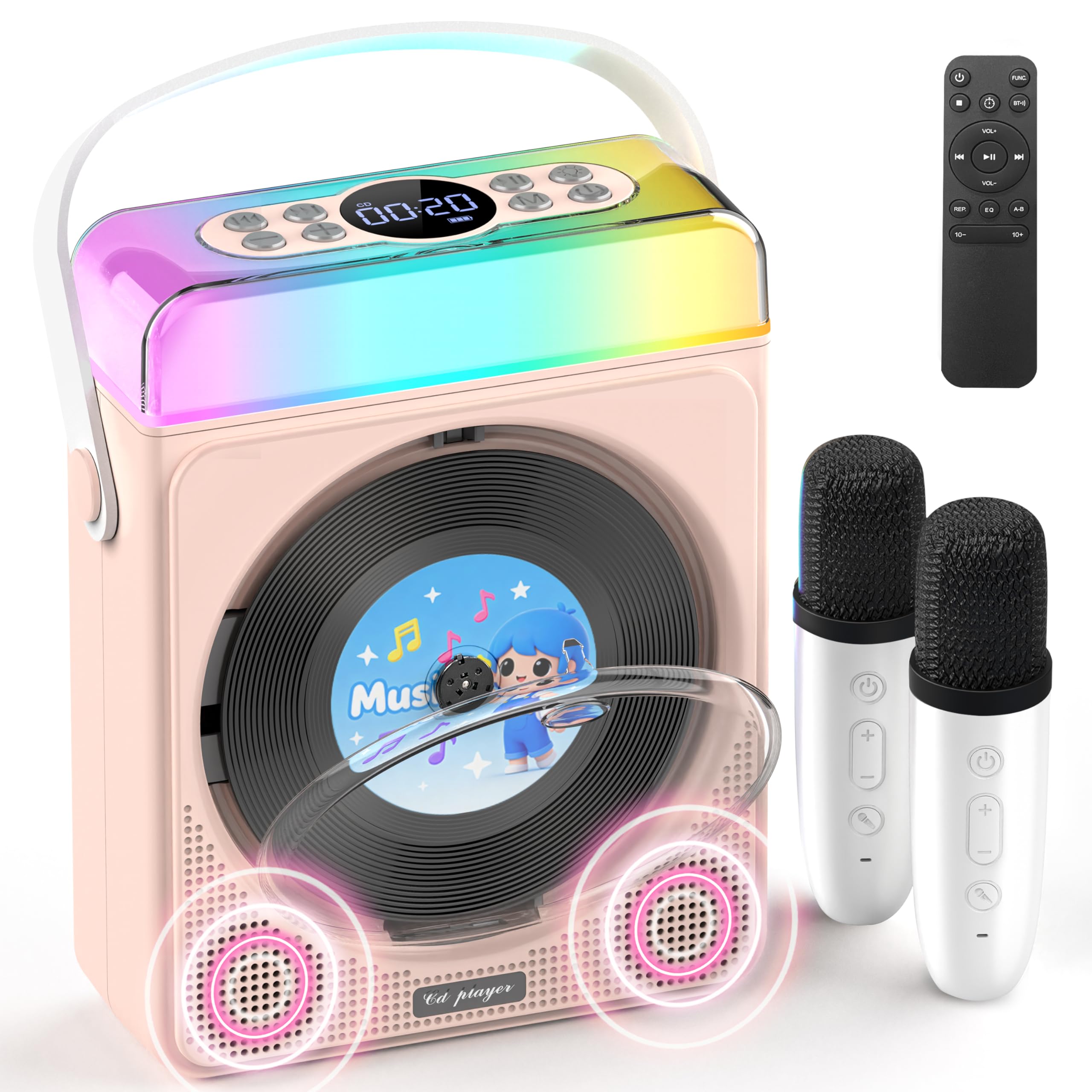
الشكل 1: Greadio CD03P Portable Bluetooth CD Player with two microphones and LED lights.

الشكل 2: قمة view of the CD03P showing control buttons and LED light bar.
محتويات الحزمة:
- Portable CD Player x 1
- ميكروفون الكاريوكي × 2
- كابل شحن من النوع C × 1
- جهاز التحكم عن بعد × 1
- كابل AUX × 1
يثبت
شحن الجهاز:
Before first use, fully charge the CD player using the provided Type-C charging cable. Connect the cable to the Type-C port on the device and a compatible 5V/2A power adapter (not included). The battery indicator on the display will show charging status.
شحن الميكروفونات:
The two wireless microphones are rechargeable. Connect them to a power source using their respective charging cables (if provided, or compatible USB cables). Each microphone offers over 30 hours of playtime on a full charge.
تعليمات التشغيل
1. تشغيل / إيقاف تشغيل الطاقة:
اضغط لفترة طويلة على زر الطاقة (⏻) on the device or remote control to turn the unit on or off.
2. اختيار الوضع:
اضغط على M (Mode) button on the device or the FUNC. button on the remote control to cycle through available modes: CD, Bluetooth, USB, TF Card, and AUX.
3. تشغيل القرص المضغوط:
- Press the release button to open the CD compartment cover.
- Carefully insert a CD (compatible with CD/CD-R/CD-RW/MP3/WMA formats) with the label side facing up.
- أغلق غطاء حجرة الأقراص المدمجة بإحكام.
- Select "CD" mode using the Mode/FUNC. button. The device will begin loading and playing the CD.
- استخدم |< و >| buttons for track navigation (short press) or fast forward/rewind (long press).
- اضغط على ◀|| زر للتشغيل أو الإيقاف المؤقت.
وصف الفيديو: This video demonstrates how to play CDs, USB, and TF cards on the Greadio CD03P. It shows inserting a CD, selecting the CD mode, and using playback controls.
4. Bluetooth Connectivity (Receiving Mode):
- اضغط على M (Mode) button until "Bluetooth" mode is selected. The display will show "BLUE" and a blinking Bluetooth icon.
- On your mobile device, enable Bluetooth and search for "CD03P".
- Select "CD03P" to pair. A confirmation tone will sound upon successful connection.
- Play audio from your mobile device, and it will stream through the Greadio CD03P speakers.
وصف الفيديو: This video illustrates the Bluetooth receiving mode, showing how to connect a mobile phone to the Greadio CD03P for audio playback.
5. Bluetooth Connectivity (Transmitting Mode):
The CD03P can transmit audio to external Bluetooth speakers or headphones when in CD, USB, TF, or AUX mode (not in Bluetooth receiving mode).
- Ensure the CD03P is in CD, USB, TF, or AUX mode.
- اضغط لفترة قصيرة على BT button on the remote control. The Bluetooth icon on the display will blink.
- Put your external Bluetooth speaker or headphones into pairing mode.
- Once connected, the Bluetooth icon on the CD03P will stop blinking. Audio will now play through the external Bluetooth device.
- To disconnect, short press the BT الزر مرة أخرى.
وصف الفيديو: This video demonstrates the Bluetooth transmitting mode, showing how to connect the Greadio CD03P to external Bluetooth speakers or headphones.
6. USB/TF Card Playback:
- Insert a USB flash drive into the USB port or a TF card into the TF card slot on the back of the device.
- اضغط على M زر (الوضع) أو FUNC. button on the remote to select "USB" or "TF" mode.
- سيقوم الجهاز تلقائيًا باكتشاف وتشغيل الصوت المتوافق files (MP3/WMA/WAV/APE/FLAC).
- استخدم |< و >| buttons for track navigation (short press) or fast forward/rewind (long press).
- اضغط على ◀|| زر للتشغيل أو الإيقاف المؤقت.
Note: For best performance with USB/TF cards, use 64GB or less. Reformat 128GB cards to FAT32 if needed.
7. مدخل AUX:
- Connect an external audio device (e.g., smartphone, MP3 player) to the AUX port on the back of the CD03P using the provided AUX cable.
- اضغط على M زر (الوضع) أو FUNC. button on the remote to select "AUX" mode.
- Play audio from your external device. The sound will be output through the CD03P speakers.
8. Karaoke Microphones:
- Turn on the microphones by pressing their power buttons. They will automatically connect to the CD03P.
- استخدم +/- buttons on the microphone to adjust microphone volume.
- اضغط على ميك button on the microphone to cycle through five voice effects: Female, Monster, Baby, Original, and KTV mode.
- اضغط على قوة button on the microphone to switch between microphone modes (e.g., adjust background music, microphone volume, reverb).
وصف الفيديو: This video demonstrates how to connect and use the wireless microphones with the Greadio CD03P, including switching voice effects and adjusting settings.
9. مصابيح LED:
- The RGB light (LED1) turns on automatically when the device is powered on.
- اضغط لفترة قصيرة على ضوء button on the device or remote to cycle through various light effects: breathing light (red, purple, blue, cyan, green, yellow, orange) and solid colors.
- اضغط لفترة طويلة على ضوء button to turn the LED lights off.
وصف الفيديو: This video showcases the dynamic LED light features of the Greadio CD03P, demonstrating how to cycle through different light modes and colors.
10. التحكم في مستوى الصوت:
استخدم المجلد+ و المجلد- buttons on the device or remote control to adjust the main speaker volume.
11. أوضاع معادلة الصوت:
اضغط لفترة قصيرة على EQ button on the remote control to switch between different equalizer modes (e.g., Pop, Jazz, Classic, Bass, Flat, Rock).
12. مؤقت النوم:
The CD03P can function as a night light with a sleep timer. Refer to the full user manual for detailed instructions on setting the sleep timer.
صيانة
- احفظ الجهاز بعيدًا عن الماء والرطوبة.
- نظّف الجهاز بقطعة قماش ناعمة وجافة. لا تستخدم منظفات أو مذيبات كاشطة.
- تجنب تعريض الجهاز لدرجات حرارة شديدة أو لأشعة الشمس المباشرة.
- Do not press the CD base directly.
- عند عدم استخدام الجهاز لفترات طويلة، قم بتخزينه في مكان بارد وجاف.
استكشاف الأخطاء وإصلاحها
| مشكلة | السبب المحتمل | حل |
|---|---|---|
| الجهاز لا يعمل. | مشكلة في البطارية أو الطاقة المنخفضة. | اشحن الجهاز بالكامل. تأكد من توصيل كابل الشحن بشكل صحيح. |
| لا يتم تشغيل القرص المضغوط أو تخطيه. | القرص المضغوط متسخ أو مخدوش أو تم إدخاله بشكل غير صحيح. | Clean the CD with a soft cloth. Ensure the CD is inserted correctly with the label side up. Try a different CD. |
| فشل اقتران البلوتوث. | Device is not in Bluetooth mode or too far from the paired device. | Ensure the CD03P is in Bluetooth receiving mode. Move devices closer. Disconnect from other Bluetooth devices. |
| الميكروفون لا يعمل. | Microphone is off, uncharged, or out of range. | Turn on the microphone. Charge the microphone. Ensure it is within range of the CD03P. |
| لا يوجد صوت. | مستوى الصوت منخفض جدًا أو مكتوم. تم اختيار وضع غير صحيح. | Increase volume. Check if the device is muted. Ensure the correct input mode (CD, Bluetooth, USB, TF, AUX) is selected. |
| الجهاز لا يستجيب. | خلل مؤقت في البرنامج. | Use a thin object to press the إعادة ضبط زر موجود في الجزء الخلفي من الجهاز. |
تحديد
| ميزة | التفاصيل |
|---|---|
| رقم الموديل | CD03P |
| أبعاد المنتج | 6.81 × 2.52 × 8.15 بوصة |
| وزن العنصر | 1.97 رطل |
| سعة البطارية | 4000 مللي أمبير (قابلة لإعادة الشحن) |
| الاتصال | Bluetooth 5.3, USB, TF Card, AUX |
| التوافق مع القرص المضغوط | CD / CD-R / CD-RW / MP3 / WMA |
| المكونات المضمنة | Portable CD Player, 2 Karaoke Microphones, Type-C Charging Cable, Remote Control, AUX Cable |
الضمان والدعم
Greadio products come with a full year of coverage. For any issues or support needs, please contact Greadio customer service. Refer to the official Greadio webقم بزيارة الموقع أو وثائق الشراء الخاصة بك للحصول على تفاصيل الاتصال.
Note: This device is designed for personal and recreational use. Any unauthorized modifications or misuse may void the warranty.