
1. المقدمة
This manual provides detailed instructions for the COLORROOM A30L1 Android 16 Tablet. Please read this manual carefully before using your device to ensure proper operation and to maximize its performance and lifespan. Keep this manual for future reference.

Image: The COLORROOM A30L1 Android 16 Tablet, showcasinتصميمها الأنيق.
2. ماذا يوجد في الصندوق
Upon unboxing your COLORROOM A30L1 tablet, verify that all the following items are included:
- COLORROOM A30L1 Android 16 Tablet
- كابل شحن USB من النوع C
- محول الطاقة
- دليل المستخدم
- حافظة حماية
- واقي الشاشة (مثبت مسبقًا أو مرفق بشكل منفصل)

Image: The COLORROOM A30L1 Tablet shown with its included accessories, including a protective case.
فيديو: فتح العلبة وعرض مميزview of the Android 16 Tablet, demonstrating its components and capabilities.
3. انتهى المنتجview
The COLORROOM A30L1 is a high-performance Android 16 tablet designed for both productivity and entertainment. It combines advanced features with a user-friendly interface.
3.1. الميزات الرئيسية
- عرض: 10-inch Full HD IPS display with 1280x800 resolution, 300 nits brightness, and 178-degree ultra-wide viewing angle. Widevine L1 certified for 1080P streaming.
- أداء: Android 16 OS, Unisoc T7200 Octa-core processor (1.6 GHz), 12nm process for improved power efficiency.
- تخزين الذاكرة: 24GB RAM (4GB physical + 20GB virtual) and 64GB internal storage, expandable up to 2TB via microSD card.
- بطارية: High-capacity 6,000mAh battery with 18W PD fast charging support.
- الاتصال: Dual-band 2.4GHz/5GHz Wi-Fi 5 (802.11ac) for high-speed internet, Bluetooth 5.0, and GPS.
- الكاميرات: 5MP front camera and 8MP rear camera.
- حماية: Facial recognition unlock and enhanced data privacy protection.
- صوتي: Dual speakers and a 3.5mm headphone jack.

Image: The tablet displaying the Android 16 interface with various application icons.

Image: A visual summary of the COLORROOM A30L1's key features, including battery, OS, CPU, cameras, and connectivity.
3.2. العرض والمرئيات
Experience vibrant colors and sharp details on the 10.1-inch IPS display. Widevine L1 certification ensures you can enjoy your favorite streaming content in full 1080P HD quality.

Image: A comparison demonstrating the superior 1080P quality with Widevine L1 versus 720P with Widevine L2.
3.3. الأداء والمعالجة
The Unisoc T7200 octa-core processor, built on a 12nm process, delivers efficient and powerful performance for smooth app usage and multitasking. Android 16 enhances security and user experience.

Image: Diagram illustrating the Unisoc T7200 Octa-core processor, highlighting its architecture and capabilities.
3.4. الذاكرة والتخزين
With 24GB of combined RAM (4GB physical + 20GB virtual) and 64GB of internal storage, the tablet handles multiple applications with ease. Expand storage up to 2TB using a microSD card for all your fileالصورة والوسائط.

Image: The tablet with a microSD card, illustrating its expandable storage capability.

Image: Visual representation of the tablet's 24GB RAM and 64GB internal storage, with up to 2TB microSD expansion.

Image: Illustrates the vast storage potential for videos and music on the tablet.
3.5. البطارية والشحن
The 6,000mAh battery provides extended usage times. With 18W PD fast charging via the Type-C port, you can quickly recharge and get back to your activities.

Image: The tablet connected to a Type-C charger, indicating fast charging.

Image: Details on the 6000mAh battery capacity and 18W PD fast charging, showing extended usage time.
3.6. الاتصال
Enjoy stable and fast internet with dual-band 2.4GHz/5GHz Wi-Fi 5. Bluetooth 5.0 allows seamless connection to wireless accessories, and built-in GPS provides accurate location services.

Image: The tablet displaying Wi-Fi and Bluetooth connection indicators.
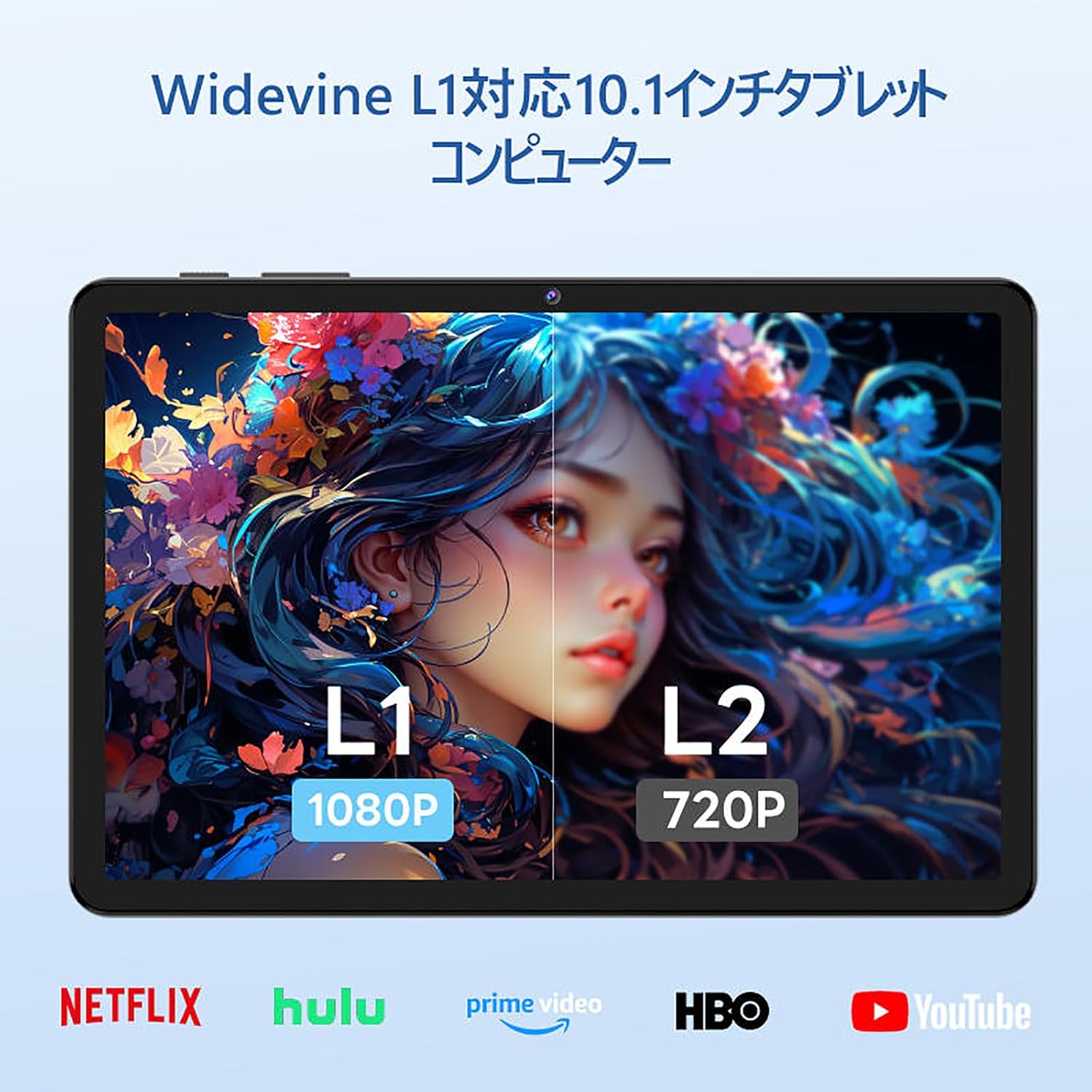
Image: The tablet showing a GPS map, indicating its navigation capabilities.
4. الإعداد
Follow these steps for the initial setup of your COLORROOM A30L1 tablet:
4.1. التشغيل الأولي واختيار اللغة
- اضغط مع الاستمرار على زر الطاقة حتى يتم تشغيل الشاشة.
- On the welcome screen, select your preferred language. For English, choose "English (United States)".
- Click "Start" to proceed.
4.2. Wi-Fi and Data Transfer
It is recommended to skip Wi-Fi connection during initial setup to avoid interruptions, especially if your Wi-Fi environment is unstable. You can connect to Wi-Fi later.
- When prompted to set up your device, click "Skip".
- If asked to connect to Wi-Fi, click "Set up offline" or "Skip". Confirm by clicking "Continue" if prompted.
4.3. إعدادات التاريخ والوقت
- Select your time zone (e.g., "Japan Standard Time").
- Adjust the date and time if necessary, then click "Next".
4.4. Screen Lock (PIN)
Setting a PIN or screen lock is recommended for security. You can skip this step and set it up later if desired.
- To set a PIN, enter your desired PIN (4 digits or more) and confirm.
- To skip, click "Skip" and confirm the skip action.
4.5. خدمات جوجل
- Review the Google Services information.
- Click "See more" multiple times until the "Agree" button appears.
- Click "Agree" to accept the terms and complete the setup.
Your tablet is now set up and ready for use.
Video: A step-by-step guide on the initial setup process for the tablet, including language selection and basic configurations.
5. تعليمات التشغيل
5.1. Basic Navigation and Gestures
- يلمس: اضغط على أيقونة لفتح تطبيق أو تحديد عنصر.
- انتقاد: مرر إصبعك على الشاشة للتنقل بين الصفحات أو المحتوى.
- التكبير والتصغير: استخدم إصبعين للتكبير أو التصغير في الصور web الصفحات.
- تقسيم الشاشة: Android 16 supports split-screen multitasking. Drag an app to one side of the screen to use two apps simultaneously.
- لقطة الشاشة: Use a three-finger swipe down gesture to capture a screenshot.

Image: The tablet screen showing various applications, demonstrating its multitasking capabilities.

Image: Various scenarios of using the tablet for entertainment, such as watching videos, reading, and video calls.

Image: More examples of the tablet being used in daily life, including during holidays and for cooking.
5.2. Media Playback and Streaming
With Widevine L1 support, you can stream high-definition content from popular services like Amazon Prime Video, Netflix, YouTube, and Hulu.

Image: The tablet displaying a high-definition video from a streaming service.
5.3. الإسقاط اللاسلكي
The tablet supports wireless projection, allowing you to mirror your screen to a larger display for an enhanced viewتجربة رائعة.
5.4. وظيفة نظام تحديد المواقع العالمي (GPS)
Utilize the built-in GPS for navigation, location-based services, and finding points of interest. The tablet supports multiple satellite systems for accurate positioning.
6. الصيانة
To ensure the longevity and optimal performance of your COLORROOM A30L1 tablet, follow these maintenance guidelines:
- تنظيف الشاشة: استخدم قطعة قماش ناعمة وخالية من الوبر لمسح الشاشة برفق. لإزالة البقع الصعبة، امسحها برفق.ampامسح القماش بالماء أو بمنظف الشاشة. تجنب المواد الكيميائية القاسية.
- تحديثات البرامج: قم بالتحقق بانتظام من تحديثات النظام وتثبيتها لضمان حصولك على أحدث الميزات والتصحيحات الأمنية وتحسينات الأداء.
- العناية بالبطارية: تجنب درجات الحرارة القصوى. لا تدع البطارية تُفرغ تمامًا بشكل متكرر. للتخزين طويل الأمد، اشحن البطارية إلى حوالي 50-60%.
- ادارة التخزين: قم بإزالة غير الضروري بشكل دوري files, apps, and cache to free up storage space and maintain performance.
- الحماية الجسدية: Use the provided protective case and screen protector to guard against scratches, drops, and impacts.
Video: Instructions on how to apply a screen protector to the tablet, ensuring a bubble-free installation.
7. استكشاف الأخطاء وإصلاحها
إذا واجهت مشكلات مع جهازك اللوحي، فراجع الحلول الشائعة التالية:
- عدم تشغيل الجهاز اللوحي: تأكد من شحن البطارية. قم بتوصيل الجهاز اللوحي بالشاحن وانتظر بضع دقائق قبل محاولة تشغيله مرة أخرى.
- الشاشة لا تستجيب: Try restarting the tablet by holding down the power button for about 10-15 seconds until it powers off, then turn it back on.
- تعطل التطبيقات/تجميدها: أغلق التطبيق الذي يُسبب المشكلة ثم أعد فتحه. إذا استمرت المشكلة، فامسح ذاكرة التخزين المؤقت للتطبيق أو أعد تثبيته. تأكد من تحديث نظام تشغيل جهازك اللوحي.
- مشكلات الاتصال بشبكة Wi-Fi: أعد تشغيل جهاز توجيه الواي فاي والجهاز اللوحي. احذف شبكة الواي فاي من جهازك اللوحي ثم أعد الاتصال بها. تأكد من أنك ضمن نطاق إشارة الواي فاي.
- الأداء البطيء: أغلق التطبيقات غير المستخدمة التي تعمل في الخلفية. امسح ذاكرة التخزين المؤقت والملفات المؤقتة. files. ضع في اعتبارك إجراء إعادة ضبط المصنع إذا استمرت مشاكل الأداء بعد خطوات استكشاف الأخطاء وإصلاحها الأخرى (قم بعمل نسخة احتياطية من بياناتك أولاً).
- مشاكل الشحن: Ensure the charging cable and adapter are securely connected and undamaged. Try using a different compatible charger and cable.
If the problem cannot be resolved using these steps, please contact customer support.
8. المواصفات
| ميزة | التفاصيل |
|---|---|
| ماركة | غرفة الألوان |
| اسم الموديل | أ30ل1 |
| نظام التشغيل | أندرويد 16 |
| حجم العرض | 10.1 بوصة |
| دقة العرض | 1280x800 Pixels (IPS) |
| العلامة التجارية وحدة المعالجة المركزية | يونيسوك |
| سرعة وحدة المعالجة المركزية | 1.6 GHz (Octa-core T7200) |
| كبش | 24 جيجابايت (4 جيجابايت فعلي + 20 جيجابايت افتراضي) |
| التخزين الداخلي | 64 جيجا بايت |
| تخزين قابل للتوسيع | تصل سعة التخزين إلى 2 تيرابايت عبر بطاقة microSD |
| سعة البطارية | 6,000 مللي أمبير |
| الشحن | 18W PD Fast Charging (Type-C) |
| نوع لاسلكي | 802.11ac (2.4GHz/5GHz Dual-band) |
| بلوتوث | بلوتوث 5.0 |
| نظام تحديد المواقع العالمي (جي بي اس) | نعم |
| الكاميرا الأمامية | 5 ميجا بكسل |
| الكاميرا الخلفية | 8 ميجا بكسل |
| وزن العنصر | 1.07 كيلوغرام |
| أبعاد الحزمة | 32.4 × 19.8 × 3.7 سم |
9. الضمان والدعم
COLORROOM offers a خدمة ضمان لمدة عام for all tablets purchased from official COLORROOM brand direct stores. This warranty covers manufacturing defects and ensures your product is free from material and workmanship flaws under normal use.
For warranty claims, technical support, or any inquiries regarding your COLORROOM A30L1 tablet, please contact COLORROOM customer service through the retailer where you purchased the product or visit the official COLORROOM webموقع للحصول على معلومات الاتصال بالدعم.
يرجى الاحتفاظ بإثبات الشراء للتحقق من صحة الضمان.