
1. المقدمة
The NZXT H2 Flow (CI-H21FB-01) is a compact vertical Mini-ITX PC case designed to maximize airflow and save space while accommodating high-performance components. It features smart cable management, tool-less access, and includes dual top fans and a premium PCIe 5.0 riser cable for a streamlined building experience.
المميزات الرئيسية:
- Hybrid Glass-and-Mesh Side Panel: Showcases your build while supporting up to a 280 mm radiator for efficient cooling.
- تصميم مضغوط: A 20.7 L volume fits most GPUs up to 331 mm, offering high-end power in a small footprint.
- High Airflow Panels: Ultra-fine mesh panels on multiple sides maximize fresh air intake and filter dust, keeping components cooler and cleaner.
- Effortless Building: Tool-less panels, integrated cable routing Velcro straps, and intuitive wire management channels simplify installation.
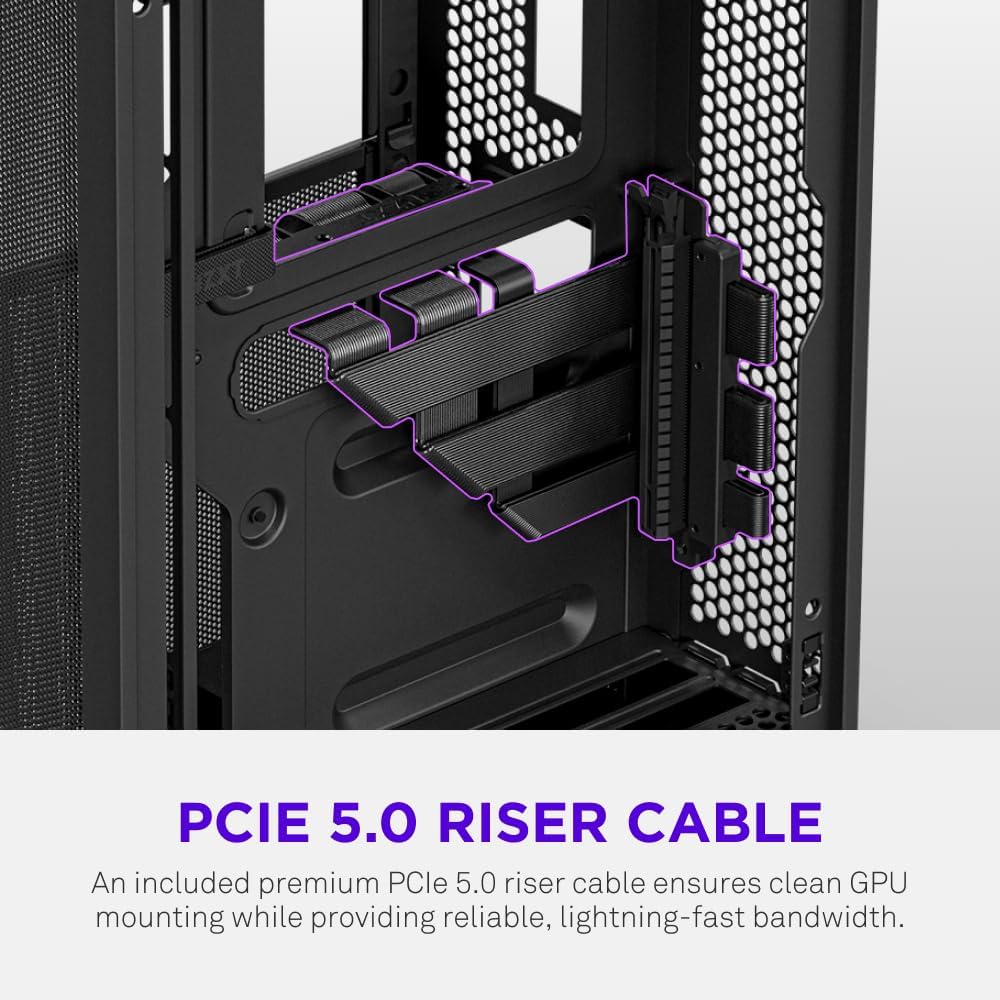
- Pre-Installed Performance: Includes a premium PCIe 5.0 riser cable for vertical GPU mounting and dual F120Q CV fans for immediate exhaust cooling.
2. معلومات السلامة
WARNING: Always disconnect power from your PC before performing any installation, maintenance, or troubleshooting. Failure to do so may result in personal injury or damage to components.
- اقرأ جميع التعليمات بعناية قبل التثبيت.
- ارتدِ سوارًا مضادًا للكهرباء الساكنة أو المس جسمًا معدنيًا مؤرضًا بشكل متكرر لمنع تلف المكونات بسبب التفريغ الكهروستاتيكي (ESD).
- Handle components with care. Avoid touching pins or exposed circuitry.
- احتفظ بالأجزاء الصغيرة ومواد التغليف بعيدًا عن متناول الأطفال.
- تأكد من وجود تهوية مناسبة حول علبة الكمبيوتر لمنع ارتفاع درجة الحرارة.
3. محتويات العبوة
Verify that all items are present in your NZXT H2 Flow package:
- NZXT H2 Flow Mini-ITX PC Case
- 2 x 120mm F120Q CV Top Fans (pre-installed)
- Premium PCIe 5.0 Riser Cable (pre-installed)
- صندوق الملحقات (يحتوي على براغي، وربطات كابلات، وأجزاء صغيرة أخرى)
4. توافق المكونات
The NZXT H2 Flow case is designed to accommodate specific component sizes for optimal performance and fit:
- اللوحة الأم: ميني آي تي إكس
- بطاقة الرسومات (GPU): Up to 331 mm in length
- المشعاع: Up to 280 mm (for liquid cooling solutions)
- مزود الطاقة (PSU): SFX/SFXL form factor is recommended for best compatibility and cable management.
- المشجعين: Includes 2 x 120mm top fans. Additional fan mounting options may be available depending on other component choices.
5. الإعداد والتثبيت
Follow these steps to assemble your PC within the NZXT H2 Flow case. Refer to your individual component manuals for specific installation details.
5.1. انتهت القضيةview والأبعاد
The NZXT H2 Flow is a compact vertical Mini-ITX case. Understanding its dimensions is crucial for planning your build.

5.2. Accessing the Case Interior
The H2 Flow features tool-less panels for easy access to the interior.

5.3. تركيب اللوحة الأم ووحدة المعالجة المركزية
Install your Mini-ITX motherboard and CPU (with cooler) before placing it into the chassis.
5.4. تركيب وحدة إمداد الطاقة (PSU)
The case supports SFX/SFXL power supplies. Mount the PSU in its designated area, typically at the bottom of the case.

5.5. إدارة الكابلات
Utilize the integrated cable routing channels and Velcro straps for a clean and organized interior.
5.6. تثبيت بطاقة الرسومات (GPU)
The H2 Flow supports GPUs up to 331 mm in length and includes a premium PCIe 5.0 riser cable for vertical mounting.

5.7. نظام التبريد
The case comes with two pre-installed 120mm F120Q CV fans at the top for exhaust. It also supports up to a 280mm radiator for liquid cooling.


5.8. انتهى المنتجview فيديو
شاهد هذا الفيديو الرسمي للحصول على نظرة عامة.view of the NZXT H2 Flow Mini-ITX PC Gaming Case.
6. تعليمات التشغيل
6.1. تشغيل/إيقاف التشغيل
Press the power button located on the front I/O panel to turn your PC on or off.
6.2. منافذ الإدخال/الإخراج الأمامية
توفر لوحة الإدخال/الإخراج الأمامية وصولاً سهلاً إلى:
- منافذ USB 3.0
- منفذ USB-C
- Audio Jack (if applicable)
Connect your peripherals such as keyboards, mice, and headsets to these ports.
7. الصيانة
7.1. تنظيف مرشحات الغبار
The NZXT H2 Flow features ultra-fine mesh panels that act as dust filters. Regularly clean these panels to maintain optimal airflow and prevent dust buildup inside your PC.
- Gently remove the mesh panels from the case.
- استخدم الهواء المضغوط أو فرشاة ناعمة لإزالة الغبار المتراكم.
- Reattach the panels securely.
7.2 تنظيف بشكل عام
استخدمي قطعة قماش ناعمةamp استخدم قطعة قماش لمسح الجزء الخارجي من العلبة. تجنب استخدام المنظفات الكاشطة أو المذيبات.
8. استكشاف الأخطاء وإصلاحها
إذا واجهت مشكلات في بناء جهاز الكمبيوتر الخاص بك، ففكر في خطوات استكشاف الأخطاء وإصلاحها الشائعة التالية:
- لا يوجد طاقة: تأكد من توصيل جميع كابلات الطاقة (من وحدة التزويد بالطاقة إلى الحائط، ومن وحدة التزويد بالطاقة إلى اللوحة الأم، ووحدة المعالجة المركزية، ووحدة معالجة الرسومات) بإحكام. تحقق من مفتاح الطاقة الموجود على وحدة التزويد بالطاقة.
- لا يوجد عرض: Verify that your monitor is connected to the graphics card (not the motherboard I/O unless using integrated graphics) and that the GPU has proper power connections. Reseat the GPU and RAM.
- ارتفاع درجة الحرارة: Check fan connections and orientation. Ensure mesh panels are clean and not obstructed. Verify CPU cooler installation and thermal paste application.
- لم يتم اكتشاف المكون: Reseat the component (GPU, RAM, storage drives). Check power and data connections.
For more complex issues, consult your individual component manuals or NZXT customer support.
9. المواصفات
| ميزة | التفاصيل |
|---|---|
| ماركة | نيوزيلاندا |
| اسم الموديل | NZXT H2 Flow |
| نوع الحالة | برج صغير |
| التوافق مع اللوحة الأم | ميني آي تي إكس |
| دعم طول وحدة معالجة الرسومات | حتى 331 ملم |
| دعم المبرد | حتى 280 ملم |
| المراوح المضمنة | 2 x 120mm F120Q CV Top Fans |
| Included Riser Cable | Premium PCIe 5.0 |
| نوع تركيب مصدر الطاقة | Bottom Mount (SFX/SFXL recommended) |
| طريقة التبريد | Air, Liquid |
| لون | أسود |
| مادة | زجاج ، معدن |
| وزن العنصر | 4.55 كيلوغرام |
| Total USB 3.0 Ports | 1 |
| Other Special Features | Tool-less Installation, Integrated Cable Management |
10. الضمان والدعم
10.1. معلومات الضمان
The NZXT H2 Flow Mini-ITX PC Case comes with a ضمان المصنع لمدة عاميرجى الاحتفاظ بإثبات الشراء الخاص بك لاستخدامه في المطالبات بالضمان.
10.2. دعم العملاء
For technical assistance, troubleshooting, or warranty inquiries, please visit the official NZXT support webالموقع أو الاتصال بفريق خدمة العملاء.
NZXT Store: Visit the NZXT Store on Amazon