
1. المقدمة
This manual provides detailed instructions for the installation, operation, and maintenance of your COUGAR OmnyX Mid Tower PC Case. Please read this manual thoroughly before beginning assembly to ensure correct setup and optimal performance. Keep this manual for future reference.
2. معلومات السلامة
- افصل دائمًا مصدر الطاقة من مقبس الحائط قبل تركيب أو صيانة أي مكونات داخل علبة الكمبيوتر.
- تعامل مع جميع المكونات بحرص لتجنب تلفها بسبب الكهرباء الساكنة. يُنصح باستخدام سوار معصم مضاد للكهرباء الساكنة.
- Avoid placing the PC case in direct sunlight, near heat sources, or in areas with high humidity.
- تأكد من وجود تهوية مناسبة حول الجهاز لمنع ارتفاع درجة الحرارة.
- احتفظ بالأجزاء والأدوات الصغيرة بعيدًا عن متناول الأطفال.
3. محتويات العبوة
تأكد من وجود جميع العناصر في الحزمة الخاصة بك:
- COUGAR OmnyX Mid Tower PC Case
- صندوق الملحقات (يحتوي على براغي، وفواصل، وربطات كابلات، وما إلى ذلك)
- دليل المستخدم (هذا المستند)
- Pre-installed 160mm fans (quantity as specified in product details)
4. انتهى المنتجview
The COUGAR OmnyX case is designed for high expandability and efficient cooling, suitable for various computing needs. Its symmetrical design allows for flexible placement, showcasing internal components from multiple angles. Key features include:
- تصميم متناظر: Allows for versatile orientation on your desk.
- Omnidirectional Dynamic Flow System (ODF): Optimized airflow for superior cooling performance.
- Quad 160mm Fans: Equipped with four large 160mm fans for powerful cooling.
- Ambidextrous I/O Module: Features 4x USB 3.0 Type-A and 2x USB 3.2 Gen 2 Type-C ports for convenient connectivity.
- آلية التحرير السريع: Tool-less panel removal for easy access and installation.
- إدارة الكابلات المبسطة: Dedicated channels and tie-down points for a clean build.
- Bracketless Vertical GPU Mount: Supports vertical GPU installation without additional brackets.
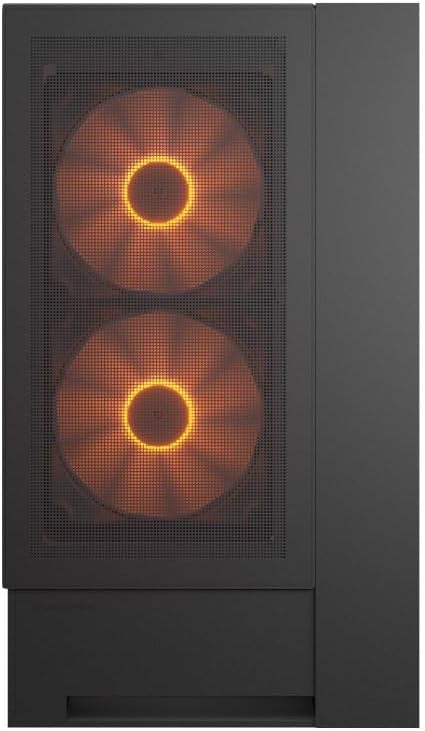
أمام view of the COUGAR OmnyX PC case, highlighting the pre-installed 160mm fans.

Illustration of the symmetrical design, allowing flexible case orientation.

Close-up of the large 160mm fans providing powerful cooling.
عرض فيديو المنتج الرسميasing the COUGAR OmnyX PC case features, including its symmetrical design, quad 160mm fans, ambidextrous I/O module, cable management, and quick release mechanism for easy installation.
5. الإعداد والتثبيت
5.1. التحضير
Before starting, ensure you have a clean, well-lit workspace and the necessary tools, including a Phillips head screwdriver.
5.2. إزالة اللوحة
The OmnyX case features a quick-release mechanism for easy panel removal. Gently pull the panels to detach them from the chassis. Refer to the exploded view لتحديد المكونات.

مفكك view of the COUGAR OmnyX case, showing removable panels and components.
5.3. تركيب اللوحة الأم
The OmnyX supports Mini ITX, Micro ATX, and ATX motherboards. Install the necessary standoffs for your motherboard size, then carefully place the motherboard and secure it with screws.

داخلي view showing the motherboard tray and mounting points.
5.4. تثبيت بطاقة الرسومات (GPU)
Install your graphics card into the appropriate PCIe slot. The case supports GPUs up to 380mm in length. For vertical GPU mounting, utilize the integrated bracketless vertical GPU mount.

Illustration of the bracketless vertical GPU mounting option.
5.5. تثبيت محرك الأقراص
The case provides bays for 2x 3.5-inch drives and 2x 2.5-inch drives. Secure your storage devices in the designated locations using the provided screws.
5.6. تركيب وحدة إمداد الطاقة (PSU)
Install your power supply unit in the rear-mount location. The case accommodates PSUs up to 200mm in length.
5.7. إدارة الكابلات
Utilize the dedicated cable management channels and tie-down points behind the motherboard tray to route and secure cables. This ensures optimal airflow and a clean internal appearance.

View illustrating the efficient cable management system within the case.
5.8. توصيلات الإدخال/الإخراج الأمامية
Connect the front panel I/O cables (USB 3.0, USB 3.2 Gen 2 Type-C, audio, power, reset) to their corresponding headers on your motherboard. The ambidextrous I/O module offers flexible placement.

Close-up of the front I/O panel with USB ports and controls.
6. تعليمات التشغيل
6.1. تشغيل/إيقاف التشغيل
After all components are installed and cables connected, plug the power supply into a wall outlet. Press the power button on the front I/O panel to turn on your PC.
6.2. التحكم في إضاءة RGB
The pre-installed fans feature RGB lighting. Control of the RGB effects and fan speed is typically managed through your motherboard's software or a dedicated controller if included. Refer to your motherboard manual for specific instructions on RGB synchronization.

Illustration depicting RGB LED and fan speed control capabilities.
7. الصيانة
Regular maintenance helps ensure the longevity and performance of your PC case:
- تنظيف الغبار: Periodically clean dust filters and internal components using compressed air or a soft brush. Dust accumulation can impede airflow and lead to overheating.
- التنظيف الخارجي: امسحي الأسطح الخارجية بقطعة ناعمة ، دamp قماش. تجنب المنظفات الكاشطة.
- فحص الكابل: Ensure all internal cables remain securely connected and neatly routed.
8. استكشاف الأخطاء وإصلاحها
إذا واجهت مشكلات، راجع خطوات استكشاف الأخطاء وإصلاحها الشائعة التالية:
- لا يوجد طاقة: Check if the power supply is properly connected to the wall outlet and the motherboard. Ensure the power button cable is correctly connected to the motherboard header.
- المراوح لا تدور: Verify that the fan cables are securely connected to the motherboard fan headers or a fan controller. Check BIOS settings for fan speed control.
- RGB Not Working: Confirm RGB cables are connected to the correct motherboard headers or controller. Check your motherboard's RGB software for settings.
- ارتفاع درجة الحرارة: Ensure all fans are functioning correctly and oriented for optimal airflow. Clean any dust buildup from filters and components. Verify CPU cooler and GPU cooler installations.
For more complex issues, consult your component manuals or contact COUGAR support.
9. المواصفات
| ميزة | مواصفة |
|---|---|
| اسم الموديل | أومني إكس |
| رقم الموديل | CGR-2WA3B-RGB |
| نوع الحالة | البرج الاوسط |
| دعم اللوحة الأم | ميني ITX / Micro ATX / ATX |
| الأبعاد (D x W x H) | 300 × 470 × 520 ملم |
| حجرات محرك الأقراص مقاس 3.5 بوصة | 2 |
| حجرات محرك الأقراص مقاس 2.5 بوصة | 2 |
| حد ارتفاع مبرد وحدة المعالجة المركزية | 170 ملم |
| حد طول وحدة معالجة الرسوميات | 380 ملم |
| الحد الأقصى لطول وحدة تزويد الطاقة | 200 ملم |
| مراوح مثبتة مسبقًا | 4 × 160 ملم |
| منافذ الإدخال / الإخراج الأمامية | 4x USB 3.0 Type-A, 2x USB 3.2 Gen 2 Type-C |
| وزن | 12.6 كجم |
10. الضمان والدعم
The COUGAR OmnyX PC Case comes with a ضمان لمدة 1 سنوات from the date of purchase. This warranty covers manufacturing defects and faulty components under normal use. It does not cover damage caused by misuse, accidents, unauthorized modifications, or improper installation.
For technical support, warranty claims, or further assistance, please visit the official COUGAR webالموقع أو اتصل بالبائع المحلي الخاص بك.
مسؤول كوغار Webموقع: www.cougar-gaming.com