
1. المقدمة
The AWithZ UK1 Mini Portable Spot Welder is a versatile and compact tool designed for precise spot welding applications, particularly for battery pack assembly and repair. Featuring a 9000W output, it offers stable welding performance while protecting battery cells. Its intuitive knob control and dual operating modes (automatic and pedal) make it suitable for both beginners and experienced users.
This manual provides essential information on the safe and effective use of your AWithZ UK1 spot welder. Please read it thoroughly before operation.

Figure 1: AWithZ UK1 Mini Portable Spot Welder with key components.
2. معلومات السلامة
- Always wear appropriate personal protective equipment, including safety glasses, during operation to protect against sparks.
- التأكد من أن منطقة العمل جيدة التهوية وخالية من المواد القابلة للاشتعال.
- This spot welder is غير مناسب for welding copper, gold, silver, or jewelry.
- When welding pure nickel, a flux may be required to achieve optimal results.
- Do not attempt to weld materials thicker than the specified limits to avoid damaging the device or producing weak welds.
- احفظ الجهاز بعيدًا عن الماء والرطوبة العالية.
- لا تقم بتفكيك الجهاز أو تعديله. يجب إحالة جميع أعمال الصيانة إلى فنيين مؤهلين.
3. محتويات العبوة
تأكد من وجود جميع العناصر في العبوة:
- 1 x AWithZ UK1 Spot Welding Unit
- 2 x WP110 Spot Welding Pens
- 1 × دواسة القدم
- 1 x Nickel-Plated Strip (approx. 2m)
- 1 x USB-C Charging Cable (approx. 0.5m)
- 1 × ورق صنفرة
- 1 × دليل التعليمات
- 1 pair of spare Soldering Pins

Figure 2: All included components in the AWithZ UK1 package.
4. انتهى المنتجview
The AWithZ UK1 is designed for portability and ease of use. It features a compact body with an intuitive control interface.
4.1 الخصائص الفيزيائية
- أبعاد: Approximately 150mm (length) x 100.5mm (width) x 48mm (height).
- وزن: Approximately 370g (main unit).
- بطارية: Built-in high-quality Lithium-polymer battery.
4.2 Interface and Controls
- Adjustment Knob/Button: Used for powering on/off, toggling options, and adjusting parameters. Rotate clockwise to increase, counter-clockwise to decrease. Short press to confirm selections.
- شاشة العرض: LED display showing current mode, gear (power level), trigger settings, and continuous weld count.
- Trigger Interface: Port for connecting the foot pedal.
- منفذ شحن من النوع C: لشحن البطارية الداخلية.
- Spot Welding Pen Installation Interface: Ports for connecting the welding pens.

الشكل 3: مفصل view of the AWithZ UK1 unit with dimensions and interface labels.
5. الإعداد
5.1 الشحن الأولي
Before first use, fully charge the spot welder. Connect the provided USB-C charging cable to the Type-C charging port on the device and to a suitable USB power adapter (not included).
- The display will indicate charging status. A full circle on the display indicates 100% charge.
- It is recommended to charge the device regularly, even during periods of inactivity, to maintain battery health.
5.2 Connecting Welding Pens
Insert the two spot welding pens into the designated installation interfaces on the front of the unit. Ensure they are securely connected.
5.3 Connecting Foot Pedal (Optional)
If using the foot pedal for manual welding, plug its connector into the Trigger Interface port on the unit.
6. تعليمات التشغيل
6.1 تشغيل/إيقاف التشغيل
لتشغيل الجهاز أو إيقاف تشغيله، الضغط لفترة طويلة مقبض التعديل.
6.2 ضبط المعلمات
The AWithZ UK1 offers precise control over welding parameters via its single knob interface. The display shows four main adjustable parameters: Mode, Gear, Trigger, and Cont Welds.
- قم بتدوير المقبض to cycle through the available options (Mode, Gear, Trigger, Cont Welds).
- Short press the knob to select the flashing option and enter adjustment mode for that parameter.
- قم بتدوير المقبض to adjust the parameter value (clockwise to increase, counter-clockwise to decrease).
- Short press the knob again to confirm the new setting and exit adjustment mode for that parameter.

Figure 4: Knob operation for parameter adjustment.
تفاصيل المعلمة:
- وضع: Selects between Automatic (A) and Pedal (M) welding modes.
- المعدات: Adjusts the welding power level from 1 to 100. Higher numbers indicate more power.
- مشغل: (Only for Automatic Mode) Sets the delay time (0.5-5 seconds) before a weld is triggered after the pens contact the material.
- Cont Welds: Sets the number of continuous welding pulses (1 or 2) for a single trigger.
6.3 عملية اللحام
The AWithZ UK1 is suitable for welding nickel-plated steel (0.1-0.35mm), pure nickel (0.1mm), and steel (0.1-0.3mm) for battery pack assembly and repair. It is commonly used for 18650 battery welding.
- تحضير المواد: Ensure the nickel strip and battery terminals are clean and free of oxidation. Use the included sandpaper if necessary.
- وضع الشريط: Place the nickel strip firmly onto the battery terminal where the weld is desired.
- وضع أقلام اللحام: Hold the welding pens perpendicular to the nickel strip, with the tips making firm contact with the strip, directly above the battery terminal. Ensure the tips are close to each other but not touching.
- بدء عملية اللحام:
- الوضع التلقائي: The weld will trigger automatically after the set delay once both pen tips make contact.
- وضع الدواسة: Press the foot pedal to trigger the weld. This offers more precise control over the timing.
- فحص اللحام: After welding, gently test the strength of the weld. Adjust the 'Gear' (power level) as needed for stronger or weaker welds.
Video 1: Demonstration of AWithZ UK1 Spot Welder operation, including interface, charging, and welding in both manual and auto modes.
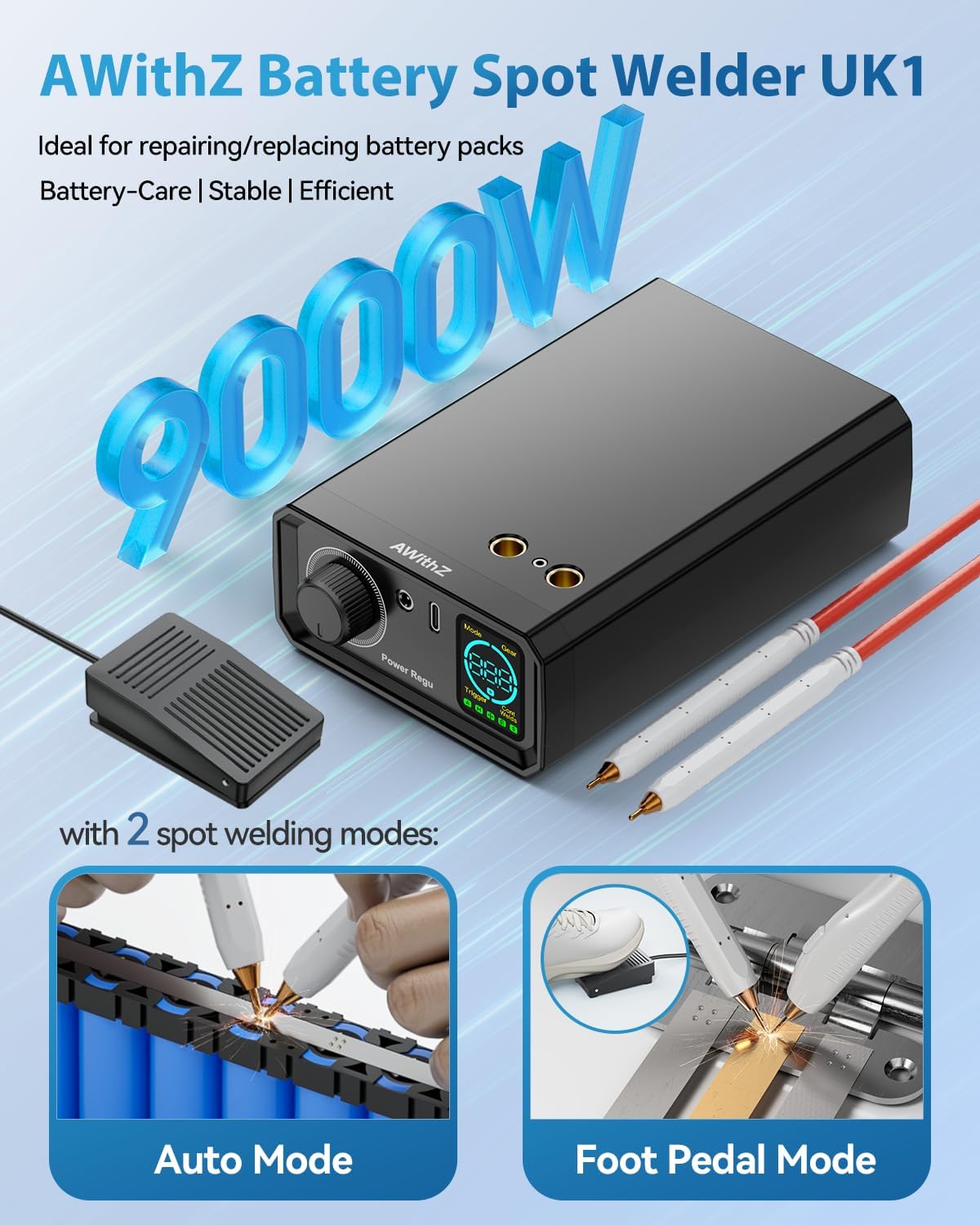
Figure 5: Illustration of Auto Mode and Foot Pedal Mode for welding.

Figure 6: Welding power levels and material compatibility.
7. الصيانة
7.1 Electrode Tip Maintenance
Over time, the welding tips may oxidize or become worn, affecting weld quality. Use the provided sandpaper to gently polish the tips to remove any oxide layer. Replace the soldering pins if they become excessively worn or damaged.
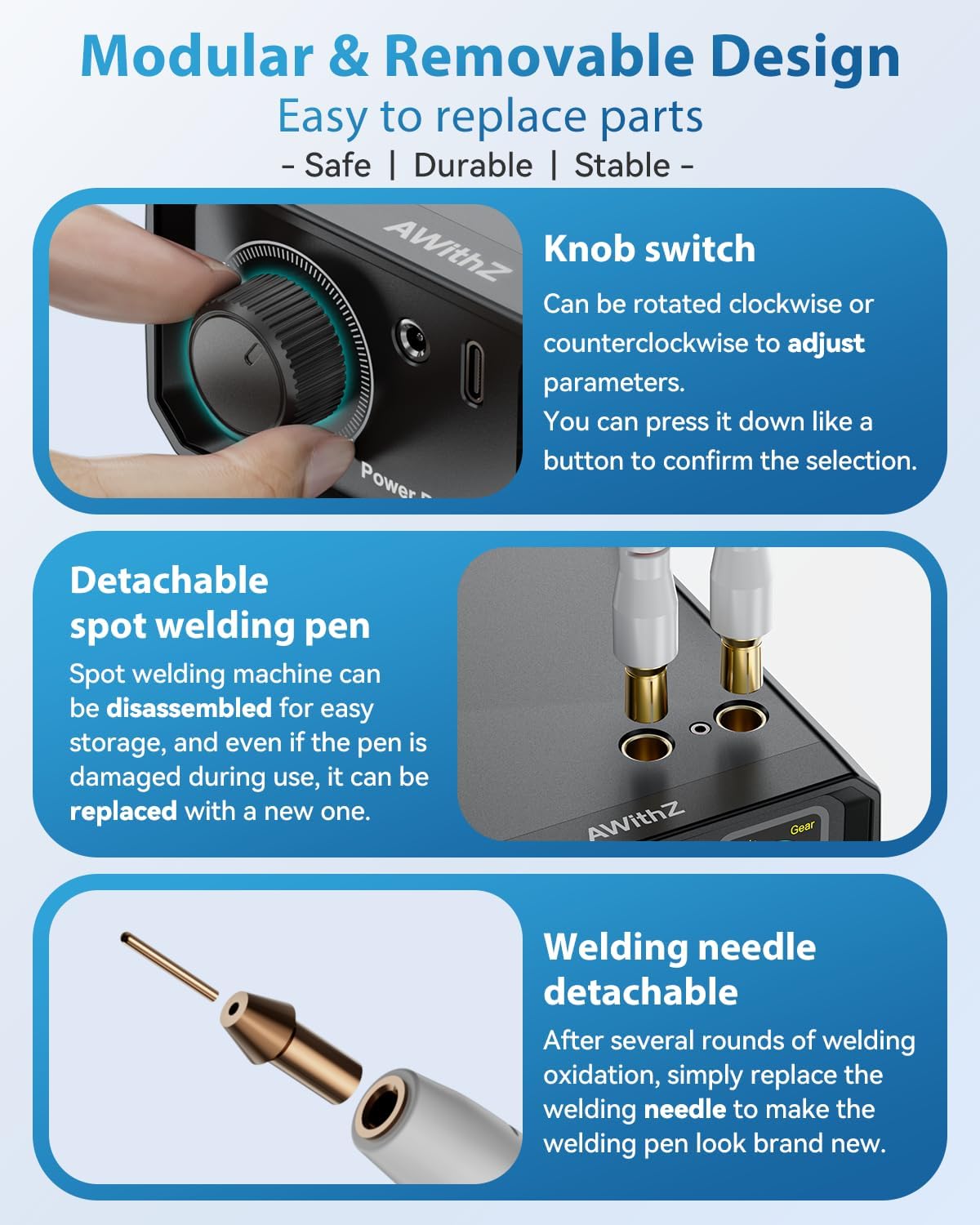
Figure 7: Detachable welding pen and replaceable welding needle.
7.2 التخزين
Store the device in a cool, dry place when not in use. Detach the welding pens for easier storage and portability.
8. استكشاف الأخطاء وإصلاحها
- Weak or Inconsistent Welds:
- Ensure welding tips are clean and polished.
- Increase the 'Gear' (power level) setting.
- Verify the material thickness is within the specified range.
- Ensure firm contact between welding pens, nickel strip, and battery terminal.
- الجهاز لا يعمل:
- تحقق من مستوى شحن البطارية وأعد شحنها إذا لزم الأمر.
- Ensure the power button (knob) is long-pressed correctly.
- ارتفاع درجة الحرارة: The device features intelligent thermal protection and auto-shutoff after 8 minutes of inactivity to prevent overheating. Allow the device to cool down if it becomes excessively warm.
9. المواصفات
| ميزة | التفاصيل |
|---|---|
| الشركة المصنعة | AWithZ |
| نموذج | المملكة المتحدة1 |
| أبعاد المنتج (الطول × العرض × الارتفاع) | 15 × 10 × 4.8 سم |
| الوزن (الوحدة الرئيسية) | حوالي 370 جرام |
| نوع البطارية | ليثيوم بوليمر (مضمن) |
| انتاج الطاقة | 9000 واط |
| Weldable Nickel-Plated Steel Thickness | 0.1 - 0.35 ملم |
| Weldable Pure Nickel Thickness | 0.1 ملم |
| Weldable Steel Thickness | 0.1 - 0.3 ملم |
| أوضاع التشغيل | Automatic, Pedal (Manual) |
| مستويات تعديل الطاقة | 1 - 100 |
10. الضمان والدعم
AWithZ is committed to providing reliable products and excellent customer service. If you have any questions, concerns, or require technical assistance regarding your UK1 Mini Portable Spot Welder, please contact AWithZ customer support through the retailer where you purchased the product.