مقدمة
This manual provides essential information for the setup, operation, and maintenance of your Generic 2026 Smartwatch T800 T900 Ultra. Designed for both men and women, this smartwatch features an HD display, heart rate monitor, notification capabilities, and sport tracking. Please read this manual thoroughly to ensure proper use and to maximize the functionality of your device.
يثبت
ماذا يوجد في الصندوق
Carefully unpack your smartwatch and ensure all components are present:
- Smartwatch unit (with pre-installed silicone band)
- Additional mesh band
- كابل شحن مغناطيسي
- دليل المستخدم (هذا المستند)
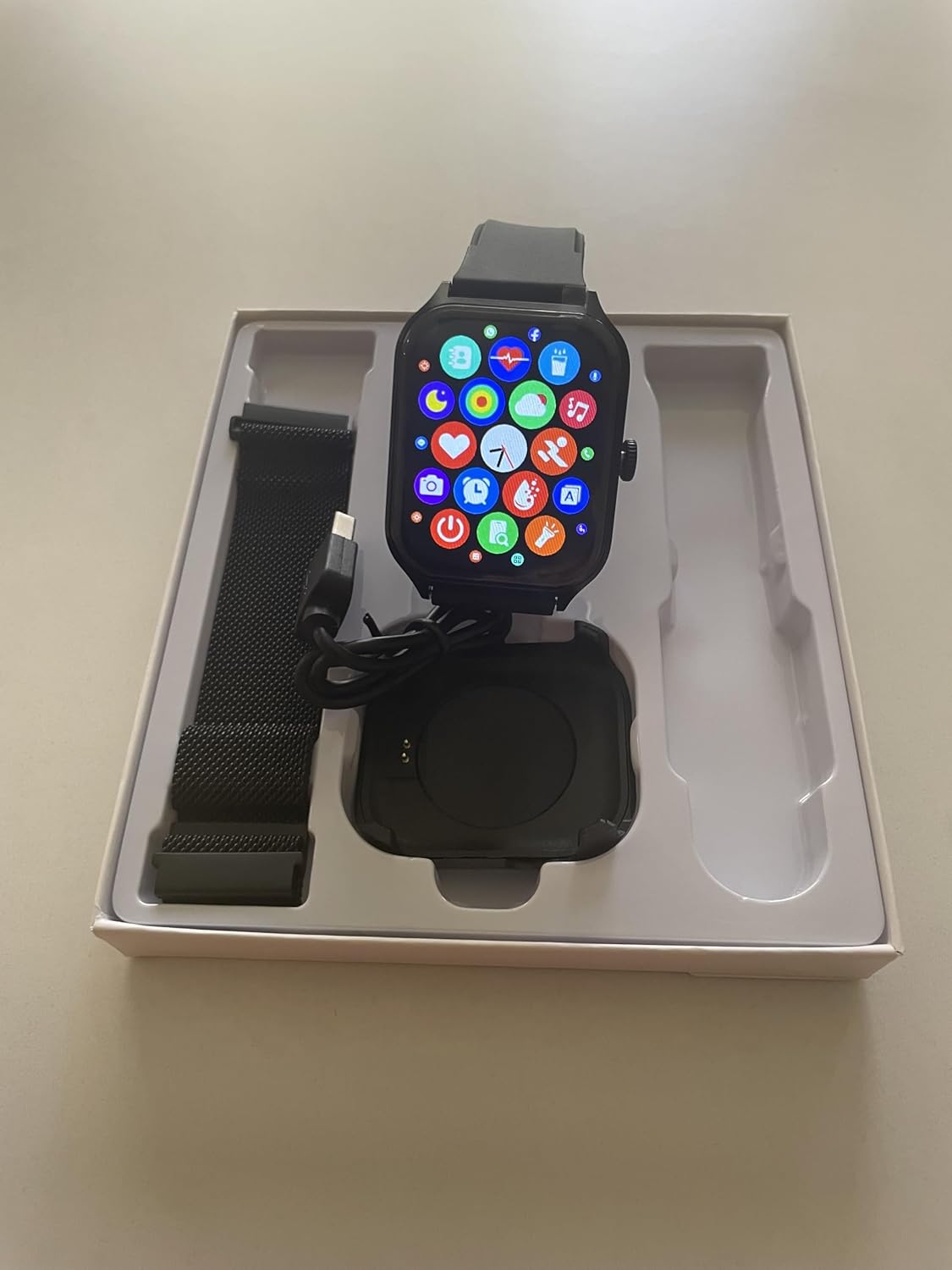
Figure 1: Smartwatch and accessories as packaged.
شحن الساعة الذكية
Before initial use, fully charge your smartwatch. The device uses a custom magnetic charging cable.
- Connect the USB end of the magnetic charging cable to a compatible USB power adapter (not included) or a computer's USB port.
- Align the magnetic end of the charging cable with the charging pins on the back of the smartwatch. The magnets will snap into place.
- The watch display will indicate charging status. Allow approximately 2.5 hours for a full charge. A full charge provides up to 14 days of use or 20 days on standby.

Figure 2: Close-up of the smartwatch's rear, highlighting the charging pins.
Attaching/Changing Wristbands
The smartwatch comes with a pre-installed silicone band and an additional mesh band. Both bands feature a quick-release design for easy interchangeability.
- To remove a band, locate the small pin on the underside of the band where it connects to the watch body. Slide the pin inwards to release the band.
- To attach a new band, align one end of the pin with the corresponding hole on the watch body. Slide the other end of the pin inwards and guide it into the remaining hole. Release the pin to secure the band.
- Gently tug on the band to ensure it is securely attached before wearing.

Figure 3: Smartwatch with interchangeable bands.
تشغيل/إيقاف التشغيل
- لتشغيل: اضغط باستمرار على الزر الجانبي حتى تضيء الشاشة.
- لإيقاف التشغيل: اضغط مع الاستمرار على الزر الجانبي، ثم حدد خيار "إيقاف التشغيل" على الشاشة.
Connecting to the Companion App
To unlock the full potential of your smartwatch, download and connect to the dedicated companion app on your Android device.
- Scan the QR code provided in the quick start guide (or search for the app name in your device's app store) to download the app.
- تأكد من تمكين Bluetooth على هاتفك الذكي.
- Open the companion app and follow the on-screen instructions to pair your smartwatch.
- Once paired, the app will synchronize data and allow for further customization of watch faces and settings.
تعليمات التشغيل
الملاحة الأساسية
- شاشة تعمل باللمس: مرر لليسار، لليمين، للأعلى، للأسفل للتنقل بين القوائم والميزات. انقر لاختيار خيار.
- Side Button/Digital Crown: Use the side-mounted digital crown for quick and precise navigation through watch functions, or to return to the home screen.
تخصيص وجوه الساعة
Personalize your smartwatch with a variety of watch faces available through the companion app.
- افتح تطبيق المرافق على هاتفك الذكي.
- Navigate to the 'Watch Face Gallery' or 'Customization' section.
- Browse through the available designs and select your preferred watch face.
- Follow the app's instructions to sync the new watch face to your smartwatch.
مراقبة الصحة
ساعتك الذكية مزودة بميزات متنوعة لمراقبة الصحة:
- مراقب معدل ضربات القلب: Access the heart rate feature on your watch to measure your current heart rate. Data is recorded and viewمتوفر في التطبيق المصاحب.
- تتبع النوم: Wear your smartwatch to bed to track your sleep patterns. Detailed sleep data can be viewed في التطبيق المصاحب.
- تتبع النشاط: The watch tracks your daily steps, distance, and calories burned. This data is synchronized with the companion app.
- ضغط الدم ونسبة الأكسجين في الدم: The smartwatch can measure blood pressure and blood oxygen levels. These measurements are for reference only and should not be used for medical diagnosis.
Notifications & Calls
ابق على اتصال دائم من خلال تلقي الإشعارات وإدارة المكالمات مباشرة من معصمك.
- إشعارات: Once paired with your smartphone, the smartwatch will display incoming call alerts, text messages, and app notifications. Manage notification settings via the companion app.
- إجراء/استقبال المكالمات: Use the built-in microphone and speaker to make and receive calls directly from your smartwatch when connected to your phone via Bluetooth.
تتبع الرياضة
The smartwatch supports over 100 different sports modes to help you track your workouts.
- Navigate to the 'Workout' or 'Sport' section on your smartwatch.
- اختر النشاط الذي ترغب فيه (مثل الجري، ركوب الدراجات، المشي).
- The watch will begin tracking relevant metrics such as duration, heart rate, and calories.
- End your workout session on the watch, and the data will synchronize with the companion app for detailed analysis.
صيانة
تنظيف ساعتك الذكية
للحفاظ على مظهر ووظائف ساعتك الذكية:
- امسح الشاشة وجسم الساعة بقطعة قماش ناعمة وخالية من الوبر.
- بالنسبة للبقع العنيدة، قم بالتدليك برفقampاغسل قطعة القماش بالماء. تجنب استخدام المواد الكيميائية القاسية أو المواد الكاشطة.
- Clean the wristbands regularly, especially after workouts, to prevent skin irritation.
مقاومة الماء
The smartwatch has an IP68 rating, indicating it is resistant to dust and can withstand immersion in water up to 1.5 meters for 30 minutes. It is suitable for daily use, including hand washing and light rain.
مهم: While water-resistant, avoid prolonged immersion, hot water, or exposure to steam, as this may compromise the seal and cause damage. Do not press buttons underwater.
استكشاف الأخطاء وإصلاحها
إذا واجهت مشاكل مع ساعتك الذكية، فجرب الخطوات التالية:
- الساعة لا تعمل: تأكد من أن الساعة مشحونة بالكامل.
- لا يمكن الاقتران بالهاتف الذكي: Ensure Bluetooth is enabled on your phone and the smartwatch is within range. Try restarting both devices.
- بيانات صحية غير دقيقة: تأكد من أن الساعة مُحكمة على معصمك، ليست ضيقة جدًا ولا واسعة جدًا. نظّف المستشعرات الموجودة على ظهر الساعة.
- عدم ظهور الإشعارات: Check notification settings in the companion app and your smartphone's system settings to ensure permissions are granted.
- الشاشة لا تستجيب: Try restarting the smartwatch by holding down the side button.
If problems persist, refer to the companion app's help section or contact customer support.
تحديد
| ميزة | التفاصيل |
|---|---|
| رقم الموديل | ت800 |
| حجم الشاشة | 1.5 بوصة |
| دقة | 240 × 240 |
| وزن العنصر | 5.5 أونصة |
| سعة تخزين الذاكرة | 32 جيجا بايت |
| معيار الاتصال اللاسلكي | بلوتوث |
| موديلات الهواتف المتوافقة | أجهزة أندرويد |
| مدخلات واجهة الإنسان | الأزرار، شاشة اللمس |
| عرض النطاق | 0.8 بوصة |
| الشركة المصنعة | Mianyang yiamier electronic ltd. |
الضمان والدعم
للحصول على معلومات الضمان أو الدعم الفني أو أي مساعدة إضافية، يرجى الرجوع إلى الموقع الرسمي للشركة المصنعة. website or contact their customer service directly. Details can typically be found on the product packaging or within the companion app's 'About' section.


