
CP PLUS CP-UVR-0801E1-IC2
CP PLUS CP-UVR-0801E1-IC2 8 Channel Full HD DVR User Manual
Model: CP-UVR-0801E1-IC2 | Brand: CP PLUS
1. المقدمة
This manual provides comprehensive instructions for the installation, operation, and maintenance of your CP PLUS CP-UVR-0801E1-IC2 8 Channel Full HD DVR. Please read this manual thoroughly before using the device to ensure proper and safe operation.
المنتج انتهىview
The CP PLUS CP-UVR-0801E1-IC2 is a high-performance 8-channel Full HD Digital Video Recorder designed for robust surveillance systems. It supports various camera inputs, including AHD, TVI, CVI, CVBS, and IP cameras, up to 2MP resolution, offering versatile compatibility for different security setups.
المميزات الرئيسية:
- 8 Channel Full HD DVR: Supports AHD, TVI, CVI, CVBS & IP camera inputs up to 2MP for hybrid compatibility.
- ضغط الفيديو H.265+: Saves storage and bandwidth while maintaining smooth video playback.
- Remote Monitoring Anywhere: الوصول المباشر view or playback remotely via CP Plus app and CMS software.
- مخرج فيديو مزدوج: HDMI and VGA outputs available for high-resolution display on monitors or TVs.
- كشف الحركة الذكية: Enables efficient surveillance by recording only when activity is detected.
- دعم الكاميرات المتعددة: Record and manage up to 8 cameras for complete coverage of your premises.
2. معلومات السلامة
Please observe the following safety precautions to prevent damage to the device and ensure personal safety:
- تأكد من أن مصدر الطاقة يطابق الحجم المحددtagالمتطلبات.
- لا تعرض جهاز التسجيل الرقمي للماء أو الرطوبة.
- تجنب وضع جهاز التسجيل الرقمي في ضوء الشمس المباشر أو بالقرب من مصادر الحرارة.
- لا تسد فتحات التهوية.
- استخدم فقط الملحقات المحددة من قبل الشركة المصنعة.
- قم بإحالة جميع أعمال الصيانة إلى موظفي الخدمة المؤهلين.
3. محتويات العبوة
تأكد من وجود جميع العناصر في العبوة:
- DVR main unit
- محول الطاقة
- ماوس USB
4. انتهى المنتجview
Familiarize yourself with the components and interfaces of the DVR.
الجبهة والجانب View

الصورة: الأمامية والجانبية view of the CP PLUS CP-UVR-0801E1-IC2 DVR, showing its compact black casing and ventilation on the side.
واجهات اللوحة الخلفية
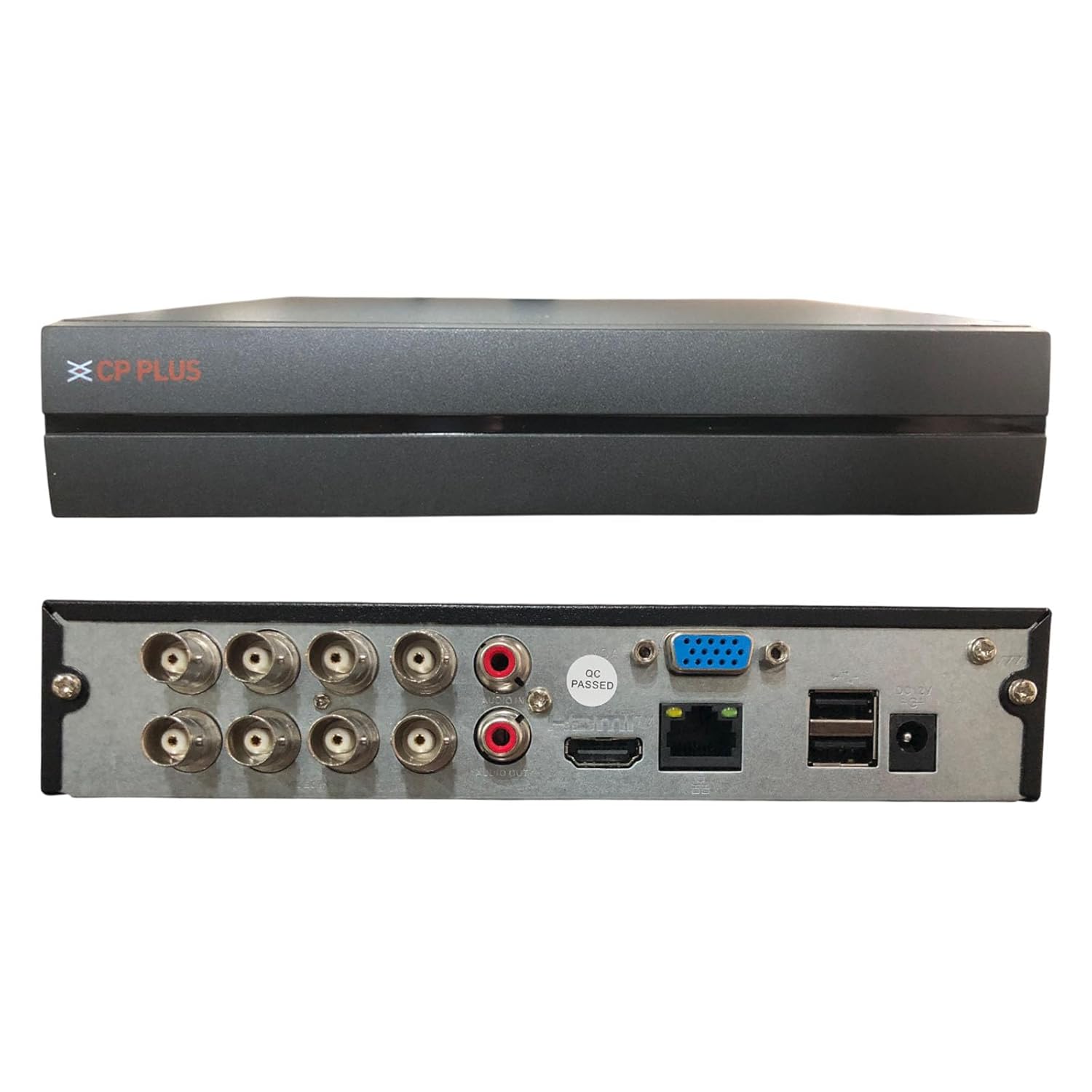
Image: Rear panel of the CP PLUS CP-UVR-0801E1-IC2 DVR, displaying various input/output ports including BNC connectors for cameras, RCA audio inputs/output, VGA, HDMI, Ethernet, USB ports, and power input.
- مدخلات فيديو BNC: Connect up to 8 analog HD or CVBS cameras.
- Audio Inputs/Output (RCA): لتسجيل وتشغيل الصوت.
- مخرج في جي ايه: قم بتوصيله بشاشة VGA.
- مخرج HDMI: Connect to an HDMI monitor or TV for high-resolution display.
- منفذ إيثرنت (RJ45): For network connection and remote access.
- منافذ USB: For mouse connection, USB backup, or external storage.
- مدخلات الطاقة DC 12V: قم بتوصيل محول الطاقة المرفق.
5. الإعداد والتثبيت
Follow these steps to set up your DVR system:
- تركيب القرص الصلب (اختياري): If a hard drive is not pre-installed, open the DVR casing, mount the HDD, and connect the SATA power and data cables. Secure the HDD with screws.
- ربط الكاميرات: Connect your analog HD or CVBS cameras to the BNC video input ports on the rear panel. For IP cameras, ensure they are on the same network as the DVR and add them through the DVR's network settings.
- توصيل الشاشة: Connect a monitor to either the VGA or HDMI output port.
- توصيل الماوس: قم بتوصيل فأرة USB بأحد منافذ USB.
- إتصال شبكة: Connect an Ethernet cable from the DVR's RJ45 port to your router or network switch for remote access capabilities.
- تشغيل الطاقة: Connect the provided power adapter to the DC 12V input port and then plug it into a power outlet. The DVR will power on automatically.
- معالج الإعداد الأولي: Upon first boot, the DVR will guide you through an initial setup wizard for language, date/time, network settings, and password creation.
6. تعليمات التشغيل
This section covers basic operation of your DVR.
يعيش View
بعد التشغيل، سيعرض جهاز التسجيل الرقمي البث المباشر view من بين جميع الكاميرات المتصلة. يمكنك التبديل بين وضع الكاميرا الواحدة view وشبكة متعددة الكاميرات view using the on-screen controls or mouse right-click menu.
تسجيل
- التسجيل المستمر: Configure channels for continuous recording via the Main Menu > Record > Schedule settings.
- تسجيل كشف الحركة: Enable motion detection for specific channels in Main Menu > Alarm > Motion Detect. The DVR will record only when motion is detected, saving storage space.
- التسجيل اليدوي: انقر على أيقونة التسجيل في البث المباشر view واجهة لبدء/إيقاف التسجيل اليدوي.
التشغيل
لإعادةview تم تسجيل فوtage:
- انقر بزر الماوس الأيمن على البث المباشر view screen and select "Playback" or navigate to Main Menu > Playback.
- Select the date and channels you wish to review.
- Use the timeline to navigate through recordings. Green segments typically indicate continuous recording, while red segments indicate motion-triggered events.
المراقبة عن بعد
The DVR supports remote access via mobile devices and PC software:
- تطبيق الهاتف المحمول: Download the official CP Plus mobile application (e.g., "CP Plus gCMOB" or similar) from your device's app store. Add your DVR using its serial number or IP address.
- CMS Software: Install the CP Plus CMS (Central Monitoring Software) on your PC. This software allows for centralized management of multiple DVRs/NVRs.
- Ensure your DVR is connected to the internet and port forwarding is configured on your router if direct IP access is desired (P2P/Cloud access usually bypasses this).
7. الصيانة
Regular maintenance ensures optimal performance and longevity of your DVR.
- تنظيف: Gently wipe the exterior of the DVR with a soft, dry cloth. Do not use liquid cleaners or aerosols. Ensure ventilation openings are free from dust and debris.
- تحديثات البرامج الثابتة: Periodically check the official CP PLUS webموقع لتحديثات البرامج الثابتة. يمكن لتحديث البرامج الثابتة تحسين الأداء، وإضافة ميزات جديدة، وإصلاح الأخطاء. اتبع التعليمات المرفقة مع تحديث البرامج الثابتة بعناية.
- حالة القرص الصلب: Monitor the health of your hard drive through the DVR's system information. Consider replacing the HDD if errors or warnings appear.
- أمان كلمة المرور: Regularly change your DVR's password to a strong, unique combination of characters.
8. استكشاف الأخطاء وإصلاحها
يتناول هذا القسم المشكلات الشائعة التي قد تواجهها.
| مشكلة | السبب المحتمل | حل |
|---|---|---|
| لا يوجد إخراج فيديو على الشاشة. | Incorrect cable connection, wrong input selected on monitor, DVR not powered on. | Check HDMI/VGA cable connections. Ensure monitor is on correct input. Verify DVR power. Try a different monitor or cable. |
| الكاميرات لا تعرض البيانات. | Loose BNC connection, camera power issue, incompatible camera type, faulty camera. | Check BNC connections. Ensure cameras are powered. Verify camera compatibility (AHD, TVI, CVI, CVBS, IP). Test with a known working camera. |
| لا يمكن الوصول إلى جهاز التسجيل الرقمي عن بُعد. | Network configuration issues, incorrect app settings, firewall blocking. | Ensure DVR is connected to the internet. Verify network settings (IP address, gateway, DNS). Check app settings (serial number/IP). Consult your router manual for port forwarding if necessary. |
| لا تسجيل. | No hard drive, hard drive not initialized, recording schedule not set, hard drive full. | Install/initialize HDD. Configure recording schedule. Check HDD status and free space. Format HDD if necessary (will erase data). |
If the problem persists, please contact CP PLUS technical support.
9. المواصفات
Detailed technical specifications for the CP PLUS CP-UVR-0801E1-IC2 DVR:
| رقم الموديل | CP-UVR-0801E1-IC2 |
| القنوات | 8 قنوات |
| ضغط الفيديو | H.265 + |
| Supported Camera Resolution | Up to 2MP (Analog HD, IP) |
| مدخلات الفيديو | 8 x BNC (AHD, TVI, CVI, CVBS & IP) |
| مخرجات الفيديو | 1 × اتش دي ام اي، 1 × في جي ايه |
| Audio Inputs/Output | RCA (specific number not detailed, typically 1-4 inputs, 1 output) |
| واجهة الشبكة | منفذ إيثرنت واحد من نوع RJ45 |
| واجهة USB | 2 منفذ USB 2.0 |
| تخزين | Supports 1 SATA HDD (capacity not specified, typically up to 6TB or 8TB) |
| مزود الطاقة | تيار مستمر 12 فولت |
| أبعاد المنتج (الطول × العرض × الارتفاع) | 25 × 23 × 4.5 سنتيمتر |
| وزن العنصر | 1.1 كجم (1 كجم 100 جم) |
Note: Specifications are subject to change without prior notice. For the most up-to-date information, please refer to the official CP PLUS webموقع.
10. الضمان والدعم
معلومات الضمان
For warranty terms and conditions, please refer to the warranty card included with your product or visit the official CP PLUS webالموقع. احتفظ بإيصال الشراء الخاص بك كإثبات للشراء في حالة مطالبات الضمان.
الدعم الفني
If you require technical assistance or have questions regarding your CP PLUS DVR, please contact CP PLUS customer support:
- الشركة المصنعة: Aditya Infotech Limited, CP PLUS
- رقم التواصل: 8800952952 (as per provided data)
- Webموقع: Visit the official CP PLUS webالموقع الخاص بموارد الدعم والأسئلة الشائعة ونماذج الاتصال.
Ask a question about this manual
Ask about setup, troubleshooting, compatibility, parts, safety, or missing instructions. Manuals+ will review the question and use this page’s manual context to help answer it.