
مقدمة
This manual provides detailed instructions for the setup, operation, and maintenance of your TELE System UP Stick Google TV 4K UHD HDMI streaming device. Please read this manual thoroughly before using the device to ensure proper functionality and to maximize your viewتجربة رائعة.

Image: The TELE System UP Stick, an Ultra HD 4K Streaming Player, featuring Google TV branding and logos for Dolby, HDMI, HEVC, and Bluetooth technologies.
ماذا يوجد في الصندوق
تأكد من تضمين جميع العناصر التالية في الحزمة الخاصة بك:
- TELE System UP Stick Google TV 4K UHD HDMI device
- جهاز التحكم عن بعد بالبلوتوث
- بطاريات لوحدة التحكم عن بعد
- HDMI Cable/Extender
- Quick Start Guide and Warranty Sheet

الصورة: الجبهة view of the TELE System UP Stick Google TV 4K UHD HDMI device, showing its compact design and the 'UP Stick' logo with a green indicator light.
تعليمات الإعداد
1. توصيل الجهاز
- Insert the UP Stick: Plug the TELE System UP Stick directly into an available HDMI port on your television. If space is limited, use the provided HDMI extender cable.
- توصيل الطاقة: Connect the power adapter (not explicitly listed in box, but implied by "Power=5V=1A" on back image) to the UP Stick and then to a power outlet. The device can also be powered via a TV's USB port (0.5A is sufficient).
- حدد إدخال HDMI: Turn on your television and select the corresponding HDMI input source to which the UP Stick is connected.
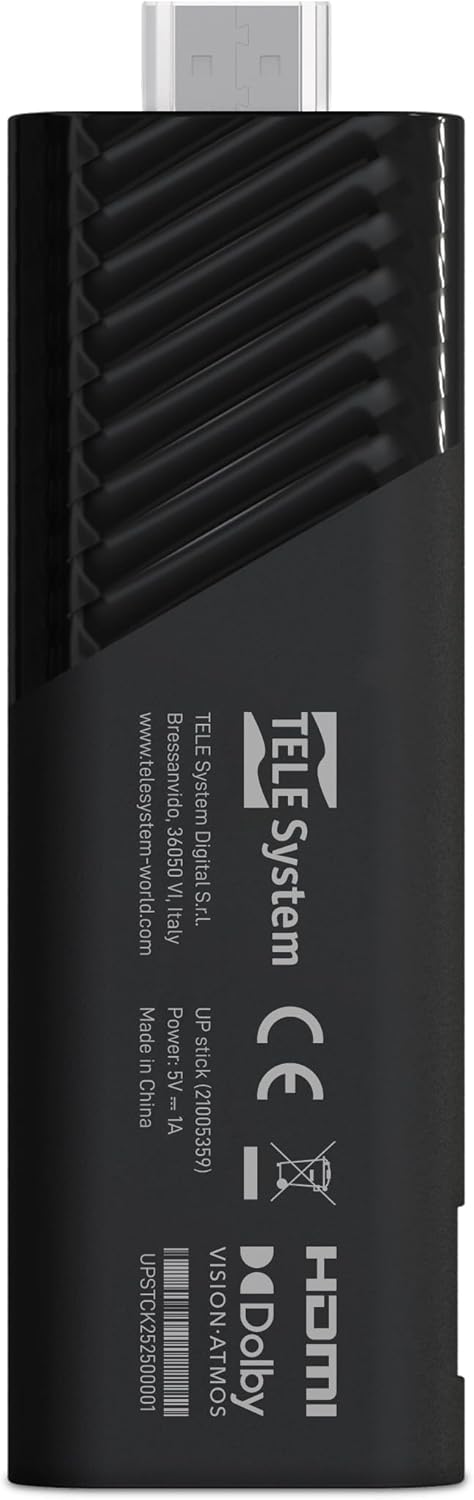
الصورة: الخلف view of the TELE System UP Stick, displaying regulatory marks, HDMI connector, and power input specifications (5V=1A).
2. الاقتران التحكم عن بعد
Upon first use, the remote control may need to be paired with the UP Stick:
- Insert the provided batteries into the Bluetooth remote control.
- Follow the on-screen instructions to pair the remote. Typically, this involves pressing and holding specific buttons (e.g., Home and Back) simultaneously until a pairing confirmation appears on the screen.

Image: The TELE System UP Stick remote control, featuring a prominent voice control button and dedicated buttons for popular streaming services like YouTube, Netflix, Prime Video, and Disney+.
3. الإعداد الأولي للبرنامج
Once connected and powered on, the device will guide you through the initial setup process:
- اختيار اللغة: اختر لغتك المفضلة.
- اتصال واي فاي: Select your Wi-Fi network from the list and enter the password. The device supports dual-band Wi-Fi for stable 4K streaming.
- تسجيل الدخول إلى حساب جوجل: Sign in with your Google account. This is necessary to access Google TV features, download apps from the Google Play Store, and use Google Assistant.
- Google TV Configuration: Follow the prompts to configure Google TV, including accepting terms of service and setting up personalized recommendations.

Image: A screenshot of the Google TV interface, displaying icons for popular streaming services such as Netflix, Prime Video, Apple TV, Disney+, and YouTube, indicating broad app compatibility.
تعليمات التشغيل
التنقل في تلفزيون جوجل
The Google TV interface organizes your content from various streaming services into a single, personalized home screen. Use the remote control's directional pad to navigate through menus, select content, and launch applications.
- الشاشة الرئيسية: Displays recommended content, installed apps, and quick access to different categories (Movies, Shows, Apps, Library).
- التطبيقات: Access all your installed applications. You can download more from the Google Play Store.
- يبحث: Use the search function to find specific titles, actors, or genres across all your streaming services.
Using Google Assistant (Voice Control)
The remote control features a dedicated button for Google Assistant. Press this button and speak your commands or questions into the remote's microphone.
- البحث عن المحتوى: Say "Find action movies" or "Open Netflix."
- التحكم في الجهاز: Say "Turn up the volume" or "Pause."
- معلومة: Ask "What's the weather?" or "Who directed this movie?"

Image: A television screen displaying the Google Assistant interface, prompted by a voice command, alongside the remote control, illustrating the voice control feature.
بث المحتوى
The UP Stick supports 4K UHD streaming with Dolby Vision, Dolby Atmos, and HDR10+ for an enhanced audio-visual experience. Access your favorite streaming services directly from the Google TV home screen or through their dedicated apps.
- الخدمات المدعومة: Netflix, Disney+, Prime Video, YouTube, DAZN, Apple TV+, NOW, RaiPlay, and more.
- تثبيت التطبيق: Download additional apps from the Google Play Store. The device has 32 GB of internal storage for apps and data.
استخدام Google Cast
The built-in Google Cast functionality allows you to stream content directly from your compatible smartphone, tablet, or computer to your television via the UP Stick.
- Ensure your mobile device and the UP Stick are connected to the same Wi-Fi network.
- افتح تطبيقًا متوافقًا (مثل يوتيوب، نتفليكس) على جهازك المحمول.
- اضغط على أيقونة الإرسال
 within the app and select your UP Stick from the list of available devices.

Image: The TELE System UP Stick shown alongside a smartphone displaying content being cast to a television, highlighting the Google Cast feature.
صيانة
- تنظيف: استخدم قطعة قماش ناعمة وجافة لتنظيف الجهاز. لا تستخدم المنظفات السائلة أو البخاخات.
- تحديثات البرامج: The UP Stick will periodically receive software updates to improve performance and add new features. Ensure your device is connected to the internet to receive these updates automatically. You can also manually check for updates in the device settings.
- ادارة التخزين: Regularly check the available storage space (32 GB total) and uninstall unused applications to maintain optimal performance.
استكشاف الأخطاء وإصلاحها
لا توجد صورة/لا توجد إشارة
- Ensure the UP Stick is securely plugged into the HDMI port on your TV.
- تأكد من ضبط جهاز التلفزيون الخاص بك على مصدر إدخال HDMI الصحيح.
- Check that the UP Stick is receiving power and its indicator light is on.
- Try plugging the UP Stick into a different HDMI port on your TV.
جهاز التحكم عن بعد لا يستجيب
- قم بفحص البطاريات الموجودة في جهاز التحكم عن بعد واستبدالها.
- Ensure there are no obstructions between the remote and the UP Stick.
- Attempt to re-pair the remote control by following the pairing instructions in the Setup section.
مشكلات الاتصال بالواي فاي
- Verify that your Wi-Fi router is powered on and functioning correctly.
- تحقق مما إذا كان بإمكان الأجهزة الأخرى الاتصال بشبكة Wi-Fi الخاصة بك.
- Restart your Wi-Fi router and the UP Stick.
- تأكد من إدخال كلمة مرور Wi-Fi الصحيحة.
تعطل التطبيق أو تجمده
- أغلق التطبيق الذي يسبب المشكلة ثم أعد فتحه.
- قم بمسح ذاكرة التخزين المؤقت وبيانات التطبيق من خلال إعدادات الجهاز (الإعدادات > التطبيقات > [اسم التطبيق] > مسح ذاكرة التخزين المؤقت/مسح البيانات).
- تأكد من تحديث التطبيق إلى الإصدار الأحدث.
- Restart the UP Stick.
تحديد
| اسم الموديل | UP Stick |
| ماركة | Tele System |
| تكنولوجيا الاتصال | WiFi, HDMI, Google Cast |
| نوع الموصل | منفذ HDMI |
| المميزات الخاصة | Dolby Vision, Dolby Atmos, HDR10+, HLG, HEVC, AV1, Google Cast |
| دقة | 4K (3840 بكسل) |
| خدمات الإنترنت المدعومة | Netflix, Disney+, Prime Video, YouTube, DAZN, Apple TV+, NOW, RaiPlay |
| عامل الشكل | عصا التلفزيون |
| لون | أسود |
| أبعاد المنتج (الطول × العرض × الارتفاع) | 30 × 20 × 110 ملم |
| تم تثبيت ذاكرة الوصول العشوائي (RAM) | 2 جيجا بايت |
| سعة التخزين | 32 جيجا بايت |
| الأجهزة المتوافقة | TV, smartphone, tablet, personal computer |
| ترميز الفيديو | H.264, H.265/HEVC, AV1 |
| التوافق مع المنزل الذكي | Compatible with digital home systems |
| بلد المنشأ | الصين |
معلومات الضمان
The TELE System UP Stick Google TV 4K UHD HDMI device is covered by a 2-year manufacturer's warranty from the date of purchase. This warranty covers defects in materials and workmanship under normal use. Please retain your proof of purchase for warranty claims.
For specific details regarding warranty terms and conditions, refer to the warranty sheet included in your product package or contact Tele System customer support.
دعم العملاء
For technical assistance, troubleshooting, or further inquiries regarding your TELE System UP Stick, please contact Tele System customer support. Refer to the contact information provided in the warranty sheet or visit the official Tele System webموقع.
الشركة المصنعة: Tele System
Webموقع: www.telesystem-world.com