
مقدمة
This manual provides essential information for the proper use and care of your Nokia C200 N151DL smartphone. Please read these instructions carefully before using your device to ensure optimal performance and longevity.
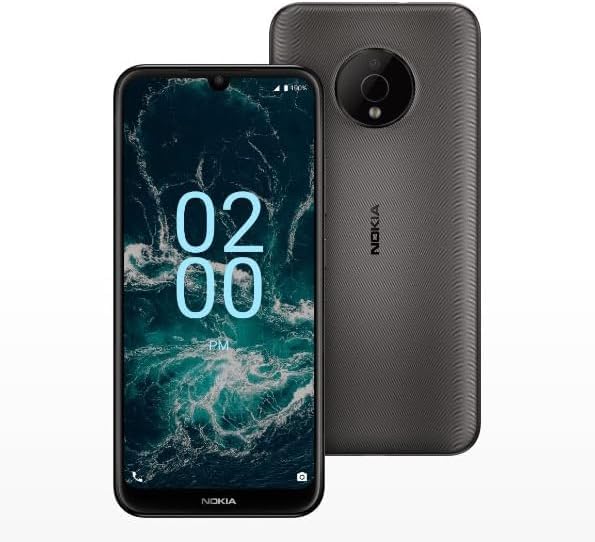
Image: The Nokia C200 N151DL smartphone, featuring its 6.1-inch HD+ display and Space Gray finish.
ماذا يوجد في الصندوق
Upon unboxing your Nokia C200 N151DL, verify that all the following items are included:
- هاتف نوكيا C200 N151DL الذكي
- كابل USB-C
- أداة قاذف SIM
يثبت
1. إدخال بطاقة SIM
- حدد مكان درج بطاقة SIM على جانب هاتفك.
- أدخل أداة إخراج شريحة SIM في الفتحة الصغيرة الموجودة على الدرج لفتحه.
- قم بوضع بطاقة Nano-SIM في الدرج مع توجيه جهات الاتصال الذهبية لأسفل.
- قم بدفع الدرج بعناية إلى داخل الهاتف حتى يستقر في مكانه.
2. شحن الجهاز
Before initial use, it is recommended to fully charge your Nokia C200 N151DL.
- قم بتوصيل كابل USB-C بمنفذ الشحن الموجود أسفل الهاتف.
- Connect the other end of the USB-C cable to a compatible USB wall adapter (not included) and plug it into a power outlet.
- سيظهر مؤشر البطارية على الشاشة تقدم الشحن.
3. التشغيل والتكوين الأولي
- Press and hold the power button (usually on the right side) until the Nokia logo appears.
- اتبع التعليمات التي تظهر على الشاشة لتحديد اللغة والاتصال بشبكة Wi-Fi وإعداد حساب Google الخاص بك.
- Your phone runs on Android 12.0, providing a clean and intuitive user experience.
التشغيل
الملاحة الأساسية
The Nokia C200 N151DL features a 6.1-inch HD+ touchscreen display. Navigate by tapping, swiping, and pinching gestures. The Android 12.0 operating system offers a user-friendly interface for accessing apps, settings, and notifications.
إدارة البطارية
Your device is equipped with a 5000 mAh battery designed for extended daily use. To optimize battery life:
- ضبط سطوع الشاشة.
- أغلق التطبيقات غير المستخدمة التي تعمل في الخلفية.
- قم بتعطيل Wi-Fi أو Bluetooth أو GPS عند عدم الاستخدام.
التخزين والأداء
With 32GB of internal storage and 3GB of RAM, the Nokia C200 N151DL provides reliable multitasking capabilities and space for your applications and media. For additional storage, consider using a microSD card (sold separately).
صيانة
تنظيف جهازك
To clean your phone, use a soft, lint-free cloth. Avoid using abrasive materials, alcohol, or chemical cleaners, as these can damage the screen and finish.
تحديثات البرامج
تحقق دوريًا من وجود تحديثات للبرامج لضمان حصول جهازك على أحدث الميزات والتحسينات الأمنية. انتقل إلى الإعدادات > النظام > تحديث النظام للتحقق من التحديثات المتوفرة وتثبيتها.
استكشاف الأخطاء وإصلاحها
If you encounter issues with your Nokia C200 N151DL, try the following common solutions:
- الهاتف لا يعمل: تأكد من شحن البطارية. قم بتوصيل الهاتف بالشاحن لمدة 30 دقيقة على الأقل، ثم حاول تشغيله مرة أخرى.
- تعطل التطبيقات أو تجميدها: أغلق التطبيق الذي به المشكلة ثم أعد فتحه. إذا استمرت المشكلة، فأعد تشغيل هاتفك.
- إشارة الشبكة ضعيفة: تأكد من إدخال بطاقة SIM. انتقل إلى منطقة ذات تغطية شبكة أفضل.
- قضايا الشحن: Verify the USB-C cable and charger are working correctly. Try a different cable or power source.
- الأداء البطيء: Clear cache for frequently used apps. Consider uninstalling unused applications to free up storage.
For more complex issues, refer to Nokia's official support webالموقع أو الاتصال بخدمة العملاء.
تحديد
Key technical specifications for the Nokia C200 N151DL:
| ميزة | مواصفة |
|---|---|
| ماركة | نوكيا |
| اسم الموديل | نوكيا C200 |
| نظام التشغيل | أندرويد 12.0 |
| حجم ذاكرة الوصول العشوائي المثبتة | 3 جيجا بايت |
| سعة تخزين الذاكرة | 32 جيجا بايت |
| نموذج وحدة المعالجة المركزية | Qualcomm Snapdragon S1 QSD8650 |
| سرعة وحدة المعالجة المركزية | 1.8 جيجاهرتز |
| حجم الشاشة | 6.1 بوصة |
| نوع العرض | شاشة الكريستال السائل |
| تكنولوجيا الخلوية | 4G |
| شركة نقل لاسلكية | حديث صريح |
| طاقة البطارية | 5000 مللي أمبير |
| نوع الموصل | يو اس بي نوع سي |
| لون | رمادي فضائي |
| الشركة المصنعة | اتش ام دي العالمية |
| رمز المنتج الموحد | 617230227802 |
| ASIN | B0FGG1Y47Z |
الضمان والدعم
معلومات الضمان
هذا المنتج مغطى بـ سياسة الإرجاع خلال 30 يومًا for a full refund or exchange from the date of purchase. Please retain your proof of purchase for warranty claims.
دعم العملاء
For further assistance, technical support, or warranty inquiries, please visit the official Nokia support website or contact your retailer. Ensure you have your device model number (N151DL) and proof of purchase available when seeking support.