
مقدمة
Welcome to the user manual for your Dubstep Buzz X9 Wireless Earbuds. These earbuds are designed to provide a high-quality audio experience with advanced features for both music and gaming. Please read this manual carefully to ensure proper use and maintenance of your device.
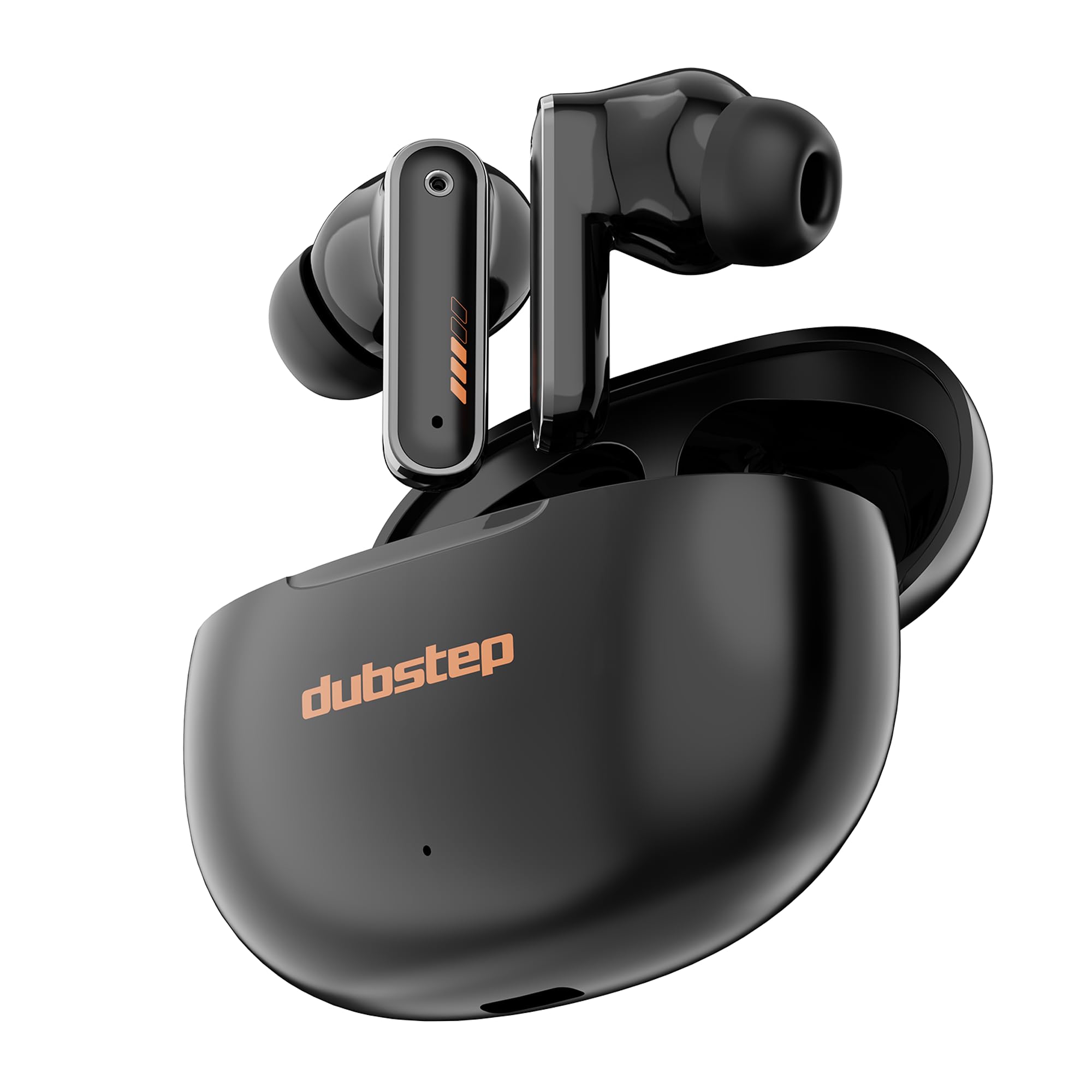
Image: Dubstep Buzz X9 Wireless Earbuds in their charging case, showcasinتصميم أنيق.
ماذا يوجد في الصندوق
Upon opening your Dubstep Buzz X9 package, you should find the following items:
- Dubstep Buzz X9 Wireless Earbuds
- حافظة الشحن اللاسلكي
- وسائد الأذن (أحجام مختلفة)
- كابل شحن من النوع C
- دليل المستخدم (هذا المستند)

Image: All items included in the Dubstep Buzz X9 retail box: earbuds, charging case, Type-C cable, and ear cushions.
الإعداد والاستخدام الأول
شحن سماعات الأذن والعلبة
قبل الاستخدام الأول، قم بشحن سماعات الأذن وعلبة الشحن بالكامل.
- ضع سماعات الأذن داخل علبة الشحن.
- قم بتوصيل كابل الشحن من النوع C بمنفذ الشحن الموجود على العلبة وبمصدر الطاقة.
- The indicator light on the case will show charging status. A full charge typically takes about 1 hour for the case.

Image: The Dubstep Buzz X9 charging case with a Type-C cable connected, illustrating the fast charging capability.
الاقتران بجهاز
The Buzz X9 earbuds utilize Bluetooth v5.4 for stable and lag-free connectivity.
- تأكد من شحن سماعات الأذن ووضعها داخل علبة الشحن.
- افتح غطاء علبة الشحن. ستدخل سماعات الأذن تلقائيًا في وضع الاقتران.
- على جهازك (الهاتف الذكي، الجهاز اللوحي، الكمبيوتر المحمول)، انتقل إلى إعدادات البلوتوث وقم بتشغيل البلوتوث.
- بحث عن "Dubstep Buzz X9" in the list of available devices and select it to connect.
- بمجرد الاتصال، سوف تسمع صوتًا تنبيهيًا، وستتغير أضواء مؤشر سماعات الأذن.

Image: Dubstep Buzz X9 earbuds demonstrating wireless connectivity with a smartphone, highlighting instant pairing.
تعليمات التشغيل
عناصر التحكم باللمس
The Dubstep Buzz X9 earbuds feature intuitive touch controls for easy management of music, calls, and modes.
- نقرة واحدة (R): رفع الصوت (+)
- صنبور واحد (L): اخفض الصوت (-)
- الضغط مرتين (يسار/يمين): تشغيل/إيقاف الموسيقى مؤقتًا
- الصنبور الثلاثي (R): الأغنية التالية
- صنبور ثلاثي (L): الأغنية السابقة
- Long Press (L/R): تفعيل المساعد الصوتي
- Four Tap (L/R): Switch between Music Mode / Game Mode
- Single Tap (during call): تلقي دعوة
- Single Tap (during call): قطع الاتصال
- Double Tap (during call): رفض المكالمة

Image: Detailed diagram illustrating the touch control functions on the Dubstep Buzz X9 earbuds.
Dual Mode Technology (Music/Game)
The Buzz X9 earbuds offer a dual-mode feature, allowing you to switch between optimized audio profiles for music listening and gaming.
- وضع الموسيقى: Provides a balanced audio experience with rich bass and clear highs, ideal for everyday listening.
- وضع اللعبة: Reduces audio latency to 40ms, ensuring synchronized sound effects and dialogue during gameplay for a competitive edge.
To switch modes, perform a أربع نقرات على أي من سماعة الأذن.

Image: Visual representation of the dual mode feature, transitioning between music and game optimized audio.

Image: The earbuds displayed with a smartphone and game controller, emphasizing the 40ms ultra-low latency for gaming.
Features and Technology
جودة الصوت
The Dubstep Buzz X9 earbuds are equipped with 13mm Neodymium Dynamic Drivers و XBass® Technology to deliver deep, resonant bass and crystal-clear audio across the frequency spectrum.

الصورة: انفجار view of the earbud's internal components, highlighting the 13mm dynamic drivers responsible for audio output.
إلغاء الضوضاء البيئية (ENC)
Integrated ENC microphones enhance call clarity by reducing ambient noise, ensuring your voice is heard clearly during calls.
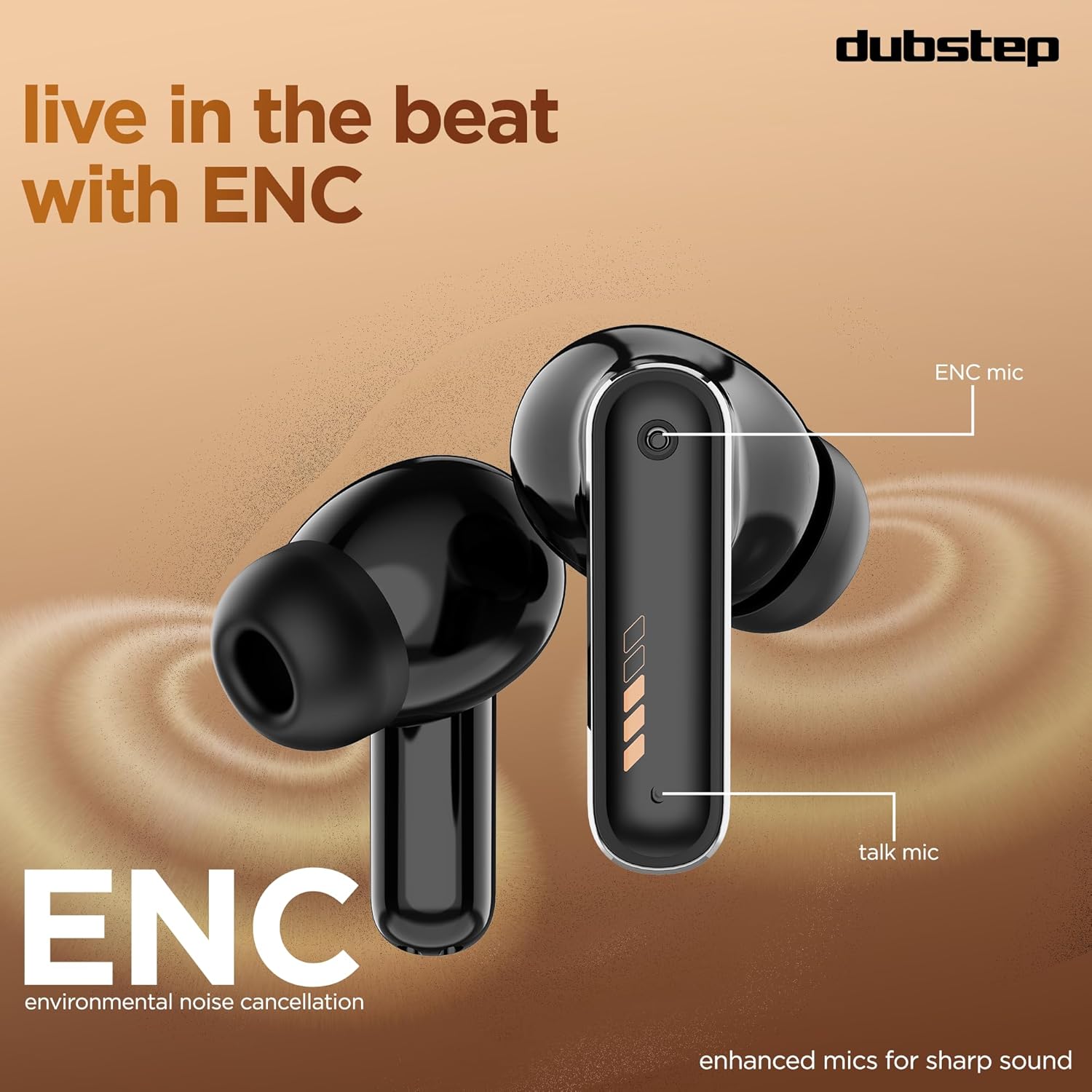
Image: Close-up of the earbud design, pointing out the locations of the ENC mic and talk mic for improved call quality.
عمر بطارية ممتد
استمتع بما يصل إلى 60 ساعة من إجمالي وقت اللعب with the charging case, with 9 hours of continuous music playback on a single charge. The earbuds also offer an impressive 300 hours of standby time.

Image: The earbuds and case with a graphic indicating 60 hours of total playtime, 9 hours of music playtime, and 300 hours of standby time.
الصيانة والعناية
To ensure the longevity and optimal performance of your Dubstep Buzz X9 earbuds, follow these care guidelines:
- تنظيف: نظّف سماعات الأذن وعلبة الشحن بانتظام بقطعة قماش ناعمة وجافة. تجنّب استخدام المواد الكاشطة أو المواد الكيميائية القاسية.
- وسائد الأذن: Remove and clean ear cushions periodically with mild soap and water, then dry thoroughly before reattaching.
- مقاومة الماء: The earbuds feature splash and sweat resistance. However, they are not waterproof. Avoid submerging them in water or exposing them to heavy rain.
- تخزين: عندما لا تكون قيد الاستخدام، قم بتخزين سماعات الأذن في علبة الشحن الخاصة بها لحمايتها والحفاظ عليها مشحونة.
- درجة حرارة: تجنب تعريض سماعات الأذن لدرجات حرارة قصوى (ساخنة أو باردة) أو لأشعة الشمس المباشرة لفترات طويلة.

Image: Earbuds with water droplets, illustrating their splash and sweat resistance feature.
استكشاف الأخطاء وإصلاحها
If you encounter any issues with your Dubstep Buzz X9 earbuds, please refer to the following common solutions:
| مشكلة | حل |
|---|---|
| سماعات الأذن لا تقترن | Ensure earbuds are charged. Place them in the case, close the lid, then open it again to re-enter pairing mode. Check your device's Bluetooth settings and try reconnecting. |
| تعمل سماعة أذن واحدة فقط | Place both earbuds back into the charging case, close the lid for 5 seconds, then open it. This should reset the connection between them. Re-pair with your device if necessary. |
| مستوى صوت منخفض أو جودة صوت رديئة | Check the volume levels on both your device and the earbuds. Ensure ear cushions are properly fitted and clean. Try different sized ear cushions for a better seal. |
| قضايا الشحن | Verify the Type-C cable is securely connected to both the case and the power source. Ensure the charging port is clean and free of debris. Try a different charging cable or power adapter. |
| الضوابط التي تعمل باللمس لا تستجيب | تأكد من أن أصابعك نظيفة وجافة. حاول إعادة تشغيل سماعات الأذن بوضعها في العلبة ثم إخراجها. |
تحديد
| ميزة | التفاصيل |
|---|---|
| اسم الموديل | Buzz X9 |
| ماركة | دوبستيب |
| وضع الأذن | في الأذن |
| عامل الشكل | لاسلكية حقيقية |
| نوع برنامج تشغيل الصوت | سائق ديناميكي |
| حجم برنامج تشغيل الصوت | 13 مليمتر |
| مقاومة | 32 أوم |
| التحكم في الضوضاء | إلغاء الضوضاء البيئية (ENC) |
| نسخة البلوتوث | 5.4 |
| مدى البلوتوث | حتى 10 مترا |
| الكمون الصوتي | 40 ميلي ثانية (وضع اللعبة) |
| عمر البطارية (سماعات الأذن) | حتى 9 ساعات (شحنة واحدة) |
| عمر البطارية (مع العلبة) | تصل إلى 60 ساعة |
| وقت الاستعداد | 300 ساعات |
| مدة الشحن (العلبة) | حوالي ساعة واحدة |
| منفذ الشحن | النوع-C |
| نوع التحكم | التحكم باللمس |
| مادة | أكريلونيتريل بوتادين ستايرين (ABS) |
| الأجهزة المتوافقة | الهواتف المحمولة، والأجهزة اللوحية، وأجهزة الكمبيوتر المحمولة |
| وزن المنتج | 40 جرام |
| بلد المنشأ | الصين |
الضمان والدعم
Your Dubstep Buzz X9 Wireless Earbuds come with a ضمان لمدة 6 شهرًا.
To avail warranty or for any support inquiries, please contact the brand directly:
- رقم التليفون: +918826257630
- معرف البريد الإلكتروني: hello@Dubstepworld.com
- Online User Manuals: For additional resources, visit www.dubstepworld.com/pages/user-manuals
انتهى فيديو المنتجview
Video: An official product highlight video for the Dubstep Buzz X9 Wireless Earbuds, showcasing key features like playtime, drivers, XBass technology, ENC mics, and Type-C fast charging.