1. المقدمة
This manual provides detailed instructions for the Generic BWHS25L Wireless Barcode Scanner. This device offers 1D, 2D, and QR code scanning capabilities with versatile connectivity options including 2.4G wireless, wired USB, and Bluetooth (tri-mode). Designed for efficiency, it features fast scanning speeds and a large storage capacity for offline use, making it suitable for various applications such as retail, warehousing, and inventory management.
2. انتهى المنتجview
The BWHS25L barcode scanner is equipped with a 32-bit CPU for advanced decoding and a scanning speed of up to 300 scans per second. It supports both instant upload and offline storage modes.

الشكل 2.1: الجبهة view of the BWHS25L barcode scanner, showing the scanning window, trigger button, and the included 2.4G USB receiver.
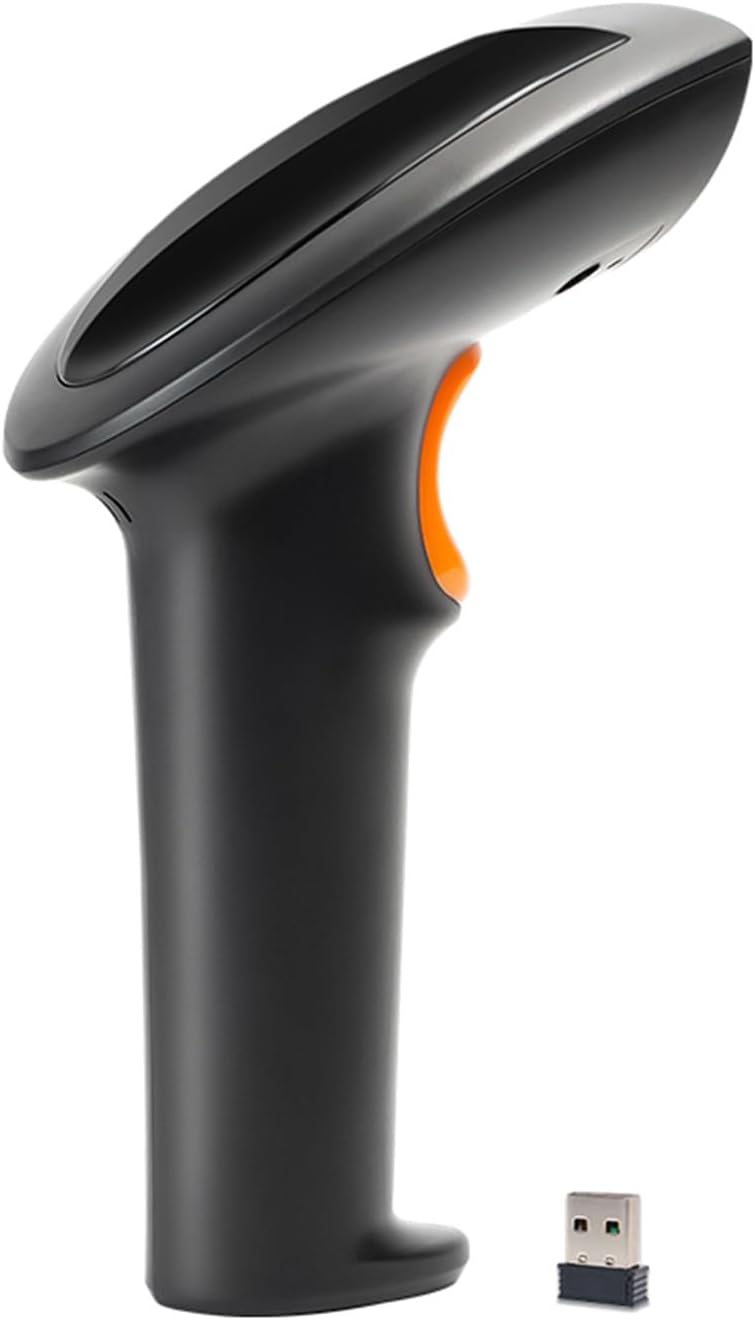
الشكل 2.2: الجانب الإيجابيfile of the BWHS25L barcode scanner, illustrating its ergonomic design and the orange trigger button.
المميزات الرئيسية:
- مسح سريع: Achieve lightning-fast scanning with a speed of up to 300 scans per second, powered by a 32-bit CPU and advanced decoding capabilities.
- اتصال متعدد الاستخدامات: Enjoy triple-mode connectivity (2.4G wireless, wired USB, and Bluetooth) for seamless integration with smartphones, tablets, and PCs.
- التشغيل بدون استخدام اليدين: Experience convenience with the included foldable stand, ideal for efficient and ergonomic scanning.
- سعة التخزين الكبيرة: Store up to 100,000 barcodes in offline storage mode, perfect for remote scanning and data synchronization.
- تصميم متين: Designed for durability, it withstands drops from 1 meter and operates in a wide temperature range from 0°C to 50°C.
3. الإعداد
3.1 شحن الماسح الضوئي
Connect the scanner to a USB power source (e.g., computer USB port, USB wall adapter) using the provided USB cable. The indicator light on the scanner will illuminate to show charging status. A full charge typically takes approximately 6 hours.
3.2 الاتصال عبر شبكة لاسلكية بتردد 2.4 جيجا هرتز
For 2.4G wireless connection, insert the small 2.4G USB receiver into an available USB port on your computer or host device. The scanner will automatically pair with the receiver. No driver installation is typically required (Plug & Play functionality).

Figure 3.1: Diagram illustrating the 2.4G wireless transmission distance of up to 80 meters between the scanner and the USB receiver.
3.3 التوصيل عبر منفذ USB سلكي
To use the scanner in wired mode, connect the scanner directly to your computer or host device using the provided USB cable. The scanner will function as a wired device, and data will be transmitted instantly.
3.4 الاتصال عبر البلوتوث
To connect via Bluetooth, ensure your host device's Bluetooth is enabled. Scan the Bluetooth pairing barcode (if provided in a physical manual or on the device itself). The scanner will appear as 'BWHS25L' (or similar) in your device's Bluetooth settings. Select it to pair.

Figure 3.2: Image demonstrating the barcode scanner's compatibility with multiple operating systems and devices (smartphone, tablet, PC) via 2.4G and Bluetooth dual-mode wireless technology.
4. تعليمات التشغيل
4.1 المسح الأساسي
Point the scanner's window at the barcode you wish to scan and press the trigger button. A successful scan will typically be indicated by a short beep and/or a green light from the intelligent indicator.
أوضاع التشغيل 4.2
- وضع التحميل الفوري: In this mode, all scanned barcodes are immediately transmitted to the connected device. This is the default mode when connected wirelessly or via USB.
- Storage Mode (Offline): When out of range or not connected to a host device, the scanner can store up to 100,000 barcodes internally. To upload stored data, connect the scanner to your device and initiate the batch upload function (refer to specific configuration barcodes in the full manual for detailed instructions on switching modes and uploading data).
4.3 Hands-Free Scanning with Foldable Stand
The included foldable stand allows for convenient hands-free scanning. Place the scanner securely on the stand. When a barcode is presented within the scanner's field of view, it will automatically detect and scan it.

Figure 4.1: Illustrations detailing the recessed design for scanner stability, U-shaped narrowing for a secure fit, and the dimensions of the foldable stand (150.5*80.5*34.6mm).

Figure 4.2: The BWHS25L 2D barcode scanner positioned on its foldable stand, demonstrating its readiness for hands-free operation.
5. الصيانة
لضمان الأداء الأمثل وطول العمر لجهاز مسح الباركود الخاص بك، اتبع إرشادات الصيانة التالية:
- تنظيف: Regularly clean the scanning window with a soft, dry, lint-free cloth. Avoid using abrasive cleaners, solvents, or harsh chemicals, as these can damage the optical components.
- تخزين: قم بتخزين الماسح الضوئي في مكان بارد وجاف بعيدًا عن أشعة الشمس المباشرة ودرجات الحرارة القصوى.
- العناية بالبطارية: For long-term storage, ensure the battery is partially charged (around 50%). Avoid fully discharging the battery for extended periods.
- الحماية الجسدية: While designed to be durable, avoid unnecessary drops or impacts.
6. استكشاف الأخطاء وإصلاحها
If you encounter issues with your BWHS25L barcode scanner, refer to the following common troubleshooting steps:
- الماسح الضوئي لا يتصل:
- تأكد من أن الماسح الضوئي مشحون بالكامل.
- For 2.4G wireless, verify the USB receiver is securely plugged into the host device.
- For Bluetooth, confirm Bluetooth is enabled on your host device and the scanner is properly paired.
- For wired connection, check the USB cable connection at both ends.
- لا يوجد إخراج مسح:
- تأكد من أن الرمز الشريطي غير تالف أو مطبوع بشكل سيئ.
- Verify the scanner is in the correct operating mode (e.g., instant upload if you expect immediate data).
- Check if the barcode type is supported by the scanner (refer to specifications).
- Clean the scanning window if it is dirty.
- Slow Scanning or Unresponsive:
- Recharge the scanner's battery.
- Ensure there are no obstructions or strong electromagnetic interference in wireless modes.
- Restart the scanner and the host device.
7. المواصفات
| ميزة | مواصفة |
|---|---|
| نموذج | BWHS25L |
| مادة | نظام ABS |
| لون | أسود |
| طريقة الاتصال | Wired + 2.4G + Bluetooth (Tri-mode) |
| مستشعر الصورة | CMOS 640x480 |
| مصدر الضوء | White LED (illumination), Red LED (focusing) |
| القدرة على فك التشفير | 1D (EAN-8, EAN-13, UPC-A, UPC-E, Code 39, Code 93, Code 128, EAN128, Codebar, Industrial 2 of 5, Interleave 2 of 5, Matrix 2 of 5, MSI, Postcode, etc.), 2D (PDF417, QR Code, Data Matrix, etc.) |
| دقة القراءة | ≥5مل |
| تباين الرموز | ≥20% |
| واجهة الاتصال | USB |
| حجم الشحنtage | 5 فولت تيار مستمر ± 5٪ |
| سعة البطارية | 2,000 مللي أمبير |
| وقت شحن البطارية | ≤6 ساعة |
| وقت التشغيل المستمر | ≥18 ساعات |
| درجة حرارة التشغيل | 0 درجة مئوية إلى 50 درجة مئوية |
| درجة حرارة التخزين | -20 درجة مئوية إلى 60 درجة مئوية |
| مقاومة السقوط | Withstands 1-meter drops |
| سعة التخزين | ≥5,000 entries (up to 100,000 barcodes) |
| مسافة الإرسال اللاسلكي | 0-80 meters (2.4G) |
8. معلومات السلامة
يرجى مراعاة احتياطات السلامة التالية:
- Do not look directly into the scanning light, as it may cause eye strain or damage.
- احتفظ بالجهاز بعيدًا عن متناول الأطفال.
- Do not attempt to disassemble or modify the scanner. This will void the warranty and may cause damage or injury.
- تخلص من البطاريات والمكونات الإلكترونية بطريقة مسؤولة وفقًا للوائح المحلية.
9. الضمان والدعم
For warranty information, technical support, or service inquiries, please contact your retailer or the manufacturer directly. Refer to the product packaging or the manufacturer's official webالموقع للحصول على تفاصيل الاتصال المحددة وشروط الضمان.