
1. مرحباً
Thank you for choosing the AWEI T1 Pro Wireless Bluetooth Headphones. This manual provides detailed instructions for setting up, operating, and maintaining your new earbuds. Please read this manual carefully before use to ensure optimal performance and longevity of your device.
2. انتهى المنتجview
2.1. محتويات العبوة
- سماعات أذن لاسلكية (يسار ويمين)
- حافظة الشحن
- كابل شحن USB
- أطراف الأذن (أحجام مختلفة)
- دليل المستخدم
2.2. Earbud and Charging Case Components
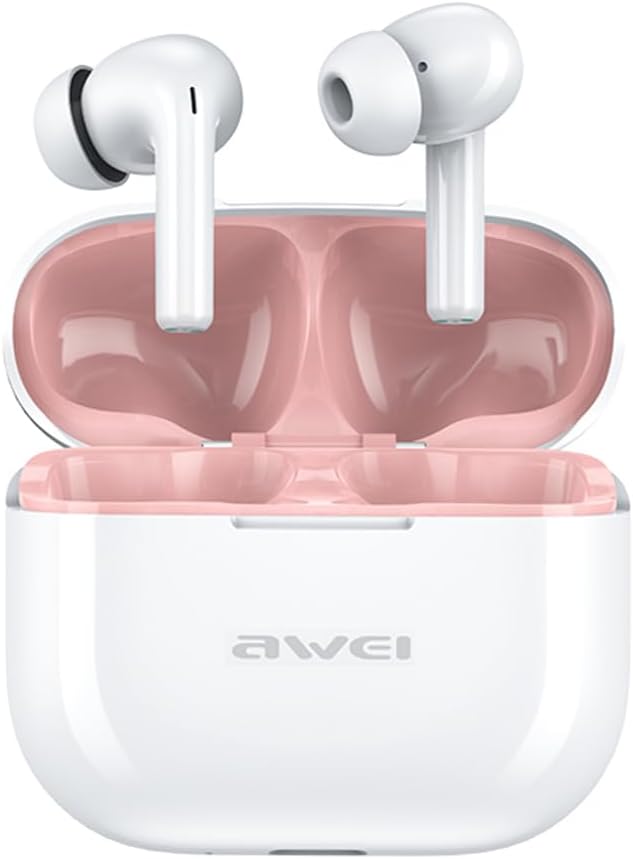
Image: The AWEI T1 Pro wireless earbuds are shown in their open charging case. The earbuds are white with a stem design, and the interior of the charging case is a light pink color. The AWEI logo is visible on the front of the white charging case.
The AWEI T1 Pro earbuds feature an ergonomic in-ear design for a comfortable and secure fit. The compact charging case not only protects the earbuds but also provides multiple charges on the go.
2.3. الميزات الرئيسية
- جودة الصوت عالية الدقة: Equipped with 13mm speakers for an immersive audio experience and clear call performance.
- تقنية البلوتوث 5.4: Ensures a faster, more stable signal transmission with low latency and a wireless range of up to 10 meters. (Note: Some packaging may indicate Bluetooth 5.3, but the device supports 5.4 for enhanced performance).
- التحكم باللمس الذكي: Intuitive touch sensors on each earbud allow for easy control of music playback, calls, and voice assistant activation.
- عمر بطارية طويل: Enjoy up to 7 hours of continuous playback per charge. The 300mAh charging case extends total playtime to 36 hours in dual-ear mode or up to 60 hours in single-ear mode. The case fully charges in approximately 1 hour via Type-C.
- تصميم مقاوم للماء IPX6: Resistant to sweat and rain, making them suitable for sports and outdoor activities.

Image: A detailed diagram illustrating the internal components of an earbud speaker, labeled as 'Drive Units HiFi Stereo', highlighting the layered structure of the audio driver for high-fidelity sound.

Image: A stylized depiction of a microchip labeled '5.3 Bluetooth', surrounded by circuit board elements, emphasizing lower latency and increased stability in wireless communication.

Image: A black earbud is shown next to a smartphone displaying a music player interface. Text indicates 'Touch Control Wake up Voice Assistant', illustrating how touch gestures on the earbud can control phone functions like answering calls or activating a voice assistant.

Image: A smartphone displaying a music player is shown alongside a transparent block, symbolizing extended power. Text highlights 'Full of Energy Long Battery Life', indicating the 300mAh charging case provides 7 hours of continuous use per charge.

Image: Two black earbuds are depicted, one dry and the other surrounded by water droplets, illustrating the 'No Fear of Sweat & Rain IPX6 Waterproof Rate' feature, which prevents water penetration during sports.
3. الإعداد
3.1. الشحن الأولي
- قبل الاستخدام الأول، ضع كلا السماعتين في علبة الشحن.
- Connect the provided USB Type-C charging cable to the charging port on the case and a power source (e.g., USB wall adapter, computer USB port).
- The indicator lights on the charging case will show charging status. A full charge for the case takes approximately 1 hour.
- Ensure the earbuds are fully charged before initial pairing.
3.2. الاقتران بجهاز
- افتح علبة الشحن. سيتم تشغيل سماعات الأذن تلقائيًا ودخول وضع الاقتران.
- على جهازك (الهاتف الذكي، الجهاز اللوحي، الكمبيوتر المحمول)، قم بتمكين البلوتوث.
- بحث عن أجهزة البلوتوث المتوفرة.
- Select "AWEI T1 Pro" from the list of devices.
- بمجرد الاتصال، سوف تسمع نغمة تأكيد، وستكون سماعات الأذن جاهزة للاستخدام.
- سيتم إعادة توصيل سماعات الأذن تلقائيًا بالجهاز المقترن الأخير عند إخراجها من العلبة، إذا تم تمكين البلوتوث على الجهاز.
4. تعليمات التشغيل
4.1. تشغيل/إيقاف التشغيل
- تشغيل الطاقة: افتح علبة الشحن، أو اضغط مطولاً على منطقة اللمس في كلتا السماعتين لمدة 3 ثوانٍ.
- إيقاف التشغيل: أعد وضع سماعات الأذن في علبة الشحن وأغلق الغطاء، أو اضغط مطولاً على منطقة اللمس في كلتا سماعتي الأذن لمدة 5 ثوانٍ.
4.2. أدوات التحكم التي تعمل باللمس
| وظيفة | فعل |
|---|---|
| تشغيل/إيقاف الموسيقى مؤقتًا | نقرة واحدة على أي من سماعات الأذن |
| الأغنية التالية | انقر مرتين على سماعة الأذن اليمنى |
| الأغنية السابقة | انقر مرتين على سماعة الأذن اليسرى |
| رفع الصوت | اضغط ثلاث مرات على سماعة الأذن اليمنى |
| خفض الصوت | اضغط ثلاث مرات على سماعة الأذن اليسرى |
| الرد على المكالمة/إنهائها | نقرة واحدة على أي من سماعات الأذن |
| رفض المكالمة | اضغط مطولاً على أي من سماعتي الأذن لمدة ثانيتين |
| تفعيل المساعد الصوتي | Long press on either earbud for 2 seconds (when not on a call) |
4.3. إجراء واستقبال المكالمات
When a call comes in, you can answer or reject it using the touch controls as described above. During a call, a single tap will end the conversation.
4.4. تشغيل الموسيقى
Control your music directly from the earbuds. Use single, double, or triple taps to play, pause, skip tracks, or adjust volume.
5. الصيانة
5.1. التنظيف
- قم بتنظيف سماعات الأذن وعلبة الشحن بانتظام باستخدام قطعة قماش ناعمة وجافة وخالية من الوبر.
- لا تستخدم المنظفات الكاشطة أو الكحول أو المذيبات الكيميائية.
- Gently remove any earwax or debris from the earbud mesh and charging contacts using a dry cotton swab or a small, soft brush.
5.2. التخزين
- عندما لا تكون قيد الاستخدام، قم دائمًا بتخزين سماعات الأذن في علبة الشحن الخاصة بها لحمايتها من الغبار والتلف.
- قم بتخزين الجهاز في مكان بارد وجاف، بعيدًا عن درجات الحرارة العالية وأشعة الشمس المباشرة.
5.3. مقاومة الماء
The AWEI T1 Pro earbuds are rated IPX6 waterproof, meaning they are protected against high-pressure water jets from any direction. This makes them suitable for workouts and light rain. However, they are not designed for swimming or submersion in water. Ensure the earbuds are dry before placing them back into the charging case to prevent damage.
6. استكشاف الأخطاء وإصلاحها
6.1. المشكلات الشائعة والحلول
- سماعات الأذن غير مقترنة بالجهاز:
Ensure both earbuds are charged. Turn off and on your device's Bluetooth. Forget "AWEI T1 Pro" from your device's Bluetooth list and try pairing again. - سماعة أذن واحدة فقط تعمل:
Place both earbuds back into the charging case, close the lid, wait a few seconds, then open the lid and take them out. This should reset their connection. If the issue persists, try resetting the earbuds (refer to manufacturer's webموقع للحصول على تعليمات إعادة الضبط المحددة إذا لزم الأمر). - لا يوجد صوت أو مستوى الصوت منخفض:
Check the volume level on both your device and the earbuds. Ensure the earbuds are properly seated in your ears. Try cleaning the earbud mesh for any obstructions. - حالة الشحن لا تشحن:
تأكد من توصيل كابل USB بإحكام بكل من العلبة ومصدر الطاقة. جرب كابل شحن أو محول طاقة آخر. - سماعات الأذن لا تشحن في حالة:
Ensure the charging contacts on both the earbuds and the case are clean and free of debris. Make sure the earbuds are correctly seated in the case.
7. المواصفات

Image: A graphic displaying the technical specifications of the AWEI T1 Pro, including basic information, horn details, Bluetooth version, and battery capacities.
| معلومات عامة | |
|---|---|
| اسم الموديل | تي 1 برو |
| نوع المنتج | سماعات أذن ستيريو TWS |
| الوزن الصافي | 36 جرام |
| الأبعاد (علبة) | 58*50*24 ملم |
| وضع الأذن | في الأذن |
| نوع التحكم | التحكم باللمس |
| مستوى مقاومة الماء | مقاومة للماء بدرجة IPX6 |
| التحكم في الضوضاء | إلغاء الضوضاء التكيفي |
| مواصفات الصوت | |
| قطر السماعة | 13 ملم |
| حساسية | 100±3 ديسيبل |
| نطاق استجابة التردد | 20 هرتز ~ 20,000 هرتز |
| مقاومة | 32 أوم |
| الاتصال | |
| نسخة البلوتوث | 5.4 (Image shows 5.3) |
| لاسلكي المدى | حتى 10 أمتار |
| البروتوكولات المدعومة | HSP، HFP، A2DP، AVRCP |
| الأجهزة المتوافقة | Laptops, Tablets, Mobile Phones |
| البطارية والشحن | |
| علبة شحن البطارية | 300 مللي أمبير / 3.7 فولت |
| سعة بطارية سماعة الأذن | 45 مللي أمبير * 2 |
| وقت تشغيل الموسيقى | تصل مدة الشحن إلى 7 ساعات (لكل شحنة) |
| وقت التحدث | تصل إلى 8 ساعة |
| وقت الاستعداد | تصل إلى 300 ساعة |
| مدة الشحن (العلبة) | حوالي ساعة واحدة |
| منفذ الشحن | يو إس بي من النوع سي |
8. الضمان والدعم
AWEI products are designed and manufactured to the highest quality standards. For information regarding warranty coverage, please refer to the warranty card included in your product packaging or visit the official AWEI website. If you encounter any issues or require technical assistance, please contact AWEI customer support through the contact information provided on the official webالموقع أو منصة الشراء الخاصة بك.