
1. المقدمة
شكرا لك على الشراءasing the SODLK T21 40W Portable Bluetooth Speaker. This manual provides essential information for setting up, operating, and maintaining your speaker. Please read it carefully before use to ensure optimal performance and longevity of the product.
2. مواصفات المنتج
- 6D stereo surround sound for an immersive audio experience.
- Strengthened deep bass with 2pcs vibrating diaphragm.
- 4pcs built-in driver unit (2pcs bass driver unit + 2pcs Mids & Tweets) for balanced sound.
- 5Play model: Supports TF card slot, U disk, AUX input, Bluetooth, and TWS connection.
- 2pcs power amplifier for robust audio output.
- Integrated LED light for visual ambiance.
- Inbuilt 3600mAh battery for extended playtime.
- TWS (True Wireless Stereo) function to connect two speakers for ampصوت ستيريو متطور.
3. محتويات العبوة
عند تفريغ العبوة، يرجى التأكد من أن جميع العناصر المدرجة أدناه موجودة وفي حالة جيدة:
- SODLK T21 Portable Bluetooth Speaker
- كابل شحن USB من النوع C
- دليل المستخدم

Image: The SODLK T21 Portable Bluetooth Speaker, highlighting its ultra-portable design and key features like IPX7 waterproof rating, BT 5.3, punchy bass, voice assistant, Type-C port, 18 hours playtime, stereo pairing, and hands-free calls.
4. الضوابط والمؤشرات
Familiarize yourself with the speaker's control panel for easy operation:
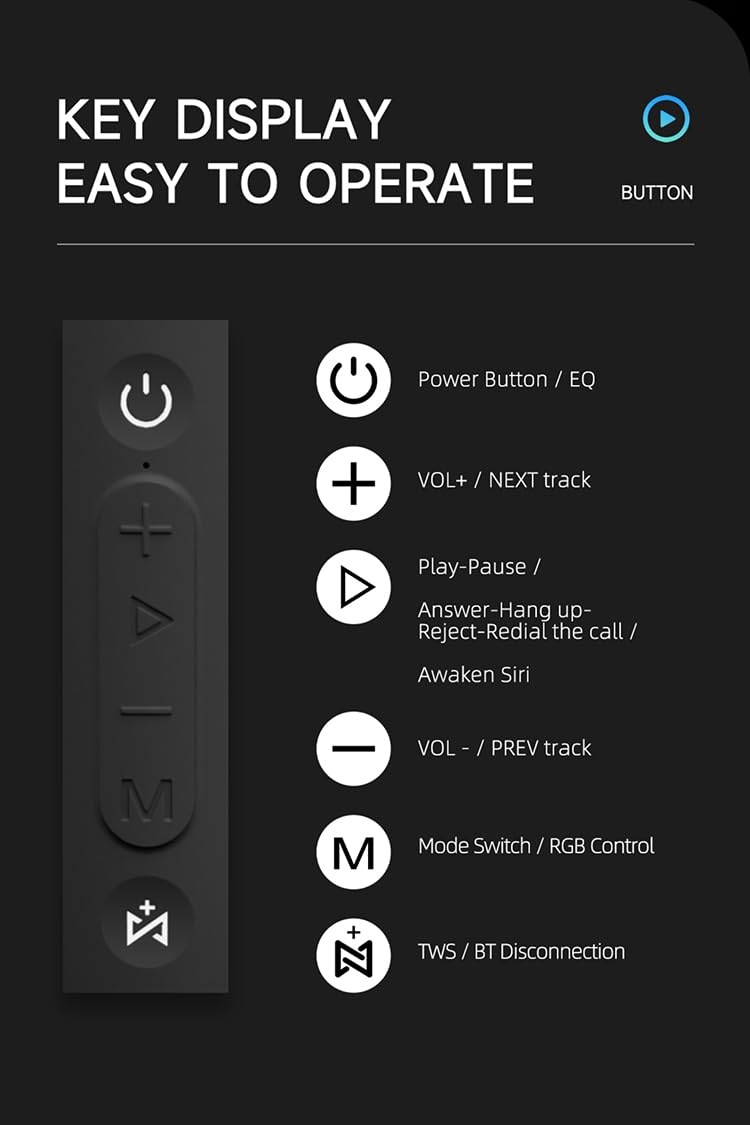
الصورة: تفصيلية view of the SODLK T21 speaker's control panel, showing buttons for Power/EQ, Volume Up/Next Track, Play/Pause/Answer/Hang Up/Reject/Redial/Awaken Siri, Volume Down/Previous Track, Mode Switch/RGB Control, and TWS/BT Disconnection.
- Power Button / EQ: Press and hold to power on/off. Short press to cycle through EQ modes.
- VOL+ / NEXT track: اضغط ضغطة قصيرة لزيادة مستوى الصوت. اضغط ضغطة طويلة للانتقال إلى المقطع التالي.
- Play-Pause / Answer-Hang up-Reject-Redial the call / Awaken Siri: Short press for play/pause. Short press to answer/hang up calls. Long press to reject calls. Double press to redial. Triple press to awaken Siri (or other voice assistant).
- VOL- / PREV track: اضغط ضغطة قصيرة لخفض مستوى الصوت. اضغط ضغطة طويلة للانتقال إلى المقطع السابق.
- Mode Switch / RGB Control: Short press to switch between input modes (Bluetooth, TF card, U disk, AUX). Long press to control RGB lighting effects.
- TWS / BT Disconnection: Short press to initiate TWS pairing. Long press to disconnect Bluetooth.
5. الإعداد والتشغيل
5.1 شحن السماعة
Before first use, fully charge the speaker. Connect the provided USB Type-C cable to the speaker's charging port and the other end to a compatible USB power adapter (5V/1A recommended). The charging time is approximately 3-4 hours.
5.2 تشغيل/إيقاف التشغيل
اضغط مع الاستمرار على زر الطاقة for 2-3 seconds to turn the speaker on or off. An audible prompt will indicate the power status.
5.3 اقتران بلوتوث
- شغّل مكبر الصوت. سيدخل تلقائيًا في وضع إقران البلوتوث، ويضيء ضوء LED وامض.
- قم بتمكين البلوتوث على جهازك (الهاتف الذكي، والكمبيوتر اللوحي، وما إلى ذلك).
- بحث عن "SODLK T21" in the list of available Bluetooth devices and select it to connect.
- Once connected, the LED light will become solid, and you will hear a confirmation tone.
إقران 5.4 TWS (ستيريو لاسلكي حقيقي)
To achieve stereo sound, you can connect two SODLK T21 speakers together:

Image: Two SODLK T21 speakers shown side-by-side with a TWS icon and dashed lines indicating a wireless connection, illustrating the stereo pairing feature.
- Ensure both SODLK T21 speakers are powered on and not connected to any other Bluetooth device.
- اضغط ضغطة قصيرة على أحد مكبرات الصوت (سيكون هذا هو مكبر الصوت الرئيسي) زر TWSسيدخل مكبر الصوت في وضع الاقتران اللاسلكي (TWS).
- سيتصل مكبرا الصوت ببعضهما تلقائيًا. وسيصدر صوت تأكيد عند نجاح عملية الاقتران اللاسلكي.
- الآن، وصّل جهازك بالسماعة الرئيسية عبر البلوتوث كما هو موضح في القسم 5.3. ستُشغّل كلتا السماعتين الصوت بتقنية الاستريو.
5.5 تبديل الوضع
اضغط لفترة قصيرة على Mode Switch Button (M) to cycle through available input modes: Bluetooth, TF Card, U Disk, and AUX. The speaker will announce the current mode.
5.6 التحكم في إضاءة RGB
اضغط لفترة طويلة على Mode Switch Button (M) to change or turn off the RGB lighting effects.

Image: The SODLK T21 speaker displaying a vibrant rainbow light show, illustrating its 16.8 million color RGB light effect feature.
6. الصيانة
- نظّف السماعة بقطعة قماش ناعمة وجافة. لا تستخدم منظفات أو مذيبات كاشطة.
- أبقِ السماعة بعيدة عن درجات الحرارة القصوى وأشعة الشمس المباشرة والرطوبة.
- لا تحاول تفكيك السماعة أو إصلاحها بنفسك. سيؤدي ذلك إلى إلغاء الضمان.
- قم بتخزين مكبر الصوت في مكان بارد وجاف عند عدم استخدامه لفترات طويلة.
7. استكشاف الأخطاء وإصلاحها
| مشكلة | السبب المحتمل | حل |
|---|---|---|
| مكبر الصوت لا يعمل. | بطارية منخفضة. | اشحن السماعة بالكامل. |
| لا يمكن الاقتران عبر البلوتوث. | مكبر الصوت ليس في وضع الاقتران أو متصل بالفعل بجهاز آخر. | Ensure the speaker is in pairing mode (flashing LED). Disconnect from other devices. Restart both speaker and device. |
| لا يوجد صوت. | مستوى الصوت منخفض جدًا، أو وضع الإدخال غير صحيح، أو الجهاز لا يعمل. | Increase volume on both speaker and device. Check input mode. Ensure audio is playing on the connected device. |
| فشل اقتران TWS. | إن مكبرات الصوت بعيدة جدًا عن بعضها أو متصلة بالفعل بأجهزة أخرى. | Ensure speakers are within close proximity. Disconnect both speakers from any other Bluetooth devices before initiating TWS pairing. |
8. المواصفات

Image: The SODLK T21 speaker with its dimensions (232mm height, 100mm width) and a table of specifications including model number, color, BT version, output, waterproof rating, play time, charging time, working distance, input, speaker size, and speaker weight.
| ميزة | التفاصيل |
|---|---|
| رقم الموديل | ت21 |
| لون | أسود |
| نسخة البلوتوث | بي تي 5.3 |
| الناتج | 40 واط |
| ضد للماء | IPX7 |
| وقت اللعب | تصل إلى 18 ساعة |
| وقت الشحن | 3-4 ساعات |
| مسافة العمل | حتى 18 م |
| مدخل | 5 فولت/1 أمبير |
| حجم السماعة | 232 مم * 100 مم |
| وزن السماعة | 1.12كجم |
9. الضمان والدعم
The SODLK T21 Portable Bluetooth Speaker comes with a standard manufacturer's warranty. Please refer to the warranty card included in your package for specific terms and conditions. For technical support or service inquiries, please contact your retailer or the SODLK customer service team.