
مقدمة
Thank you for choosing the Diyife 15kg Stainless Steel Kitchen Scale. This electronic scale features a unique split design, allowing for clear display readings even with large items. Equipped with a magnetic HD LCD screen, it offers versatile placement and night illumination for easy readability. With a weighing capacity of 2g to 15kg, multiple unit options, and functions like tare and counting, this scale is designed for various daily weighing needs. It supports both USB charging and battery power for extended use.
معلومات السلامة
- لا تغمر الميزان في الماء أو أي سوائل أخرى.
- تنظيف الميزان بالاعلانamp القماش. لا تستخدم المنظفات الكاشطة.
- Place the scale on a stable, flat surface to ensure accurate measurements.
- Avoid exposing the scale to extreme temperatures or humidity.
- Do not overload the scale beyond its maximum capacity of 15kg.
- يحفظ بعيدًا عن متناول الأطفال.
محتويات الحزمة
يرجى التحقق من الحزمة للعناصر التالية:
- 1 x Weighing Platform
- 1 x Display Unit
- 1 × دليل المستخدم
- 4 بطاريات AAA
- 1 × كابل شحن USB
يثبت
1. Battery Installation / Powering On
- Open the battery compartment on the back of the display unit.
- قم بإدخال البطاريات الثلاث AAA، مع التأكد من القطبية الصحيحة (+/-).
- Alternatively, connect the display unit to a USB power source using the provided USB cable.
- اضغط على زر الطاقة (M) on the display unit to turn it on.
2. Placing the Scale and Display
Place the weighing platform on a flat, stable surface. The display unit can be placed separately. Its magnetic back allows it to be attached to metal surfaces like refrigerators or workbenches for optimal viewعمل.

Image: The separate display unit can be conveniently placed on a magnetic surface, such as a refrigerator, allowing for clear readings even when large items are on the weighing platform.
تعليمات التشغيل
1. الوزن الأساسي
- قم بتشغيل الميزان بالضغط على زر الطاقة (M).
- Ensure the display shows '0' before placing items. If not, press the Tare button (T).
- ضع العنصر (العناصر) المراد وزنها في منتصف منصة الوزن.
- اقرأ الوزن المعروض على شاشة LCD.

Image: The scale in use, displaying a weight of 200g for ingredients in a bowl.
2. وحدة التحويل
The scale supports 7 different units. To change the unit:
- With the scale on, press the Unit button (M) repeatedly to cycle through the available units: grams (g), kilograms (kg), water milliliters (water ml), milk milliliters (milk ml), taels (tl), pounds:ounces (lb:oz), and fluid ounces (fl:oz).
- سيتم عرض الوحدة المحددة على الشاشة.

Image: The display unit illustrating the seven available measurement modes for different types of ingredients.
3. دالة الوزن الصافي
The Tare function allows you to subtract the weight of a container or previous ingredients, enabling you to weigh multiple items consecutively in the same bowl.
- ضع وعاءً فارغاً على منصة الوزن.
- Wait for the weight to stabilize, then press the Tare button (T). The display will reset to '0'.
- Add your ingredients to the container. The display will show only the weight of the added ingredients.
- Repeat the Tare function as needed for additional ingredients.

Image: A visual guide to using the Tare function, showing how to zero out the weight of a container before adding ingredients.
4. P-button Function (Calibration / Counting)
The 'P' button on your scale serves multiple functions, including calibration and potentially a counting feature. For calibration, follow these steps:
- With the scale on, briefly press the P button to enter calibration mode. The display may still show the current weight.
- اضغط مع الاستمرار على P button to cycle through available reference weights (e.g., 25g, 50g, or 100g). Use the M button to select the desired reference weight.
- Place the exact chosen reference weight onto the center of the weighing platform.
- اضغط على P button again to confirm the calibration. The scale will then be calibrated.
The scale also features a counting function. Refer to the detailed user manual included in your package for specific instructions on how to activate and use the counting feature, as the procedure may vary.
5. High Accuracy Weighing
Equipped with four high-precision sensors, the scale provides accurate measurements with a precision of +/- 1g, suitable for a wide range of ingredients from 2g up to 15kg.

Image: Demonstrating the scale's high accuracy and capacity, suitable for weighing both dry and liquid ingredients.
6. الإغلاق التلقائي
The scale features a customizable automatic shut-off function to conserve battery life. The settings are 0 (no auto-off), 2, 4, 6, or 10 minutes. Refer to the included user manual for specific instructions on how to adjust this setting.
7. التحذيرات
- تحذير انخفاض البطارية: An indicator will appear on the display when the batteries are low. Replace the AAA batteries or connect the scale via USB for charging.
- تحذير من التحميل الزائد: If the weight exceeds 15kg, an overload warning will be displayed. Remove items immediately to prevent damage to the scale.
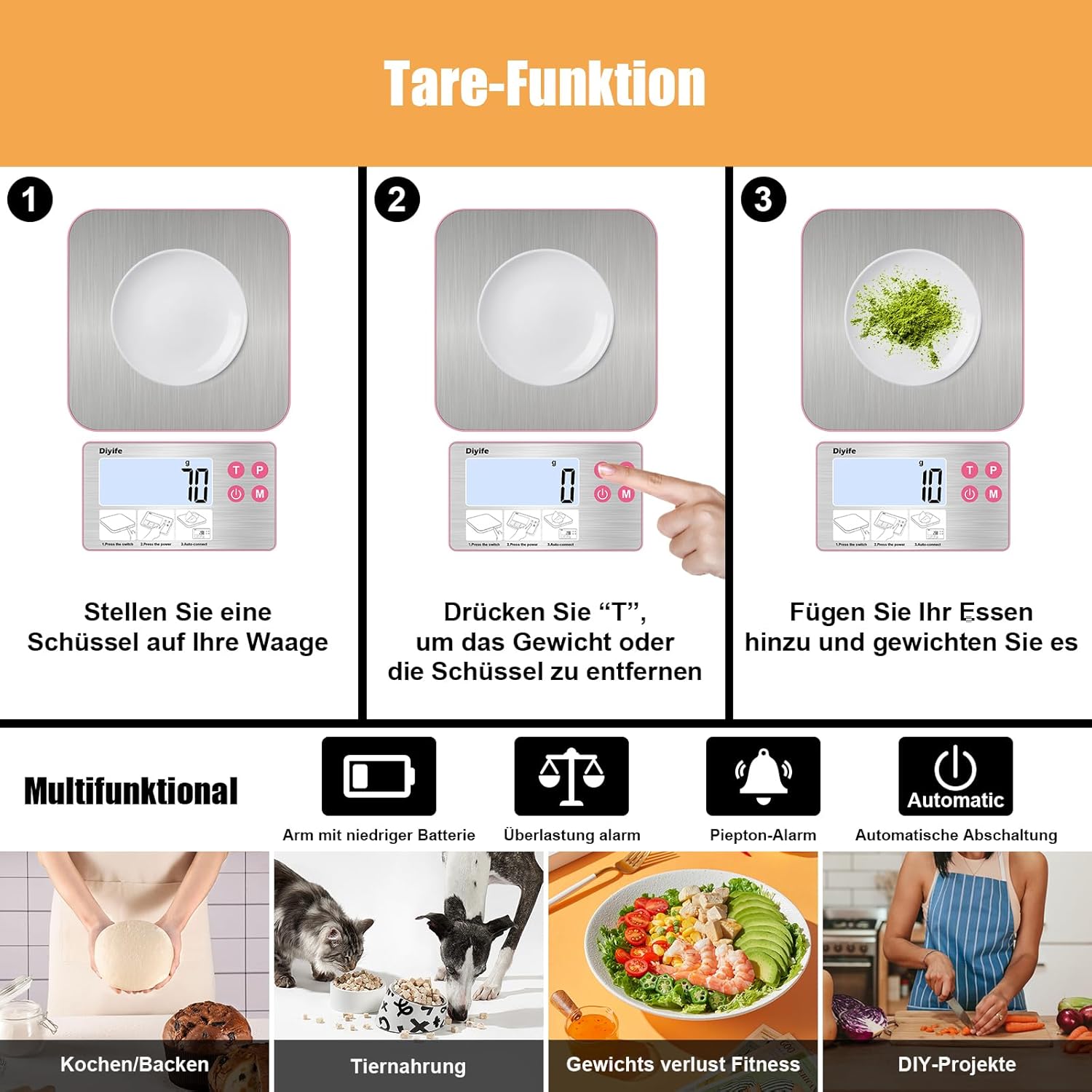
الصورة: أكثر منview of the scale's multifunctional capabilities, including safety warnings and diverse applications.
صيانة
1. التنظيف
The scale features an integrated, easy-to-clean stainless steel surface that is resistant to stains and fingerprints.
- Wipe the weighing platform and display unit with a soft, damp قطعة قماش.
- لا تستخدم مواد كيميائية قاسية أو منظفات كاشطة أو تغمر الترسبات في الماء.
- تأكد من أن الميزان جاف تمامًا قبل التخزين أو الاستخدام التالي.
2. التخزين
Store the scale in a cool, dry place away from direct sunlight and extreme temperatures. The ultra-thin design allows for easy storage.
استكشاف الأخطاء وإصلاحها
| مشكلة | السبب المحتمل | حل |
|---|---|---|
| المقياس لا يعمل | Low or dead batteries; No USB power; Incorrect battery installation. | Replace AAA batteries; Connect USB cable; Check battery polarity. |
| قراءات غير دقيقة | Unstable surface; Overload; Scale not tared; Environmental factors. | Place on a flat, stable surface; Do not exceed 15kg; Use Tare function; Avoid drafts or vibrations. |
| "Lo" or Low Battery indicator | البطاريات منخفضة. | Replace AAA batteries or connect via USB. |
| "O-Ld" or Overload indicator | Weight exceeds maximum capacity (15kg). | Remove items immediately to prevent damage. |
| العرض غير متصل | Connection issue between platform and display. | Ensure both units are powered on and within range. Restart both units. |
تحديد
| ميزة | التفاصيل |
|---|---|
| رقم الموديل | DEHMK21CDF |
| الشركة المصنعة | ديييف |
| الحد الأقصى لوزن السعة | 15 كيلوغرامًا (33 رطلاً) |
| دقة القياس | +/- 1 Gram |
| وحدات القياس | g, kg, water ml, milk ml, tl, lb:oz, fl:oz (7 units) |
| مصدر الطاقة | 4 x AAA Batteries (included), USB Charging |
| عرض | Magnetic HD LCD with backlight |
| المميزات الخاصة | Split independent display, Tare function, Counting function, Stain and fingerprint resistant stainless steel, Ultra-thin design, Customizable auto-off (0/2/4/6/10 min), Low battery warning, Overload alarm, Beep alarm |
| أبعاد المنتج (العبوة) | 22.4 × 15.2 × 1.9 سم |
| وزن المنتج (العبوة) | 290 جرام |
| لون | لون القرنفل |
معلومات الضمان
Specific warranty details are not provided in the product information. Please refer to the documentation included with your purchase or contact the retailer for warranty terms and conditions.
دعم العملاء
For any questions, issues, or technical support regarding your Diyife Kitchen Scale, please contact the seller or manufacturer directly. Keep your purchase receipt and model number (DEHMK21CDF) handy when contacting support.