
Dubstep Pop 610
Dubstep Pop 610 Wireless Speaker User Manual
Model: Pop 610
1. المقدمة
The Dubstep Pop 610 is a compact wireless speaker designed for portable audio. It features 52mm dynamic drivers, 6W sound output, and True Wireless Stereo (TWS) pairing capability for an enhanced audio experience. With up to 15 hours of playtime, it is suitable for various indoor and outdoor settings. This manual provides essential information for setting up, operating, and maintaining your speaker.

Figure 1: Dubstep Pop 610 Wireless Speaker
2. ماذا يوجد في الصندوق
يرجى التحقق من محتويات العبوة عند فتح الصندوق:
- Speaker (1 Unit)
- كابل شحن (وحدة واحدة)
- Lanyard (1 Unit)

Figure 2: Contents of the Dubstep Pop 610 package
3. انتهى المنتجview
3.1 عناصر التحكم والمنافذ
Familiarize yourself with the control buttons and ports on your Dubstep Pop 610 speaker.

Figure 3: Control buttons on the speaker's bottom panel
- زر الطاقة: اضغط مع الاستمرار للتشغيل / إيقاف التشغيل.
- زر التشغيل/الإيقاف المؤقت: اضغط لتشغيل الصوت أو إيقافه مؤقتًا.
- زر المسار السابق: اضغط للانتقال إلى الأغنية السابقة.
- زر المسار التالي: اضغط للانتقال إلى الأغنية التالية.
- Answer/Hangup Button: اضغط للرد على مكالمة أو إنهائها.

Figure 4: Type-C charging port
- منفذ شحن من النوع C: يستخدم لشحن السماعة.
4. الإعداد
4.1 شحن السماعة
- قم بتوصيل كابل الشحن من النوع C المرفق بمنفذ شحن السماعة.
- قم بتوصيل الطرف الآخر من الكابل بمحول طاقة USB (غير متضمن) أو بمنفذ USB الخاص بالكمبيوتر.
- سيضيء مؤشر الشحن. يستغرق الشحن الكامل حوالي ثلاث ساعات.
- بمجرد الشحن الكامل، سوف يتغير مؤشر الضوء أو ينطفئ، حسب الطراز.
تتيح لك الشحنة الكاملة الحصول على ما يصل إلى 15 ساعة من اللعب.
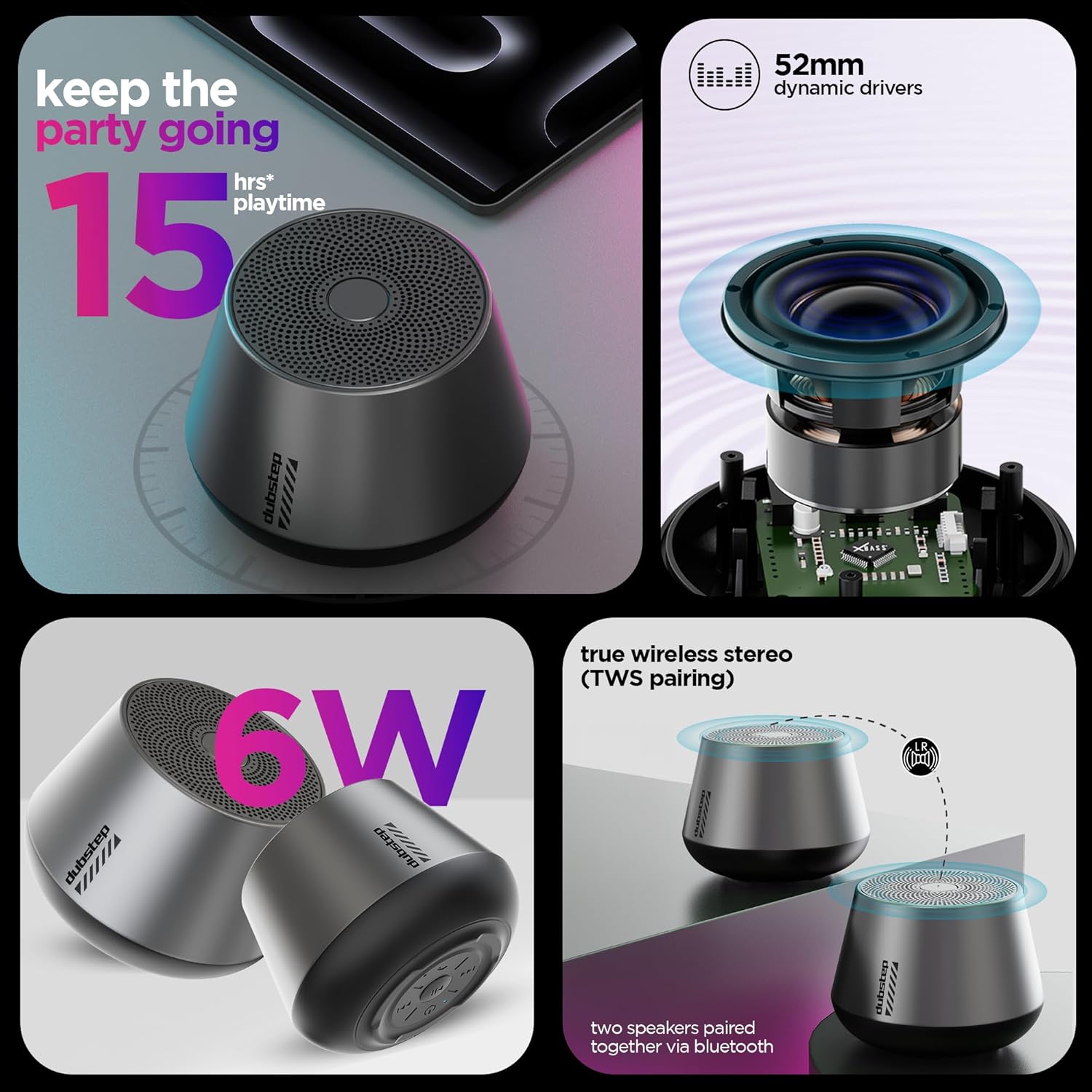
Figure 5: Visual representation of key features including 15 hours playtime
4.2 تشغيل/إيقاف التشغيل
- To power on, press and hold the Power button until you hear an audible prompt or see the indicator light illuminate.
- لإيقاف التشغيل، اضغط مع الاستمرار على زر الطاقة مرة أخرى حتى يتم إيقاف تشغيل مكبر الصوت.
5. تعليمات التشغيل
5.1 اقتران بلوتوث
قم بتوصيل مكبر الصوت بجهاز يدعم تقنية البلوتوث.
- Ensure the speaker is powered on and in pairing mode (indicator light will flash, usually blue).
- على جهازك (الهاتف الذكي، أو الجهاز اللوحي، وما إلى ذلك)، انتقل إلى إعدادات البلوتوث وقم بتشغيل البلوتوث.
- بحث عن available devices and select "Dubstep Pop 610" from the list.
- بمجرد الاتصال، سيصبح ضوء المؤشر ثابتًا، وستسمع صوت تأكيد.
The wireless connectivity range is approximately 10 meters.

Figure 6: Speaker connected wirelessly to a smartphone
5.2 إقران ستيريو لاسلكي حقيقي (TWS)
Pair two Dubstep Pop 610 speakers for an immersive stereo sound experience.
- تأكد من تشغيل كلا السماعتين وعدم توصيلهما بأي جهاز بلوتوث آخر.
- On one speaker (this will be the primary speaker), press and hold the TWS pairing button (refer to product diagram if available, otherwise assume a dedicated button or a combination).
- سوف يبحث المتحدث الأساسي عن المتحدث الثانوي.
- Once paired, you will hear a confirmation sound, and the indicator lights on both speakers will synchronize.
- الآن، قم بتوصيل جهازك بالسماعة الرئيسية عبر البلوتوث كما هو موضح في القسم 5.1. سيتم تشغيل الصوت من خلال كلا السماعتين بنظام ستيريو.

Figure 7: Two speakers demonstrating True Wireless Stereo (TWS) pairing
5.3 Audio Playback and Call Management
- تشغيل/إيقاف مؤقت: اضغط على زر التشغيل / الإيقاف المؤقت.
- المسار التالي: اضغط على زر المسار التالي.
- المسار السابق: اضغط على زر المسار السابق.
- الرد/إنهاء المكالمة: Press the Answer/Hangup button during an incoming call or to end an ongoing call.
6. الصيانة
6.1 التنظيف
- امسح السماعة بقطعة قماش ناعمة وجافة.
- لا تستخدم كيماويات مركزة أو محاليل التنظيف أو المنظفات القوية.
6.2 التخزين
- قم بتخزين السماعة في مكان بارد وجاف بعيداً عن درجات الحرارة القصوى.
- Avoid prolonged exposure to direct sunlight or moisture.
6.3 مقاومة الماء
The Dubstep Pop 610 features sweat and splash resistance, making it suitable for light outdoor use or near water. However, it is NOT waterproof and should not be submerged in water.

Figure 8: Speaker shown with water droplets, illustrating sweat and splash resistance
7. استكشاف الأخطاء وإصلاحها
| مشكلة | السبب المحتمل | حل |
|---|---|---|
| لا يتم تشغيل مكبر الصوت. | بطارية منخفضة. | اشحن السماعة بالكامل. |
| لا يوجد صوت. | Volume too low; Device not connected; Speaker paused. | Increase volume on speaker and device; Re-pair Bluetooth; Press Play/Pause. |
| فشل اقتران البلوتوث. | السماعة ليست في وضع الاقتران؛ البلوتوث في الجهاز معطل؛ المسافة بين السماعة والجهاز بعيدة جدًا. | تأكد من أن السماعة في وضع الاقتران؛ قم بتشغيل البلوتوث في الجهاز؛ قرّب الجهاز (في حدود 10 أمتار). |
| فشل اقتران TWS. | السماعات متصلة بالفعل بأجهزة أخرى؛ وليست في وضع الاقتران اللاسلكي الحقيقي (TWS). | Disconnect speakers from other devices; Ensure both speakers are in TWS pairing mode. |
8. المواصفات
| ميزة | التفاصيل |
|---|---|
| نموذج | بوب 610 |
| نوع السماعة | مكبر صوت بلوتوث |
| نوع برنامج تشغيل الصوت | سائق ديناميكي |
| حجم برنامج تشغيل الصوت | 52 ملم |
| مخرج مكبر الصوت | 6 واط (RMS) |
| تكنولوجيا الاتصال | بلوتوث |
| مدى البلوتوث | 10 مترا |
| المميزات الخاصة | X-Bass Technology, TWS Pairing, Sweat & Splash Resistance |
| نوع البطارية | أيون الليثيوم |
| متوسط عمر البطارية | 15 ساعة |
| وقت الشحن | 2 ساعة |
| وزن العنصر | 210 جرام |
| أبعاد المنتج | 9 عمق × 8 عرض × 9 ارتفاع سنتيمتر |
| مادة | أكريلونيتريل بوتادين ستايرين (ABS) |
| بلد المنشأ | الصين |
9. الضمان والدعم
9.1 معلومات الضمان
The Dubstep Pop 610 Wireless Speaker comes with a ضمان لمدة 6 شهرًا من تاريخ الشراء، بما في ذلك تغطية عيوب التصنيع.
9.2 Manufacturer Contact
For support, service, or warranty claims, please contact:
- الشركة المصنعة: Nuworld Retail Private Limited
- عنوان: Plot No.17-18, Pole No.9, PO Dhoolsiras, Dwarka, Sector-28, New Delhi - 110077
- بريد إلكتروني: hello@Dubstepworld.com
- الهاتف: +91-8826257630
10. فيديو المنتج
Watch the official product video for a visual guide to the Dubstep Pop 610 Wireless Speaker.
فيديو: عرض فيديو رسمي للمنتجasing the features and design of the Dubstep Pop 610 Wireless Speaker.
Ask a question about this manual
Ask about setup, troubleshooting, compatibility, parts, safety, or missing instructions. Manuals+ will review the question and use this page’s manual context to help answer it.