
1. المقدمة
Thank you for choosing the taopodo Children's Smartwatch TK09-QSUK1-SBE. This smartwatch is designed for children aged 3-12 years, offering a range of features including games, a camera, music player, alarm clock, flashlight, and health monitoring functions. This manual provides essential information for safe and effective use of your device.
2. معلومات السلامة
- خطر الاختناق: احتفظ بالأجزاء الصغيرة بعيدًا عن متناول الأطفال الصغار.
- سلامة البطارية: Do not attempt to replace the battery yourself. Use only the provided charging cable.
- مقاومة الماء: The smartwatch may have limited water resistance. Avoid submerging it in water or exposing it to high-pressure water.
- درجة حرارة: لا تعرض الجهاز لدرجات حرارة عالية (ساخنة أو باردة).
- تنظيف: Clean the device with a soft, dry cloth. Avoid harsh chemicals.
- الإشراف: Adult supervision is recommended for young children using the device.
3. محتويات العبوة
يرجى التحقق من الحزمة للعناصر التالية:
- taopodo Children's Smartwatch TK09-QSUK1-SBE (Dark Blue)
- كابل الشحن
- دليل المستخدم (هذا المستند)
4. انتهى المنتجview
تعرّف على المكونات الرئيسية لساعتك الذكية.

الصورة: الجبهة view of the taopodo Children's Smartwatch, showing the screen and side buttons.
4.1 مكونات الساعة
- HD Touch Screen: الواجهة الرئيسية للتفاعل.
- الأزرار الجانبية: Typically used for power on/off, back function, or specific feature activation.
- منفذ الشحن: Located on the side or back, used with the provided charging cable.
- آلة تصوير: مُدمج لالتقاط الصور.
- مكبر الصوت/الميكروفون: For audio playback and recording (if supported).
5. الإعداد
5.1 شحن الساعة الذكية
- Connect the charging cable to the smartwatch's charging port.
- قم بتوصيل الطرف الآخر من كابل الشحن بمحول طاقة USB القياسي (غير متضمن) أو منفذ USB الخاص بالكمبيوتر.
- The watch screen will display a charging indicator. Allow approximately 2-3 hours for a full charge.
5.2 تشغيل/إيقاف التشغيل
- لتشغيل: Press and hold the power button (usually on the side) for a few seconds until the screen lights up.
- لإيقاف التشغيل: اضغط مع الاستمرار على زر الطاقة حتى يظهر خيار إيقاف التشغيل على الشاشة. انقر للتأكيد.
5.3 الإعداد الأولي
Upon first power-on, you may be prompted to set the following:
- لغة: اختر اللغة المفضلة لديك.
- التاريخ والوقت: تعيين التاريخ والوقت الحاليين.
This smartwatch is designed to function independently without requiring a smartphone app for its core features. However, an optional companion app may be available for viewing health data on a parent's device.

الصورة: أكثر منview of smartwatch features, including health tracking and utility apps. The device works without a phone for basic functions, but an app can be used to view health data.
6. تعليمات التشغيل
6.1 التنقل عبر الواجهة
- شاشة اللمس: Swipe left, right, up, or down to navigate through menus and applications. Tap to select an item.
- زر جانبي: Press the side button to return to the previous screen or the home screen.
6.2 الميزات الأساسية
6.2.1 لعبة
The smartwatch includes 12 puzzle games to entertain and engage children.
- From the home screen, swipe to find the 'Games' icon and tap it.
- Select from the list of available games.
- اتبع التعليمات التي تظهر على الشاشة للعب.
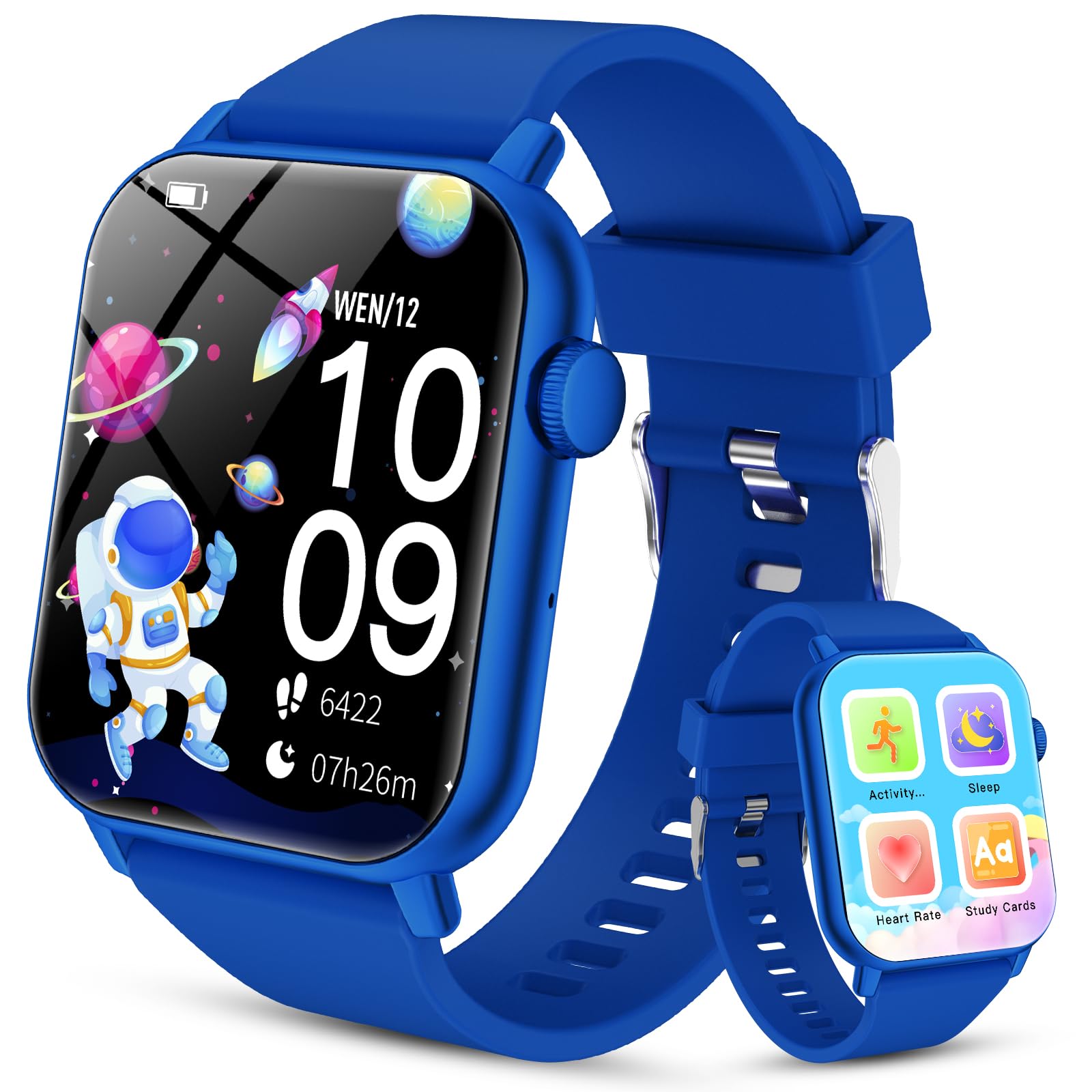
Image: The smartwatch screen showing a selection of 12 built-in puzzle games.
6.2.2 كاميرا
Capture photos directly from the smartwatch.
- Locate and tap the 'Camera' icon.
- انقر على الشاشة لالتقاط صورة.
- Photos are saved to the watch's internal storage.
6.2.3 مشغل موسيقى
Listen to pre-loaded music or transfer compatible audio files to the watch.
- Tap the 'Music' icon to open the player.
- Select a song to play.
- Use on-screen controls for play, pause, skip, and volume adjustment.
6.2.4 منبه
Set alarms to help with daily routines.
- Open the 'Alarm' application.
- Tap to add a new alarm and set the time.
- Customize alarm settings such as repeat days.
6.2.5 مصباح يدوي
قم بتشغيل المصباح اليدوي المدمج للإضاءة.
- Find and tap the 'Flashlight' icon.
- Tap again to turn it off.
6.2.6 تتبع النشاط
Monitor daily steps and estimated calories burned.
- Tap the 'Activity' icon to view your daily progress.
- The watch tracks steps and calculates distance and calories automatically.

Image: The smartwatch screen showing activity tracking, including steps and distance covered.
6.2.7 Real-time Heart Rate Monitoring
The smartwatch can monitor heart rate in real-time.
- Tap the 'Heart Rate' icon.
- Ensure the watch is snug on the wrist for accurate readings.
- The screen will display the current heart rate in BPM (beats per minute).

Image: The smartwatch screen showing real-time heart rate monitoring with a graphical display.
6.2.8 Auto Sleep Monitoring
The watch automatically tracks sleep patterns.
- Wear the smartwatch to bed.
- In the morning, open the 'Sleep' application to view sleep duration and quality.

Image: The smartwatch screen showing automatic sleep monitoring data, including total sleep duration and sleep quality score.
6.2.9 Study Cards & Audiobooks
Access educational content directly on the watch.
- Tap the 'Study Cards' or 'Audiobooks' icon.
- Browse and select content for learning or listening.
6.2.10 أدوات مساعدة أخرى
The smartwatch also includes useful tools:
- آلة حاسبة: للحسابات الأساسية.
- المؤقت: Set countdown timers.
- ساعة التوقيف: قياس الوقت المنقضي.
7. الصيانة
7.1 التنظيف
- امسح الشاشة وجسم الساعة بقطعة قماش ناعمة وخالية من الوبر.
- بالنسبة للعلامات العنيدة، د قليلاًampاغسل القماش بالماء. لا تستخدم مواد كيميائية قاسية أو مواد كاشطة.
7.2 العناية بالبطارية
- Charge the smartwatch regularly, even if not in use, to maintain battery health.
- تجنب تفريغ البطارية بالكامل بشكل متكرر.
- لا تترك الساعة تشحن لفترات طويلة بعد اكتمال شحنها.
7.3 التخزين
- Store the smartwatch in a cool, dry place away from direct sunlight and extreme temperatures.
- If storing for a long period, ensure the battery is charged to about 50% to prevent deep discharge.
8. استكشاف الأخطاء وإصلاحها
8.1 Smartwatch Will Not Turn On
- Ensure the battery is charged. Connect the charging cable and leave it to charge for at least 30 minutes.
- Try pressing and holding the power button for 10-15 seconds.
8.2 Screen is Unresponsive
- Restart the smartwatch by holding the power button until the power-off option appears, then power it back on. If unresponsive, force restart by holding the power button for an extended period (e.g., 15-20 seconds).
- تأكد من أن الشاشة نظيفة وجافة.
8.3 قضايا الشحن
- Verify the charging cable is securely connected to both the watch and the power source.
- جرب محول طاقة USB مختلف أو منفذ USB مختلف.
- Check the charging port on the watch for any debris or damage.
8.4 قراءات صحية غير دقيقة
- Ensure the smartwatch is worn snugly on the wrist, not too loose or too tight.
- Readings can be affected by movement, skin conditions, and environmental factors. These are for reference only and not for medical use.
9. المواصفات
| ميزة | وصف |
|---|---|
| اسم الموديل | TK09-QSUK1-SBE |
| ماركة | تاوبودو |
| نظام التشغيل | أندرويد وير 1.0 |
| حجم الشاشة | 1.96 بوصة |
| تكنولوجيا الاتصال | بلوتوث |
| مدخلات واجهة الإنسان | الأزرار، شاشة اللمس |
| المكونات المضمنة | كابل الشحن |
| لون | أزرق غامق |
| المميزات الخاصة | Puzzle Games, Study Cards, Real-time Heart Rate Monitoring, Sleep Monitoring, Durable Battery Life |
10. الضمان والدعم
للحصول على معلومات الضمان ودعم العملاء، يرجى الرجوع إلى الوثائق المقدمة وقت الشراء أو الاتصال بالبائع. احتفظ بإثبات الشراء لتقديم أي مطالبات ضمان.