
1. المقدمة
Welcome to the world of Care Bears Digital Pets! This interactive virtual pet allows you to care for your very own Cheer Bear. Engage in daily activities, play mini-games, and watch your Cheer Bear grow and express unique emotions on its retro pixel screen. This manual provides all the information you need to get started and enjoy your new digital companion.

Image: The Cheer Bear Digital Pet, a bright pink device shaped like Cheer Bear's head, featuring her rainbow belly badge on the screen.
2. ماذا يوجد في الصندوق
Your Care Bears Digital Pet package includes:
- 1 x Kea Kuma Digital Pet (Cheer Bear)
3. الإعداد
3.1 تركيب البطارية
Your Care Bears Digital Pet requires 1 Nonstandard Battery (included). To install or replace the battery:
- حدد مكان حجرة البطارية في الجزء الخلفي من الجهاز.
- استخدم مفك براغي صغير (غير مرفق) لفتح غطاء حجرة البطارية.
- أدخل البطارية مع التأكد من القطبية الصحيحة (+/-).
- أعد تركيب الغطاء وثبته بالمسمار.
3.2 Initial Power-On and Time Setting
After battery installation, the device will power on. You may need to set the current time and date using the control buttons. Refer to the 'Operation' section for button functions.

Image: The back of the Cheer Bear Digital Pet, indicating the location of the battery compartment.
4. التشغيل
4.1 الضوابط الأساسية
The device features several control buttons for interaction:
- زر الوضع: Cycles through different menus and options.
- أزرار الاتجاهات (يسار/يمين): Navigates within menus or selects actions.
- زر الدخول: يؤكد الاختيارات أو ينفذ الإجراءات.
4.2 Nurturing Your Cheer Bear
To keep your Cheer Bear happy and healthy, perform regular care activities:
- يٌطعم: Select the food icon to offer meals when your Cheer Bear is hungry.
- ينظف: Keep your Cheer Bear's environment tidy by selecting the cleaning option.
- راحة: Provide comfort and attention when your Cheer Bear seems sad or lonely.
- يلعب: Engage in mini-games to boost your Cheer Bear's happiness.

Image: A close-up of the Cheer Bear Digital Pet, highlighting its interactive display, control buttons, and keychain attachment.
5. طريقة اللعب
The Cheer Bear Digital Pet offers interactive gameplay and daily care activities designed to engage users. The retro pixel screen displays Cheer Bear's actions and emotions.
5.1 Interactive Mini-Games
Play cheerful mini-games to keep your Cheer Bear entertained. These games contribute to your pet's happiness and growth.

Image: A visual representation of the gameplay options on the Cheer Bear Digital Pet screen, including Nurture, Play, Feed, and Grow.
5.2 Growth and Evolution
As you care for your Cheer Bear, it will progress through different stages of growth. Consistent care and interaction are key to its development.

Image: The Cheer Bear Digital Pet screen displaying icons for different interactive activities and care options.
6. المميزات
The Care Bears Digital Pet is designed with several features to enhance your interactive experience:
- شاشة عرض تفاعلية: A 1.4-inch retro pixel screen brings Cheer Bear to life.
- أزرار التحكم: Easy-to-use buttons for navigation and interaction.
- Keychain: A convenient keychain allows you to carry your digital pet anywhere.
- Unique Facial Expressions: Watch Cheer Bear beam, sparkle, and delight with various expressions.
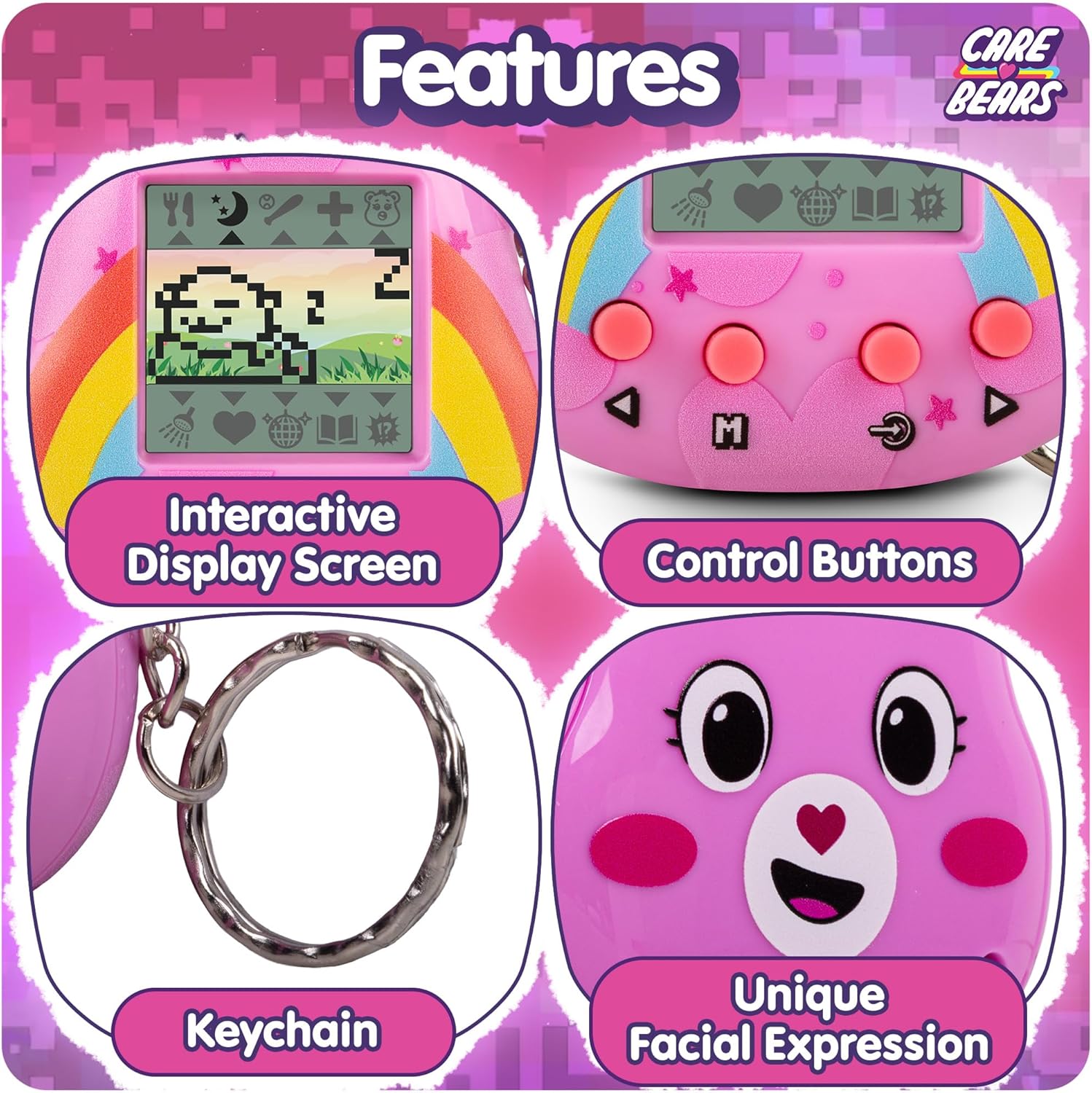
الصورة: تفصيلية view of the Cheer Bear Digital Pet, illustrating its interactive display, physical control buttons, keychain, and the unique facial expressions of the character.

Image: The Cheer Bear Digital Pet showcasing its original design from both front and back views.
6.1 فيديو المنتج الرسمي
Video: An official video introducing the Care Bears Digital Pets, highlighting their features and interactive nature.
7. الصيانة
7.1 التنظيف
To clean your Care Bears Digital Pet, gently wipe the device with a soft, dry cloth. Avoid using harsh chemicals or abrasive materials.
7.2 العناية بالبطارية
If the device's battery life seems short or inconsistent, consider replacing the battery with a fresh one. Ensure the battery compartment is securely closed after replacement.
8. استكشاف الأخطاء وإصلاحها
8.1 Device Resets Unexpectedly
If your Care Bears Digital Pet resets frequently, especially after pressing buttons, check the battery compartment. Ensure the battery is properly seated and the cover is securely fastened. A loose connection can cause unexpected resets.
8.2 Pet Appears Sad or Unresponsive
If your Cheer Bear seems sad or unresponsive, it may require more attention. Ensure you are regularly feeding, cleaning, comforting, and playing with it. Consistent interaction is crucial for its well-being.
9. المواصفات
| حجم الشاشة | 1.38 بوصة |
| عدد البطاريات | 1 بطارية غير قياسية (متضمنة) |
| هل التجميع مطلوب؟ | لا |
| منصة | مخصص |
| مقاس | صغير |
| أبعاد المنتج الطول × العرض × الارتفاع | 2.36 بوصة طول × 0.78 بوصة عرض × 2.36 بوصة ارتفاع |
| وزن العنصر | 0.07 كيلوغرام |
| لون | الدب المشجع |
| سمة | حيوان |
| شخصية الموضوع | Cheer Bear (Care Bears) |
| نوع المادة | بلاستيك |
| وصف الفئة العمرية | 8 سنوات + |
| رقم الموديل | CB/KK1CB |
| الشركة المصنعة | Thumbs Up! |
10. معلومات السلامة
تحذير: خطر الاختناق - أجزاء صغيرة. غير مناسب للأطفال دون سن 3 سنوات.
11. الضمان والدعم
يأتي هذا المنتج مع ضمان الشركة المصنعة لمدة عامين. For support or warranty claims, please refer to the manufacturer's contact information provided with your purchase or visit the official Care Bears store on Amazon: Care Bears Store.