
1. انتهى المنتجview
The Veken 63 x 28 Inch Electric Standing Desk (Model ODHOME123) is designed to provide a versatile and ergonomic workspace. It features a spacious desktop, smooth electric height adjustment, and a robust metal frame for stability. This desk is suitable for various uses including home office work, study, and gaming.
المميزات الرئيسية:
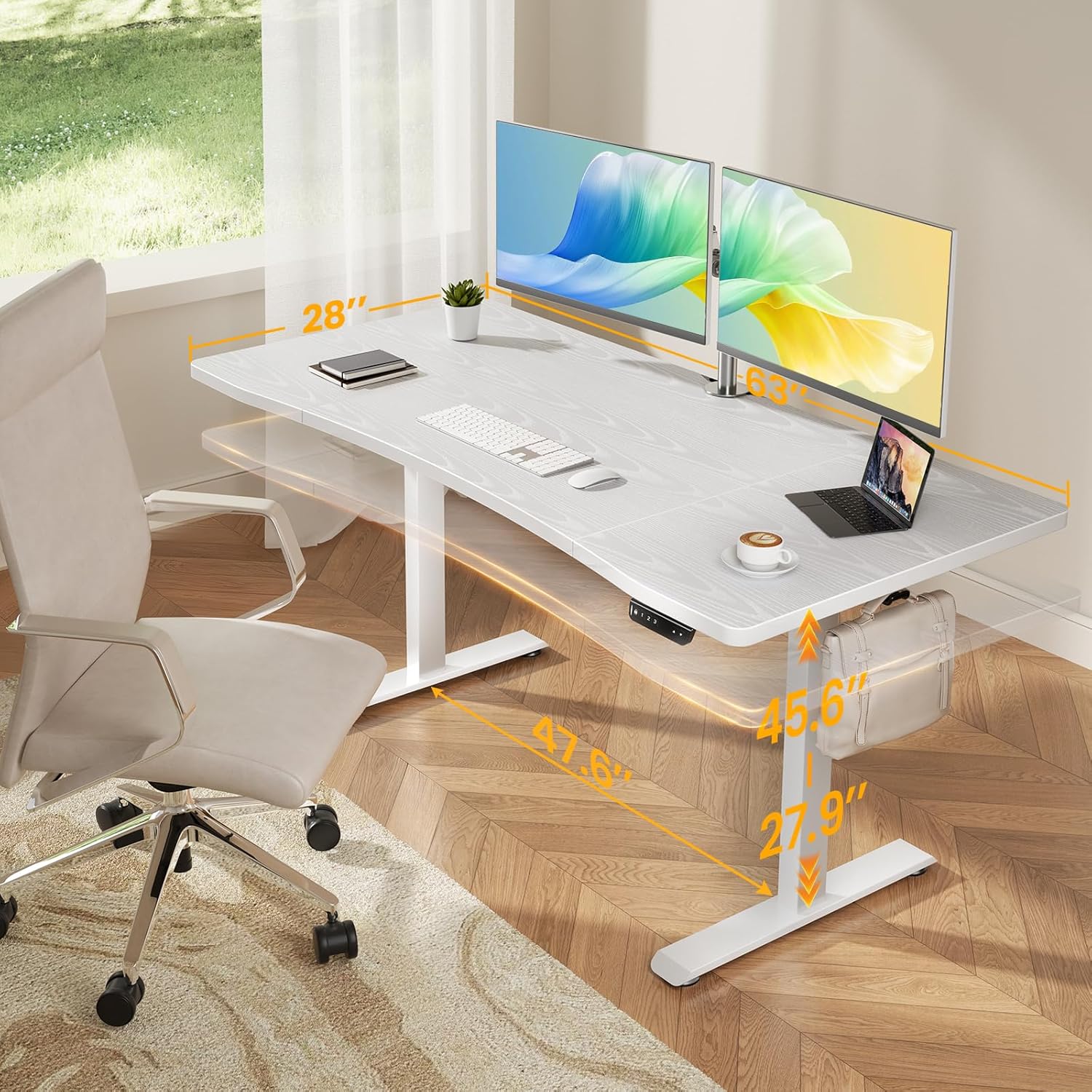
- Spacious Worksurface: An expansive 63" x 28" desktop accommodates multiple monitors and office supplies, promoting an organized and efficient workflow.
- حافة منحنية مريحة: A smooth, human-centric curved edge reduces arm strain and allows easy access to items, enhancing comfort during long work hours.
- استقرار قوي كالصخر: A reinforced structure ensures exceptional stability and shake-free operation, even at full height.
- Heavy-Duty Metal Frame: Constructed with premium cold-rolled steel, the desk legs offer robust load-bearing capacity and long-lasting durability.
- تعديل الارتفاع بسلاسة: Easily switch between sitting and standing positions with an electric motor, offering a wide height range from 27.9" to 45.6".

2. معلومات السلامة
يرجى قراءة وفهم جميع تعليمات السلامة قبل التجميع والاستخدام لمنع الإصابة أو التلف.
- Ensure proper assembly and stability by following all user manual instructions carefully.
- Use the provided feet pads to prevent slipping and protect floor surfaces.
- Be mindful of the weight limits and avoid overloading the desk to maintain stability and prevent damage. The desk has an ultra-high load-bearing capacity of up to 176 lbs.
- أبقِ الأطفال والحيوانات الأليفة بعيدًا عن المكتب أثناء تعديل ارتفاعه لمنع وقوع الحوادث.
- Do not place liquids directly on the desk surface without protective coasters.

3. محتويات العبوة
تأكد من وجود كافة المكونات قبل البدء بالتجميع.
- Desk Components (Desktop sections, Legs, Frame)
- لوحة التحكم
- محول الطاقة والكابل
- مقطع الكابل
- Feet Pads (4 units)
- خطاف سماعة الرأس
- دليل المستخدم (1 وحدة)
- أدوات التجميع (براغي، مفاتيح ألين، إلخ).
4. تعليمات الإعداد والتجميع
Follow these steps carefully for correct assembly. All holes are pre-drilled, and accessories are pre-labeled for ease of installation.
- فك مكونات الحزمة: قم بإزالة جميع الأجزاء من العبوة بعناية وضعها على سطح نظيف وناعم لمنع الخدوش.
- تجميع سطح المكتب: Connect the desktop sections according to the included diagrams, ensuring the curved edge faces the user.
- Attach Legs and Frame: Secure the desk legs and crossbar frame to the desktop using the provided hardware. Ensure all connections are tight and stable.
- تثبيت لوحة التحكم: قم بتثبيت لوحة التحكم أسفل المكتب في المكان المخصص.
- توصيل الطاقة: قم بتوصيل محول الطاقة بصندوق التحكم ثم بمأخذ الحائط.
- إدارة الكابلات: Use the included cable clips to organize power and data cables for a tidy workspace.

دليل فيديو التجميع:
5. تعليمات التشغيل
The Veken Electric Standing Desk features an intuitive control panel for easy height adjustment and memory presets.
ضبط الارتفاع:
- استخدم أعلى (▲) و لأسفل (▼) أزرار على لوحة التحكم لضبط ارتفاع المكتب يدويًا.
- The desk can be adjusted smoothly within a range of 27.9 inches to 45.6 inches.
إعدادات الذاكرة المسبقة:
The control panel allows you to save preferred sitting and standing heights for quick adjustments.
- قم بضبط المكتب على الارتفاع المطلوب باستخدام الأزرار لأعلى/لأسفل.
- اضغط على 'م' button (Memory) followed by a number button ('1', '2'، أو '3') لحفظ الارتفاع الحالي لهذا الإعداد المسبق.
- لاستدعاء ارتفاع محفوظ، ما عليك سوى الضغط على زر الرقم المقابل ('1', '2'، أو '3'). The desk will automatically move to the preset height.

6. الصيانة
Regular maintenance ensures the longevity and optimal performance of your Veken Electric Standing Desk.
- تنظيف: امسح سطح المكتب بقطعة قماش ناعمة.amp القماش. تجنب استخدام المواد الكيميائية القاسية أو المنظفات الكاشطة التي قد تتلف الطبقة النهائية المصفحة.
- التحقق من الاتصالات: افحص جميع البراغي والصواميل دوريًا للتأكد من إحكام ربطها. أعد ربطها إذا لزم الأمر.
- إدارة الكابلات: تأكد من عدم انضغاط الكابلات أو تشابكها، خاصة أثناء تعديل الارتفاع.
- توزيع الوزن: قم بتوزيع الوزن بالتساوي على سطح المكتب لمنع الضغط على المحرك والإطار.
7. استكشاف الأخطاء وإصلاحها
إذا واجهتك مشكلات مع مكتبك، راجع المشكلات والحلول الشائعة التالية.
المشاكل الشائعة:
- المكتب لا يمكن تعديله: تأكد من توصيل كابل الطاقة بإحكام في كل من المكتب ومقبس الحائط. تأكد من عدم وجود أي عوائق تعيق حركة المكتب.
- ضبط الارتفاع غير المتساوي: This can sometimes be caused by incorrect installation of internal components. Refer to the specific installation videos below.
- رموز الخطأ: If the control panel displays an error code, consult the full user manual for specific code meanings and troubleshooting steps.
Troubleshooting Video Guides:
8. المواصفات
| ماركة | فيكن |
| رقم الموديل | ODHOME123 |
| أبعاد المنتج | 63 بوصة عرض × 28 بوصة عمق × 27.9 بوصة - 45.6 بوصة ارتفاع |
| الحد الأدنى للارتفاع | 27.9 بوصة |
| الحد الأقصى للارتفاع | 45.6 بوصة |
| وزن العنصر | 43.4 رطل |
| سعة التحميل | 176 رطل |
| لون | أبيض |
| نوع المادة العلوية | Blockboard (Laminated Finish) |
| المادة الأساسية | الفولاذ المدلفن على البارد |
| المميزات الخاصة | Adjustable Height, Electric, Ergonomic, Memory Preset |
| مطلوب التجميع | نعم |
9. الضمان والدعم
For warranty information and customer support, please refer to the documentation included with your product or contact Veken customer service.
- ضمان الشركة المصنعة: Details regarding the manufacturer's warranty are typically provided within the product packaging.
- دعم العملاء: If you have any questions, require assistance with assembly, or need troubleshooting help, please reach out to Veken customer support through the contact information provided on the official Veken webالموقع أو منصة الشراء الخاصة بك.