
1. المقدمة
Thank you for choosing the WiMiUS P62 Pro 4K Projector. This manual provides essential information for setting up, operating, and maintaining your projector to ensure optimal performance and longevity. Please read this manual thoroughly before use and retain it for future reference.
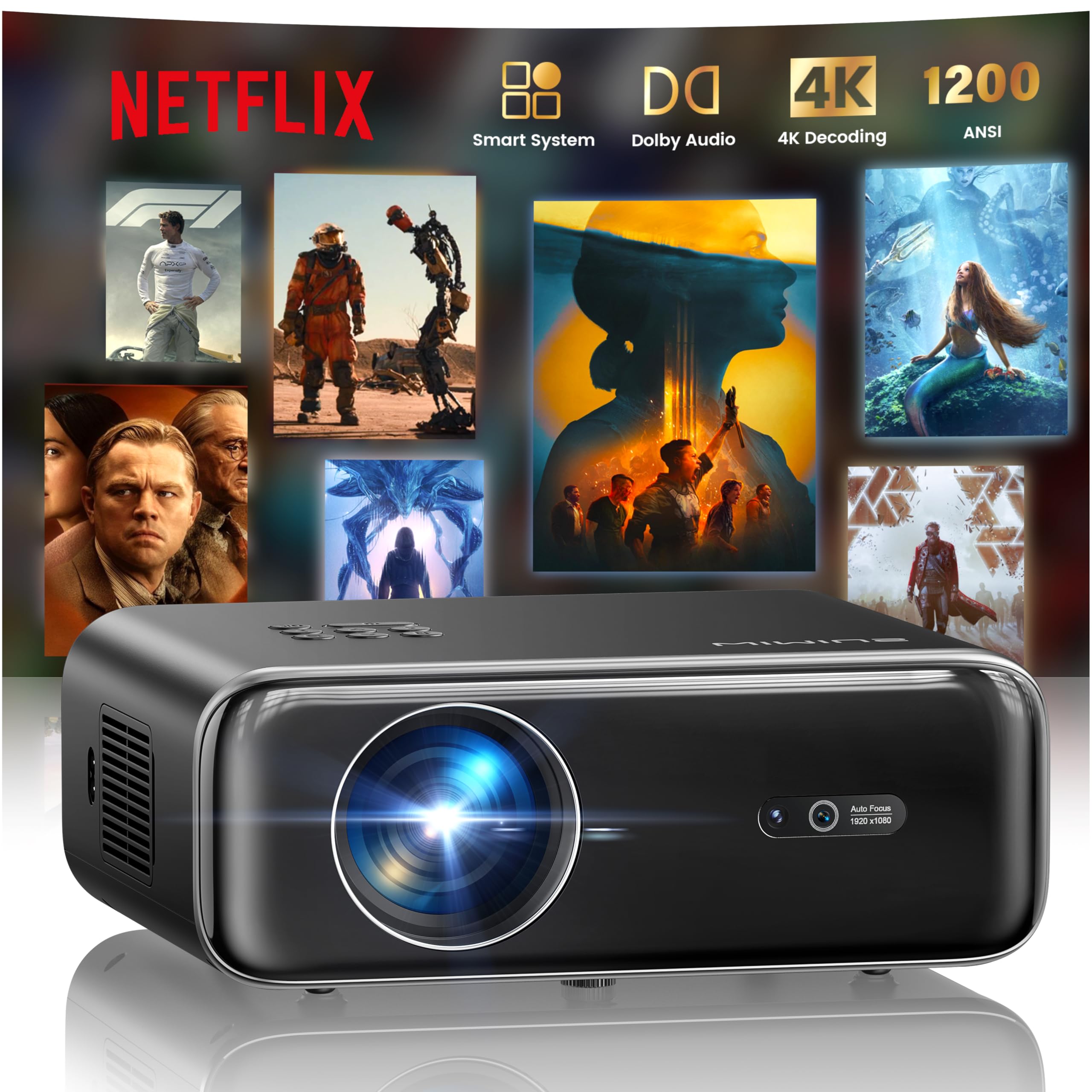
The WiMiUS P62 Pro 4K Projector, a compact and powerful device designed for home entertainment.
2. ماذا يوجد في الصندوق
Carefully unpack your WiMiUS P62 Pro projector and ensure all items are present:
- WiMiUS P62 Pro Projector (Netflix included)
- جهاز التحكم عن بعد
- غطاء العدسة
- سلك الطاقة
- كابل HDMI
- مجموعة التنظيف
- دليل البدء السريع

Contents of the WiMiUS P62 Pro package, including the projector, remote, and essential cables.
3. انتهى المنتجview والميزات الرئيسية
The WiMiUS P62 Pro is a versatile 4K-supported projector designed for a superior home cinema experience. Its key features include:
- عالية السطوع: 1400 ANSI lumens for clear images even in ambient light.
- دقة العرض الأصلية 1080 بكسل: Supports 4K Ultra HD input for crisp visuals.
- Smart OS with Official Apps: Pre-installed Netflix, YouTube, Prime Video, Plex, and access to over 20,000 apps.
- AI Intelligent Adjustment: Automatic focus, keystone correction, obstacle avoidance, and screen alignment.
- صوت دولبي: Integrated dual 36W speakers with Dolby Audio for immersive sound.
- اتصال متعدد الاستخدامات: WiFi 6, Bluetooth 5.4 (bidirectional), HDMI (ARC & CEC), USB.
- تصميم محمول: Compact dimensions (25.7 x 20 x 10.3 cm) and lightweight (1.8 kg) for easy transport.
- حماية العين: Utilizes diffuse reflection imaging technology to reduce eye strain.

The WiMiUS P62 Pro offers a revolutionary home cinema experience with integrated streaming apps like Netflix, YouTube, and Prime Video.

Experience exceptional audio quality with integrated Dolby Audio and powerful Hi-Fi speakers.
4. الإعداد
اتبع هذه الخطوات لإعداد جهاز العرض الخاص بك في البداية:
- الموقع: Position the projector on a stable, flat surface or mount it (ceiling or tripod). Ensure adequate ventilation around the device. The projector can be placed between 1 to 6 meters from the projection surface.
- توصيل الطاقة: قم بتوصيل سلك الطاقة بجهاز العرض ثم بمأخذ الطاقة.
- تشغيل الطاقة: اضغط على زر الطاقة الموجود على جهاز العرض أو جهاز التحكم عن بعد لتشغيله.
- التعديلات التلقائية: The projector features AI-powered auto-focus and auto-keystone correction. It will automatically adjust the image for clarity and shape. It also includes intelligent obstacle avoidance and automatic screen alignment.
- Manual Adjustments (if needed): If further adjustments are required, use the remote control to access settings for focus, keystone, and zoom (50%-100%).

The projector features intelligent screen adaptation 3.0, including auto-focus, auto-keystone correction, and obstacle avoidance.
5. تعليمات التشغيل
5.1 تشغيل/إيقاف التشغيل
- لتشغيل: اضغط على زر الطاقة الموجود بجهاز العرض أو جهاز التحكم عن بُعد.
- لإيقاف التشغيل: اضغط على زر التشغيل مرة أخرى. أكد إيقاف التشغيل إذا طُلب منك ذلك.
5.2 Navigation and Source Selection
- Use the remote control's directional buttons and OK button to navigate the on-screen menu.
- Select your desired input source (HDMI 1, HDMI 2, USB, or Smart Apps) from the main menu.
5.3 إعدادات الصورة والصوت
- Access the settings menu to adjust picture parameters such as brightness, contrast, color, and aspect ratio.
- Adjust sound volume and audio modes. The integrated Dolby Audio provides rich sound.

Enjoy an ultimate gaming experience with low latency and a 60Hz refresh rate.

Easily display your work or presentations on a larger screen.
6. الاتصال
The WiMiUS P62 Pro offers multiple connectivity options:
- منافذ HDMI (x2): Connect devices like laptops, gaming consoles, Blu-ray players. HDMI 2 supports ARC (Audio Return Channel) and CEC (Consumer Electronics Control) for simplified audio setup and control.
- منافذ USB (x2): Play media directly from USB drives or connect external devices.
- واي فاي 6: Connect to your home network for internet access and streaming. Supports screen mirroring from iOS, Android, and Windows 10 devices for seamless content sharing.
- بلوتوث 5.4 (ثنائي الاتجاه): Connect external Bluetooth speakers or headphones for enhanced audio. The projector can also act as an independent Bluetooth speaker when connected to a phone.

The rear panel of the projector features multiple connectivity ports including HDMI and USB.

Synchronize and enjoy with multiple connectivity options for seamless entertainment.
7. الميزات الذكية
7.1 Integrated Streaming Applications
The projector comes with officially certified streaming applications pre-installed, providing direct access to a vast library of content:
- نيتفليكس
- يوتيوب
- برايم فيديو
- بليكس
- And more via the integrated App Store.

Access official integrated apps like Netflix and Plex directly from your projector.

Explore more applications through the integrated App Store.
7.2 AI-Powered Image Adjustment
The projector utilizes advanced AI algorithms for automatic image optimization:
- التركيز التلقائي: Automatically adjusts the image sharpness.
- تصحيح الانحراف التلقائي: Corrects distorted images to a perfect rectangle.
- تجنب العوائق الذكية: Detects and adjusts the projection to avoid objects in the path.
- محاذاة الشاشة التلقائية: Optimizes the image to fit the projection surface.

AI-optimized intelligent configuration ensures the best image quality wherever you are.
7.3 Web التصفح
Navigate the internet directly on your projector using the integrated web browser. This allows you to access websites, news, and online content without needing an external computer.

تصفح web directly on your projector with the integrated navigation feature.
8. الصيانة
تضمن الصيانة المناسبة طول عمر جهاز العرض الخاص بك وأدائه الأمثل:
- تنظيف العدسات: Use the provided cleaning kit or a soft, lint-free cloth to gently clean the projector lens. Avoid abrasive materials or harsh chemicals.
- تهوية: تأكد من أن فتحات تهوية جهاز العرض نظيفة وغير مسدودة لمنع ارتفاع درجة حرارته. لا تضع جهاز العرض على أسطح ناعمة قد تعيق تدفق الهواء.
- إزالة الغبار: قم بتنظيف الجزء الخارجي من جهاز العرض بشكل دوري باستخدام قطعة قماش ناعمة وجافة لإزالة الغبار.
- تخزين: عند عدم استخدام جهاز العرض لفترات طويلة، قم بتخزينه في مكان بارد وجاف، ويفضل أن يكون ذلك في عبوته الأصلية أو في حقيبة واقية.
9. استكشاف الأخطاء وإصلاحها
If you encounter issues with your WiMiUS P62 Pro projector, refer to the following common problems and solutions:
| مشكلة | السبب المحتمل | حل |
|---|---|---|
| لا توجد صورة معروضة | تم فصل كابل الطاقة، مصدر الإدخال غير صحيح، غطاء العدسة موجود. | تحقق من توصيل الطاقة، حدد مصدر الإدخال الصحيح، ثم قم بإزالة غطاء العدسة. |
| الصورة ضبابية | الصورة غير واضحة، وتحرك جهاز العرض. | Allow auto-focus to engage or manually adjust focus using the remote. |
| الصورة مشوهة (شكل شبه منحرف) | جهاز العرض غير عمودي على الشاشة. | Allow auto-keystone correction to engage or manually adjust keystone settings. |
| لا يوجد صوت | مستوى الصوت منخفض جدًا، جهاز الصوت الخارجي غير متصل، إخراج الصوت غير صحيح. | Increase volume, check external audio connections, ensure correct audio output is selected. |
| لا يمكن الاتصال بشبكة WiFi/Bluetooth | Incorrect password, device out of range, network issue. | Verify password, move devices closer, restart router/projector. |
للحصول على مزيد من المساعدة، يرجى الرجوع إلى معلومات الاتصال في قسم الضمان والدعم.
10. المواصفات
Detailed technical specifications for the WiMiUS P62 Pro Projector:
- ماركة: WiMiUS
- نموذج: بي 62 برو
- سطوع: 1400 لومن ANSI (38000 لومن)
- الدقة الأصلية: 1920 × 1080 بكسل
- الحد الأقصى لدقة العرض: 3840 x 2160 (4K Ultra HD Support)
- نسبة التباين: 40000:1
- نوع العرض: LCD أو LED
- تقنية الاتصال: بلوتوث 5.4، HDMI، USB، واي فاي 6
- الاستخدامات الموصى بها: Home Cinema, Gaming, Live TV & Sports, Outdoor, Campعمل
- المميزات الخاصة: AI Auto Focus/Keystone, Obstacle Avoidance, Screen Alignment, Official Apps (Netflix, etc.), Dolby Audio, HDMI ARC/CEC
- مسافة الإسقاط: من 1 إلى 6 متر
- حجم الصورة: من 40 إلى 300 بوصة
- نوع التحكم: جهاز التحكم عن بعد
- وزن: 1.8 كيلوغرام
- أبعاد: 25.7 × 20 × 10.3 سم
- ترميز الفيديو: ح.264، ح.265

The projector boasts 1400 ANSI lumens and a 40000:1 contrast ratio for remarkable brilliance.

يتمتع viewing without harmful blue light, reducing eye fatigue.
11. الضمان والدعم
The WiMiUS P62 Pro Projector comes with a 2-year warranty. For any questions or support needs regarding your projector, please refer to the service information provided in the Quick Start Guide or contact WiMiUS customer support directly. You can often find support contact details on the manufacturer's official webالموقع أو من خلال منصة الشراء الخاصة بك.