
1. المقدمة
This user manual provides detailed instructions for the setup, operation, and maintenance of your BOXPUT Q11 Android TV Box. The Q11 is a high-performance streaming media player featuring the Amlogic S905X4 Quad-Core processor, Android 11.0 operating system, and support for 8K and 4K UHD video streaming. It includes dual-band Wi-Fi (2.4/5GHz) and a 1000M Ethernet port for stable network connectivity, along with an IRI Voice Remote for convenient control. Please read this manual thoroughly to ensure proper use and to maximize your viewتجربة رائعة.

Image: The BOXPUT Q11 Android TV Box, its IRI Voice Remote, and the product packaging, showcasing the device's sleek design and included accessories.
2. محتويات العبوة
تأكد من تضمين جميع العناصر المدرجة أدناه في عبوة المنتج الخاصة بك:
- 1 x BOXPUT Q11 Android TV Box
- 1 x IRI BT Voice Remote Control
- شنومكس x الولايات المتحدة محول الطاقة
- 1 × كابل HDMI
- 1 × دليل المستخدم

Image: A visual representation of the BOXPUT Q11 TV Box and its included accessories: the TV box, remote controller, user guide, power adapter, and HDMI cable.
3. انتهى المنتجview
The BOXPUT Q11 features a compact design with essential ports for connectivity. Familiarize yourself with the device's layout and available connections.
Device Ports and Interfaces:
- LAN 1000M: منفذ جيجابت إيثرنت للاتصال بالشبكة السلكية.
- إخراج AV: For connecting to older televisions.
- Optical Audio Output (SPDIF): لتوصيل الصوت الرقمي.
- HDMI: For connecting to modern displays.
- تيار مستمر 5 فولت: منفذ إدخال الطاقة.
- منفذ كارت الذاكرة الصغيرة: Supports up to 128GB for expanded storage.
- يو اس بي 2.0: منفذ USB قياسي للأجهزة الطرفية.
- يو اس بي 3.0: High-speed USB port for faster data transfer.
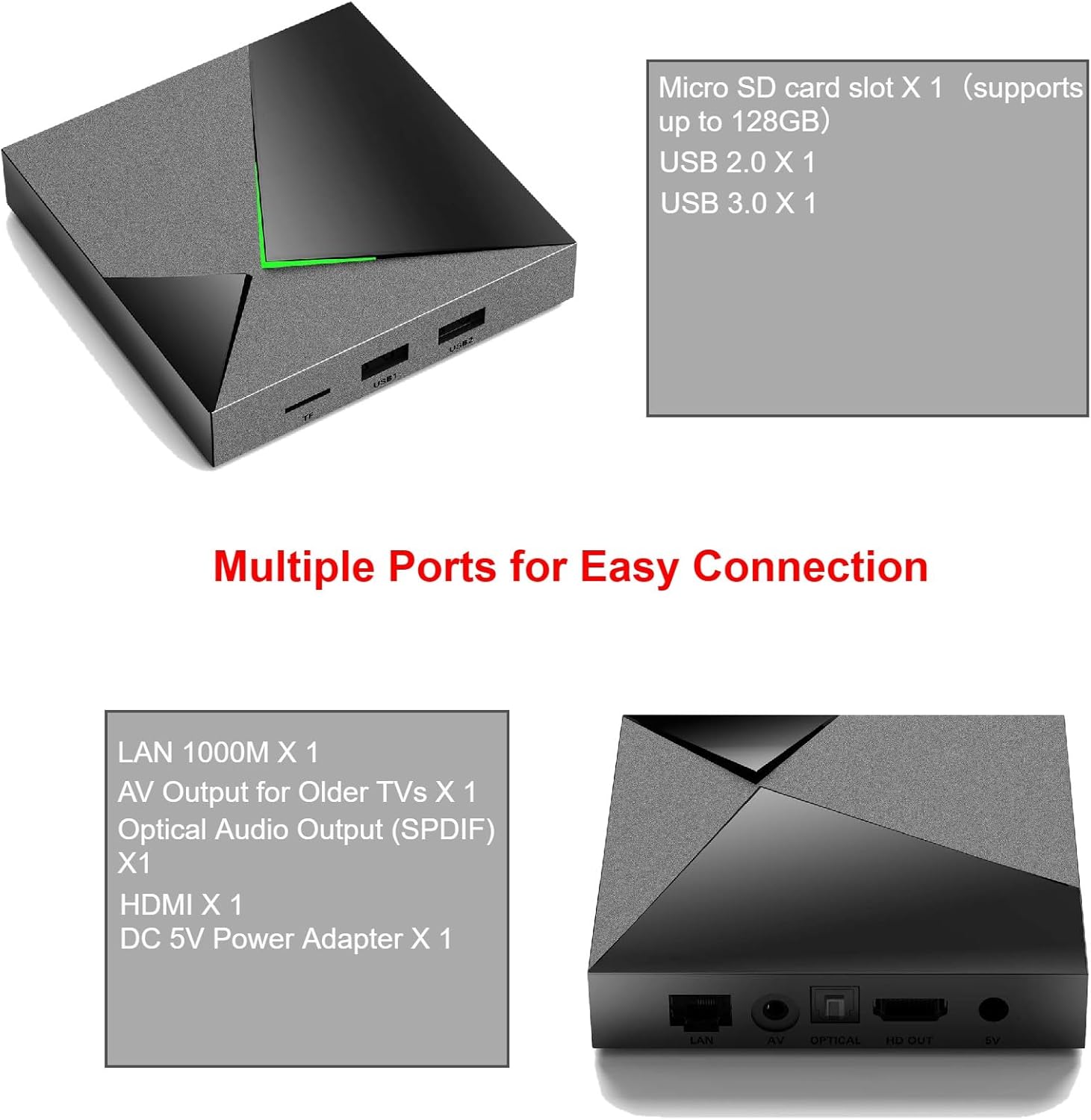
Image: A detailed diagram illustrating the various input and output ports on the BOXPUT Q11 Android TV Box, including LAN, AV, Optical, HDMI, DC 5V, Micro SD, USB 2.0, and USB 3.0.
4. الإعداد
Follow these steps to set up your BOXPUT Q11 Android TV Box:
- الاتصال بالتلفزيون: Connect one end of the provided HDMI cable to the HDMI port on the Q11 TV Box and the other end to an available HDMI input on your television.
- توصيل الطاقة: Plug the US power adapter into the DC 5V port on the Q11 TV Box, then plug the adapter into a wall outlet.
- اتصال الشبكة (اختياري):
- السلكية: For a stable connection, connect an Ethernet cable from your router to the LAN 1000M port on the Q11 TV Box.
- لاسلكي: If using Wi-Fi, you will configure this after the initial boot-up.
- تشغيل الطاقة: Turn on your television and select the correct HDMI input source. The Q11 TV Box should automatically power on and display the boot-up screen.
- الترتيب الأولي: Follow the on-screen prompts to complete the initial setup, including language selection, Wi-Fi connection (if not using Ethernet), and Google account login.

Image: The BOXPUT Q11 TV Box positioned in front of a television screen, illustrating a typical setup for home entertainment, highlighting its Android 11 OS, S905X4 processor, Dual WiFi, and Bluetooth 4.2 capabilities.
5. تعليمات التشغيل
Once set up, navigate the Android TV interface using the IRI BT Voice Remote Control. The remote allows for intuitive control and voice commands.
الملاحة الأساسية:
- Use the directional pad (up, down, left, right) to move between menu items.
- اضغط على OK زر لتحديد عنصر.
- اضغط على خلف زر للعودة إلى الشاشة السابقة.
- اضغط على بيت button to go to the main Android TV home screen.
التحكم الصوتي:
Press the dedicated voice button on your IRI BT Voice Remote to activate voice commands. Speak clearly into the remote to search for content, open applications, or control playback.
انعكاس الشاشة (Miracast):
The Q11 supports one-click screen mirroring, allowing you to cast games or live sports from your compatible phone or tablet directly to your TV. Access the Miracast feature from the device's settings or a dedicated app.
6. الاتصال
The BOXPUT Q11 offers robust connectivity options to ensure a smooth streaming experience.
اتصال واي فاي:
The device supports dual-band 2.4GHz and 5GHz Wi-Fi, providing flexibility and improved performance in congested wireless environments. To connect to Wi-Fi:
- اذهب الى إعدادات على الشاشة الرئيسية.
- يختار الشبكات والانترنت.
- اختر شبكة Wi-Fi المطلوبة من القائمة.
- أدخل كلمة مرور Wi-Fi إذا طُلب منك ذلك.
اتصال إيثرنت:
For the most stable and fastest connection, use the built-in 1000M Gigabit Ethernet port. Simply connect an Ethernet cable from your router to the LAN port on the Q11 TV Box. The device will automatically detect and use the wired connection.
بلوتوث:
The Q11 features Bluetooth connectivity, primarily used for the IRI BT Voice Remote Control. It can also be used to connect other compatible Bluetooth accessories.
7. 8K/4K UHD Streaming
Experience ultra-high-definition content with the BOXPUT Q11, designed to deliver stunning visuals.
8K@60fps Output:
The Q11 streaming box supports 8K resolution at 60 frames per second, providing exceptional detail and clarity. This requires an 8K-compatible television and 8K content.
المدى الديناميكي العالي (HDR):
Enjoy brighter, more realistic colors and greater detail with HDR support. This technology enhances the contrast and color accuracy of compatible content.

Image: A visual comparison demonstrating the enhanced clarity and detail of 8K HDR compared to HD and 4K resolutions, highlighting the vibrant colors and sharper image quality.
Advanced Video Formats:
The Q11 is compatible with advanced video codecs including H.265, VP9, and AV1, ensuring efficient decoding of high-quality video streams.

Image: An illustration detailing the efficiency of the AV1 codec (50% more efficient than H.264, 20% more efficient than HEVC) and a comparison of 60 frames per second playback on the Q11 versus standard TV boxes, showing smoother motion.
8. الميزات المتقدمة
VPN Sharing:
The Q11 TV Box supports sharing VPN internet access. You can log in to your VPN application via an Ethernet connection, and the Q11 can then function as a software Wi-Fi router to share the VPN-protected internet with other devices in your home.

Image: A diagram illustrating how the BOXPUT Q11 can share a VPN connection. The Q11 connects to the internet via a 1G cable Ethernet, runs a VPN app, and then broadcasts a 2T2R Wi-Fi signal to other devices, effectively acting as a VPN router.
9. الصيانة
To ensure the longevity and optimal performance of your BOXPUT Q11 Android TV Box, follow these maintenance guidelines:
- تنظيف: استخدم قطعة قماش ناعمة وجافة لتنظيف الجزء الخارجي من الجهاز. تجنب استخدام المنظفات السائلة أو المواد الكاشطة.
- تهوية: Ensure the device is placed in a well-ventilated area to prevent overheating. Do not block the ventilation openings.
- إيقاف التشغيل: عند عدم الاستخدام لفترات طويلة، يوصى بفصل محول الطاقة.
- تحديثات البرامج: تحقق بشكل دوري من وجود تحديثات للنظام في إعدادات الجهاز للتأكد من حصولك على أحدث الميزات والتصحيحات الأمنية.
10. استكشاف الأخطاء وإصلاحها
If you encounter issues with your BOXPUT Q11, refer to the following common problems and solutions:
- لا يوجد طاقة/لا يوجد عرض:
- تأكد من توصيل محول الطاقة بشكل آمن بالجهاز ومأخذ الطاقة العامل.
- Verify that the HDMI cable is properly connected to both the TV Box and the TV, and that the correct HDMI input is selected on your TV.
- لا يوجد اتصال بالإنترنت:
- For Wi-Fi, check your network settings and ensure the correct password is entered. Try restarting your router.
- For Ethernet, ensure the cable is securely connected and your router is functioning correctly.
- جهاز التحكم عن بعد لا يستجيب:
- افحص البطاريات الموجودة في جهاز التحكم عن بعد واستبدلها إذا لزم الأمر.
- تأكد من عدم وجود أي عوائق بين جهاز التحكم عن بعد وجهاز استقبال التلفزيون.
- If it's a Bluetooth remote, try re-pairing it in the device's Bluetooth settings.
- جودة الفيديو رديئة:
- Ensure your internet connection is stable and fast enough for high-resolution streaming.
- Verify that your TV supports the resolution (e.g., 4K or 8K) you are trying to stream.
- Check the video output settings on the Q11 TV Box.
11. المواصفات
| ميزة | مواصفة |
|---|---|
| ماركة | صندوق وضع |
| رقم الموديل | س11 |
| نظام التشغيل | أندرويد 11.0 |
| المعالج | Amlogic S905X4 Quad-Core |
| كبش | 4 جيجا بايت |
| ذاكرة للقراءة فقط | 32 جيجا بايت |
| مخرج الفيديو | 8K@60fps, H.265, VP9, AV1 |
| الاتصال | Dual-band 2.4GHz/5GHz Wi-Fi, 1000M Ethernet, Bluetooth |
| الموانئ | HDMI, USB 2.0, USB 3.0, Micro SD, LAN, AV, Optical (SPDIF), DC 5V |
| أبعاد | 7.8 × 5.6 × 2.2 بوصة |
| وزن | 1.21 جنيه (0.55 كيلوجرام) |
| لون | أسود |
| المميزات الخاصة | Convenient control, Easy to install, Miracast |
12. الضمان والدعم
BOXPUT is committed to providing quality products and customer satisfaction. While specific warranty details are not provided in this manual, the product includes access to a friendly after-sales support team.
For any questions, technical assistance, or support needs, please refer to the contact information provided with your purchase or visit the official BOXPUT website. Our support team is available to assist you with any issues or inquiries regarding your Q11 Android TV Box.

Image: A person seated at a desk, using a computer, with the BOXPUT Q11 TV Box and remote control nearby, symbolizing readily available customer support and assistance.