
1. المقدمة
This manual provides detailed instructions for the installation, operation, and maintenance of your BESTTEN 24W USB Wall Outlet, Model BAA-015. This device integrates a standard 15 Amp electrical outlet with both Type C and Type A USB charging ports, offering a total output of 4.8A (5VDC, 24W). It is designed for convenient charging of various electronic devices while maintaining a clean aesthetic with its screwless wallplate.

الصورة 1.1: انتهىview of the BESTTEN 24W USB Wall Outlet.
2. معلومات السلامة
Please read all safety instructions carefully before installation and use. Failure to follow these instructions may result in electric shock, fire, or property damage.
- المدرجة في قائمة UL / cUL: This product is UL/cUL Listed, ensuring it meets recognized safety standards.
- Tamper-Resistant (TR) Shutters: يتميز المنفذ بـamper-resistant shutters to prevent foreign objects from being inserted, enhancing electrical safety, especially in homes with children.
- مادة: Constructed from fire and impact-resistant polycarbonate thermoplastic material for enhanced durability and safety.
- يحذر أثناء التثبيت:
- احرص دائمًا على فصل التيار الكهربائي من قاطع الدائرة قبل التركيب.
- Do not unscrew the terminal screws too far or with excessive force.
- Do not use power tools to loosen or tighten terminal screws.
- The USB receptacle can only be wired to one circuit.
- This USB outlet cannot charge laptops.

Image 2.1: Tamper-Resistant feature for enhanced safety.

Image 2.2: Multiple safety protections integrated into the outlet.
3. محتويات العبوة
تأكد من وجود كافة المكونات قبل البدء في التثبيت:
- USB Outlets (quantity as per pack)
- Screwless Wallplates
- مسامير التثبيت
4. المواصفات
| ميزة | مواصفة |
|---|---|
| رقم الموديل | بي ايه ايه-015 |
| تصنيف USB | Two USB Ports with 4.8 Amp, 5VDC (24W total) |
| AC Outlet Rating | 15 Amp، 125VAC |
| محطات الأسلاك | #14 - #12 AWG for Side, #14 AWG for Back |
| درجة حرارة التشغيل | -4 إلى 140 درجة فهرنهايت (-20 إلى 60 درجة مئوية) |
| التوافق مع USB | USB 1.1/2.0/3.0 Devices, including Apple Products (excluding laptops) |
| شهادة | مدرج في قوائم UL / cUL |
| مادة | البولي كربونات (PC) |
| أبعاد المنتج | 4.69"L x 2.91"W x 1.75"D (11.91cm x 7.39cm x 4.45cm) |
| وزن العنصر | 6.3 أونصات |
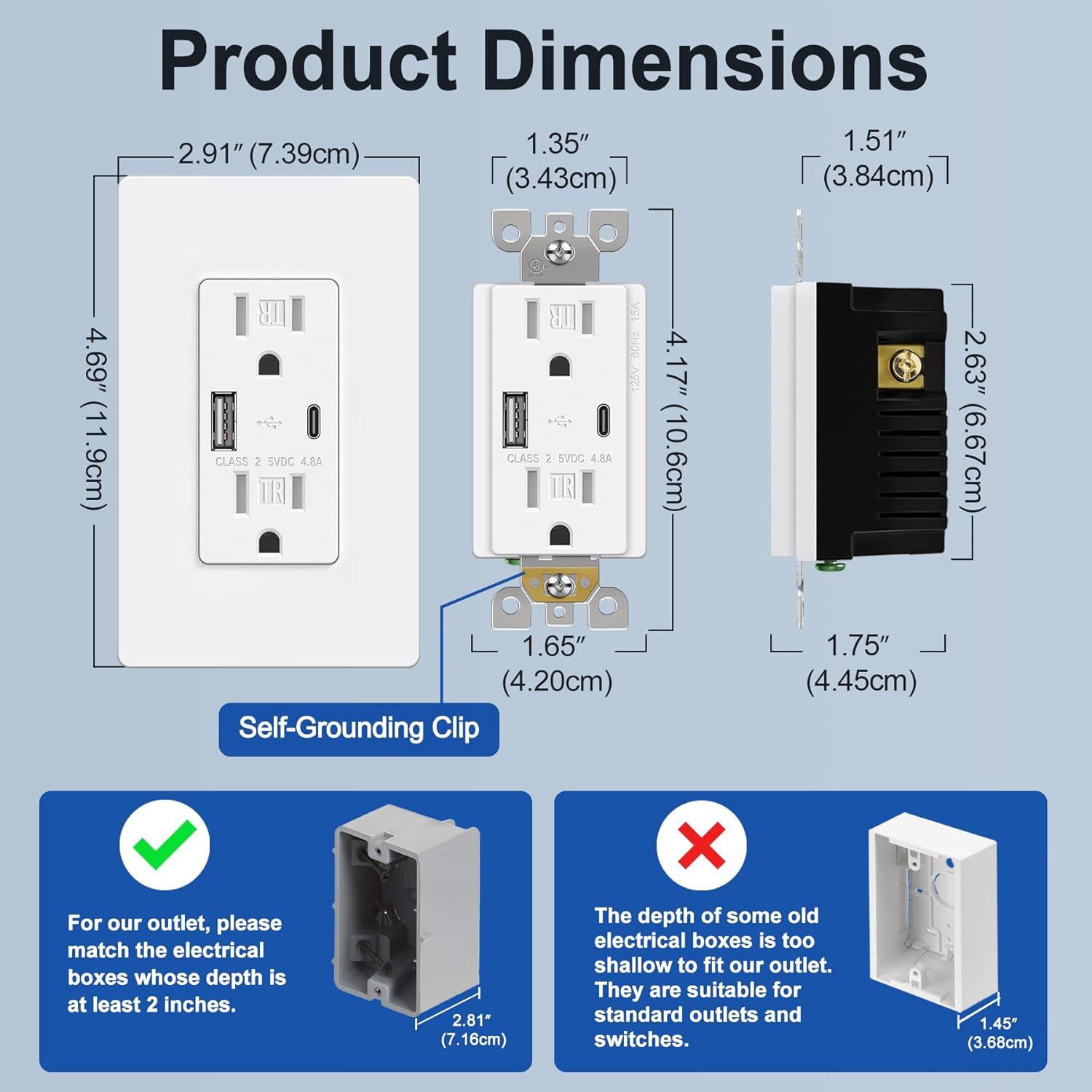
Image 4.1: Product dimensions and electrical box depth requirement.

Image 4.2: Comprehensive product specifications and dimensions.
5. الإعداد (التثبيت)
Installation should be performed by a qualified electrician or a knowledgeable individual following all local electrical codes and safety guidelines. Always ensure power is OFF at the circuit breaker before starting.
تعليمات التوصيل
The outlet supports both back and side wiring options.

Image 5.1: Wiring diagram and installation steps.

Image 5.2: Back wire vs. Side wire connection methods.
Steps for Back Wiring:
- Gently loosen the screw holding it against the terminal.
- Press the screw, insert the bare wire into the terminal hole.
- Tighten the terminal screw to 12-14 in-lbs.
Steps for Side Wiring:
- Strip approximately 1 inch of insulation from the wire.
- Wrap the wire clockwise around the screw terminal, ensuring 2/3 of the way around.
- Tighten the terminal screw securely.
تنبيهات هامة:
- Ensure the electrical box depth is at least 2 inches for proper fitment.
- Connect the Black/Hot wire to the Brass screw, White/Neutral wire to the Silver screw, and Green/Ground wire to the Green screw.
- After wiring, carefully push the outlet into the electrical box and secure it with mounting screws.
- Attach the screwless wallplate by snapping it into place.
- استعادة الطاقة عند قاطع الدائرة.
6. تعليمات التشغيل
Once installed and power is restored, the BESTTEN USB Wall Outlet is ready for use.
- منافذ التيار المتردد: Plug standard electrical devices into the two 15 Amp AC receptacles.
- منافذ شحن USB: Use the Type C or Type A USB ports to charge compatible electronic devices. The total output for both USB ports is 4.8A (5VDC, 24W).
- الشحن المتزامن: You can charge two USB devices simultaneously without needing adapters, while still having access to the two AC outlets.
- التوافق: Compatible with a wide range of electronic devices including smartphones, tablets, e-readers, digital cameras, and MP3 players. Note: This USB outlet cannot charge laptops.

Image 6.1: High-speed charging with Type C and Type A USB ports.

Image 6.2: Wide compatibility with various electronic devices.
7. الصيانة
The BESTTEN USB Wall Outlet requires minimal maintenance.
- تنظيف: To clean the surface, wipe with a soft, damp قطعة قماش. لا تستخدم منظفات أو مذيبات كاشطة. تأكد من فصل الكهرباء قبل التنظيف.
- تقتيش: Periodically inspect the outlet and wallplate for any signs of damage, wear, or loose connections. If any issues are found, turn off power at the breaker and consult a qualified electrician.
8. استكشاف الأخطاء وإصلاحها
If you encounter issues with your USB wall outlet, refer to the following table:
| مشكلة | السبب المحتمل | حل |
|---|---|---|
| No power from AC outlets | Circuit breaker tripped; Loose wiring connection | Check and reset the circuit breaker. Verify wiring connections are secure (power off first). |
| منافذ USB لا تشحن | Device incompatibility; Faulty USB cable; USB ports failed; Overload | Ensure device is compatible (not a laptop). Try a different USB cable. Reduce number of devices charging. If USB ports fail after extended use, replacement may be necessary. |
| شحن الجهاز بطيء | High power demand from multiple devices; Faulty USB cable | Ensure total USB current draw does not exceed 4.8A. Try a different, high-quality USB cable. |
| لا تتناسب لوحة الحائط بشكل محكم | Electrical box too shallow; Obstruction | Ensure electrical box depth is at least 2 inches. Check for any wires or debris obstructing the fit. |
9. الضمان والدعم
This BESTTEN product is backed by a standard return policy, typically 30 days from the date of purchase for refund or replacement, as per retailer terms. For specific warranty details and duration, please refer to the product packaging or contact BESTTEN customer support.
For technical assistance or further inquiries, please visit the official BESTTEN webالموقع الإلكتروني أو تواصل مع قسم خدمة العملاء. احتفظ بإيصال الشراء لطلبات الضمان.
معلومات الاتصال:
Please refer to the BESTTEN official webللحصول على أحدث تفاصيل الاتصال بدعم العملاء، يرجى زيارة الموقع الإلكتروني.