
مقدمة
This manual provides essential information for the safe and efficient operation of your Bagotte BG550 Pro Robot Vacuum and Mop. Please read it thoroughly before using the product and retain it for future reference. The Bagotte BG550 Pro is a versatile 3-in-1 cleaning device designed to vacuum, sweep, and mop various floor types, including hardwood, tile, laminate, and low-pile carpets.
معلومات السلامة
لتقليل خطر الإصابة أو التلف، يرجى مراعاة احتياطات السلامة التالية:
- تأكد من شحن الروبوت بالكامل قبل الاستخدام الأول.
- Do not operate the robot in wet environments or near standing water.
- Keep loose cables, curtains, and small objects out of the robot's path to prevent entanglement.
- راقب الأطفال والحيوانات الأليفة أثناء تشغيل الروبوت.
- Do not use the robot to pick up large debris, sharp objects, or burning materials.
- Only use the original charging dock and power adapter provided with the unit.
- قم بتنظيف الفرش والفلاتر بانتظام للحفاظ على الأداء الأمثل.

Image: The robot vacuum features anti-collision sensors, obstacle avoidance, and fall prevention to ensure safe operation around furniture and stairs.
محتويات الحزمة
تأكد من وجود جميع العناصر في العبوة:
- Bagotte BG550 Pro Robot Vacuum Cleaner x1
- محطة شحن ×1
- محول الطاقة x1
- 2-in-1 Water Tank x1
- فرش جانبية عدد 2
- حامل ممسحة عدد 1
- ممسحة قماش x2
- HEPA Filters x1
- فرشاة تنظيف x1
- Remote Control x1 (2 AAA batteries included)
- دليل المستخدم x1

Image: A visual representation of all items included in the Bagotte BG550 Pro Robot Vacuum and Mop package, including the robot, charging station, remote control, water tank, brushes, mop cloths, and user manual.
المنتج انتهىview
The Bagotte BG550 Pro combines vacuuming, sweeping, and mopping functionalities. It features a powerful 5000Pa suction for effective debris and pet hair removal, and a 2-in-1 dustbin and water tank system for comprehensive cleaning. Its slim design allows it to navigate under furniture, while anti-drop sensors and obstacle transition capabilities ensure thorough coverage.

Image: The Bagotte BG550 Pro robot vacuum and mop is shown performing 3-in-1 cleaning, highlighting its vacuuming, sweeping, and mopping capabilities with adjustable suction and water levels.

Image: The robot vacuum is shown actively cleaning a wooden floor, illustrating its powerful suction to prevent hair entanglement and effectively pick up debris.

Image: The robot vacuum is depicted with its slim profile, emphasizing its ability to clean under low-lying furniture and its quiet operation.
يثبت
- فك التعبئة: Carefully remove all components from the packaging. Remove any protective films or stickers from the robot and charging dock.
- وضع قاعدة الشحن: Place the charging dock against a wall in an open area, ensuring there are no obstacles within 1 meter (3 feet) to either side and 2 meters (6 feet) in front. Connect the power adapter to the charging dock and plug it into a wall outlet.
- التهمة الاولية: Place the robot onto the charging dock. The indicator light on the robot will show charging status. Allow the robot to fully charge before its first use (approximately 5-6 hours).
- تركيب الفرش الجانبية: قم بتثبيت الفرش الجانبية على الأعمدة الموجودة في الجزء السفلي من الروبوت حتى تستقر في مكانها.
- التحضير للمسح (اختياري): If using the mopping function, fill the 2-in-1 water tank with clean water and attach the mop cloth to the mop holder. Insert the assembled water tank into the robot.

Image: The robot vacuum is shown automatically returning to its charging station when its battery is low, illustrating the self-charging feature.
التشغيل
The Bagotte BG550 Pro offers multiple ways to control its cleaning functions:
- التحكم اليدوي: اضغط على زر الطاقة الموجود على الروبوت لبدء التنظيف أو إيقافه مؤقتًا.
- جهاز التحكم عن بعد: Use the included remote control to direct the robot, select cleaning modes, and initiate charging.
- تطبيق Tuya الذكي: Download the Tuya Smart app on your smartphone. Connect the robot to your 2.4GHz Wi-Fi network. The app allows you to:
- Start/Pause/Stop cleaning
- Select cleaning modes (Auto, Edge, Spot, Manual)
- Adjust suction power and water levels
- تحديد جداول التنظيف
- View سجلات التنظيف
- Locate the robot using the "Find Robot" function
- التحكم الصوتي: Integrate with Google Assistant or Amazon Alexa for voice commands (e.g., "Alexa, turn on the robot").

الصورة: صورة علوية view of a floor plan showing the robot vacuum operating in different cleaning modes: Auto Cleaning, Edge Cleaning, Spot Cleaning, and Manual Cleaning.

Image: The robot vacuum is shown being controlled by voice commands through an Amazon Echo device and via the Tuya Smart app on a smartphone, demonstrating multiple control options.
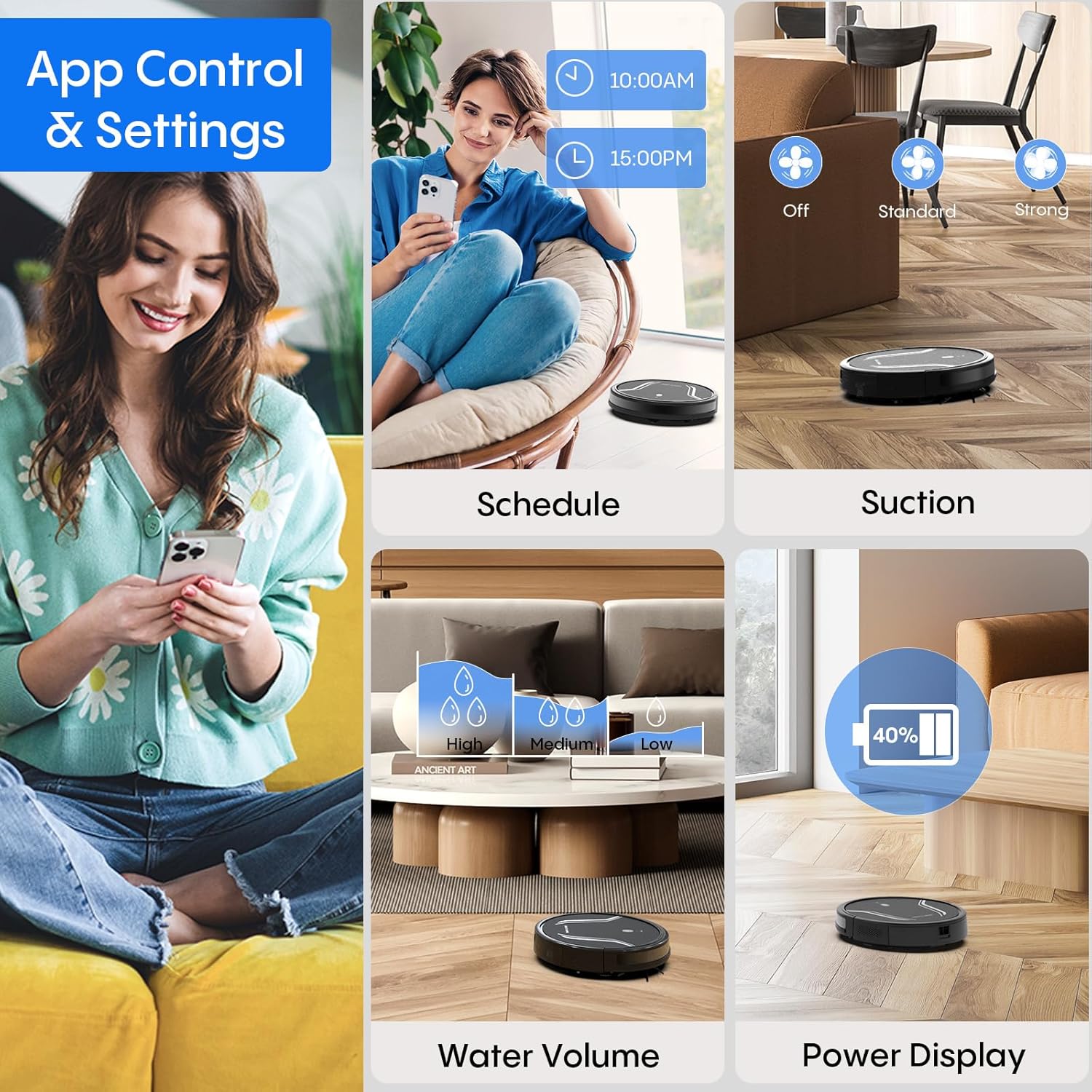
Image: A smartphone screen displays the Bagotte BG550 Pro app interface, showing options for scheduling cleaning, adjusting suction power, controlling water volume for mopping, and monitoring battery level.
صيانة
تضمن الصيانة الدورية الأداء الأمثل وتطيل عمر مكنسة الروبوت الخاصة بك.
- تفريغ سلة المهملات: After each cleaning cycle, press the dustbin release button and remove the dustbin. Open the dustbin cover and empty its contents.
- تنظيف الفلاتر: Remove the HEPA filter and primary filter from the dustbin. Tap them to remove dust. Rinse the primary filter and dustbin with water (do not rinse the HEPA filter). Allow them to air dry completely before reassembling.
- تنظيف الفرش الجانبية: Regularly check side brushes for tangled hair or debris. Use the cleaning tool to cut and remove any tangled hair. Replace worn brushes.
- قطعة قماش تنظيف الممسحة: Remove the mop cloth after each mopping session and wash it by hand or machine. Allow it to air dry completely.
- أجهزة استشعار التنظيف: Wipe the anti-drop sensors and bumper sensors with a clean, dry cloth to ensure they function correctly.
- العناية بالبطارية: To maintain battery health, ensure the robot is charged when not in use. If storing for an extended period, fully charge the battery and turn off the robot.

Image: The robot vacuum is shown disassembled to highlight its 250ml dustbin with high-efficiency filter, 200ml electric control water tank, and washable mopping cloth, illustrating components for maintenance.
استكشاف الأخطاء وإصلاحها
If you encounter issues with your Bagotte BG550 Pro, refer to the following common solutions:
| مشكلة | حل |
|---|---|
| الروبوت لا يعمل | Ensure the battery is charged. Check if the power switch is in the 'ON' position. |
| الروبوت لا يشحن | Verify the charging dock is powered. Clean charging contacts on both the robot and dock. Ensure proper alignment. |
| الروبوت يتعطل بشكل متكرر | Clear obstacles, loose cables, and thick rugs from the cleaning area. Clean drive wheels. |
| أداء التنظيف الضعيف | Empty the dustbin. Clean or replace filters. Clean side brushes and main brush. Check for blockages in the suction inlet. |
| وظيفة المسح لا تعمل | Ensure the water tank is filled and correctly installed. Check if the mop cloth is attached. Adjust water level settings in the app. |
تحديد
| ميزة | التفاصيل |
|---|---|
| ماركة | Bagotte |
| اسم الموديل | BG550 Pro |
| ميزة خاصة | تنظيف الحواف |
| لون | أسود غير لامع |
| أبعاد المنتج | 15 بوصة طول × 12.5 بوصة عرض × 4 بوصة ارتفاع |
| نوع الفلتر | مرشح هواء عالي الكفاءة |
| عمر البطارية | 120 دقائق |
| مصدر الطاقة | تعمل بالبطارية |
| طريقة التحكم | التطبيق ، الصوت |
| الأجهزة المتوافقة | أمازون إيكو (أليكسا)، مساعد جوجل |
| عامل الشكل | روبوتي |
| وزن العنصر | 7.09 رطل |
| البطاريات | يتطلب بطاريتين C (متضمنتين) |
| توصية السطح | Wood, Tile, Laminate, Low-pile Carpet |
الضمان والدعم
The Bagotte BG550 Pro Robot Vacuum Cleaner comes with a 12-month service warranty. For professional customer service and support, please refer to the contact information provided in your warranty card or visit the official Bagotte webموقع.
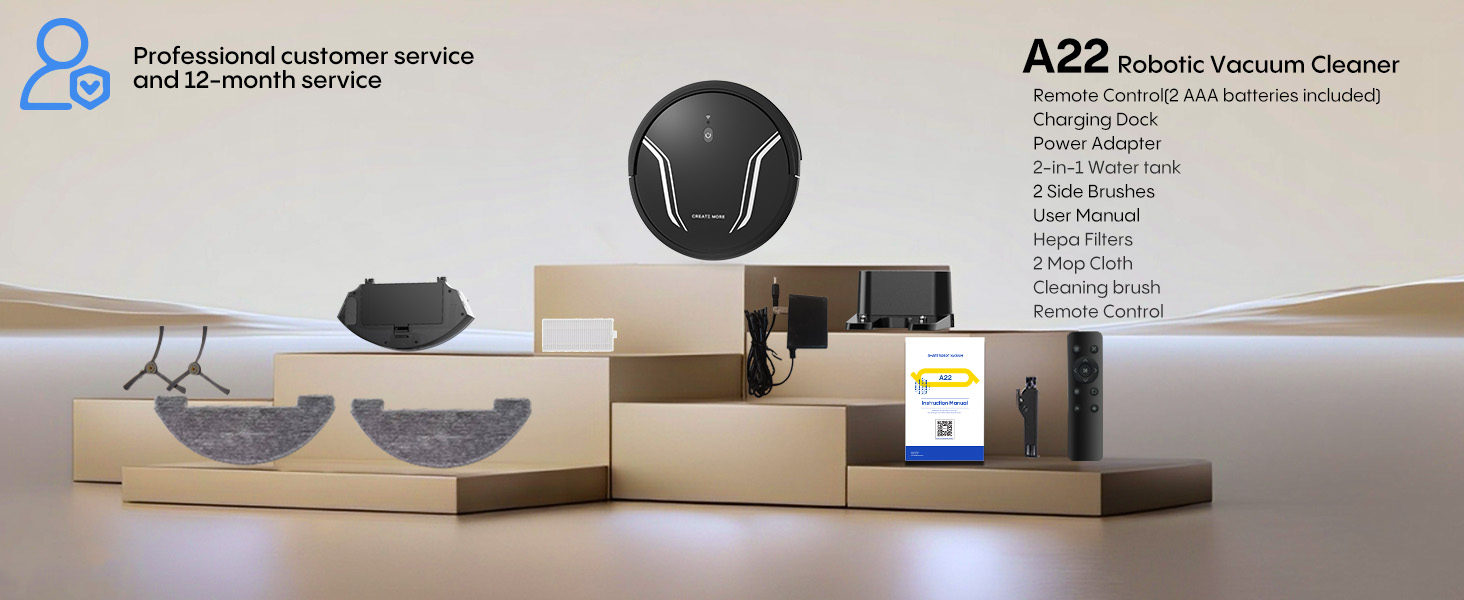
Image: The Bagotte A22 (BG550 Pro) robot vacuum and its accessories are displayed, along with a note about professional customer service and a 12-month service period.