1. المقدمة
Welcome to the user manual for your new Generic T900 Ultra 3 Smartwatch. This guide provides essential information on how to set up, operate, maintain, and troubleshoot your device. Please read this manual thoroughly before using your smartwatch to ensure proper function and to maximize your user experience.
The T900 Ultra 3 Smartwatch is designed to integrate seamlessly with your daily life, offering features such as Bluetooth calling, health monitoring, and notification synchronization, all accessible via a vibrant 2.08-inch HD display.
2. محتويات العبوة
يرجى التأكد من وجود جميع العناصر في عبوة المنتج الخاصة بك:
- Generic T900 Ultra 3 Smartwatch
- كابل الشحن
- دليل المستخدم
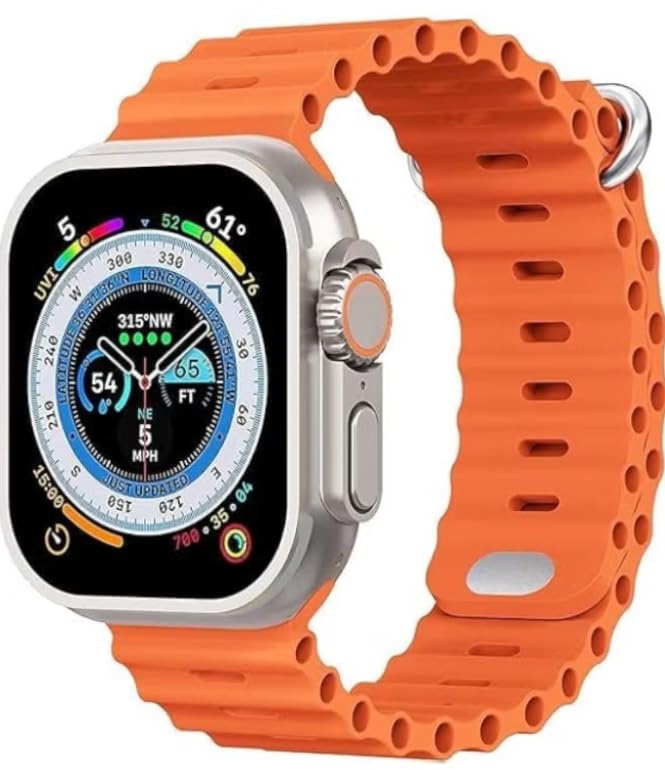
Image: The retail box of the Generic T900 Ultra 3 Smartwatch, indicating the product and its packaging.
3. انتهى الجهازview
Familiarize yourself with the physical components of your T900 Ultra 3 Smartwatch:
- عرض: شاشة لمس عالية الدقة مقاس 2.08 بوصة للتفاعل وعرض المعلومات.
- الزر الجانبي (الأزرار الجانبية): Typically used for power on/off, menu access, or back functions.
- ميكروفون: For voice commands and Bluetooth calls.
- المتحدث: For audio output, including call audio and alerts.
- مستشعر معدل ضربات القلب: Located on the back of the watch, for health monitoring.
- شحن جهات الاتصال: On the back, for connecting the charging cable.

Image: The T900 Ultra 3 Smartwatch displaying a compass interface, showcasing the screen and side buttons.
4. الإعداد
4.1. الشحن الأولي
Before first use, fully charge your smartwatch. Connect the charging cable to the charging contacts on the back of the watch and plug the USB end into a standard USB power adapter (not included) or a computer USB port. The watch display will indicate charging status. A full charge typically takes 1-2 hours.
4.2. تشغيل/إيقاف التشغيل
- لتشغيل: اضغط مع الاستمرار على الزر الجانبي حتى تضيء الشاشة.
- لإيقاف التشغيل: اضغط مع الاستمرار على الزر الجانبي، ثم حدد خيار "إيقاف التشغيل" على الشاشة.
4.3. الاقتران بهاتفك الذكي
To unlock the full functionality of your smartwatch, pair it with your smartphone:
- Download the companion application (e.g., 'HiWatch' or similar, refer to the watch screen or packaging for the exact app name) from your phone's app store (Google Play Store for Android, Apple App Store for iOS).
- تأكد من تمكين Bluetooth على هاتفك الذكي.
- افتح التطبيق المصاحب واتبع التعليمات التي تظهر على الشاشة لإضافة جهازك.
- The app will search for your smartwatch. Select 'T900 Ultra 3' from the list of available devices.
- قم بتأكيد طلب الاقتران على كل من هاتفك وساعتك الذكية.
5. تشغيل الساعة الذكية
5.1. الملاحة
- اسحب لأعلى/لأسفل: التنقل عبر القوائم أو الإشعارات.
- اسحب لليسار/اليمين: الوصول إلى الأدوات المختلفة أو الإعدادات السريعة.
- مقبض: حدد عنصرًا أو افتح تطبيقًا.
- زر جانبي: Press to return to the home screen or access the app menu.
5.2. الوظائف الأساسية
- الوقت والتاريخ: Automatically synchronized with your paired smartphone.
- إشعارات: استقبل التنبيهات للمكالمات والرسائل وإشعارات التطبيقات مباشرة على معصمك.
- مكالمات بلوتوث: Make and receive calls using the watch's built-in microphone and speaker once paired via Bluetooth.
- التحكم بالموسيقى: تحكم في تشغيل الموسيقى على هاتفك الذكي (تشغيل، إيقاف مؤقت، تخطي المقاطع).
5.3. تتبع الصحة
The T900 Ultra 3 Smartwatch includes several health monitoring features:
- مراقب معدل ضربات القلب: Measures your heart rate throughout the day. Access this feature from the main menu.
- عداد الخطوات (مقياس الخطوات): يتتبع خطواتك اليومية والمسافة التي تقطعها والسعرات الحرارية التي تحرقها.
- متتبع النوم: Monitors your sleep patterns, including deep and light sleep stages. Wear the watch during sleep for accurate data.
5.4. التخصيص
- مشاهدة الوجوه: Change the watch face from the watch settings or through the companion app to personalize your device.
- إدارة التطبيقات: Manage and organize applications via the companion app on your smartphone.
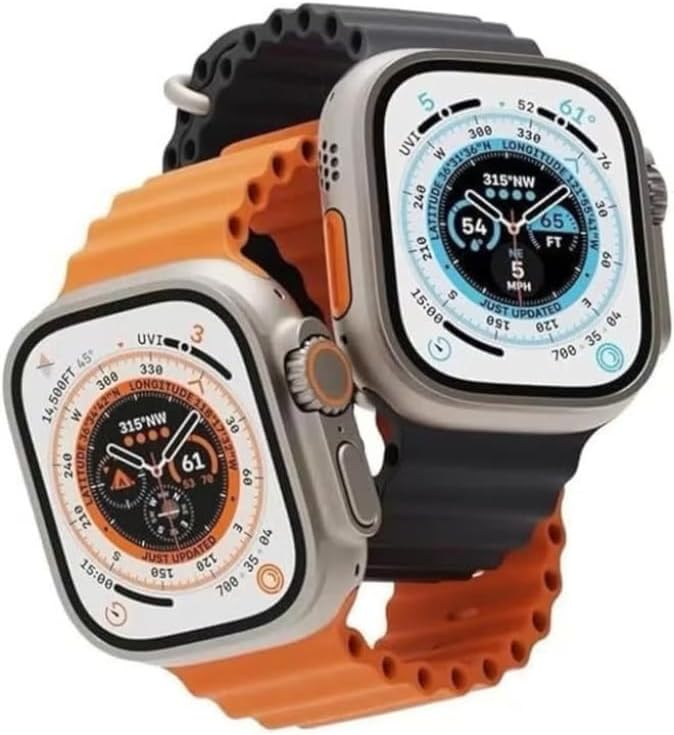
Image: Two T900 Ultra 3 Smartwatches, one showing a compass and the other displaying fitness data, illustrating various display options.
6. الصيانة
6.1. التنظيف
Regularly clean your smartwatch to ensure optimal performance and hygiene:
- امسح الشاشة وجسم الساعة بقطعة قماش ناعمة وخالية من الوبر.
- بالنسبة للأوساخ العنيدة، قم بإزالة الأوساخ برفق.ampاغسل قطعة القماش بالماء. تجنب استخدام المواد الكيميائية القاسية أو المواد الكاشطة.
- تأكد من أن جهات اتصال الشحن نظيفة وجافة قبل الشحن.
6.2. مقاومة الماء
The T900 Ultra 3 Smartwatch may offer basic splash resistance. Avoid submerging the watch in water, showering, or swimming with it, as this can cause damage not covered by warranty. Ensure the watch is dry before charging.
6.3. العناية بالبطارية
- تجنب تفريغ البطارية بالكامل بشكل متكرر.
- Do not expose the watch to extreme temperatures, as this can degrade battery life.
- استخدم فقط كابل الشحن المرفق.
7. استكشاف الأخطاء وإصلاحها
إذا واجهت مشكلات مع ساعتك الذكية، فراجع الحلول الشائعة التالية:
| مشكلة | حل |
|---|---|
| الساعة لا تعمل | Ensure the watch is fully charged. Press and hold the side button for at least 10 seconds. |
| لا يمكن الاقتران بالهاتف الذكي | Ensure Bluetooth is enabled on your phone and the watch. Restart both devices. Check that the companion app is installed and updated. |
| قراءات صحية غير دقيقة | Ensure the watch is worn snugly on your wrist, not too tight or too loose. Clean the sensor area. Avoid excessive movement during readings. |
| عمر البطارية قصير | Reduce screen brightness. Turn off unnecessary notifications. Limit continuous heart rate monitoring. Ensure background apps are closed on the watch. |
| Watch is unresponsive | Perform a force restart by pressing and holding the side button for approximately 15 seconds until the device reboots. |
8. المواصفات
| ميزة | التفاصيل |
|---|---|
| ماركة | نوعي |
| اسم الموديل | T900 Ultra 3 |
| حجم الشاشة | 2.08 بوصة |
| نوع العرض | شاشة تعمل باللمس عالية الدقة |
| تكنولوجيا الاتصال | بلوتوث |
| معيار الاتصال اللاسلكي | بلوتوث |
| نظام التشغيل | Android Wear 1.0 (Compatibility with Android & iOS devices) |
| المميزات الخاصة | Screen protector, Health Monitoring (Heart Rate, Step Counter, Sleep Tracker) |
| نظام تحديد المواقع العالمي (جي بي اس) | بدون نظام تحديد المواقع |
| شكل العنصر | Rectangular (based on product images) |
| بلد المنشأ | الصين |
| أبعاد الشحن | 20.2 × 7.2 × 3.1 سم |
| وزن العنصر | 180 غرام (وزن الشحن) |
9. معلومات السلامة
- Do not attempt to disassemble or modify the smartwatch. This will void the warranty and may cause damage.
- احتفظ بالجهاز بعيدًا عن درجات الحرارة العالية وأشعة الشمس المباشرة واللهب المكشوف.
- تجنب تعريض الساعة لحقول مغناطيسية قوية.
- If you experience skin irritation, discontinue use and consult a physician.
- تخلص من الجهاز وبطاريته بطريقة مسؤولة وفقًا للوائح المحلية.
10. الضمان والدعم
Your Generic T900 Ultra 3 Smartwatch is covered by a standard manufacturer's warranty against defects in materials and workmanship. Please retain your proof of purchase for warranty claims. For specific warranty terms and conditions, refer to the documentation provided at the time of purchase or contact your retailer.
For technical support or further assistance, please contact the retailer or manufacturer through their official support channels. Details are typically available on the product packaging or the retailer's webموقع.


