مقدمة
This manual provides comprehensive instructions for the Generic DZ09 Bluetooth 4.1 Smart Watch. It covers setup, operation, maintenance, and troubleshooting to ensure optimal use of your device. The smartwatch is designed to enhance daily routines with seamless connectivity and various functions.
يرجى قراءة هذا الدليل بعناية قبل استخدام الجهاز.
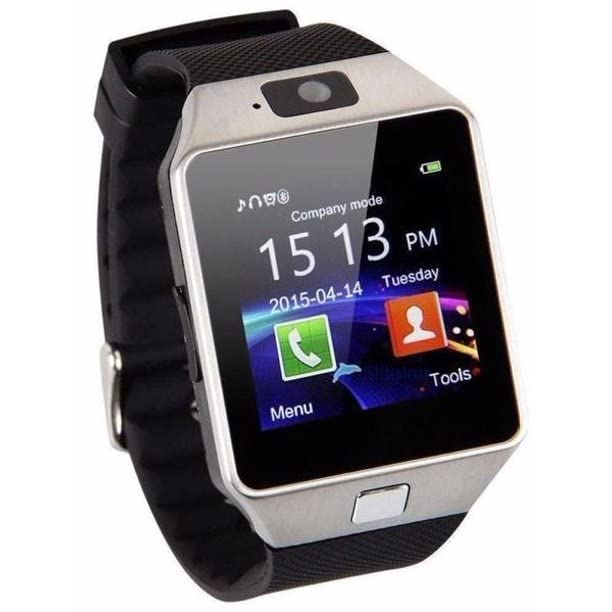
الشكل 1: الجبهة view of the Generic DZ09 Bluetooth 4.1 Smart Watch.
ماذا يوجد في الصندوق
تأكد من وجود جميع العناصر في العبوة:
- DZ09 Smart Watch
- كابل شحن USB
- دليل المستخدم
يثبت
1. شحن الساعة الذكية
Before first use, fully charge the smartwatch. Connect the USB charging cable to the charging port on the watch and to a standard USB power adapter (not included) or a computer USB port.
وقت الشحن: حوالي 2 ساعة.
Battery Life: Up to 24 hours on a single charge (usage dependent).
2. تشغيل / إيقاف التشغيل
- لتشغيل: Press and hold the power button (usually located on the side of the watch) until the screen lights up.
- لإيقاف التشغيل: اضغط مع الاستمرار على زر الطاقة حتى يظهر خيار إيقاف التشغيل على الشاشة، ثم قم بالتأكيد.
3. تركيب شريحة SIM (اختياري)
The DZ09 Smart Watch supports a SIM card for standalone call functionality. Locate the SIM card slot, typically under the back cover or battery. Insert a micro-SIM card with the gold contacts facing down, ensuring it clicks into place. Ensure the watch is powered off before inserting or removing the SIM card.
4. الاقتران عبر البلوتوث مع الهاتف الذكي
The smartwatch connects to your smartphone via Bluetooth 4.1. It is compatible with Android 4.3 and later versions. For iOS devices, basic functions like answering calls and music playback are supported, but advanced features like SMS and remote camera control are not.
- تأكد من تمكين Bluetooth على هاتفك الذكي.
- On the smartwatch, navigate to the Bluetooth settings and enable visibility.
- On your smartphone, search for available Bluetooth devices. Select "DZ09" from the list.
- Confirm the pairing request on both devices if prompted.
تعليمات التشغيل
الملاحة الأساسية
The smartwatch features a touchscreen display and physical buttons for navigation. Swipe left/right or up/down on the screen to access different menus and functions. Use the side button to return to the home screen or power on/off.
الوظائف الرئيسية
- إجراء/الرد على المكالمات: Once paired with your phone or with a SIM card inserted, you can dial numbers directly from the watch or answer incoming calls.
- تشغيل الموسيقى: Control music playing on your connected smartphone or play music stored on the watch (if applicable).
- عداد الخطى: Tracks your steps, distance, and calories burned. Access this feature from the main menu.
- Anti-Loss Alarm: When connected to your smartphone, the watch will alert you if your phone moves out of Bluetooth range, helping to prevent loss.
- آلة تصوير: The watch includes a camera for basic photo capture.
القيود الهامة
Please note the following functionalities are غير مدعوم by this device:
- SMS messaging (for iOS devices, and potentially limited for Android depending on app compatibility).
- Remote camera control (for iOS devices).
- Advanced smartphone notifications beyond basic call and music control (especially for iOS).
صيانة
- تنظيف: Wipe the watch and strap with a soft, dry cloth. Avoid using harsh chemicals or abrasive materials.
- مقاومة الماء: This device is not waterproof. Avoid exposure to water, rain, or excessive moisture.
- درجة حرارة: Do not expose the watch to extreme temperatures (hot or cold) or direct sunlight for prolonged periods.
- العناية بالبطارية: لإطالة عمر البطارية، تجنب تفريغها بالكامل بشكل متكرر. اشحن الساعة بانتظام.
استكشاف الأخطاء وإصلاحها
Watch Does Not Power On
- تأكد من شحن الساعة بالكامل. وصلها بالشاحن لمدة 30 دقيقة على الأقل.
- اضغط مع الاستمرار على زر الطاقة لمدة 10-15 ثانية لمحاولة إعادة التشغيل القسري.
لا يمكن الاقتران بالهاتف الذكي
- Verify Bluetooth is enabled on both the watch and your smartphone.
- Ensure the watch is in pairing mode (visible to other devices).
- Check that your smartphone's operating system is Android 4.3 or higher.
- Move the devices closer together to ensure they are within Bluetooth range.
- Restart both the watch and the smartphone, then try pairing again.
Functions Not Working (e.g., SMS, Remote Camera)
- Refer to the "Important Limitations" section. Some functions are not supported, especially with iOS devices.
- Ensure the necessary permissions are granted to the companion app (if applicable) on your Android smartphone.
تحديد
| ميزة | التفاصيل |
|---|---|
| ماركة | نوعي |
| نموذج | ef7c8545-ece4-4213-9e8f-4c98e248e703 |
| الاتصال | بلوتوث 4.1 |
| نظام التشغيل المتوافق | Android 4.3+ (Limited iOS compatibility) |
| نوع العرض | التناظرية الرقمية |
| واجهة الإدخال | الأزرار، شاشة اللمس |
| نوع البطارية | ليثيوم أيون |
| Battery Life (Avg.) | 24 ساعة |
| وقت الشحن | 2 ساعة |
| وزن | 100 جرام |
| المميزات الخاصة | SIM Card support, Multifunction |
| المكونات المضمنة | DZ09 Smart Watch, USB cable, User manual |
الضمان والدعم
للحصول على معلومات الضمان ودعم العملاء، يرجى الرجوع إلى الوثائق المقدمة وقت الشراء أو الاتصال بالبائع. احتفظ بإثبات الشراء لتقديم أي مطالبات ضمان.
This product is manufactured by Generic.