
1. المقدمة
This manual provides essential information for the safe and efficient operation of your FASTWD Android 15 Tablet 11-inch. Please read this manual thoroughly before using the device and retain it for future reference. This tablet features an 11-inch 2K display, Android 15 operating system, Octa-Core processor, 36GB RAM, 256GB ROM (expandable up to 1TB), 4G LTE, and 5G WiFi connectivity.
2. معلومات السلامة
- لا تعرض الجهاز اللوحي لدرجات حرارة عالية، أو أشعة الشمس المباشرة، أو الرطوبة العالية.
- تجنب إسقاط الجهاز اللوحي أو تعريضه لصدمات قوية.
- استخدم فقط الشواحن والملحقات المعتمدة لمنع التلف وضمان السلامة.
- احفظ القرص بعيدًا عن الماء والسوائل الأخرى.
- لا تحاول تفكيك الجهاز اللوحي أو إصلاحه بنفسك. تواصل مع خدمة دعم العملاء للحصول على المساعدة.
- تخلص من البطارية والجهاز وفقًا للوائح المحلية.
3. محتويات العبوة
Upon opening your FASTWD Android 15 Tablet package, please verify that all the following items are included:
- FASTWD Tablet
- لوحة مفاتيح بلوتوث
- الفأر
- حافظة حماية
- قلم ستايلس
- كابل من النوع C
- شاحن
- دليل المستخدم

Image: The FASTWD Android 15 Tablet displayed with its full set of accessories, including the keyboard, mouse, protective case, stylus, and charging components.
4. انتهى الجهازview
The FASTWD Android 15 Tablet features a sleek metal body with an 11-inch 2K INCell display. It is designed for both productivity and entertainment.
4.1 الميزات المادية
- عرض: 11-inch 2K UHD INCell display with 120Hz refresh rate.
- الكاميرات: 8MP front camera, 13MP rear camera with LED flash.
- الموانئ: منفذ USB من النوع C للشحن ونقل البيانات.
- فتحة البطاقة: Dual SIM card slot, also supports MicroSD card expansion up to 1TB.
- المتحدثون: أربعة amplitude speakers for enhanced audio.

Image: A visual representation of the FASTWD tablet's slim design, 11-inch screen, and Type-C charging port.
5. الإعداد
5.1 التشغيل المبدئي
- Press and hold the Power button located on the side of the tablet until the FASTWD logo appears.
- اتبع التعليمات التي تظهر على الشاشة لتحديد اللغة والمنطقة والاتصال بشبكة Wi-Fi.
- قم بتسجيل الدخول باستخدام حسابك على جوجل أو أنشئ حسابًا جديدًا للوصول إلى متجر جوجل بلاي والخدمات الأخرى.
5.2 تركيب بطاقة SIM وبطاقة MicroSD
Your tablet supports dual SIM cards for 4G LTE connectivity and a MicroSD card for expanded storage.
- حدد مكان درج بطاقة SIM/MicroSD على جانب الجهاز اللوحي.
- استخدم أداة إخراج بطاقة SIM المتوفرة للدفع برفق داخل الفتحة الصغيرة بجوار الدرج حتى تخرج.
- ضع بطاقة (بطاقات) Nano-SIM و/أو بطاقة MicroSD في الفتحات المخصصة لها على الدرج. تأكد من وضعها في الاتجاه الصحيح.
- أعد إدخال الدرج في الجهاز اللوحي بعناية حتى تسمع صوت طقطقة عند تثبيته في مكانه.

الصورة: تفصيلية view of the tablet's SIM card tray, showing slots for two SIM cards and one MicroSD card.
6. تعليمات التشغيل
The FASTWD tablet runs on Android 15, offering an intuitive and customizable user experience.
6.1 الملاحة الأساسية
- اسحب للاعلى: قم بالوصول إلى درج التطبيقات.
- انتقد أسفل: افتح لوحة الإشعارات والإعدادات السريعة.
- مقبض: حدد العناصر أو افتح التطبيقات.
- ضغطة طويلة: الوصول إلى القوائم السياقية أو نقل الأيقونات.
- التكبير والتصغير: Adjust zoom level in apps like browser or gallery.
6.2 مميزات نظام أندرويد 15
Android 15 introduces several enhancements for privacy, security, and user experience:
- Improved Privacy Controls: Granular permissions for apps, allowing you to authorize access more precisely.
- تحسين الذكاء الاصطناعي: Intelligent AI features for improved performance and battery life.
- التنقل بالإيماءات: New touch control gestures for a more fluid interaction.
- Global Dark Mode: System-wide dark theme for reduced eye strain and power consumption.
- Face Recognition Unlock: افتح جهازك اللوحي بأمان باستخدام خاصية التعرف على الوجه.
- الرقابة الأبوية: Manage screen time and app access for children.
- تقسيم الشاشة: Use two applications simultaneously side-by-side.
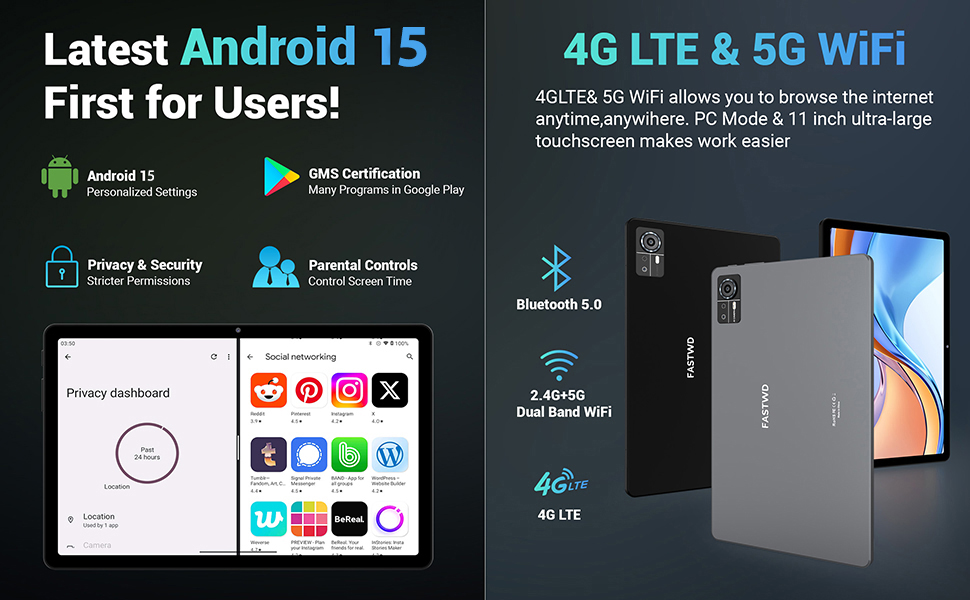
Image: A visual guide to key Android 15 features such as easy app pairing, storage management, quick Bluetooth connection, face recognition unlock, double-tap to wake, and parental control settings.
7. الاتصال
Your FASTWD tablet offers versatile connectivity options for internet access and peripheral devices.
7.1 اتصال واي فاي
- اذهب الى إعدادات > الشبكات والانترنت > واي فاي.
- تبديل Wi-Fi On.
- حدد الشبكة المطلوبة من القائمة وأدخل كلمة المرور إذا طُلب منك ذلك.
- The tablet supports dual-band 2.4G/5G Wi-Fi for stable and fast connections.
7.2 4G LTE Mobile Data
With a compatible SIM card installed, you can access 4G LTE mobile data.
- Ensure your SIM card is correctly installed (refer to Section 5.2).
- اذهب الى إعدادات > الشبكات والانترنت > شبكة الهاتف المحمول.
- يُمكَِن بيانات الجوال and configure APN settings if required by your carrier.
7.3 اقتران بلوتوث
Connect Bluetooth accessories like the included keyboard and mouse.
- اذهب الى إعدادات > الأجهزة المتصلة > بلوتوث.
- تبديل البلوتوث On.
- ضع ملحق البلوتوث الخاص بك في وضع الاقتران.
- Select the accessory from the list of available devices and follow any on-screen prompts to complete pairing.
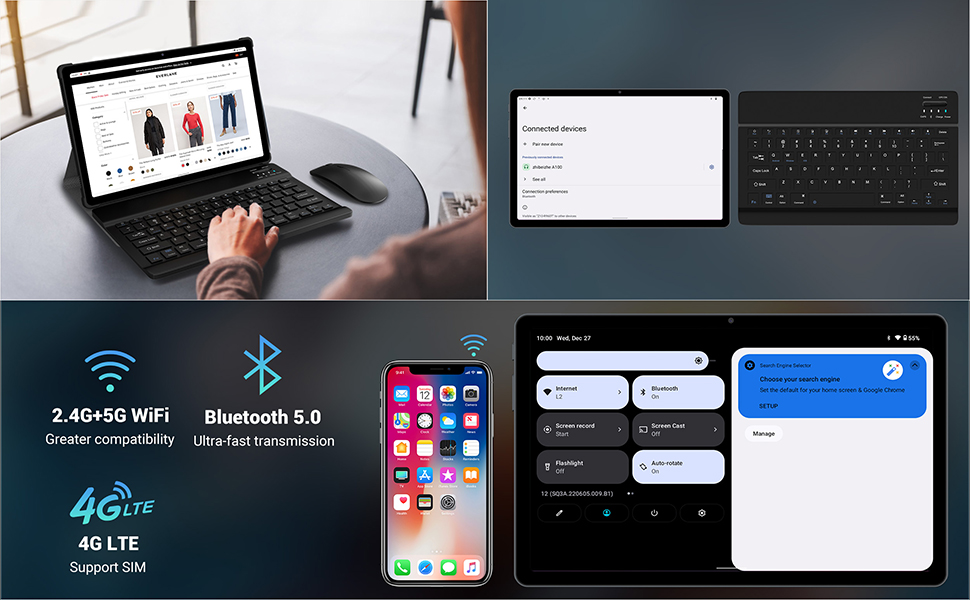
Image: The FASTWD tablet connected to its keyboard and mouse, illustrating its 2.4G+5G WiFi, Bluetooth 5.0, and 4G LTE SIM support for comprehensive connectivity.
8. الكاميرا
The tablet is equipped with an 8MP front camera and a 13MP rear camera for photos and video calls.
- افتح آلة تصوير طلب.
- اضغط على زر الغالق لالتقاط صورة.
- يمكنك التبديل بين الكاميرا الأمامية والخلفية باستخدام رمز تبديل الكاميرا.
- AI post-processing technology enhances photo quality, making images more realistic.

الصورة: تفصيلية view of the tablet's rear camera, highlighting its 13MP sensor and AI Camera branding.
9. إدارة البطارية
The tablet features a 9580mAh battery for extended usage and supports 12W fast charging.
9.1 شحن الجهاز اللوحي
- Connect the Type-C cable to the tablet's charging port.
- Plug the other end of the cable into the provided charger, and then into a power outlet.
- سيشير رمز البطارية الموجود على الشاشة إلى حالة الشحن.
9.2 تحسين البطارية
- ضبط سطوع الشاشة إلى المستوى المريح.
- أغلق التطبيقات غير المستخدمة التي تعمل في الخلفية.
- تمكين وضع توفير البطارية في إعدادات > بطارية.
- قم بتعطيل Wi-Fi أو Bluetooth أو GPS عند عدم الاستخدام.

Image: The FASTWD tablet connected to a Type-C charger, illustrating its 9580 mAh battery and 12W fast charging capability.
10. التخزين
The tablet comes with 256GB of internal storage (ROM) and supports expansion up to 1TB via a MicroSD card.
10.1 إدارة التخزين
- للتحقق من استخدام مساحة التخزين، انتقل إلى إعدادات > تخزين.
- You can free up space by uninstalling unused apps, deleting old files, or moving media to a MicroSD card.
10.2 RAM Management
The tablet features 36GB RAM (12GB LPDDR4 + 24GB expandable virtual memory) for smooth multitasking.
- The system automatically manages RAM for optimal performance.
- You can activate additional virtual RAM in the settings if needed for demanding applications.
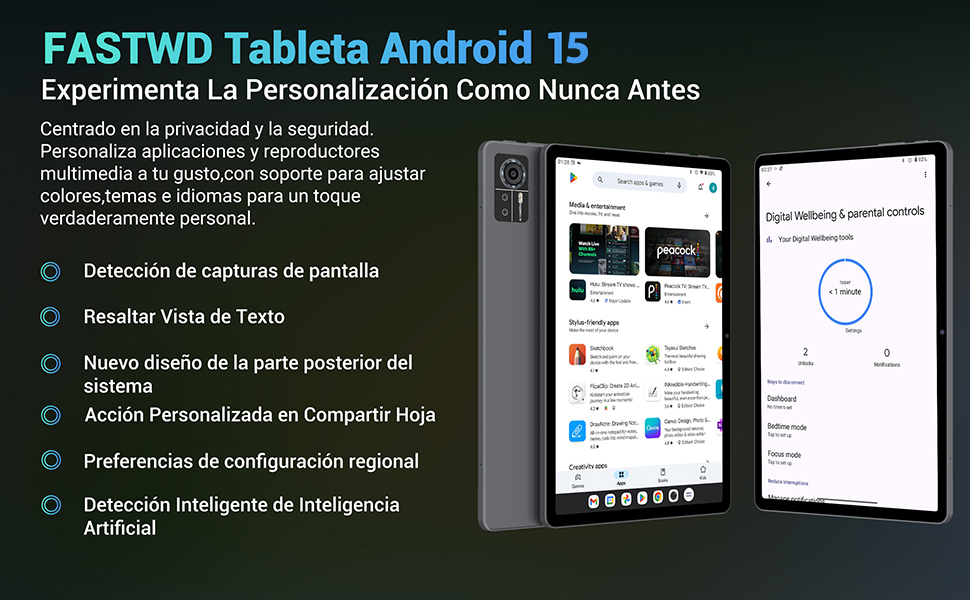
Image: An illustration highlighting the tablet's 36GB RAM (12+24GB), 256GB ROM, and 1TB MicroSD expansion capabilities, alongside its Octa-core processor.
11. الصيانة
11.1 التنظيف
- استخدم قطعة قماش ناعمة وخالية من الوبر لتنظيف الشاشة وجسم الجهاز اللوحي.
- لا تستخدم مواد كيميائية قاسية أو مواد كاشطة.
11.2 تحديثات البرامج
- تحقق بانتظام من وجود تحديثات للنظام في إعدادات > نظام > تحديث النظام لضمان الأداء والأمان الأمثل.
12. استكشاف الأخطاء وإصلاحها
إذا واجهت مشكلات مع جهازك اللوحي، فراجع الحلول الشائعة التالية:
| مشكلة | حل |
|---|---|
| الجهاز اللوحي لا يعمل | تأكد من شحن البطارية. وصّل الشاحن وانتظر بضع دقائق قبل محاولة تشغيل الجهاز مرة أخرى. إذا لم يستجب، فأعد تشغيله قسرًا بالضغط مع الاستمرار على زر التشغيل لمدة 10-15 ثانية. |
| Applications crash or freeze | Close background applications. Clear the cache of the problematic app (Settings > Apps > [App Name] > Storage & cache > Clear cache). Restart the tablet. |
| اتصال Wi-Fi ضعيف | تأكد من أنك ضمن نطاق جهاز توجيه الواي فاي. أعد تشغيل جهاز التوجيه والجهاز اللوحي. احذف الشبكة وأعد الاتصال بها. |
| لم يتم الكشف عن بطاقة SIM | Ensure the SIM card is correctly inserted into the tray. Restart the tablet. Verify the SIM card is active with your mobile carrier. |
| تستنزف البطارية بسرعة | Reduce screen brightness. Disable unused connectivity features (Wi-Fi, Bluetooth, GPS). Close background apps. Check for apps consuming excessive battery in Settings > Battery. |
13. المواصفات
Detailed technical specifications for the FASTWD Android 15 Tablet 11-inch (Model M986):
| ميزة | مواصفة |
|---|---|
| ماركة | سريع |
| اسم الموديل | FASTWD Android 15 Tablet 11 Pulgadas |
| نظام التشغيل | أندرويد 15 |
| سرعة المعالج | معالج ثماني النواة بتردد 2 جيجاهرتز |
| كبش | 36 GB (12GB LPDDR4 + 24GB expandable) |
| التخزين الداخلي (ROM) | 256 جيجا بايت |
| تخزين قابل للتوسيع | Up to 1 TB via MicroSD card |
| حجم الشاشة | 11 Pulgadas (Inches) |
| دقة الشاشة | 2560 x 1440 pixels (2K UHD INCell) |
| معدل التحديث | 120 هرتز |
| الكاميرا الخلفية | 13 ميجا بكسل |
| الكاميرا الأمامية | 8 ميجا بكسل |
| سعة البطارية | 9580 مللي أمبير |
| Battery Life (average) | 8 ساعة (تشغيل الفيديو) |
| الشحن | شحن سريع بقوة 12 واط، منفذ من النوع C |
| الاتصال | 4G LTE (Cellular), 5G Wi-Fi (802.11ac), Bluetooth 5.0 |
| أبعاد | 29.7 × 19.6 × 4 سم |
| وزن | 1.36 كجم |
| المميزات الخاصة | Gaming Tablet, Face Recognition, Parental Control, GPS (Beidou, Galileo, Glonass, GPS) |
14. الضمان والدعم
FASTWD offers two years of premium after-sales service and long-term technical support for your tablet.
- فترة الضمان: سنتان من تاريخ الشراء.
- الدعم الفني: For any issues or inquiries, please contact the FASTWD after-sales team through your Amazon purchase platform.
- يهدف فريق الدعم لدينا إلى الرد في غضون 24 ساعة.